Our Top Picks
 acer Nitro 5-17.3" Laptop Intel i5-9300H 2.4GHz 8GB17-30.99 inches11 x 15.9 x 1 inches5.73 poundsCheck on Amazon
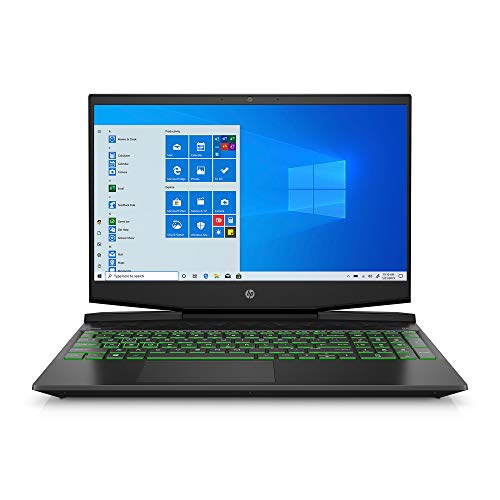 HP Pavilion Gaming Laptop 15-dk0096wm8GB | 256GB SSD14.09 x 10.04 x 0.93 Inches7.48 poundsCheck on Amazon
 ASUS TUF Gaming F17 Gaming Laptop24 GB RAM | 1 TB SSD15.71 x 10.59 x 1.02 inches5.73 PoundsCheck on Amazon
The honest answer on cheap gaming laptops under 600 dollars is that most affordable options are older-generation, used or refurbished machines with an entry-class GPU such as the GTX 1650, 8GB of RAM and a small SSD. The nine listings below fit that description, but many were priced above the 600-dollar line when we compiled them, so treat them as models to price-watch. Always verify the current price and condition.
Nine budget listings compared at a glance

Acer Nitro 5 Gaming Laptop, 9th Gen Intel Core i5-9300H, NVIDIA GeForce GTX 1650, 15.6" Full HD IPS Display, 8GB DDR4, 256GB NVMe SSD, Wi-Fi 6, Backlit Keyboard, Alexa Built-in, AN515-54-5812
One of the money options compared in this guide.
View on Amazon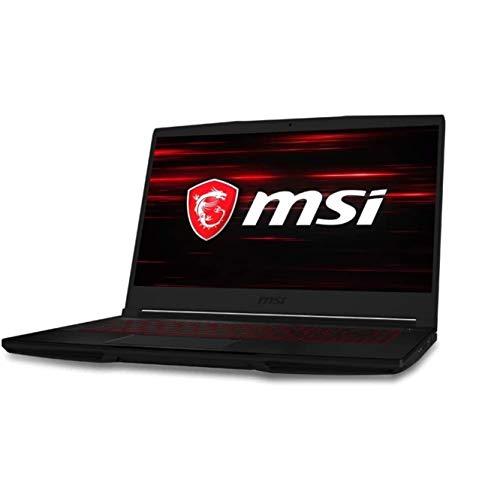
MSI Computer GF63, NVIDIA GeForce GTX 1650 Graphics, 15.6" 8GB 256GB Intel Core i5-10300H X4 2.5GHz Win10, Black
One of the money options compared in this guide.
View on Amazon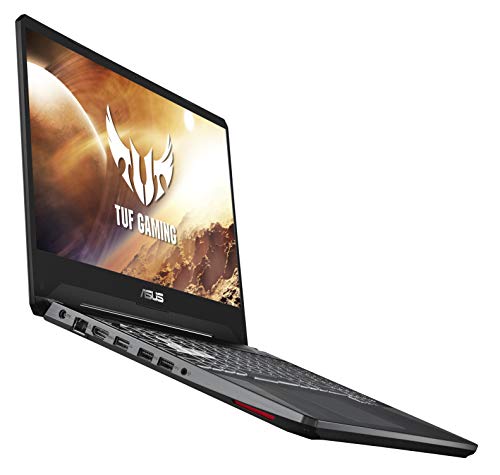
ASUS TUF Gaming Laptop, 15.6” Full HD IPS-Type, Intel Core i5-9300H, GeForce GTX 1650, 8GB DDR4, 512GB PCIe SSD, Gigabit Wi-Fi 5, Windows 10 Home, FX505GT-US52
One of the money options compared in this guide.
View on Amazonacer Nitro 5-17.3" Laptop Intel i5-9300H 2.4GHz 8GB Ram 512GB SSD W10H
One of the money options compared in this guide.
View on AmazonHP Pavilion Gaming Laptop 15-dk0096wm - Core i5-9300H - 8 GB RAM - 256 GB SSD - GTX 1650 4 GB Graphics Card - 15.6"" Full HD 1920x1080 LCD - Webcam - Wireless - Bluetooth - Windows 10, Black
One of the money options compared in this guide.
View on AmazonASUS TUF Gaming F17 Gaming Laptop, 17.3” 144Hz FHD IPS-Type Display, Intel Core i5-10300H, GeForce GTX 1650 Ti, 8GB DDR4, 512GB PCIe SSD, RGB Keyboard, Windows 10, Bonfire Black, FX706LI-ES53
One of the money options compared in this guide.
View on Amazon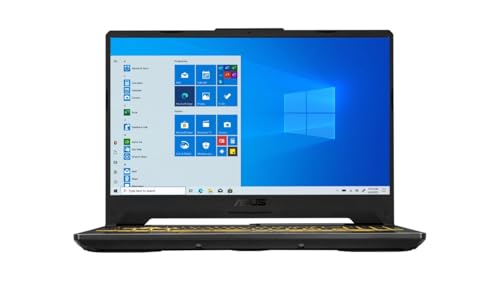
ASUS TUF F15 Gaming Laptop, 15.6" 144Hz FHD IPS-Type Display, Intel Core i5-10300H Processor, GeForce GTX 1650, 8GB DDR4 RAM, 512GB PCIe SSD, Wi-Fi 6, Windows 11 Home, FX506LH-AS51
One of the money options compared in this guide.
View on Amazon
MSI GF63 Thin 11SC-693 15.6" Gaming Laptop, Intel Core i5-11400H, NVIDIA GeForce GTX 1650, 8GB Memory, 256GB NVMe SSD, Windows 11
One of the money options compared in this guide.
View on Amazon
HP Pavilion Gaming 15.6-Inch Micro-EDGE Laptop, Intel Core i5-9300H Processor, NVIDIA GeForce GTX 1650 (4 GB), 8 GB SDRAM, 256 GB SSD, Windows 10 Home (15-dk0020nr, Shadow Black/Acid Green)
One of the money options compared in this guide.
View on Amazon| Model | Key point from title | Price tier | Best for |
|---|---|---|---|
| Acer Nitro 5 17.3-inch | i5-9300H, 8GB, 512GB, no GPU named in title | Budget | Bargain hunters who confirm the graphics card |
| HP Pavilion Gaming 15-dk0096wm | i5-9300H, GTX 1650 4GB, 8GB, 256GB | Budget | Low entry price with a dedicated GPU |
| ASUS TUF F15 | i5-10300H, GTX 1650, 8GB, 512GB, Windows 11 | Budget | Larger SSD and a newer OS |
| MSI GF63 Thin 11SC | i5-11400H, GTX 1650, 8GB, 256GB, Windows 11 | Mid-range | Newest CPU generation in the set |
| ASUS TUF Gaming FX505GT | i5-9300H, GTX 1650, 8GB, 512GB, Windows 10 | Mid-range | 512GB drive on an older platform |
| MSI Computer GF63 | i5-10300H, GTX 1650, 8GB, 256GB, Windows 10 | Mid-range | Compact 15.6-inch body |
| Acer Nitro 5 AN515-54 | i5-9300H, GTX 1650, 8GB, 256GB | Mid-range | Buyers wanting a named model code |
| HP Pavilion Gaming 15-dk0020nr | i5-9300H, GTX 1650 4GB, 8GB, 256GB | Premium | Near-duplicate of the cheaper HP |
| ASUS TUF Gaming F17 | 17.3-inch 144Hz, GTX 1650 Ti, 512GB | Premium | Larger screen and a 144Hz panel |
The nine listings, one by one
Acer Nitro 5 17.3-inch
The title gives an Intel i5-9300H, 8GB of RAM, a 512GB SSD and a Windows 10 Home licence, but it names no graphics card at all. That is a red flag on a laptop sold for gaming; confirm the GPU on the listing and the model number before purchase. A 17.3-inch body is heavier than the 15-inch options.
- Pro: Lowest tier in the set
- Pro: 512GB storage
- Con: No GPU in the title
- Con: Older platform
Who it’s for: Careful bargain hunters who verify the GPU.
HP Pavilion Gaming 15-dk0096wm
The title lists a Core i5-9300H, GTX 1650 with 4GB, 8GB of RAM and a 256GB SSD in a 15.6-inch full HD body with a webcam. The title has a stray double quote after 15.6, a small sign of rushed listing text. Storage is the quickest upgrade.
- Pro: Dedicated GTX 1650
- Pro: Low-tier entry
- Con: 256GB fills quickly
- Con: Older platform
Who it’s for: Shoppers wanting the cheapest listing that names a GPU.
ASUS TUF F15
This listing offers an i5-10300H, a GTX 1650, 8GB DDR4, a 512GB PCIe SSD, Wi-Fi 6 and Windows 11 Home on a 144Hz full HD IPS-type panel. The 144Hz refresh rate and larger drive make it one of the better fits for a tight budget.
- Pro: 144Hz display
- Pro: 512GB SSD and Windows 11
- Con: 8GB RAM
Who it’s for: Players who want smoother motion and a newer operating system.
MSI GF63 Thin 11SC-693
With an i5-11400H, GTX 1650, 8GB memory, a 256GB NVMe SSD and Windows 11, this has the newest CPU generation in the set. The 256GB drive is the weak point, so budget for a second SSD or a bigger replacement.
- Pro: Newest CPU generation here
- Pro: NVMe SSD
- Con: 256GB storage
- Con: Not the cheapest
Who it’s for: Buyers who prefer a newer processor.
ASUS TUF Gaming FX505GT
The title lists a 15.6-inch full HD IPS-type screen, an i5-9300H, GTX 1650, 8GB DDR4, a 512GB PCIe SSD and Windows 10 Home. Windows 10 means you should check the operating-system support status and whether the machine can move to Windows 11.
- Pro: 512GB PCIe SSD
- Pro: IPS-type panel
- Con: Windows 10 listed
- Con: Older CPU generation
Who it’s for: Shoppers who want storage over a newer CPU.
MSI Computer GF63
The listing shows a GTX 1650, 15.6-inch screen, 8GB RAM, 256GB storage and an i5-10300H on Windows 10. The title is oddly punctuated, so cross-check specs on the manufacturer page. It is a compact option, but storage is thin.
- Pro: Compact 15.6-inch body
- Pro: Dedicated GPU
- Con: 256GB storage
- Con: Windows 10 listed
Who it’s for: Buyers who want a smaller body.
Acer Nitro 5 AN515-54
An i5-9300H, GTX 1650, 15.6-inch full HD IPS display, 8GB DDR4 and a 256GB NVMe SSD arrive with Wi-Fi 6 and Alexa built in. A model code in the title makes it easy to compare against the manufacturer’s page.
- Pro: Wi-Fi 6
- Pro: Named model code
- Con: 256GB storage
- Con: Older platform
Who it’s for: Buyers who want a clearly identified model.
HP Pavilion Gaming 15-dk0020nr
The title lists an i5-9300H, GTX 1650 with 4GB, 8GB RAM and a 256GB SSD, so on paper it matches the cheaper HP above while sitting at the top of the price range in this set. Treat it as a near-duplicate and buy whichever is cheaper when you check.
- Pro: Same GPU class as its sibling
- Con: Near-duplicate of a cheaper listing
- Con: 256GB storage
Who it’s for: Only shoppers who find it discounted.
ASUS TUF Gaming F17
A 17.3-inch 144Hz full HD IPS-type panel, i5-10300H, GTX 1650 Ti, 8GB DDR4 and a 512GB PCIe SSD make this the highest-tier listing in the set, on Windows 10. The Ti variant is a small step up from the standard GTX 1650, which may not justify the extra cost.
- Pro: Large 144Hz screen
- Pro: GTX 1650 Ti named
- Con: Highest price tier here
- Con: Windows 10 listed
Who it’s for: Players who want the biggest screen on an entry GPU.
How we picked these
The Editorial team compiled this list from published specifications, manufacturer documentation and buyer reviews, selecting entry-class gaming laptops that appear in online listings. Nobody on the team used or measured these units. All specs come from listing titles; several prices sat above 600 dollars at the time, so treat the list as a shortlist to watch and verify.
How to get a gaming laptop under 600 dollars
Used and refurbished routes
Used or refurbished stock is the usual way to reach this price. Look for a stated grade, a written warranty of at least 90 days (our suggestion, not a standard) and a return window. Ask about battery condition and fan noise, which wear first.
Entry GPU options
The GTX 1650 appears throughout this set and should be seen as a basic entry card. It handles esports and older games at reduced settings, and struggles with newer demanding titles. A listing without any named graphics card is not worth the risk until you verify it.
What to compromise on
Accept lower resolution and refresh rate before you give up a dedicated GPU. A 60Hz panel is fine at this price, but 8GB of RAM should be a short-term state. Choose a model with a free memory slot.
Upgrading RAM and storage
Moving from 8GB to 16GB of RAM and adding a larger SSD is the usual upgrade path. The planning rule we suggest is to hold back 10 to 15 percent of your budget for those upgrades. On a 600-dollar cap, that is roughly 60 to 90 dollars, an estimate that depends on current memory and drive prices. Check the manufacturer’s service documents for slot layout. For more headroom later, see our guides to gaming laptops under 1000 dollars and gaming laptops that ship with 32GB RAM.
Pre-purchase checklist
Is a GPU named? Is the RAM upgradeable? Is the operating system current and activated? Is there a written warranty? Can you return it? Is the battery condition stated? If two or more answers are no, keep looking.
A compromise ladder: what to drop, in order
Work down this list until the total fits. First drop screen size and resolution, because a 15.6-inch full HD panel is plenty. Second, drop refresh rate; 60Hz is acceptable on a tight limit. Third, drop storage, since a 256GB drive can be swapped later. Fourth, drop RAM to 8GB only if a free slot exists. Do not drop the dedicated GPU, the cooling or the warranty, because those cannot be fixed cheaply afterwards.
Reading a budget listing for warning signs
Older listings are often re-sold by third parties with copied text, which explains typos and stray punctuation in several titles above. Check that the processor, graphics card and model number agree with each other, and that photos show the same machine. Compare the seller’s history, the number of units they ship and whether they accept returns. Where a title mentions Alexa or other bundled features, confirm they are part of the machine, not an accessory.
Battery and thermals on older units
Laptops from the 9th and 10th Intel generations may have degraded batteries, dust in the cooling fans and dried thermal paste, especially when sold used. A fresh clean and repaste can help but may affect the warranty. Treat battery life as a bonus; plan to play plugged in, and ask the seller for a battery health statement where they provide one.
A worked example of the upgrade reserve
Suppose you set a 600-dollar ceiling and find a machine at the top of it. With a 12 percent reserve for a RAM stick and a larger SSD, the real ceiling for the laptop itself is about 528 dollars. That simple subtraction, based on our assumed 12 percent, often explains why a slightly cheaper model with a free memory slot is the better purchase than the more capable one that leaves nothing for upgrades.
Mistakes buyers make
Buying a listing that names no graphics card, or one where the title contradicts the photos. Paying a premium for a near-duplicate model. Ignoring the operating system, since Windows 10 listings may need an upgrade. Spending the whole budget and having nothing left for RAM or storage. Treating a refurbished unit without a warranty as a bargain. Expecting a GTX 1650 to run new games at high settings.
Verdict
For value on paper, the ASUS TUF F15 offers a 144Hz panel, 512GB drive and Windows 11 in the cheapest tier that names a dedicated GPU. The MSI GF63 Thin 11SC has the newest CPU generation here. Whichever you pick, verify the real price, the condition and the return terms first. If nothing fits under the line this month, waiting for a sale or stepping up slightly in budget usually buys a noticeably newer graphics generation, which matters more for longevity than any single spec here. Also check whether the seller lists the battery and charger as included, since replacements for older models can cost more than expected. Keep a note of the price history for the two or three models you like, and buy when one dips.
Related guides
- Business Laptops With Quad Core Processors
- Travel Backpack With Laptop Compartment
- Retro Game Storage Cases And Displays
Frequently asked questions
Can you get a good gaming laptop for under 600 dollars?
New models rarely reach that line with a dedicated GPU, so most shoppers look at used, refurbished or older-generation units, or watch for sales. Expect entry graphics, 8GB of RAM and a small SSD, and accept lower settings in recent games. The listings below are candidates to price-watch, not guaranteed under-600 buys.
Is a refurbished gaming laptop a good idea on a tight budget?
It can be, if the seller states the grade, gives a written warranty and offers a clear return window. Ask about the battery and fan condition, because those wear first. Without a warranty and a return option, a refurbished unit is a gamble.
What should I compromise on first?
Give up resolution and refresh rate before graphics class, then storage size, since an SSD can be added later. Keep a dedicated GPU, a full HD IPS-type panel and at least 8GB of RAM, with a path to 16GB.
Can I upgrade the RAM and SSD myself?
Often yes, but not always; some designs solder memory or limit drive slots. Check the manufacturer’s service documentation for your exact model number before buying parts, and confirm whether opening the case affects the warranty.
Do older GTX 1650 laptops still play modern games?
They can play many esports and older titles at reduced settings, but newer demanding games may need low presets and may run poorly. Treat the card as an entry option, and check recent buyer reviews of the exact model for realistic expectations.