Our Top Picks
A trader with six charts, a dispatcher with a wall of status panels, and a spreadsheet-heavy accountant all share one problem: the graphics output on their motherboard runs out of connectors long before their desk runs out of room. The question behind “best video card for multiple monitors” is not how fast a card draws frames. It is how many screens the card can drive at once, through which connectors, and whether it physically fits the case you already own.
This guide is written for office, finance, monitoring, and video-wall builders who care about screen count first and gaming speed a distant second. Every card below is judged only from what its listing states: memory size, memory type, connector layout, slot width, and the resolution it claims to drive. If you plan to game on all those panels, look elsewhere; if you want more windows open in 2026 without rebuilding your PC, read on.
Quick Picks
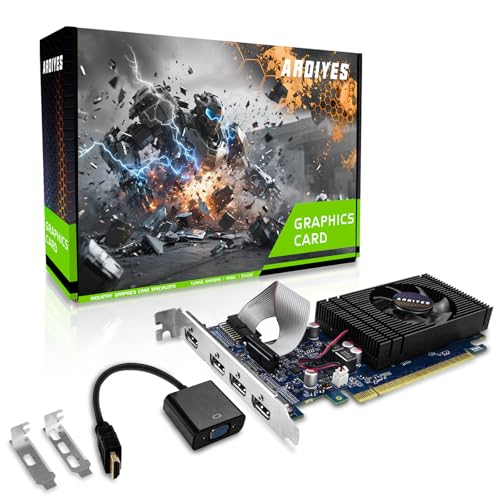
ARDIYES GT 740 4GB GDDR5 Low Profile GPU Graphics Card, 4X HDMI Ports for Quad Multi-Monitor Setup, PCI Express 3.0 x16, Silent Cooling, Ideal for Office and Home Theater
One of the consumer electronics options compared in this guide.
View on Amazon
ARDIYES GT 730 4GB GDDR3 GPU 4X HDMI Graphics Card, 4 Independent Display Multi-Monitor Setup, 64-bit DDR3 Video Card for Computer PC ITX Single Slot PCI Express
One of the consumer electronics options compared in this guide.
View on Amazon
SEVYMNAX GeForce GT 730 4GB Graphics Card 4 HDMI Multi Monitor Low Profile | Computer GPU Video Card for PC 4 HDMI Multi-Monitor 4K Display Office Trading Digital Signage Surveillance Display Expansion
One of the consumer electronics options compared in this guide.
View on Amazon
QTHREE GeForce GT 730 4GB Graphics Card,2X HDMI, DP,VGA,DDR3,64 Bit,Low Profile Video Card for PC,Computer GPU,PCI Express X8,SFF,DirectX 12,Support Winows 11
One of the consumer electronics options compared in this guide.
View on Amazon
Glorto GeForce GT 730 4G Low Profile Graphics Card, 2X HDMI, DP, VGA, DDR3, PCI Express 2.0 x8, Entry Level GPU for PC, SFF and HTPC, Compatible with Windows 11
One of the consumer electronics options compared in this guide.
View on Amazon
RX560 4GB GDDR5 4 HDMI Multi Monitor Graphics Card | 4 HDMI video card for office multi-screen, stock trading, supports up to 3840x2160 60Hz
One of the consumer electronics options compared in this guide.
View on Amazon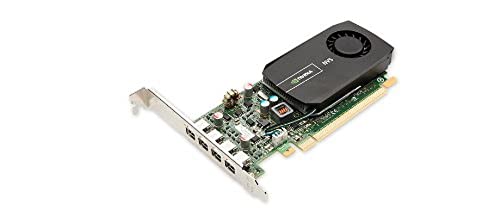
PNY NVIDIA NVS 510 Graphics Card with DisplayPort Accessories VCNVS510DP-PB
One of the consumer electronics options compared in this guide.
View on Amazon
SOYO Geforce GT 730 Graphics Card, 4GB DDR3 64 Bit 4xHDMI 2.0B 4K Quad Monitors Multiple Displays, PCI-E x8 2.0 Single Fan Cooling GPU for Video Wall, Stock Trading & Monitoring (Blue)
One of the consumer electronics options compared in this guide.
View on AmazonRX560 2GB GDDR5 4 HDMI Multi Monitor Graphics Card | 4 HDMI video card for office multi-screen, stock trading, supports up to 3840x2160 60Hz
One of the consumer electronics options compared in this guide.
View on Amazon
RX580 8GB GDDR5 6 HDMI 4K 60Hz Multi Monitor Graphics Card | 6 HDMI video card for office multi-screen, stock trading, supports up to 3840x2160 60Hz
One of the consumer electronics options compared in this guide.
View on Amazon| Product | Best for | Key spec from the title |
|---|---|---|
| ARDIYES GT 740 | Quad-screen office desks in small cases | 4GB GDDR5, 4 HDMI, low profile |
| ARDIYES GT 730 | Four independent displays, compact builds | 4GB GDDR3, 4 HDMI, single slot |
| SEVYMNAX GT 730 | Low-profile quad-HDMI setups | 4GB, 4 HDMI, 4K display support |
| QTHREE GT 730 | Mixed old and new monitors | 2 HDMI, DP, VGA, PCIe x8 |
| Glorto GT 730 | Small-form-factor and HTPC builds | 2 HDMI, DP, VGA, PCIe 2.0 x8 |
| RX560 4GB 4-HDMI | Trading desks needing four 4K-capable outputs | 4GB GDDR5, 4 HDMI, 3840×2160 60Hz |
| PNY NVS 510 | DisplayPort-based business workstations | DisplayPort accessories included |
| SOYO GT 730 | Video walls and signage | 4xHDMI 2.0B, PCI-E x8 2.0 |
| RX560 2GB 4-HDMI | Lighter four-screen workloads | 2GB GDDR5, 4 HDMI |
| RX580 8GB 6-HDMI | Six-screen walls and heavy trading rigs | 8GB GDDR5, 6 HDMI, 4K 60Hz |
How to Choose
Count outputs, then count cables
Start with the number of panels you own today plus the ones you will add within a year. A card with four HDMI ports covers four screens with no adapters, while a card with two HDMI, one DisplayPort, and one VGA covers four only if your monitors accept those inputs. Adapters add cost and one more failure point, so match the connector type on the card to the connector on each monitor before you buy. Write the list down: monitor one, HDMI; monitor two, DisplayPort; and so on.
Check the slot and the bracket
Low-profile cards fit slim office towers, but you need to confirm your case ships with, or can accept, a half-height bracket. Look at the slot interface too. A card listed as PCIe x8 still works in a longer x16 slot, yet it is a poor match if your only free slot is an x1 slot. Single-slot designs matter in cramped small-form-factor cases where a second card or a capture device sits next to the GPU.
Memory is about desktop real estate, not frame rates
Four 1080p panels need far less video memory than a single demanding game. For spreadsheets, charts, and browsers, 2GB is workable and 4GB gives breathing room. Memory type separates the tiers: GDDR5 cards move data faster than DDR3 cards, and a 64-bit bus, which several listings state, limits bandwidth. Ignore any “gaming” language on a GT 730-class card; it is aimed at displaying windows, not rendering new titles. Think of it as a screen multiplier, and judge it by how cleanly it fills every connected panel.
Resolution and refresh claims need a closer read
A listing that promises 4K may mean 4K on one output, or 4K at 60Hz on every output at once. The title text usually does not say which. If you want four 4K panels, read the full spec sheet for per-port limits and confirm your monitors support the HDMI version the card provides. Budget cards cut corners on cooling, driver support for current operating systems, and bracket quality, so favor boards with a stated fan or silent heatsink design if the PC runs all day.
The 10 Best Options
ARDIYES GT 740 4GB
This low-profile card pairs 4GB of GDDR5 with four HDMI ports and a PCI Express 3.0 x16 connector, aimed at quad-monitor office desks. Buyers who want a newer-interface slot match will appreciate the x16 design, and the silent-cooling wording suggests a design meant for quiet offices rather than noisy workshops.
- Strength: four HDMI outputs without adapters.
- Strength: GDDR5 memory, a step above the DDR3 cards in this group.
- Trade-off: it is still entry-level silicon, so heavy 3D work is off the table.
Skip it if your monitors only take DisplayPort or VGA.
ARDIYES GT 730 4GB
Listed with 4GB of GDDR3, four HDMI ports, and four independent displays, this single-slot ITX-friendly board targets compact desktops that need many windows. The 64-bit DDR3 wording signals a narrow memory path, which is fine for static spreadsheets and dashboards but less ideal for constant motion.
- Strength: four independent display outputs on a single-slot body.
- Strength: fits small ITX-style cases.
- Trade-off: DDR3 memory means slower bandwidth than the GDDR5 options.
Skip it if you scroll fast-moving video across several screens.
SEVYMNAX GT 730 4GB
This GeForce GT 730 lists 4GB, four HDMI outputs, a low-profile body, and 4K display support for office and training rooms. It is a straightforward choice for slim towers, reception desks, and training rooms where several identical screens show the same slide deck or schedule.
- Strength: four HDMI ports in a low-profile format.
- Strength: 4K display support is part of the listing.
- Trade-off: the title does not state memory type, so verify before ordering.
Skip it if you need a clear spec sheet on bandwidth.
QTHREE GT 730 4GB
Instead of four HDMI ports, this model offers two HDMI, one DisplayPort, and one VGA, with DDR3 memory, a 64-bit bus, DirectX 12 support, and a PCIe x8 interface. It suits desks where one older VGA monitor still lives next to newer panels, a common situation in shared offices that upgrade a screen at a time.
- Strength: mixed connectors reduce the need for adapters.
- Strength: DirectX 12 support and low-profile format for small cases.
- Trade-off: only one DisplayPort and one VGA, so four modern HDMI monitors need adapters.
Skip it if every panel is HDMI-only.
Glorto GT 730 4G
A low-profile GT 730 with two HDMI, DisplayPort, VGA, DDR3 memory, and PCIe 2.0 x8, pitched at SFF and HTPC use. It is the most conventional layout among the 730 boards here, and the HTPC mention hints at living-room media boxes as much as desks.
- Strength: four mixed outputs for varied monitors.
- Strength: small-form-factor focus suits media-center PCs.
- Trade-off: PCIe 2.0 x8 and DDR3 keep bandwidth modest.
Skip it if you need more than four screens.
RX560 4GB 4-HDMI
This generic board lists 4GB of GDDR5, four HDMI ports, and output up to 3840×2160 at 60Hz, pitched at office multi-screen and stock trading. The AMD RX560 name suggests more headroom than the GT 730 group, which can matter when four windows of live market data update at once.
- Strength: four HDMI outputs with a 4K 60Hz claim.
- Strength: GDDR5 memory.
- Trade-off: the brand is unnamed, so warranty details need checking.
Skip it if you need a recognized brand and support channel.
PNY NVIDIA NVS 510
The only name-brand workstation card here, listed with DisplayPort accessories. It is aimed at business environments built around DisplayPort, where a single branded card from a known workstation vendor is easier to standardize across many identical desks.
- Strength: PNY and NVIDIA branding point to professional-class support.
- Strength: DisplayPort accessories included in the package.
- Trade-off: the title gives no memory or output count, so confirm both.
Skip it if your displays are all HDMI.
SOYO GT 730 4GB
Listed with 4GB DDR3, a 64-bit bus, four HDMI 2.0B outputs, PCI-E x8 2.0, and single-fan cooling, aimed at video walls and quad 4K monitors. That makes it a natural match for lobby displays, control rooms, and menu boards driven by one small PC.
- Strength: HDMI 2.0B is stated, which matters for 4K at 60Hz.
- Strength: single-fan cooling for sustained signage use.
- Trade-off: a fan adds a moving part and some noise.
Skip it if you need a silent passive cooler.
RX560 2GB 4-HDMI
The smaller sibling of the 4GB RX560 lists 2GB of GDDR5, four HDMI ports, and 3840×2160 60Hz support. It fits a lighter workload where four 1080p windows carry mostly text and tables.
- Strength: four HDMI outputs on GDDR5 memory.
- Strength: suitable for text-heavy multi-screen work.
- Trade-off: only 2GB of memory leaves less room for four high-resolution canvases.
Skip it if you plan four 4K screens with video content.
RX580 8GB 6-HDMI
The highest-capacity board here lists 8GB of GDDR5, six HDMI outputs, and 4K 60Hz, targeted at office multi-screen and trading walls. Few single cards on the market list that many outputs, which is the whole appeal.
- Strength: six HDMI outputs from one card.
- Strength: 8GB of GDDR5 for large desktops.
- Trade-off: a full-size RX580-class board needs case space and power; the title lists no low-profile option.
Skip it if your case is slim or your power supply is minimal.
Which One Fits Your Situation
You trade from four charts in a mid-tower
The RX560 4GB 4-HDMI gives four direct outputs and GDDR5 memory, which keeps chart redraws smooth across panels.
Your office PC is a slim desktop
The ARDIYES GT 740 combines four HDMI ports with a low-profile body, the easiest upgrade for a half-height slot.
You are building a six-screen wall
The RX580 8GB 6-HDMI is the only card in this set with six outputs, so it avoids the cost of a second graphics card and the extra slot that card would occupy.
Old and new monitors share the desk
The QTHREE GT 730 offers HDMI, DisplayPort, and VGA together, so a legacy VGA panel can stay in service while newer panels use the digital ports.
Common Mistakes
- Buying by port count without checking whether the case accepts a low-profile or full-height bracket.
- Assuming a 4K claim applies to every output at once instead of reading the per-port limits.
- Choosing DDR3 memory for scrolling video walls and wondering why motion looks choppy.
- Forgetting that adapters add cost, cable clutter, and extra points of failure, especially cheap passive converters that drop out at higher resolutions.
- Expecting a GT 730-class card to run modern games across multiple screens, when its job is simply to light up extra displays for everyday work.
Related guides
- Business Laptops With Quad Core Processors
- Travel Backpack With Laptop Compartment
- Cheap Gaming Laptops Under 600 Dollars
Frequently Asked Questions
Can one card really drive four monitors?
Yes, when the listing states four video outputs and four independent displays. Confirm each monitor input matches a port so you do not need adapters, and set the extra screens up in the display settings after installing the driver.
Is 4GB of memory enough for several screens?
For documents, charts, and browsers, 4GB is generous. Memory type and bus width affect smoothness more than raw capacity on these cards.
Do these cards need extra power cables?
Entry-level low-profile boards often draw power from the slot alone, which keeps cabling simple in small cases, but larger boards like the RX580 class usually need a connector. Check the full spec sheet and your power supply wattage, and leave headroom for the rest of the system.
Will an older GT 730 work with current Windows?
Driver support varies by vendor and operating system. Look for a stated driver download and compatible Windows version before purchase, and keep the installer on a USB stick in case the automatic update picks the wrong driver.