Our Top Picks
 MAYFLASH Universal Arcade Fighting Stick F500 for Switch/Switch14.17 x 2.4 x 9.17 inches6.5 poundsCheck on Amazon


Buying one arcade stick is easy; buying one that follows you from a PC at your desk to a PlayStation, Xbox or Switch in the living room is the harder decision. Console makers each use their own controller authentication, so a stick built for a single system can be locked out of the others entirely. Cross-platform models solve that with multi-system electronics, but the fine print differs: some need an original controller plugged in to authenticate, and current-generation PlayStation support often depends on a separate adapter.
This guide is for players who split their time between a gaming PC and at least one console, and who would rather own one good stick than a shelf of single-system ones. Every pick below was chosen from its Amazon product page, using the platform list, connection modes and part specifications printed there, so the compatibility claims in this article are the manufacturers’ own published figures rather than assumptions.
Quick Picks
As an Amazon Associate we earn from qualifying purchases
| Product | Best for | Key spec from title |
|---|---|---|
| MAYFLASH F500 | One stick for a mixed PlayStation, Xbox, Switch and PC home | Lists Switch, Xbox Series X/S, PS4, PS3 and Windows |
| MAYFLASH F300 | A first cross-platform stick you plan to mod | Sanwa TP-8YT lever and OBSF-30 button fitment |
| PXN 0082 | Casual play across PC and last-generation consoles | USB stick for PC, PS4, Xbox Series X/S and Switch |
| 8BitDo Arcade Stick | Wireless Switch and PC play between couch and desk | Bluetooth, 2.4G and USB-C, up to 40 hours on 2.4G |
How to Choose
Read the Platform List, Not the Headline
Start with the exact system list on the product page and match it against every machine you own. “Multi-platform” can mean anything from two systems to more than a dozen: the MAYFLASH F500 and F300 list Switch, PlayStation, Xbox, PC, macOS and even mini consoles, while the 8BitDo Arcade Stick covers Switch and Windows only. Pay special attention to the current generation. A stick that lists PS4 is not automatically a PS5 stick, and on the Mayflash models PS5 support is routed through a separate adapter rather than built in.
Understand Authentication Before You Buy
Several cross-platform sticks borrow a license from hardware you already own. On the MAYFLASH F500 and F300, using the stick on PS4 or Xbox means connecting an original controller from that console to the stick’s USB port, so the console accepts the input. That is a workable system if the right controller is already in a drawer, but it adds a cable and a setup step every time you change rooms. Sticks like the 8BitDo avoid this on their supported systems because Switch and PC need no such handshake, which is one reason narrower platform lists can still be the simpler choice.
Match the Input Mode to Each Machine
On PC, the mode a stick reports matters as much as the cable. XInput is the standard modern Windows games expect, while DInput serves older fighting games and emulators that predate it. The Mayflash sticks offer both, selected with a mode switch that also covers their console settings, so the same hardware can present itself correctly to a retro emulator build and a current Steam release. The 8BitDo takes a different route with a dynamic button layout that changes its printed labels when you move between Switch and X-Input modes, reducing guesswork about which button does what.
Leave Yourself Room to Mod
A cross-platform stick tends to stay in service for years, across console generations, so replaceable parts protect the purchase. Check whether the case accepts standard 30 mm buttons and a common lever mount before you buy. The MAYFLASH F300 and F500 are built to Sanwa Denshi sizes, the 8BitDo uses a universal mounting plate that accepts Sanwa and other levers, and both approaches mean a worn lever or a preference for different buttons never forces a whole new stick. Budget models like the PXN 0082 make no such promise in their listings, which is fine for casual play but limits repairs.
The 4 Best Options
MAYFLASH F500
The F500 is the pick for a household where fighting games happen on whatever screen is free. Its published compatibility list is the widest here, running from Switch and Xbox Series X/S through PS4 and PS3 to Windows, macOS, Steam Deck and several mini consoles, so one purchase covers a desk setup and a living-room console without swapping hardware. The larger metal-panel case gives it lap-friendly weight, and because it accepts Sanwa Denshi parts, it can grow with a player who starts casually and later wants tournament-standard buttons and lever.
Specs
- System compatibility: Switch and Switch 2, Xbox Series X/S, Xbox One, Xbox 360, PS4, PS3, PC Windows, macOS, Android, Raspberry Pi, Steam Deck, PS Classic, NEOGEO Mini, SEGA Genesis Mini
- Supports XINPUT and DINPUT when used on PC
- Turbo function with different speed settings
- Headset support for background music and online chat on PS4 and Xbox
- Compatible with Sanwa Denshi buttons and joystick
- Dimensions 360 x 231.3 x 118.3 mm; weight 3 kg
- PS5 use requires a MAYFLASH Magic-S Ultimate adapter or MagicBoots converter (sold separately)
Best for: Players who rotate between several consoles and a PC and want one full-size stick for all of them.
Watch out for: PS4 and Xbox play needs an original controller plugged into the stick for authentication, and PS5 play needs a separate MAYFLASH adapter, so confirm both before ordering.
MAYFLASH F300
The F300 covers nearly the same platform ground as its bigger sibling in a smaller, lighter case, which suits players who carry a stick between a PC desk and a friend’s console. It keeps the features that make cross-platform use painless: XInput and DInput on PC, two turbo speeds for older arcade titles, and a metal top panel that keeps the unit planted during play. Its real long-term appeal is the upgrade path, since the lever mount matches the Sanwa TP-8YT and the button holes match Sanwa OBSF-30 parts exactly.
Specs
- System compatibility: PS4, PS3, Switch and Switch 2, Xbox Series S/X, Xbox One, Xbox 360, PC Windows, macOS, Steam Deck, Raspberry Pi, Android
- Supports XINPUT and DINPUT when used on PC
- Turbo-1 at 15 times per second and Turbo-2 at 25 times per second
- Lever compatible with Sanwa TP-8YT; buttons compatible with Sanwa OBSF-30
- Metal top panel; item weight 3.98 pounds
- In the box: one-metre USB cable, USB Type-C cable, octagonal gate
- PS5 use requires a MAYFLASH Magic-S Ultimate adapter or MagicBoots-S5 converter
Best for: Beginners and modders who want wide compatibility now and Sanwa upgrades later.
Watch out for: The stock lever and buttons are MAYFLASH parts, not Sanwa; the listing’s Sanwa compatibility describes what fits, not what is fitted.
PXN 0082
The 0082 is the low-commitment way to find out whether one stick can serve several systems in your home. Its listing covers Windows PC, PS4, PS3, Xbox One, Xbox Series X/S and Switch, a spread that handles most last-generation consoles plus a computer. Turbo and Macro functions are built in, the lever can be switched to act as a D-pad, and four suction pads on the base grip a desk. The compact shell will not match the bigger sticks for lap play, but as a shared second stick or a first cross-platform trial it covers the essentials.
Specs
- Compatible with Xbox One, Xbox Series X/S, PS3, PS4, Switch and Windows PC
- USB wired connection; supports X-input on PC
- Turbo and Macro functions
- Joystick can be interchanged with D-pad input
- Four suction pads on the base
- Dimensions 9.84 x 6.89 x 4.13 inches
Best for: Casual players testing one stick across a PC and older consoles on a desk.
Watch out for: The listing claims no PS5 support, and the compact suction-pad base is designed for flat desks rather than laps.
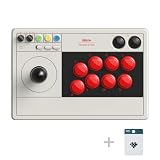
8BitDo Arcade Stick
The 8BitDo trades breadth for convenience across the two systems it does support. Between Switch and Windows it connects three ways — Bluetooth, the included 2.4G receiver or USB-C — so it can live on the couch for console sessions and move to a PC without trailing a cable. The dynamic button layout relabels itself when you change modes, the Ultimate Software handles remapping and macros, and the rechargeable battery is rated for up to 40 hours over the 2.4G connection. For a Switch-plus-PC household, that wireless freedom outweighs the missing PlayStation and Xbox support.
Specs
- Compatible with Switch and Windows
- Bluetooth, 2.4G wireless and wired USB-C connections; 2.4G receiver stores in a hidden compartment
- 8BitDo Ultimate Software for button mapping and macros
- Dynamic button layout changes with the selected mode
- Universal mounting plate supports Sanwa arcade sticks
- 1000mAh rechargeable battery: up to 40 hours on 2.4G, 30 hours on Bluetooth, about 4 hours to charge
- Dimensions 11.93 x 7.99 x 4.39 inches; weight 4.62 pounds
Best for: Switch and Windows players who want wireless freedom between a TV and a desk.
Watch out for: There is no PlayStation or Xbox support in the listing at all, so it cannot grow with you if you add one of those consoles.
Which One Fits Your Situation
One Stick for PlayStation, Xbox, Switch and PC
If your fighting games genuinely live on all four families of hardware, the MAYFLASH F500 is the straightforward answer. Its listing covers current Xbox and Switch models, PS4 and PS3, Windows and macOS, plus mini consoles, and the Sanwa-ready case means the same stick can be maintained for years. Just plan for the authentication step on PlayStation and Xbox, and treat PS5 play as an adapter purchase rather than a built-in feature.
A First Stick You Intend to Upgrade
Start with the MAYFLASH F300 if you expect your tastes to change. It reaches almost every system the F500 does, including Switch, Xbox Series, PS4 and PC, and its Sanwa-sized lever mount and button holes turn future upgrades into a drop-in job. The smaller case also travels better between a desk and a television, and the included octagonal gate lets you experiment with a different lever feel before spending on new parts.
Switch on the TV and PC at the Desk
When your two systems are a Switch and a Windows PC, the 8BitDo Arcade Stick removes the cable from the equation. Use the 2.4G receiver on whichever machine you play most, Bluetooth as the backup, and USB-C when the battery runs low; the rated 40 hours on 2.4G means charging is an occasional chore, not a nightly one. Its software profiles also let the same buttons behave differently in each mode.
Casual Play Across Older Consoles
For retro nights that rotate between a PS3, PS4, Xbox One and a PC emulator setup, the PXN 0082 covers the room without taking it over. Its compact case and suction-pad base suit a desk or media shelf, Turbo and Macro help with older arcade titles, and the lever’s D-pad mode handles games that expect digital input. It is the easiest of these four to lend to a second player or store in a drawer between sessions.
Common Mistakes
- Assuming PS4 support means PS5 support: none of these listings promises native PS5 play, and the Mayflash route to PS5 is a separate adapter.
- Forgetting the authentication controller: Mayflash sticks used on PS4 or Xbox need an original controller connected to the stick, so check you have a spare before a session.
- Leaving the mode switch in the wrong position: a stick set to a console mode may not register correctly on PC, and XInput versus DInput changes what older games can see.
- Buying for systems you do not own: the 8BitDo covers Switch and Windows only, so it is the wrong purchase if PlayStation or Xbox play is part of the plan.
- Skipping the dimensions: the F500 is a wide, 3 kg case built for laps and desks, while the PXN 0082 is a compact desktop unit, so measure your space first.
Frequently Asked Questions
Can one arcade stick really work on PC and consoles at the same time?
It works on them one at a time, as you plug it in or flip the mode switch. The MAYFLASH F500 and F300 list PC, PlayStation, Xbox and Switch support in one unit; the 8BitDo covers Switch and Windows only. Per system, only the setup changes: cable or receiver, input mode, and, on Mayflash models, a controller attached for authentication.
Do any of these arcade sticks work on PS5?
Not natively, according to their listings. MAYFLASH states that the F500 and F300 reach PS5 through its Magic-S Ultimate adapter or a MagicBoots converter, both sold separately. The 8BitDo and PXN 0082 listings make no PS5 claim at all, listing Switch and Windows, or PS4-era consoles, instead. If PS5 fighting games are your main use, budget for the adapter or choose a stick licensed for PS5.
What is the difference between XInput and DInput on PC?
XInput is the input standard modern Windows games are built around, modeled on the Xbox controller, while DInput is the older standard that legacy fighting games, emulators and some arcade collections still expect. A stick that offers both, like the Mayflash models here, can be switched to whichever a given title recognises. Sticks limited to one mode can leave older software unable to see the controls.
Can I swap in Sanwa parts later?
On three of these four, yes. The MAYFLASH F300’s lever mount matches the Sanwa TP-8YT and its buttons match OBSF-30 sizing, the F500 is likewise listed as Sanwa Denshi compatible, and the 8BitDo’s universal mounting plate accepts Sanwa and other levers. The PXN 0082 listing does not promise standard fitments, so treat its lever and buttons as fixed and choose it for casual play rather than a modding project.
FAQ
Can one arcade stick really work on PC and consoles at the same time?
Do any of these arcade sticks work on PS5?
What is the difference between XInput and DInput on PC?
Can I swap in Sanwa parts later?
More from Amazon
Programs that pair well with the guide above. Offers and eligibility are set by Amazon and may change.
Free shipping on eligible items, Prime Video and more. Eligible new members can start with a free trial.
Start a Prime free trialAd-free music streaming. Eligible new subscribers can start with a free trial.
Try Music Unlimited freeA Prime membership for ages 18-24 with a trial period. Eligibility is set by Amazon.
See Prime for Young AdultsAudiobooks and podcasts to listen to on the go. Eligible new members can start with a free trial.
Try Audible freeAs an Amazon Associate we earn from qualifying purchases.