Our Short List of 3

- Best for: One Windows PC where documents, spreadsheets, slides, PDF work, mail and calendar all need to live under a single stated lifetime licence.
- Edition: Home & Business
- Modules named in the title: Documents, Sheets, Slides, PDF, Mail and Calendar
- Licence: Lifetime License, described on the listing as a premium licence for 1 user
- Devices: 1 Windows PC or laptop

- Best for: A buyer with a current laptop that has no disc drive, who wants install media on a stick and a licence term stated in the title.
- Edition: Office Suite 2026
- Delivery format: USB stick
- Licence: lifetime licence with free updates, as stated in the listing title
- File compatibility named in the title: Office 2024 and 2021 Word, Excel and PowerPoint files

- Best for: An older Windows desktop with a working optical drive that must open Office files created across many different Office versions.
- Edition: Office Suite 2026
- Delivery format: CD DVD disc, supplied in a protective sleeve per the listing
- File compatibility named in the title: Microsoft Office 2024, 2021, 365, 2019, 2016, 2013, 2010 and 2007 Word, Excel and PowerPoint files
- Software basis named on the listing: powered by Apache OpenOffice
All 4 Picks at a Glance
| Product | Specs | Action |
|---|---|---|
| 1. OfficeSuite Home & Business – Lifetime License – Documents, Sheets, Slides, PDF, Mail & Calendar for Windows |
| Check price on Amazon |
| 2. Office Suite 2026 on USB | MS Office Alternative Compatible with Office 2024 2021 Word Excel PowerPoint Files |
| Check price on Amazon |
| 3. Office Suite 2026 on CD DVD Disc | Compatible with Microsoft Office 2024 2021 365 2019 2016 2013 2010 2007 Word Excel PowerPoint Files |
| Check price on Amazon |
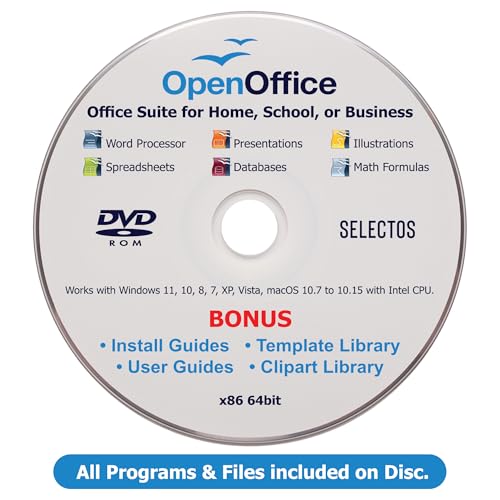 4. Office Suite Newest 2026 on DVD – Alternative to MS Office – for School, Home, or Business |
| Check price on Amazon |
Our Top Picks
The decision in this category is not really about documents, spreadsheets and slides, because every listing here covers those basics. The real decision is what exactly you are buying: an alternative suite that opens Microsoft Office files is a different product from Microsoft Office itself, and the five listings below differ again in licence term, in whether they arrive on a card, a USB stick or a disc, and in which Windows versions they name.
This roundup serves home users replacing an old suite, students who need Word, Excel and PowerPoint file compatibility for coursework, and small offices that want mail, calendar and PDF tools in one package. Every product was selected from its Amazon product name and listing details, and each entry states edition, licence, delivery format and operating system exactly as the listing presents them.
Quick Picks
As an Amazon Associate we earn from qualifying purchases.
| Product | Best for | Key spec from title |
|---|---|---|
| OfficeSuite Home & Business | A single Windows PC needing documents, PDF and mail in one licence | Lifetime License, Documents, Sheets, Slides, PDF, Mail and Calendar for Windows |
| Office Suite 2026 on USB | Installing from a stick on a PC with no optical drive | USB delivery, compatible with Office 2024 and 2021 Word, Excel and PowerPoint files |
| Office Suite 2026 on CD DVD Disc | An older desktop that still has a working disc drive | CD DVD disc, compatible with Microsoft Office files from 2024 back to 2007 |
| Office Suite Newest 2026 on DVD | A mixed school, home or small business setup | DVD format, described as an alternative to MS Office for school, home or business |
| Office Suite 2026 Special Edition | Buyers who also want a large bundled font library | Special Edition for Windows 11, 10, 8, 7, Vista and XP, with 1.000 new fonts |
How to Choose
Know whether you are buying an alternative or Microsoft Office itself
Every listing in this article is a Microsoft Office alternative, not a Microsoft product. The titles say so: one calls itself an MS Office Alternative, another an Alternative to MS Office, and the first is a separate suite, OfficeSuite, that works with Office file formats. Compatibility means the software opens, edits and saves Word, Excel and PowerPoint files; it does not mean you receive Word, Excel or PowerPoint. If your employer, school or client specifically requires genuine Microsoft Office or a Microsoft 365 sign-in, none of these listings provides that. If you mainly exchange standard documents, an alternative can be the right category, as long as you choose it knowingly.
Match the delivery format to the hardware you actually own
These five listings arrive in four different ways: a physical activation card, a USB stick, a CD DVD disc and a DVD. The format decides whether you can install the software at all. A card assumes you can follow its activation steps on the named PC. A USB stick works in any machine with a free standard USB port, which includes most current laptops. The two disc editions are different: they need a working optical drive, and many current laptops ship without one, as do some compact desktops. Before choosing a disc version, check your exact machine for a drive tray or slot, or plan how you would attach an external drive.
Read the licence term on the listing, not in your assumptions
Only some of these titles state a licence term outright. The OfficeSuite listing names a Lifetime License in its title, and the USB edition’s listing title also states a lifetime licence with free updates. The CD DVD disc edition and the Special Edition do not state a licence term in their product names, so treat the term as unknown until you read it on the listing itself. A term can also be limited by device count: the OfficeSuite licence is written for one PC and one user in its listing details. Never carry a lifetime assumption from one listing across to a similarly named product from another seller.
Check the Windows versions named in the title
The titles name different Windows ranges, and the range is part of the product. The Special Edition names the widest span, Windows 11, 10, 8, 7, Vista and XP. The DVD edition for school, home or business covers Windows and Mac installation files according to its listing, while the OfficeSuite title simply says Windows and its listing details describe a single Windows PC or laptop. Write down the exact Windows version on the computer you will install on, then compare it word for word with the versions printed in the title. A suite that names older systems is not automatically suitable for a new machine, and the reverse applies too.
1. OfficeSuite Home & Business – Lifetime License – Documents, Sheets, Slides, PDF, Mail & Calendar for Windows
- Best for: One Windows PC where documents, spreadsheets, slides, PDF work, mail and calendar all need to live under a single stated lifetime licence.
- Edition: Home & Business
- Modules named in the title: Documents, Sheets, Slides, PDF, Mail and Calendar
- Licence: Lifetime License, described on the listing as a premium licence for 1 user
- Devices: 1 Windows PC or laptop
One Windows PC where documents, spreadsheets, slides, PDF work, mail and calendar all need to live under a single stated lifetime licence.
The licence covers one PC and one user, so a household with several computers should not assume this single purchase covers them all.
This is the only listing here built around named modules: Documents, Sheets, Slides, PDF, and Mail and Calendar, sold as the Home & Business edition of OfficeSuite by MobiSystems. Its Amazon listing describes a lifetime premium licence for one user on one Windows PC or laptop, delivered as a physical activation card rather than a disc or download. That structure suits a single main computer, such as a home office desktop handling letters, budgets, presentations, PDFs and email. It is an alternative suite compatible with popular Office file formats, and it is not Microsoft Office, so do not expect Microsoft account services with it.
Watch out for: The licence covers one PC and one user, so a household with several computers should not assume this single purchase covers them all.
2. Office Suite 2026 on USB | MS Office Alternative Compatible with Office 2024 2021 Word Excel PowerPoint Files
- Best for: A buyer with a current laptop that has no disc drive, who wants install media on a stick and a licence term stated in the title.
- Edition: Office Suite 2026
- Delivery format: USB stick
- Licence: lifetime licence with free updates, as stated in the listing title
- File compatibility named in the title: Office 2024 and 2021 Word, Excel and PowerPoint files
A buyer with a current laptop that has no disc drive, who wants install media on a stick and a licence term stated in the title.
Confirm you are ordering the USB edition from the named seller, because near-identical titles are also sold on disc by the same brand family.
The defining feature of this edition is printed in the middle of its name: it arrives on USB. The listing title describes it as an MS Office Alternative powered by Apache OpenOffice, compatible with Office 2024 and 2021 Word, Excel and PowerPoint files, and states a lifetime licence with free updates. USB delivery matters for buyers whose laptop has no optical drive but who still want physical install media they can keep for a reinstall. The listing names Windows 11 and 10 PCs and Mac. Remember what compatibility means here: it opens Microsoft file formats; it is not Microsoft Office.
Watch out for: Confirm you are ordering the USB edition from the named seller, because near-identical titles are also sold on disc by the same brand family.
3. Office Suite 2026 on CD DVD Disc | Compatible with Microsoft Office 2024 2021 365 2019 2016 2013 2010 2007 Word Excel PowerPoint Files
- Best for: An older Windows desktop with a working optical drive that must open Office files created across many different Office versions.
- Edition: Office Suite 2026
- Delivery format: CD DVD disc, supplied in a protective sleeve per the listing
- File compatibility named in the title: Microsoft Office 2024, 2021, 365, 2019, 2016, 2013, 2010 and 2007 Word, Excel and PowerPoint files
- Software basis named on the listing: powered by Apache OpenOffice
An older Windows desktop with a working optical drive that must open Office files created across many different Office versions.
A disc is only useful if your computer has an optical drive; many current laptops have none, so check the hardware before choosing this format.
This listing makes the widest file-compatibility claim of the five, naming Microsoft Office 2024, 2021, 365, 2019, 2016, 2013, 2010 and 2007 Word, Excel and PowerPoint files. It is a 2026 edition powered by Apache OpenOffice, according to its listing, and it ships on a CD DVD disc for offline installation. That combination points at older desktops that still have an optical drive and trade documents with people running many different Office generations. The product name states no licence term, so read the term on the listing before ordering rather than assuming it matches the USB edition. It is an alternative suite, not Microsoft Office itself.
Watch out for: A disc is only useful if your computer has an optical drive; many current laptops have none, so check the hardware before choosing this format.
4. Office Suite Newest 2026 on DVD – Alternative to MS Office – for School, Home, or Business
- Best for: A school, home or small business buyer with a DVD drive who wants one disc that covers both an older Windows PC and an older Mac.
- Edition: Office Suite Newest 2026
- Delivery format: DVD, with Windows and Mac installation files on the disc per the listing
- Licence: perpetual licence, as described in the listing details
- Systems named on the listing: Windows 11, 10, 8, 7, Vista and XP, and macOS 10.7 to 10.15
A school, home or small business buyer with a DVD drive who wants one disc that covers both an older Windows PC and an older Mac.
The Mac support named on the listing stops at macOS 10.15, so a Mac on a newer system version falls outside the range printed for this edition.
This listing says Alternative to MS Office in its own name, the clearest labelling in the group, and positions the suite for school, home or business use. It ships on DVD, and its listing says the disc carries both Windows and Mac installation files, with compatibility across Windows 11, 10, 8, 7, Vista and XP and macOS 10.7 to 10.15. The listing describes a perpetual licence and disc extras such as installation guides, user guides, a clipart library and a template library. A household or classroom with an older Windows PC and an older Mac could find that single-disc arrangement convenient, provided both machines still have DVD drives.
Watch out for: The Mac support named on the listing stops at macOS 10.15, so a Mac on a newer system version falls outside the range printed for this edition.
5. Office Suite 2026 Special Edition for Windows 11-10-8-7-Vista-XP | PC Software and 1.000 New Fonts
The Special Edition separates itself with breadth in two directions. Its title names the widest Windows range here, Windows 11, 10, 8, 7, Vista and XP, and it bundles 1.000 new fonts, with its listing adding a large clipart collection alongside word processing, spreadsheet and presentation tools. It is presented as an alternative to Microsoft Office compatible with Word, Excel and PowerPoint files, which means file compatibility rather than the Microsoft programs themselves. The product name states neither a licence term nor a delivery format, so confirm both on the listing before you buy. Buyers maintaining an older Windows machine, or who want the font bundle, are its audience.
Specs
- Edition: Office Suite 2026 Special Edition
- Systems named in the title: Windows 11, 10, 8, 7, Vista and XP
- Included extra named in the title: 1.000 new fonts
- Further extra named on the listing: a clipart collection
- File compatibility named on the listing: Word, Excel and PowerPoint files
- Licence term: not stated in the product name; check the listing
- Delivery format: not stated in the product name; check the listing before ordering
Best for: A buyer keeping an older Windows PC in service who also wants a large bundled font library for documents and presentations.
Watch out for: Neither the licence term nor the delivery format appears in this product name, so confirm both on the listing instead of guessing from the other 2026 editions.
ASIN: 3959828241
Which One Fits Your Situation
One main Windows PC handles your documents, email and PDFs
Choose the OfficeSuite Home & Business listing. It is the only one here that names Mail and Calendar alongside Documents, Sheets, Slides and PDF, and its licence is stated as a lifetime licence for one user on one Windows PC, delivered on an activation card. That matches a single home office machine, as long as you accept it is an alternative suite rather than Microsoft Office.
Your laptop has no disc drive but you still want physical media
Choose Office Suite 2026 on USB. A USB stick installs on machines that dropped the optical drive years ago, and the listing title states a lifetime licence with free updates and compatibility with Office 2024 and 2021 files. Keep the stick afterwards; physical media you can find again is this format’s practical advantage over a download.
An older desktop must open files from many Office generations
Choose Office Suite 2026 on CD DVD Disc if that desktop still has a working optical drive. Its title names compatibility with Office files from 2024 back to 2007, including 365, which suits a machine exchanging documents with many different senders. If the drive is missing or broken, switch to the USB edition instead of buying a disc you cannot read.
You are equipping a classroom or a mixed home setup
Choose Office Suite Newest 2026 on DVD when the machines involved still read DVDs. Its listing describes one disc with Windows and Mac installation files, a perpetual licence, and guides and template extras on the disc, and its title names school, home and business use. Check the Mac system version carefully, because the listing range ends at macOS 10.15.
Common Mistakes
- Mistaking an alternative suite for Microsoft Office: every listing here is an alternative that works with Office file formats, and none of them is Word, Excel or PowerPoint from Microsoft.
- Ordering a CD or DVD edition for a laptop with no optical drive, then finding there is nowhere to insert the disc.
- Assuming every 2026 edition carries a lifetime licence, when only some titles state a term at all.
- Ignoring the device count on a licence written for one PC and one user, then installing on every household computer.
- Comparing titles instead of systems: two listings can share the words Office Suite 2026 while naming different Windows versions, formats and sellers.
Frequently Asked Questions
Are any of these listings actually Microsoft Office?
No. All five are alternative suites that open, edit and save Microsoft Office file formats such as Word, Excel and PowerPoint files. The product names say this with phrases like MS Office Alternative and Alternative to MS Office. If a school, employer or client requires genuine Microsoft Office or a Microsoft 365 account, you need a Microsoft listing instead.
What does compatible with Office files mean in practice?
It means the alternative suite is presented as able to create, open, edit and save documents in the formats associated with Word, Excel and PowerPoint, including files from the Office versions named in each title. It does not mean the Microsoft programs are included, and complex documents can still behave differently between suites. For everyday letters, spreadsheets and slides, format compatibility is the feature these listings are selling.
Which edition should I pick if my computer has no DVD drive?
Pick a format that does not depend on an optical drive. The OfficeSuite listing arrives as a physical activation card for one Windows PC, and Office Suite 2026 on USB installs from a stick. Avoid the CD DVD disc edition and the DVD edition unless you already own a working external optical drive, because both listings deliver the software on a disc your machine cannot read on its own.
Why do some listings state a lifetime licence and others do not?
Because the licence term is set per listing, not per product family name. The OfficeSuite title states a Lifetime License, and the USB edition title states a lifetime licence with free updates, while the disc and Special Edition names state no term. Where the name is silent, read the licence wording on the Amazon listing before ordering, and treat the term as unconfirmed until you have seen it there.
FAQ
Are any of these listings actually Microsoft Office?
What does compatible with Office files mean in practice?
Which edition should I pick if my computer has no DVD drive?
Why do some listings state a lifetime licence and others do not?
More from Amazon
Programs that pair well with the guide above. Offers and eligibility are set by Amazon and may change.
Free shipping on eligible items, Prime Video and more. Eligible new members can start with a free trial.
Start a Prime free trialAd-free music streaming. Eligible new subscribers can start with a free trial.
Try Music Unlimited freeA Prime membership for ages 18-24 with a trial period. Eligibility is set by Amazon.
See Prime for Young AdultsAudiobooks and podcasts to listen to on the go. Eligible new members can start with a free trial.
Try Audible freeAs an Amazon Associate we earn from qualifying purchases.