Our Top Picks
 Dell Latitude 7420 2-in-1 Touchscreen Business Laptop12.6 x 8.2 x 0.6 inches2.9 PoundsCheck on Amazon
 Dell Latitude 3190 11.6" HD 2-in-1 Touchscreen Laptop3190 2-in-1 128GB/8GB11 x 1 x 3 inches2 PoundsCheck on Amazon
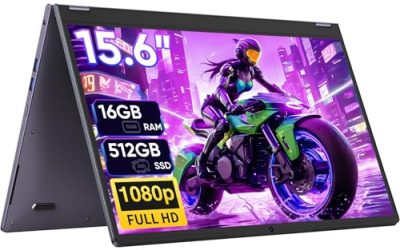
 Tylvx 15.6" 2-in-1 Laptop/Tablet16GB+512SSD Laptop14.14 x 9.8 x 0.89 inches3.59 poundsCheck on Amazon
 Lenovo IdeaPad 5i 2-in-1 16" Touchscreen Laptop |Intel14.02 x 10.03 x 0.72 inches4.41 poundsCheck on Amazon
 HP OmniBook X Flip 14 2-in-1 Touchscreen Laptop16GB RAM | 512GB SSD12.32 x 8.6 x 0.58 inches3.06 PoundsCheck on Amazon
A 2-in-1 touch screen laptop asks you to settle two arguments at once. The first is whether you want a laptop that sometimes behaves like a tablet or a tablet that sometimes needs a keyboard. The second is how much of the machine’s budget should go into the hinge and panel versus the processor and memory. Convertibles that fold a full 360 degrees reward people who sketch, annotate PDFs, sign documents, or prop the screen up like a tent for video calls. If you only tap a screen a few times a day, a standard clamshell will usually give you more speed for the same money.
This guide is for students, mobile professionals, and home users who want a flip-style machine without wading through hundreds of near-identical listings. The six models below span a wide spread of processors, from older dual-core chips to a current Intel Core Ultra part, and from a 4GB Chromebook to a 32GB Windows notebook. Everything here is judged on the specifications stated in each listing for 2026 shoppers, so use the tables and checklists to match a machine to your actual workload.
Quick Picks
Dell Latitude 7420 2-in-1 Touchscreen Business Laptop, 14" FHD (1920x1080), 11th Gen Core i7-1185G7, 16GB RAM, 512GB SSD, Thunderbolt 4, HDMI Windows 11 Pro (Renewed)
One of the consumer electronics options compared in this guide.
View on AmazonDell Latitude 3190 11.6" HD 2-in-1 Touchscreen Laptop Intel N5030 1.1Ghz 8GB Ram 128GB SSD Windows 11 Professional (Renewed)
One of the consumer electronics options compared in this guide.
View on AmazonTylvx 15.6" 2-in-1 Laptop/Tablet, 360° Flip FHD Touchscreen, Intel Core m3-8100Y up to 3.4GHz, 16GB RAM 512GB SSD, Win11, Deep Purple for Student Note-Taking, Design, Entertainment
One of the consumer electronics options compared in this guide.
View on AmazonLenovo IdeaPad 5i 2-in-1 16" Touchscreen Laptop |Intel Core 5 120U |Intel Graphics|Office 365|Backlit| 16GB RAM DDR5 | 512GB SSD |Windows 11 Home |Bundle with Stylus Pen
One of the consumer electronics options compared in this guide.
View on Amazon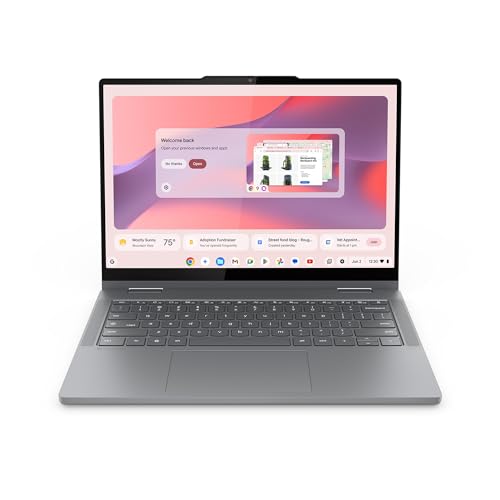
Lenovo Chromebook 2-in-1 - Lightweight Laptop - Google Gemini - Intel® N150 CPU - 14" WUXGA IPS Touchscreen Display - 4GB RAM - 128GB UFS Storage - Integrated Intel® Graphics - Luna Grey
One of the consumer electronics options compared in this guide.
View on AmazonHP OmniBook X Flip 14 2-in-1 Touchscreen Laptop, Ultra 5 226V, 32GB RAM | 14" WUXGA, Intel Arc 130V GPU, 32GB RAM 512GB SSD, Thunderbolt 4, Windows 11 with Stylus Pen
One of the consumer electronics options compared in this guide.
View on Amazon| Product | Best for | Key spec from the title |
|---|---|---|
| Dell Latitude 7420 2-in-1 | Business travel and office work | 14″ FHD, Core i7-1185G7, 16GB RAM, 512GB SSD, Thunderbolt 4 |
| Lenovo IdeaPad 5i 2-in-1 16″ | Big-screen everyday use | Intel Core 5 120U, 16GB DDR5, 512GB SSD, backlit keyboard |
| HP OmniBook X Flip 14 | Multitasking and premium builds | Ultra 5 226V, 32GB RAM, 14″ WUXGA, Thunderbolt 4 |
| Dell Latitude 5300 2-in-1 | Compact, port-rich workhorse | 13.3″ FHD, Core i5-8365U, 16GB DDR4, 256GB SSD |
| Tylvx 15.6″ 2-in-1 | Students on a tight budget | 360-degree flip FHD touch, Core m3-8100Y, 16GB RAM, 512GB SSD |
| Lenovo Chromebook 2-in-1 14″ | Web apps and light schoolwork | Intel N150, 14″ WUXGA IPS touch, 4GB RAM, 128GB UFS |
How to Choose
Hinge style and weight
A true 2-in-1 uses a 360-degree hinge so the keyboard folds behind the screen. Listings that say only “touchscreen” may be plain clamshells, so look for the words “2-in-1,” “flip,” or “convertible” in the title. Smaller screens in the 13 to 14 inch range are far easier to hold in tablet mode than 15.6 or 16 inch panels, which are better treated as laptops that occasionally tent or stand. Anything above 15 inches will feel heavy when held in one hand for a long reading session, so match the size to how you will actually carry and hold it each day.
Processor generation, not just the brand tier
A Core i5 from 2019 and a Core i5 from this year are very different machines. The spec sheet shows generation clues in the model number: 11th Gen chips such as the i7-1185G7 carry Thunderbolt 4 and decent integrated graphics, while the 8th Gen i5-8365U is a dual-core design aimed at office tasks. Newer Intel Core Ultra and Core 5 parts add AI features and better efficiency. For Chromebooks, an N-series chip is fine for browsers and Android apps but will strain under dozens of tabs.
RAM and storage thresholds
For Windows, treat 8GB as the floor and 16GB as the comfortable target, since touch-first apps and browser tabs eat memory quickly. Storage of 256GB works for documents; 512GB is safer if you keep photos or video. ChromeOS devices can live with 4GB and 128GB because most files sit in the cloud, but the memory ceiling arrives sooner than you expect. Be careful with eMMC and UFS storage: it is cheaper and slower than an SSD.
Ports, display and what to ignore
Full HD (1920×1080) or WUXGA (1920×1200) is the sweet spot for a screen this size. A resolution labeled merely “HD” will look soft on a 14 inch panel. Thunderbolt 4 or USB-C charging means you can plug in a dock and a monitor with a single cable, and HDMI saves you a dongle. Ignore boosted clock speeds written as “up to 3.4GHz”; they describe a short burst, not sustained performance. Budget models usually cut corners on brightness, keyboard backlighting, and charging speed.
The 6 Best Options
Dell Latitude 7420 2-in-1
This is the business-class pick of the group. The listing combines a 14 inch Full HD touch panel with an 11th Gen Core i7-1185G7, 16GB of RAM, a 512GB SSD, Thunderbolt 4, and HDMI, which covers most office and travel needs without adapters. It suits consultants, managers, and anyone who lives in spreadsheets and video meetings. Because the processor generation is clearly stated, a buyer can judge exactly what era of hardware they are getting, which is not always true of generic listings.
- Thunderbolt 4 and HDMI make docking and presenting simple.
- Sixteen gigabytes of RAM leaves room for heavy browser use.
- Trade-off: it is a business-line model, so expect a conservative design and no gaming graphics.
Skip it if you want a big screen for media or a low entry cost.
Lenovo IdeaPad 5i 2-in-1 16″
The 16 inch panel makes this the roomiest convertible on the list. The title cites an Intel Core 5 120U, 16GB of DDR5 memory, a 512GB SSD, a backlit keyboard, Office 365, and Windows 11 Home, so it arrives ready for household or school work. It fits people who treat their laptop as the main screen and tablet mode as an occasional bonus, such as parents sharing one machine for homework, recipes, and streaming on a kitchen counter.
- DDR5 memory and a recent Core 5 chip give it a newer platform than most budget flips.
- The larger display suits split-screen document work.
- Trade-off: a 16 inch body is awkward as a handheld tablet.
Skip it if you commute by bus with a small bag.
HP OmniBook X Flip 14
This is the performance and polish leader. The listing names an Ultra 5 226V processor, Intel Arc 130V graphics, 32GB of RAM, a 512GB SSD, a 14 inch WUXGA display, and Thunderbolt 4. That much memory means you can keep research tabs, a video call, and creative software open together. It is a fit for professionals and creators who want a premium flip, particularly anyone who edits photos, runs analytics dashboards, or keeps several large documents open at once.
- Thirty-two gigabytes of RAM is the highest on this list.
- The 14 inch WUXGA panel is a good size for tablet-style use.
- Trade-off: it sits in the premium tier, and 512GB of storage fills up with media.
Skip it if your tasks are limited to email and streaming.
Dell Latitude 5300 2-in-1
A compact 13.3 inch convertible built around a Core i5-8365U, 16GB of DDR4 RAM, and a 256GB SSD. The listing also highlights a backlit keyboard, Type-C, and HDMI. It suits anyone who prefers a small, travel-friendly screen and mainly runs office software, and it is a sensible pick for a second computer kept in a bag or a classroom cart.
- The 13.3 inch Full HD screen is easy to carry and hold.
- Sixteen gigabytes of memory is generous for the age of the platform.
- Trade-off: the 8th Gen dual-core processor is the oldest design in this lineup and will feel slow in demanding apps.
Skip it if you plan to edit video or keep many heavy apps open.
Tylvx 15.6″ 2-in-1
A budget-tier flip with a 15.6 inch Full HD touchscreen and a 360-degree hinge. The listing pairs a Core m3-8100Y with 16GB of RAM and a 512GB SSD, plus Windows 11, and it is marketed to students. The memory and storage are large for the price class, which helps with note-taking, downloaded lecture files, and offline reading when campus Wi-Fi is unreliable.
- Sixteen gigabytes of RAM and a 512GB SSD at an entry-level tier.
- A big Full HD display for reading and annotating.
- Trade-off: the Core m3 is a low-power, tablet-class processor, so heavy multitasking will slow it down.
Skip it if you need steady speed for demanding software.
Lenovo Chromebook 2-in-1 14″
This is the lightweight pick for web-first users. It lists an Intel N150 processor, a 14 inch WUXGA IPS touch display, 4GB of RAM, and 128GB of UFS storage, along with Google Gemini features. It fits students, travelers, and relatives who live in Chrome and Google apps and want a device that boots fast and asks for little upkeep.
- The WUXGA IPS panel is sharper than many Chromebook screens.
- ChromeOS keeps the system simple and easy to maintain.
- Trade-off: 4GB of RAM limits tab-heavy sessions, and it cannot run full Windows software.
Skip it if you depend on desktop applications.
Which One Fits Your Situation
You split time between the office and airports
The Dell Latitude 7420 2-in-1 packs a Full HD 14 inch screen, a fast 11th Gen Core i7, and Thunderbolt 4 for docks. It handles presentations, calls, and spreadsheets without dongles.
You want maximum power for creative or multitasking work
Go with the HP OmniBook X Flip 14. Its 32GB of RAM and Arc graphics give it the most headroom, and the 14 inch flip format is comfortable in tablet mode.
You are a student with a small budget
The Tylvx 15.6″ 2-in-1 gives you a large touchscreen, 16GB of RAM, and 512GB of storage at an entry tier. If your classes are browser-based, the Lenovo Chromebook 2-in-1 is a simpler and lighter alternative.
You want a large screen at home
The Lenovo IdeaPad 5i 2-in-1 16″ offers the biggest canvas, a backlit keyboard, and a modern DDR5 platform for family use and homework.
Common Mistakes
- Assuming every touchscreen laptop flips; check for the 360-degree hinge or “2-in-1” wording.
- Buying on RAM alone while ignoring the processor generation, which is why a 16GB older chip can feel slower than a newer 8GB one.
- Choosing a 15 or 16 inch convertible and expecting to use it like a tablet on the couch.
- Overlooking storage type; UFS or eMMC drives are slower than SSDs.
- Ignoring ports; a model without USB-C charging or HDMI turns every presentation into a dongle hunt.
Related guides
- Retro Game Storage Cases And Displays
- Solar Chargers For Camping And Hiking
- Wireless Chargers For Samsung Galaxy
Frequently Asked Questions
Is a 2-in-1 laptop good enough to replace a tablet?
For many people, yes. A 13 to 14 inch convertible handles reading, note-taking, and video, though it weighs more than a dedicated tablet. If tablet use is your main goal, favor the smaller, lighter models.
How much RAM do I need in a touch screen convertible?
Sixteen gigabytes is the practical target for Windows machines. Eight works for basic use, while ChromeOS can manage with 4GB if you keep tab counts low.
Does a touchscreen hurt battery life?
The touch layer itself has a small effect; the display resolution, brightness, and processor matter more. Look at battery claims in the full spec sheet rather than the title alone, and remember that a bright screen with the hinge folded into tablet mode drains power faster than plain typing in a document.
Should I buy a renewed or older-generation model?
Older business models can be strong value, but check the processor generation, as chips from 2019 lack the efficiency and ports of newer ones. Confirm the return policy and battery condition before committing.