
Key takeaways
- Pro: Two integrated displays dramatically expand your workspace on the go.
- Pro: Premium Zenbook Duo models offer gorgeous OLED panels and strong specs.
- Pro: Screen extenders add a second display to any laptop affordably.
- Pro: Great for coding, trading, content creation, and multitasking.
What's inside
Dual-screen laptops have graduated from novelty to genuinely useful productivity tools. By stacking or extending a second display into the chassis, they let you code on one panel while referencing docs on another, or keep a video call open above your work, all without carrying a separate portable monitor. The category has matured fast, and 2026’s options range from polished OLED flagships to clever budget extenders.
This review breaks down what to expect from a dual-screen laptop, evaluates real-world usability, and compares the standout models and accessories. Whether you want an all-in-one dual-OLED machine or a cheaper way to add a second screen to your current laptop, there’s a route here for you.
As an Amazon Associate we earn from qualifying purchases at no extra cost to you. Product prices and availability are accurate as of the date shown and are subject to change.




🎮 Get More From Your Setup — Free
Prime Gaming gives you free PC games every month, in-game loot, and a free Twitch channel sub — plus fast free shipping on all the gear above. New members get a 30-day free trial.
Watch: Dualscreen Laptop: Review & Buyer’s Guide — Video Review
Design & Build
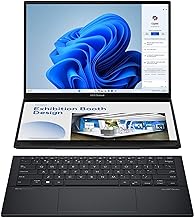
The gold standard is ASUS’s Zenbook Duo line, which pairs two 14-inch OLED 3K touch displays in a single premium chassis with an included stand and stylus. The 2026 model steps up to a 144Hz refresh and an Intel Core Ultra 9 386H, while the Core Ultra 7 255H version offers the same dual-screen magic for less. Beyond ASUS, compact 2-in-1 dual-screen laptops and triple-screen machines with fold-out side panels take more experimental approaches, and screen-extender accessories clip onto any existing laptop to add one or two portable panels. Build quality varies widely here, with the Zenbook Duo clearly leading in fit and finish.
Performance
The ASUS Zenbook Duo models are the performance benchmark, with their Core Ultra processors, 32GB of RAM, and 1TB SSDs handling serious multitasking, creative apps, and the extra GPU load of driving two OLED panels. The dual displays genuinely boost productivity once you adapt to the workflow. Budget dual-screen laptops built around lower-power N100 or N95 chips are fine for browsing, writing, and media across two screens but won’t tackle heavy work. Clip-on screen extenders, meanwhile, borrow your host laptop’s power and simply mirror or extend the desktop over USB-C, offering a flexible upgrade path without buying a whole new machine.
Pros & Cons
- Pro: Two integrated displays dramatically expand your workspace on the go.
- Pro: Premium Zenbook Duo models offer gorgeous OLED panels and strong specs.
- Pro: Screen extenders add a second display to any laptop affordably.
- Pro: Great for coding, trading, content creation, and multitasking.
- Con: Dual displays reduce battery life compared to single-screen laptops.
- Con: Budget dual-screen models use weak processors ill-suited to heavy work.
- Con: The workflow takes some adjustment and adds weight.
Alternatives to Consider
If you want the best integrated experience, the ASUS Zenbook Duo (2026) with dual OLED and the Core Ultra 9 is the flagship to beat, with the Core Ultra 7 255H version as a more affordable path to the same concept. Buyers who already own a capable laptop should consider a clip-on 15.6-inch screen extender or a triple portable monitor kit, which add screens for far less. Those wanting a compact convertible can look at the 13.5-inch dual-screen 2-in-1 for lightweight portability.
Frequently Asked Questions
Are dual-screen laptops actually useful?
For multitaskers, absolutely. Having a second built-in display for reference material, chat, or timelines while you work on the main screen mirrors the productivity boost of a desktop dual-monitor setup, but portable.
How is battery life on dual-screen laptops?
Running two panels draws more power, so expect shorter runtimes than a comparable single-screen laptop. Premium models like the Zenbook Duo manage it reasonably, and you can disable the second screen to conserve battery.
Is a screen extender better than a true dual-screen laptop?
It depends on your needs. A clip-on extender is cheaper and works with your current laptop, but an integrated dual-screen machine like the Zenbook Duo is sleeker and better balanced for daily use.
Can dual-screen laptops handle creative work?
The high-end Zenbook Duo models with Core Ultra chips, 32GB RAM, and OLED displays handle photo editing and content creation well. Budget dual-screen laptops with N-series chips are limited to lighter tasks.
Verdict
Dual-screen laptops are a legitimately productive category now, led by the ASUS Zenbook Duo’s polished dual-OLED design. The 2026 Core Ultra 9 model is our top pick for power users, with the Core Ultra 7 version offering the same idea for less. If you’d rather upgrade what you have, a clip-on screen extender is the budget-friendly way to gain a second display.


