Key takeaways
- Cardioid mics (used in the Razer BlackShark V2 X and V3 X) focus on your voice and reject background noise from the sides.
- AI noise-canceling mics, like on the Edifier G5 MAX, actively filter out keyboard clacks, fans, and roommates.
- Flip-to-mute designs, found on the Logitech G432 and Turtle Beach Stealth 600, let you mute instantly without fumbling for a button.
A gaming headset does more than pump music into your ears — it’s often the difference between hearing an enemy’s footsteps a half-second before they hear yours, or catching every line of dialogue in a story-driven game without waking the whole house. With so many models spanning wired and wireless, budget and premium, picking the right one can feel overwhelming.
This guide breaks down exactly what matters when shopping for a gaming headset — sound quality, microphone performance, comfort, connection type, and platform compatibility — so you can make a confident choice instead of a guess.
Our top picks
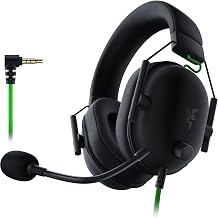
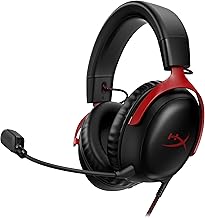
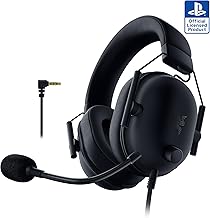
 Razer BlackShark V2 X Xbox Gaming Headset
- Our cutting-edge proprietary design divides the driver into…
- An improved pickup pattern ensures more voice and…
- Sturdy closed earcups fully cover the ears to…
 Ozeino Gaming Headset for PC
- Immersive 7.1 Surround Sound: This gaming headset delivering…
- Great Humanized Design: Comfortable and breathable permeability protein…
- Sensitivity Noise-Cancelling Microphone: 360° omnidirectionally rotatable sensitive microphone,…
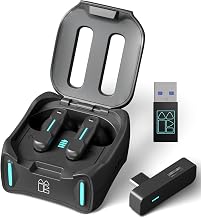
 Edifier G5 MAX Gaming Headset
- THX 7.1.4 Spatial Audio for Pro-Level Gaming Immersion:…
- 53mm PEN Diaphragm Drivers & Hi-Res Audio Certification:…
- 4-in-1 Connectivity with Ultra-Low Latency: This headset offers…
| Product | Key specs | |
|---|---|---|
| Razer BlackShark V2 X Xbox Gaming Headset | Our cutting-edge proprietary design divides the driver into… An improved pickup pattern ensures more voice and… Sturdy closed earcups fully cover the ears to… | Check price |
| Ozeino Gaming Headset for PC | Immersive 7.1 Surround Sound: This gaming headset delivering… Great Humanized Design: Comfortable and breathable permeability protein… Sensitivity Noise-Cancelling Microphone: 360° omnidirectionally rotatable sensitive microphone,… | Check price |
| Edifier G5 MAX Gaming Headset | THX 7.1.4 Spatial Audio for Pro-Level Gaming Immersion:… 53mm PEN Diaphragm Drivers & Hi-Res Audio Certification:… 4-in-1 Connectivity with Ultra-Low Latency: This headset offers… | Check price |
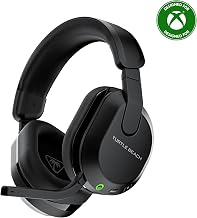
 Turtle Beach Stealth 600 Wireless Gaming Headset Turtle Beach Stealth 600 Wireless Gaming Headset | Memory Foam Cushions with Glasses-Friendly Technology Powerful, 50mm Nanoclear Drivers for Vibrant Spatial Audio Mappable Wheel and Mode Button for Customizable Functions | Check price |
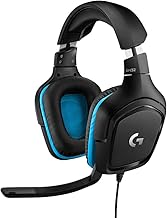
 Logitech G432 Wired Gaming Headset Logitech G432 Wired Gaming Headset | Enjoy expansive cinematic sound Hear Enemies From All Sides Be Heard Loud and Clear | Check price |
 Razer BlackShark V3 X HyperSpeed Wireless PC Razer BlackShark V3 X HyperSpeed Wireless PC | Tuned for improved clarity and positional performance, the… DETACHABLE HYPERCLEAR CARDIOID 9.9MM MIC Featuring an ultra-fast 2.4 GHz wireless connection, enjoy… | Check price |
 SteelSeries Arctis Nova 5 Wireless Multi-System Gaming SteelSeries Arctis Nova 5 Wireless Multi-System Gaming | 100+ GAME AUDIO PRESETS Play longer than ever with the next-gen battery Toggle between 2.4GHz gaming and Bluetooth 5.3 with… | Check price |
 SteelSeries Arctis Nova Pro Omni SteelSeries Arctis Nova Pro Omni | Officially certified to meet the highest standards for… ALL YOUR SYSTEMS, ALL AT ONCE - Connect… High-bandwidth omnidirectional microphone for pro-level voice clarity, with… | Check price |
As an Amazon Associate we earn from qualifying purchases at no extra cost to you.
🎮 Get More From Your Setup — Free
Prime Gaming gives you free PC games every month, in-game loot, and a free Twitch channel sub — plus fast free shipping on all the gear above. New members get a 30-day free trial.
Watch: Gaming Headset Buying Guide — Video Review
Wired vs. Wireless
Wired headsets like the Logitech G432 offer zero input lag, no charging required, and typically cost less for the same audio quality. Wireless models like the Razer BlackShark V3 X HyperSpeed or Turtle Beach Stealth 600 trade a bit of latency risk for freedom of movement and cleaner desk setups — modern 2.4GHz wireless connections have essentially closed the lag gap for gaming. If you’re mostly at a desk and want the most reliable performance, wired is hard to beat. If you move around, game on console from a couch, or just hate cable clutter, go wireless.
Sound Quality and Drivers
Driver size (measured in millimeters) is a rough indicator of potential sound quality, but tuning matters more than raw specs. Most solid gaming headsets use 50mm drivers, like the Razer BlackShark V2 X and Turtle Beach Stealth 600, which balance clear highs with punchy bass. The Edifier G5 MAX steps up to a 53mm driver with Hi-Res Audio and THX certification, aimed at listeners who want music and game audio to sound equally great. Surround sound features, like the 7.1 virtual surround on the Ozeino headset, can help with directional awareness in competitive titles, though a well-tuned stereo headset with good positional audio often performs just as well.
Microphone Quality
If you play with friends or use voice chat regularly, don’t treat the mic as an afterthought.
- Cardioid mics (used in the Razer BlackShark V2 X and V3 X) focus on your voice and reject background noise from the sides.
- AI noise-canceling mics, like on the Edifier G5 MAX, actively filter out keyboard clacks, fans, and roommates.
- Flip-to-mute designs, found on the Logitech G432 and Turtle Beach Stealth 600, let you mute instantly without fumbling for a button.
Comfort and Build Quality
You’ll wear this thing for hours, so weight and clamping force matter as much as sound. Lightweight designs with memory foam or breathable earcups — a strength of the Razer BlackShark V2 X — reduce ear fatigue during long sessions. Over-ear, noise-isolating cups also passively block outside sound, which helps immersion even before you turn on any active features. If you wear glasses, look for headsets with softer earcup padding to avoid pressure points.
Platform Compatibility
Not every headset works seamlessly with every system. Check the connection type against your setup: 3.5mm jacks (Razer BlackShark V2 X, Logitech G432) work almost universally, USB adds digital audio processing on PC, and Bluetooth/2.4GHz wireless (Turtle Beach Stealth 600, Razer BlackShark V3 X, Edifier G5 MAX) offer multi-device flexibility for switching between console, PC, and phone. If you’re a multi-platform gamer, prioritize headsets explicitly listed as compatible with Xbox, PS5, Switch, and PC alike.
Tips
- Match battery life to your habits — a headset with 70+ hours (like the Razer BlackShark V3 X) means fewer mid-session charging interruptions.
- Test the fit before committing to long sessions; adjust the headband and earcup angle for even pressure distribution.
- Update firmware on wireless headsets when available — it often improves battery life and connection stability.
- Keep the mic boom a couple finger-widths from your mouth to avoid muffled or overly loud audio.
Frequently Asked Questions
Do I need surround sound for competitive gaming?
Not necessarily. Virtual surround sound (like 7.1) can enhance directional cues, but many pro players prefer well-tuned stereo headsets because they offer more precise, natural positional audio without artificial processing.
Is wireless latency noticeable for gaming?
With modern 2.4GHz wireless connections, latency is generally imperceptible during gameplay. Bluetooth alone can introduce slightly more delay, so headsets offering a dedicated 2.4GHz mode are preferable for fast-paced games.
Can I use a PC gaming headset on console?
It depends on the connection type. Headsets with a standard 3.5mm jack usually work across PC and consoles. USB-only or proprietary wireless dongles may be limited to PC — always check the listed compatibility before buying.
How long should a gaming headset battery last?
For wireless headsets, look for at least 15-20 hours for casual use, though options with 70+ hours are ideal if you don’t want to think about charging for weeks at a time.
Conclusion
The best gaming headset isn’t the one with the flashiest spec sheet — it’s the one that fits your platform, your play style, and your ears comfortably enough to forget you’re wearing it. Whether you prioritize a lightweight wired option, a feature-packed wireless model, or something in between, the picks above cover the range of needs most gamers actually have.