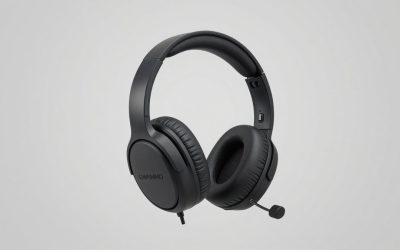
Our Top Picks
This SteelSeries Arctis 3 review comes down to a verdict: it is a lightweight, wired, all-platform headset with 40mm drivers and a retractable mic, built for budget-minded players who want one headset for PC, console and phone. It is an older design, so check current stock, and look at newer SteelSeries models if you want modern features.
Verdict First: Is the Arctis 3 Still Worth Buying?
The Arctis 3 launched as an affordable member of SteelSeries’ Arctis family. Reviewers at the time called it a lightweight, affordable, all-purpose gaming headset. It stands out for three reasons: a simple 3.5mm connection that works across platforms, a retractable microphone that stays out of the way, and a design that looks more like casual headphones than a gaming headset.
Its age shows in the feature list. There is no wireless connection on the standard model, no surround software on the 3.5mm version and no active noise cancelling. If you see one at a low price, it can still be a decent headset for casual play. If the price is close to a modern entry-level wireless headset, spend a little more.
- Best for: casual players, students, shared setups and anyone who wants one plug-in headset for several devices.
- Skip if: you need wireless, strong bass, a studio-quality mic or software controls.
- Main caution: the stock and exact variant vary. Make sure you know whether you are buying the standard 3.5mm model, the console edition or the Bluetooth version.
This review is research-based. We did not use an Arctis 3 ourselves, and we do not quote measurements we did not see. Every number below comes from the maker’s listed specifications as repeated by retailers and editorial reviews. For frequency response charts, check a dedicated measurement site yourself.
SteelSeries Arctis 3 Specs Table
| Spec | Arctis 3 (3.5mm model) |
|---|---|
| Driver | 40mm neodymium |
| Frequency response | 20 to 22,000 Hz |
| Impedance | 32 ohm |
| Sensitivity | 98 dB |
| Total harmonic distortion | Under 3 percent |
| Microphone type | Retractable, bidirectional, noise cancelling |
| Microphone frequency response | 100 Hz to 10 kHz |
| Microphone sensitivity | -48 dB |
| Microphone impedance | 2,200 ohm |
| Connection | Dual 3.5mm 3-pole plugs, or one 3.5mm 4-pole plug through the included adapter |
| Cable | About 3 m, detachable, with a share jack |
| Platforms | PC, Mac, mobile, Xbox One, PlayStation 4, VR and Nintendo Switch |
| Weight and battery | Not listed on the sources we read for the wired model; check the maker |
One source we found listed a different microphone sensitivity and a USB connection. That conflicts with the other sources and with the maker-style spec sheets, so we left it out. If a listing shows a USB cable, you may be looking at a different model.
Design, Comfort and Build
Reviewers described the Arctis 3 as lightweight and casual looking, which is the main design point of the model. We do not have a weight figure we can confirm, so check the box or the maker’s page.
Earcup material and clamp force are not stated in the sources we read, so check recent owner comments on long-session comfort. The retractable microphone slides into the left earcup, so the headset looks like normal headphones when you take it out of the house. That is the feature most reviewers liked best.
Because the headset is light and the cable is long, it suits a couch setup. A 3 m cable reaches a TV from a sofa without needing an extension. The share jack on the cable lets a second person plug in another headset, which is helpful for co-op games and shared screens.
Sound Quality and Performance by Use
The 40mm neodymium drivers are standard for the price tier. The listed frequency response covers the full audible range, but a number on a spec sheet does not tell you what the headset sounds like. Reviews we found describe it as an everyday gaming headset rather than a bass-heavy one, but we cannot back that with numbers. The listed 32 ohm impedance is low, which is easy for a console controller or phone to drive.
Competitive and online games
For footsteps and voice chat, a clear mid and high range matters more than bass. The Arctis 3 is a reasonable fit. The 3.5mm model offers plain stereo, with no virtual surround, so you rely on the game’s own mix.
Story games and movies
An everyday sound signature works for story games and streaming. If you like heavy bass in action games, listen to a few comparisons before you commit, because we have no data to promise it.
Music
It is fine for background music, and the share jack lets two people listen together. Music lovers will prefer a dedicated pair of headphones.
Mobile and Switch
The 4-pole adapter lets the headset work with a phone, tablet or Switch through a single plug. The low impedance suits mobile devices. Make sure the adapter is in the box, since the dual-plug cable is for a PC with separate mic and headphone sockets.
Microphone Quality and Chat
The Arctis 3’s microphone is retractable and bidirectional, with noise cancelling listed. A bidirectional pickup is meant to reduce sound from the sides, which helps with keyboard noise and room chatter. The listed range of 100 Hz to 10 kHz is typical for voice chat and fine for party chat and calls.
We will not claim studio quality. If you stream or record, a separate USB microphone will sound better. For casual team chat, the built-in mic is a good, convenient option because you can retract it and avoid the awkward boom that hangs in front of your face.
Connections and Compatibility
- PC and Mac: use the dual 3.5mm plugs if your computer has separate headphone and mic jacks, or the single 4-pole plug with the adapter if it has one combined jack.
- Xbox One and PlayStation 4: plug the 4-pole connector into the controller jack. For newer consoles, check that the controller has a 3.5mm headphone port, and confirm with the maker.
- Nintendo Switch and mobile: use the 4-pole connection.
- VR: listed as compatible through the 3.5mm jack where the headset has a jack.
Variants matter. There is a console edition, and there is a Bluetooth version with Bluetooth 4.1 and a listed battery life of up to 28 hours alongside the 3.5mm analog connection. If you want wireless, buy the Bluetooth version on purpose, not by accident.
SteelSeries Arctis 3 Price: Which Tier Does It Sit In?
The Arctis 3 sits in the budget-to-mid tier among wired gaming headsets. We do not quote exact figures, because prices move and the stock is mixed. As a rule:
- If you can find the standard wired model at a clear budget price, it is a fair buy for casual use.
- If the listing is at a premium price, or lists a different variant, look at the newer Arctis family instead.
- Avoid listings with missing cables, no adapter or unclear model names.
Newer budget headsets, including those from SteelSeries, offer features the Arctis 3 lacks. When the gap is small, choose the newer headset.
Arctis 3 Measurements and RTINGS
People searching for “arctis 3 rtings” want independent frequency response, mic and isolation data. We did not see that data, so we do not repeat them here. If you want them, visit a measurement-focused review site and look at the frequency response chart, the microphone sample and the isolation graph yourself. Compare the Arctis 3 against the other headsets you are considering, using the same site so the numbers use the same method.
Where to Buy and What to Check
Many shoppers look at large online retailers first when they search for this headset. The checks are the same wherever you buy:
- Confirm the exact model name: Arctis 3, Arctis 3 Console Edition or Arctis 3 Bluetooth.
- Check the box contents for the dual-plug cable, the 4-pole adapter and the share jack cable.
- Check the return window, so you can swap the headset if the mic fails.
- Avoid sellers who do not show photos of the actual unit.
- Be careful with third-party replacement cables, since the plug type matters.
Arctis 3 vs a Modern Budget Headset
The most useful comparison for most shoppers is not another old headset, it is a modern budget model. The table shows where the Arctis 3 stands, using only what the listings and spec sheets state.
| Feature | Arctis 3 (3.5mm) | Modern wired budget headset |
|---|---|---|
| Connection | 3.5mm, dual plug or 4-pole adapter | 3.5mm, often one 4-pole plug |
| Microphone | Retractable, noise cancelling | Detachable or flip-to-mute boom |
| Software | None needed | Sometimes a companion app |
| Wireless | Only on the Bluetooth variant | Not on wired models |
| Cable length | About 3 m with a share jack | Varies; check the listing |
| Availability | Mixed stock, several variants | Easier to find |
The Arctis 3 advantages are the long cable, the share jack and the hidden mic. Its disadvantages are age and stock confusion.
Common Problems and Fixes
No Mic on PC
If you use the dual-plug cable, make sure the mic plug goes to the mic socket and the headphone plug goes to the headphone socket. If your computer has a single combined jack, use the 4-pole adapter instead. Then check that the correct input device is selected in your system sound settings.
No Mic on a Console Controller
Use the 4-pole plug, not the dual plugs, and push it fully into the controller jack. Check the controller headset volume and the console microphone settings.
Crackling or One-Sided Sound
A partly seated plug is the usual cause. Reseat the cable at both ends. If the problem stays, swap the cable, which is detachable, before you blame the headset.
Cable Wear
A long cable takes more abuse. Use a cable clip if one is included, and avoid rolling a chair over the cable.
How We Chose the Alternatives
This is a research-based article and we did not use any of these headsets. We picked alternatives from real store listings that share at least one trait with the Arctis 3: wired 3.5mm use, multi-platform support, a light build or a budget tier. We limited the list to two SteelSeries models and added models from other makers for comparison. For each one we repeat only what the listing states, and we point you to the maker page for anything we could not confirm.
Who Should Buy the Arctis 3
- Casual players who want one headset for PC, console and phone.
- Families that want a headset with a share jack.
- Anyone who dislikes a bulky mic boom.
Who Should Skip It
- Players who want wireless, unless they pick the Bluetooth version.
- Streamers who need strong mic quality.
- Bass lovers and anyone who wants app controls.
Getting the Most Out of the Arctis 3
A wired headset with no software leaves you with few settings, so a handful of habits make the difference.
- Use the game’s own audio options. Many games offer a headphone mode or an audio profile. Choose the one made for stereo headphones, since the Arctis 3 has no surround processing of its own.
- Use your system equalizer if you want more bass. Windows and consoles often include a simple equalizer or sound profile. A small bass lift can compensate for a light low end, but avoid large boosts, which can add distortion.
- Set the mic level. Check the input level on your system and keep it out of the red. A retractable mic sits close to your mouth, so you rarely need a high gain.
- Use the share jack. If you play co-op on a couch, the share jack lets a friend plug in a second headset without extra hardware.
- Keep the cable clear. Run the cable behind the desk and use the clip if there is one.
What to Expect in 2026
The Arctis 3 first appeared years ago. Gaming headsets have moved toward wireless, companion apps and active noise cancelling, and even budget models now offer features the Arctis 3 does not. That does not make the headset obsolete. A wired headset has no battery to degrade, no dongle to lose and no firmware to maintain. If you want a simple tool that plugs in and works, the Arctis 3’s age counts for less than its simplicity.
The risk is on the buying side. Stock is mixed, and the product names are close to one another. A listing for a console edition or a Bluetooth version might look like the standard model at first glance, so read the title and the box contents. When in doubt, ask the seller to confirm which variant is in the box.
Alternatives to the Arctis 3
These are real products from the store listings. They are not scored against the Arctis 3. Check each maker’s page for current specs.
SteelSeries Arctis Prime

SteelSeries Arctis Prime - Black | Competitive Gaming Headset - High Fidelity Audio Drivers - Multiplatform Compatibility
Chosen because it specifies Black and Competitive Gaming Headset.
View on AmazonThe Arctis Prime is a competitive-focused wired headset from the same maker. The listing names high-fidelity audio drivers and multiplatform compatibility. It is a closer relative of the Arctis 3 than most newer models, so the feel is similar. Best for: players who want a SteelSeries wired headset with a competitive tuning. Skip if: you want wireless or a retractable mic, which the listing does not mention.
SteelSeries Arctis Nova 1P

SteelSeries Arctis Nova 1P Multi-System Gaming Headset - White | Hi-Fi Drivers — 360° Spatial Audio — Comfort Design — Lightweight — Noise-Cancelling Mic — PS5/PS4, PC, Xbox, Switch
Chosen because it specifies White and Xbox.
View on AmazonThe Nova 1P is a newer wired option with hi-fi drivers, 360 degree spatial audio, a lightweight comfort design and a noise-cancelling mic. The listing names PS5, PS4, PC, Xbox and Switch. It is the closest modern step up in feel, because it keeps the light, casual style. Best for: a modern wired replacement. Skip if: you want a battery and a wireless connection.
JBL Quantum 100M2

JBL Quantum 100M2 Wired Gaming Headset, Detachable Mic - Black | Memory Foam Ear Cushions And 3.5 Mm Jack Work With PC, PlayStation, Xbox, Nintendo Switch For Immersive PC Gaming Sessions
Chosen because it specifies Detachable Mic and Black.
View on AmazonThe Quantum 100M2 is a wired headset with a detachable mic, memory foam ear cushions and a 3.5mm jack, listed for PC, PlayStation, Xbox and Switch. It is at the budget end. Best for: players who want to spend little. Skip if: you want a retractable mic.
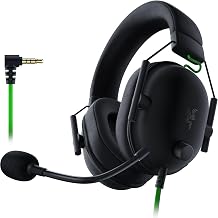
Razer BlackShark V2 X

Razer BlackShark V2 X Wired PlayStation Gaming Headset, Black | 50mm Drivers, Cardioid Mic, Lightweight, Comfortable Noise Isolating Earcups, For PS5, Xbox Series X, PC, Switch, 3.5 mm Jack
Chosen because it specifies Black and 50mm Drivers.
View on AmazonThis wired PlayStation version has 50mm drivers, a cardioid mic, noise-isolating earcups and a 3.5mm jack, and the listing names PS5, Xbox Series X, PC and Switch. It is light and aimed at esports-style play. Best for: players who want a wired headset with larger drivers. Skip if: you prefer the Arctis style of headband.
Pre-Purchase Checklist
- Decide whether you want wired only or the Bluetooth version, and read the listing title to match.
- Count your connections. A PC with two sockets uses the dual plugs, while consoles and phones need the 4-pole plug.
- Check that the adapter and the long cable are included.
- Compare against one newer wired model at a similar tier, using the same criteria.
- Keep the return window in mind and test the mic as soon as the headset arrives.
- If the listing is unclear, buy something else. A clear listing from a known seller is worth more than a small saving.
Run through this list and you will avoid the most common problems with older headsets: wrong variant, missing cables and unclear stock.
Frequently Asked Questions
Is the SteelSeries Arctis 3 good for gaming?
Yes for casual gaming. It is light, clear in the mids and easy to plug into several platforms, but it lacks wireless and software features.
What are the Arctis 3 drivers and impedance?
The listed specs are 40mm neodymium drivers, 32 ohm impedance and 98 dB sensitivity, with a 20 to 22,000 Hz frequency response.
Does the Arctis 3 work on PS5 and Xbox Series X?
The listed platforms are PlayStation 4 and Xbox One. A 3.5mm plug may work on newer controllers, so check the maker before you rely on it.
Is the Arctis 3 mic good?
It is retractable, bidirectional and noise cancelling, which suits casual chat. For streaming or recording, a separate microphone sounds better.
How much is the Arctis 3?
It sits in the budget-to-mid tier. Exact prices change, so check current listings and compare them with newer budget headsets.
Is there an Arctis 3 Bluetooth version?
Yes. It adds Bluetooth 4.1 and a listed battery of up to 28 hours, alongside the 3.5mm analog connection.
Which Headset Should You Pick?
Pick the Arctis 3 if you find a standard model at a budget price and want a light, casual headset for several devices. Pick a newer SteelSeries wired model such as the Nova 1P if you want a modern build with a similar feel. Pick the JBL or the Razer if cost or larger drivers matter more than the retractable mic. Whichever you choose, confirm the exact variant and the connector before paying.
Sources
- SteelSeries, Arctis 3 product specifications
- KitGuru, SteelSeries Arctis 3 Bluetooth review
- TechPowerUp, SteelSeries Arctis 3 Bluetooth review
- Techaeris, SteelSeries Arctis 3 review
- B&H Photo Video, SteelSeries Arctis 3 product page
Last updated: November 2026
FAQ
Verdict First: Is the Arctis 3 Still Worth Buying?
SteelSeries Arctis 3 Price: Which Tier Does It Sit In?
Is the SteelSeries Arctis 3 good for gaming?
What are the Arctis 3 drivers and impedance?
Does the Arctis 3 work on PS5 and Xbox Series X?
Is the Arctis 3 mic good?
How much is the Arctis 3?
Is there an Arctis 3 Bluetooth version?
More from Amazon
Programs that pair well with the guide above. Offers and eligibility are set by Amazon and may change.
Free shipping on eligible items, Prime Video and more. Eligible new members can start with a free trial.
Start a Prime free trialAd-free music streaming. Eligible new subscribers can start with a free trial.
Try Music Unlimited freeA Prime membership for ages 18-24 with a trial period. Eligibility is set by Amazon.
See Prime for Young AdultsAudiobooks and podcasts to listen to on the go. Eligible new members can start with a free trial.
Try Audible freeAs an Amazon Associate we earn from qualifying purchases.