Our Top Picks
Pick a 75 percent keyboard if you want a function row and a bit more desk-friendly navigation in a compact body, and pick a 65 percent keyboard if you want the smallest layout that still keeps dedicated arrow keys. The real difference is one row of keys on top and how the right-hand cluster is arranged, and that difference shapes how much mouse space you get and how often you reach for shortcuts.
What Each Layout Is
Both layouts are compact versions of the full-size keyboard that drop the number pad. Percent figures are rough shorthand for how many keys a layout keeps compared with a 100 percent board, and makers do not all count the same way.

Womier DK75 75% Wireless Gaming Keyboard, Creamy Computer Keyboards, Blue | Tri-Mode 2.4GHz/USB-C/BT5.0 Silent Membrane Keyboard, RGB Backlit, OLED Screen, Media Knob, Anti-Ghosting, Mac/Windows
Chosen because it specifies Creamy Computer Keyboards and Blue.
View on Amazon
FREEWOLF M68 65% Wireless Gaming Keyboard,Bluetooth/2.4GHz/ Wired Tri-Mode Silent Membrane Keyboard,PBT Keycaps,2000mAH Rechargeable,67 Keys Rainbow LED Backlit PC Gaming Keyboard for Win/Mac-Cheese
Chosen because it specifies Bluetooth/2.4GHz/ Wired Tri-Mode Silent Membrane Keyboard and PBT Keycaps.
View on Amazon
GEODMAER 65% Gaming Keyboard, Wired Backlit Mini Keyboard, Ultra-Compact Anti-Ghosting No-Conflict 68 Keys Membrane Gaming Wired Keyboard for PC Laptop Windows Gamer
Chosen because it specifies Wired Backlit Mini Keyboard.
View on Amazon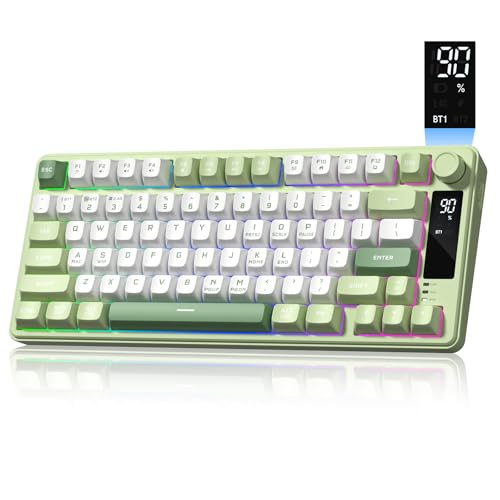
Womier DK75 75% Wireless Gaming Keyboard, Creamy Computer Keyboards, Green | Tri-Mode 2.4GHz/USB-C/BT5.0 Silent Membrane Keyboard, RGB Backlit, OLED Screen, Media Knob, Anti-Ghosting, Mac/Windows
Chosen because it specifies Creamy Computer Keyboards and Green.
View on Amazon65 Percent
A 65 percent board has the main alphanumeric block, a number row, dedicated arrow keys, and usually a narrow column of three to five keys on the right (commonly Delete, Page Up, Page Down, and sometimes Home or End). There is no function row, so F1 to F12 are reached by holding a function (Fn) key and pressing the number row. The key count is around 66 to 68.
75 Percent
A 75 percent board keeps nearly everything a tenkeyless board has but packs the keys together with almost no gaps. It includes a dedicated function row above the number row, arrow keys, and a right-hand column of navigation keys such as Delete, Page Up, Page Down, and Home or End. The key count is around 82 to 84, and many models add a rotary knob or a screen.
Key Differences at a Glance
| Feature | 65 Percent | 75 Percent |
|---|---|---|
| Approximate key count | 66 to 68 | 82 to 84 |
| Dedicated function row | No (Fn layer) | Yes |
| Dedicated arrow keys | Yes | Yes |
| Navigation column | Small, a few keys | Usually fuller |
| Width and depth | Narrower and shorter | Same width as a 65 percent but taller (extra row) |
| Mouse space | Maximum | Slightly less depth, similar width |
| Typing feel | Same main block | Same main block |
| Learning curve | Fn layer for F-keys | Almost none for TKL users |
Because the number of columns is similar, the two boards can be close in width. The 75 percent is mostly taller, not wider. Exact sizes depend on the model’s case design and bezel.
Who Should Choose Which
Competitive Gamers
Low-sensitivity mouse players who swing wide benefit from the narrowest possible footprint, and a 65 percent board is often chosen for that reason. Most games do not use the function row in play. However, if you bind F-keys in MMOs, simulators, or strategy titles, a 75 percent layout removes the Fn gymnastics.
Creators and Office Users
Video and photo editors, programmers, and spreadsheet users often rely on F-keys (rename in file managers, debug and refresh shortcuts in editors). A 75 percent layout keeps those one press away. If your workflow uses a small number of shortcuts, a 65 percent works fine with a function layer.
Budget Buyers
Both sizes are common across the entry, mid, and enthusiast tiers, so the layout alone does not decide the budget. The price differences come from build quality (plastic versus aluminum case), switch type, hot-swap sockets, wireless support, and gasket mounting. Entry options usually cover wired-only boards with factory switches; mid-tier boards add hot-swap sockets and better stabilizers; enthusiast boards add metal cases, gasket mounts, and tri-mode wireless.
Small Desks and Travel
A 65 percent board is more portable and leaves more space. A 75 percent board still fits in most bags and offers the most keys per inch of desk width.
Common Myths
- “A 75 percent is much bigger.” It is typically taller by about one key row, not much wider.
- “You cannot game on a 65 percent.” Most games do not need the function row, and the arrows are present.
- “Smaller always means better aim.” More mouse space can help low-sensitivity play, but the benefit depends on your settings and mousepad.
- “The layout decides typing feel.” Switches, keycaps, case, and mounting style affect feel far more.
- “Hot-swap is only on one layout.” Both sizes come in hot-swap and soldered versions.
Features That Matter More Than Percent
- Switch type: linear, tactile, or clicky; magnetic Hall-effect switches with adjustable actuation have become popular on gaming boards, with makers advertising rapid trigger and adjustable actuation points.
- Polling rate: wired gaming boards list 1,000 Hz and some list 8,000 Hz; the maker’s spec sheet shows what the model supports.
- Connectivity: wired, 2.4 GHz wireless, and Bluetooth; wireless adds battery considerations.
- Software and layers: some makers use their own app, others support open firmware such as QMK or VIA on selected models, letting you remap keys.
- Keycap profile and material: PBT is often described as more durable than ABS.
- Layout standard: ANSI versus ISO changes the Enter and left-shift shape; make sure keycap sets match.
Examples of makers selling both sizes in 2026 include Keychron, Wooting, Logitech, Corsair, Razer, SteelSeries, and Ducky, among many others. Check the specific model’s layout diagram, since a few “65 percent” boards add a column or move keys.
Practical Recommendation
If you game with a wide mouse sweep, rarely use F-keys, and want the cleanest desk, choose 65 percent. If you edit, code, or run shortcuts that rely on F1 to F12, or if you simply dislike layers, choose 75 percent. When torn, count how often you reach for the function row in a normal week. Under a handful of times, 65 percent likely suits you; more often, 75 percent saves frustration.
Before buying, look at the maker’s layout picture to confirm where the arrows, Delete, and right Shift sit, since some compact layouts squeeze the right Shift or arrows in unusual ways. If you plan to swap keycaps, confirm the bottom row size matches standard sets.
Typing, Sound, and Desk Habits
Because both layouts share the same main block, the switch and case decide most of the typing experience. Gasket-mounted or foam-dampened boards tend to sound deeper, while rigid plate-mounted boards sound sharper. Wrist rests are worth a thought on a 75 percent board, since the extra function row pushes the home row slightly farther from the desk edge. Also consider where the knob or screen sits if the model has one, because those features can change the usable footprint. Finally, think about your monitor arm and mousepad size: the more mouse space you need, the stronger the case for the narrower board.
Frequently Asked Questions
Is a 75 percent keyboard bigger than a 65 percent?
Slightly. The extra function row adds depth, but the widths are close. A 75 percent usually takes a bit more room front to back.
Can I use F-keys on a 65 percent keyboard?
Yes. You hold the Fn key and press the number row keys. Some boards let you remap this behavior in software or firmware.
Which layout is better for FPS games?
Many players favor the smaller footprint of a 65 percent for extra mouse room, but a 75 percent works just as well if your desk is wide enough. Switch choice and polling rate usually matter more than the layout.
Are keycaps interchangeable between the two sizes?
Mostly, since both use a standard main block. Check the bottom row and the right-hand keys, because compact layouts sometimes use nonstandard sizes.
Do these layouts work with Mac and Windows?
Most do, and many boards include a Mac and Windows toggle or extra keycaps. Check the maker’s spec list for your operating system.