Key takeaways
- Superb ergonomics: The MX Master series excels for long, comfortable workdays.
- High precision: Both productivity and gaming models offer accurate sensors.
- Fast scrolling: MagSpeed scrolling accelerates document navigation.
- Customization: Gaming mice add programmable buttons and adjustable weights.
A professional mouse is a tool you touch for hours every day, and the right one can meaningfully improve both comfort and productivity. The term spans two distinct worlds: ergonomic productivity mice built for developers, designers, and office professionals, and high-performance gaming mice engineered for precision and speed. The best pick depends entirely on whether your work is about long comfortable sessions or split-second accuracy.
In this review we compare leading professional mice, from Logitech’s acclaimed MX Master series for productivity to the G-series gaming models built for performance. We will examine ergonomics, sensor precision, connectivity, and features so you can choose the mouse that fits your profession, whether you are wrangling spreadsheets and code or chasing frames in competitive games.
Our top picks
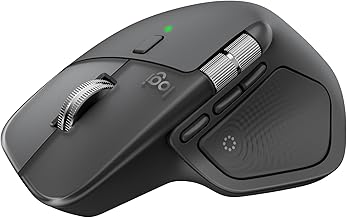
 Logitech MX Master 4 Ergonomic Wireless Mouse
- Precision you can feel with the Haptic Sense…
- Effortlessly access favorite tools with Actions Ring (2)…
- Scroll 1,000 lines per second and stop on…
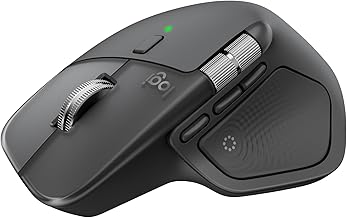
 Logitech MX Master 3S Bluetooth Wireless Mouse
- Logitech MX Master 3S Bluetooth Edition is a…
- 8K DPI Any-surface tracking: Use MX Master 3S…
- Quiet Clicks: MX Master 3S Bluetooth mouse with…
| Product | Key specs | |
|---|---|---|
| Logitech MX Master 4 Ergonomic Wireless Mouse | Precision you can feel with the Haptic Sense… Effortlessly access favorite tools with Actions Ring (2)… Scroll 1,000 lines per second and stop on… | Check price |
| Logitech MX Master 3S Bluetooth Wireless Mouse | Logitech MX Master 3S Bluetooth Edition is a… 8K DPI Any-surface tracking: Use MX Master 3S… Quiet Clicks: MX Master 3S Bluetooth mouse with… | Check price |
 Logitech MX Master 3S Wireless Mouse Standard Logitech MX Master 3S Wireless Mouse Standard | Check price | |
 Logitech G PRO X2 SUPERSTRIKE Wireless Gaming Logitech G PRO X2 SUPERSTRIKE Wireless Gaming | Designed With Pros, Engineered to Win: Designed alongside… Dominate with industry-leading speed: 30 ms faster clicks… Haptic Feedback: This breakthrough haptic gaming mouse with… | Check price |
 Logitech G502 Hero Wired Gaming Mouse Logitech G502 Hero Wired Gaming Mouse | Check price | |
 Logitech G305 Lightspeed Wireless Gaming Mouse Logitech G305 Lightspeed Wireless Gaming Mouse | Formats: DVD-ROM | Check price |
 Razer Basilisk V3 Customizable RGB Wired Ergonomic Razer Basilisk V3 Customizable RGB Wired Ergonomic | PC gaming mouse favored by millions worldwide with… Assign macros and secondary functions across 11 programmable… Speed through content with a scroll wheel that… | Check price |
 Logitech MX Master 3S Logitech MX Master 3S | Check price |
As an Amazon Associate we earn from qualifying purchases at no extra cost to you.
🎮 Get More From Your Setup — Free
Prime Gaming gives you free PC games every month, in-game loot, and a free Twitch channel sub — plus fast free shipping on all the gear above. New members get a 30-day free trial.
Watch: Professional Mouse: Review & Buyer’s Guide — Video Review
Design & Build
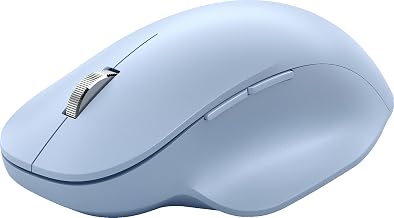
Ergonomics define the productivity mice here. The Logitech MX Master 4 and MX Master 3S feature a sculpted, palm-filling shape designed for all-day comfort, with premium materials and thoughtful thumb controls. The MX Master 4 adds haptic feedback for a refined tactile experience. On the gaming side, the G PRO X2 Superstrike is an ultralight 61g design for rapid movement, while the G502 Hero uses a heavier, feature-packed body with adjustable weights and eleven programmable buttons for customization.
Performance
The two categories excel in different ways. The MX Master 3S and MX Master 4 deliver 8K DPI precision, ultra-fast MagSpeed scrolling, and the ability to track on glass, making them ideal for navigating large documents, timelines, and design canvases. They connect via Bluetooth or Logi Bolt across Mac, Windows, and Linux. The gaming G-series mice prioritize speed and accuracy: the G PRO X2 Superstrike offers customizable magnetic switches and adjustable haptics, the G502 Hero packs a 25,600 DPI sensor, and the G305 Lightspeed delivers reliable wireless performance with long battery life.
Pros & Cons
- Superb ergonomics: The MX Master series excels for long, comfortable workdays.
- High precision: Both productivity and gaming models offer accurate sensors.
- Fast scrolling: MagSpeed scrolling accelerates document navigation.
- Customization: Gaming mice add programmable buttons and adjustable weights.
- Different strengths: Productivity and gaming mice are not interchangeable.
- Premium pricing: The flagship MX Master 4 commands a higher cost.
- Weight preference: The heavy G502 may not suit everyone.
Alternatives to Consider
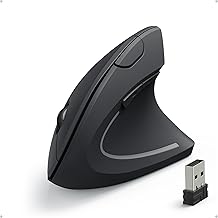
Buyers who want ergonomic relief beyond a standard shape might consider a vertical or trackball mouse. Competitive gamers on a budget could look at lighter wireless options from other brands, while professionals who value simplicity may prefer a compact travel mouse. But for a blend of comfort, precision, and features, the MX Master and G-series lines set the standard.
Frequently Asked Questions
Which professional mouse is best for office work?
The Logitech MX Master 3S or MX Master 4 is the top choice, offering sculpted ergonomics, fast scrolling, and multi-device support ideal for developers, designers, and office professionals.
Do I need a gaming mouse for work?
Not usually. Gaming mice excel at speed and precision, but for productivity, an ergonomic mouse like the MX Master is more comfortable for long sessions of document and app navigation.
What does the MX Master 4’s haptic feedback do?
It provides subtle tactile responses for actions and gestures, adding a refined, informative feel to interactions that the MX Master 3S does not include.
Are these mice compatible with Mac?
Yes. The MX Master series works across Mac, Windows, Linux, and Chrome, while the gaming G-series mice are primarily designed for PC and Mac use.
Verdict
The best professional mouse depends on your work. For productivity, the Logitech MX Master 4 is the premium flagship and the MX Master 3S is the outstanding value pick, both delivering superb ergonomics and precision. For gaming professionals, the ultralight G PRO X2 Superstrike leads on performance. Identify whether comfort or competitive speed matters most, and choose the tool built for it.