Key takeaways
- Table of Contents 7 sections 7 min read 1 Quick comparison of the best budget gaming keyboards 2 Mechanical versus membrane: which feels better? 2.1 Mechanical keyboards 2.2 Membrane keyboards 3 Latency, rollover, and gaming performance 4 Durability, layout, and…
What's inside
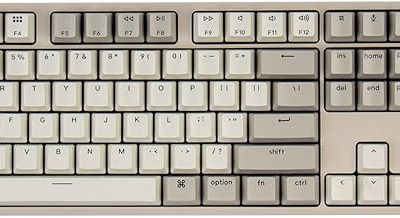
For most PC players, the top budget gaming keyboards are the Keychron C3 Pro for affordable mechanical performance, the HyperX Alloy Origins Core when you want a sturdier tenkeyless board, the Logitech G213 Prodigy for quiet membrane gaming, and the Redragon K552 Kumara for the lowest-cost mechanical option. Expect to spend roughly $30–$80, depending on layout, switch type, RGB lighting, and sales. Mechanical boards generally provide clearer actuation and better long-term key feel, while membrane models are quieter and often include useful media controls at a lower price.
Quick comparison of the best budget gaming keyboards
| Keyboard | Switch or feel | Layout | Connection and polling | Typical price range | Best for |
|---|---|---|---|---|---|
| Keychron C3 Pro | Hot-swappable mechanical; red, brown, or other compatible switches | 87-key TKL | USB-C wired; up to 1,000 Hz | Usually $35–$60 | Customizable mechanical gaming |
| HyperX Alloy Origins Core | HyperX Red, Aqua, or Blue mechanical switches | 87-key TKL | USB-C wired; 1,000 Hz | Usually $60–$90 | Durability and fast response |
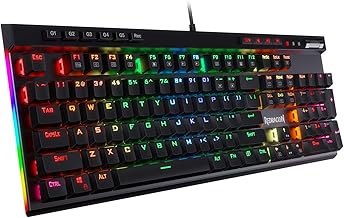
| Redragon K552 Kumara | Outemu-style mechanical switches, commonly red or blue | 87-key TKL | USB wired; commonly 1,000 Hz | Usually $25–$45 | Lowest-cost mechanical entry |
| Logitech G213 Prodigy | Quiet rubber-dome membrane | Full-size, 104 keys | USB wired; up to 1,000 Hz | Usually $35–$60 | Quiet play and full-size controls |
| Corsair K55 RGB Pro | Quiet membrane | Full-size, 110 keys | USB wired; 1,000 Hz | Usually $40–$70 | Macro keys and media control |
| SteelSeries Apex 3 | Whisper-quiet membrane | Full-size, 104 keys | USB wired; 1,000 Hz | Usually $35–$60 | Quiet gaming and spill resistance |
Mechanical versus membrane: which feels better?
Mechanical keyboards
Mechanical switches use an individual switch beneath every key. Linear red switches move smoothly with little tactile resistance and are popular for shooters because repeated movement inputs feel quick and consistent. Tactile brown or Aqua-style switches add a bump that helps with typing and deliberate key presses. Clicky blue switches provide a loud audible click, which some users enjoy but many shared-room players should avoid.
The main benefit is consistency. A mechanical key usually registers at a predictable point rather than requiring the rubber dome to collapse fully. That does not automatically make every mechanical keyboard faster, but it can make rapid strafing, repeated abilities, and rhythm-game inputs feel more controlled. Hot-swappable models such as the Keychron C3 Pro also let you replace compatible switches without soldering.
Membrane keyboards
Membrane boards use a rubber dome and contact sheet, producing a softer, quieter press. The Logitech G213 Prodigy, Corsair K55 RGB Pro, and SteelSeries Apex 3 are comfortable choices for offices, bedrooms, and shared spaces. Their keys can feel less crisp than mechanical switches, and the rubber domes may become heavier or uneven after years of use, but they remain perfectly capable for strategy games, RPGs, casual shooters, and everyday typing.
Membrane keyboards can also offer features that budget mechanical boards omit, including dedicated media rollers, macro buttons, wrist rests, and spill-resistant construction. If noise, price, and convenience matter more than switch customization, a good membrane model is often the more sensible purchase.
Latency, rollover, and gaming performance
For competitive PC play, look for a wired USB connection and a polling rate of 1,000 Hz. A 1,000 Hz setting reports input once every millisecond, although total key-to-screen latency also depends on switch electronics, the game, USB processing, and display response. Avoid treating polling rate as the only performance measurement: a well-designed board with reliable firmware is preferable to an inexpensive model advertising a high number without consistent behavior.
N-key rollover and anti-ghosting are also important. N-key rollover allows the keyboard to track many simultaneous presses, while anti-ghosting prevents an unintended key from appearing when several nearby keys are pressed together. The Redragon K552, Keychron C3 Pro, HyperX Alloy Origins Core, and the listed membrane boards provide gaming-oriented rollover or anti-ghosting features, but exact behavior can vary by connection mode and firmware.
Dedicated macro keys are useful for MMO hotbars, productivity shortcuts, and streaming controls, but they increase desk width. A tenkeyless keyboard removes the number pad and leaves more room for a low-sensitivity mouse, making boards such as the C3 Pro and Alloy Origins Core attractive for tactical shooters. Full-size keyboards remain better for spreadsheets, frequent numeric entry, and users who want a separate volume control.
Durability, layout, and useful features
Build quality
Look for a rigid metal top plate, adjustable feet with rubber grips, double-shot or durable printed keycaps, and a detachable USB-C cable where possible. The Alloy Origins Core uses an aluminum body and is one of the sturdier options in this price category. The C3 Pro offers a more customization-friendly design, while the K552 keeps costs low with a simpler construction. Neither budget mechanical nor membrane keyboards should be assumed to be waterproof; “spill-resistant” is not the same as safe immersion.
Layout choices
Full-size boards occupy approximately 17–18 inches of horizontal desk space, while an 87-key tenkeyless model is generally around 14 inches wide. Tenkeyless is the practical middle ground for gaming because it keeps the function row, arrows, and navigation cluster while removing the number pad. Compact 60% keyboards save even more space but move arrows and function commands onto layers, which can slow ordinary desktop use.
Check the exact regional layout before buying. US ANSI, UK ISO, and other layouts differ in the shape and position of the Enter, Shift, and punctuation keys. Keycap replacement can be difficult if the board uses nonstandard bottom-row sizes, so verify compatibility before planning an upgrade.
Lighting and controls
RGB lighting is mostly cosmetic, but per-key or zone lighting can make legends easier to see at night. Software support varies: the Logitech G213 uses Logitech G HUB, Corsair’s K55 RGB Pro uses iCUE, SteelSeries uses GG, and HyperX models use NGENUITY where supported. A keyboard with onboard profiles is preferable if you regularly move between computers. Dedicated media buttons and a volume wheel are genuinely useful; elaborate lighting should come after switch feel, layout, and reliability.
Which keyboard should you choose?
Choose the Keychron C3 Pro if you want a modern, inexpensive mechanical TKL with hot-swappable switches, USB-C, and a straightforward layout. Pick the HyperX Alloy Origins Core if a dense aluminum chassis and established mechanical switch options matter more than the lowest price. The Redragon K552 is the value choice when you want mechanical keys for around the cost of a basic office keyboard, though its software and finish are less refined.
For quiet play, the Logitech G213 Prodigy is a balanced full-size option with a comfortable membrane feel and dedicated media controls. The Corsair K55 RGB Pro is the better match for users who need six macro keys, while the SteelSeries Apex 3 suits players who want a quiet board with spill-resistant design. None of these membrane boards will feel as sharp as a quality linear mechanical model, but all can provide reliable everyday gaming.
FAQ
Are budget mechanical keyboards better for competitive gaming?
Not automatically. A wired 1,000 Hz keyboard with dependable anti-ghosting can perform well regardless of switch technology. Mechanical switches usually offer a clearer, more consistent feel and greater repairability, while a quality membrane board can have comparable practical latency. Choose based on actuation feel, noise, layout, and firmware quality rather than the word “mechanical” alone.
Is a 60% keyboard better than a tenkeyless keyboard for gaming?
A 60% model gives your mouse more room, but it removes dedicated arrow, navigation, and function keys. A tenkeyless keyboard is the safer choice for mixed gaming and general PC use because it preserves those controls while still being substantially narrower than a full-size board. Choose 60% only if you are comfortable using function layers or already have a separate macro pad.
Bottom line
The best budget gaming keyboard depends on the compromises you can live with. The Keychron C3 Pro is the strongest all-round mechanical recommendation, the HyperX Alloy Origins Core emphasizes construction and consistency, and the Redragon K552 makes mechanical gaming accessible at the lowest price. For quiet rooms and extra controls, choose the Logitech G213 Prodigy, Corsair K55 RGB Pro, or SteelSeries Apex 3. Prioritize a wired connection, reliable rollover, a comfortable layout, and the switch feel you can enjoy for hours; RGB lighting should be the final consideration, not the first.