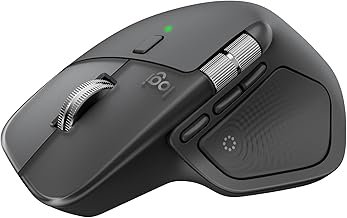
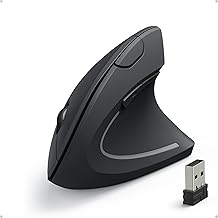
Our Top Picks
Pros & cons
- Up to 250 hours of gameplay come from a single AA battery
- Endurance mode can extend battery life up to 9 months
- At 3.4 ounces, the lightweight body supports high maneuverability
- Relies on a single AA battery rather than a rechargeable cell
- 12,000 DPI sensitivity may be more than casual users need
 Razer Basilisk V3 X HyperSpeed Customizable Wireless GamingStandard5.12 x 2.96 x 1.67 inches0.2 poundsCheck on Amazon
Pros & cons
- 11 programmable buttons allow extensive customization of controls
- Adjustable weights let you fine-tune balance to your preference
- HERO sensor tracks up to 25,600 DPI without smoothing or filtering
- Wired-only design limits freedom compared to wireless mice
- RGB lighting customization requires installing Logitech Gaming Software
The best mouse for Minecraft is a comfortable, reliable mouse with crisp, consistent click switches, a shape that fits your grip and, for PvP, a weight you can control. You do not need an expensive one. A budget wired mouse with a healthy switch is enough for building and survival, while PvP players benefit from a light mouse with clean left-click feel. This guide covers eight picks for PvP, building and budget play, explains Minecraft PvP clicking and server rules, and also answers the keyboard questions people ask alongside it.
Best Mouse for Minecraft: Picks at a Glance
| Pick | Connection | Weight or feel (listing) | Best for |
|---|---|---|---|
| Logitech G305 LIGHTSPEED | Wireless | Lightweight | All-round, low cost |
| Redragon M612 | Wired | Check maker | Lowest-cost wired |
| Razer Basilisk V3 X HyperSpeed | Wireless | Customizable buttons | Building and hotkeys |
| Razer Viper V3 HyperSpeed | Wireless | 82 g | Mid-weight wireless for PvP |
| Logitech G502 HERO | Wired | Adjustable weights | Tinkerers, many buttons |
| Glorious Model O Eternal | Wired | 55 g | Light wired PvP |
| SteelSeries Aerox 5 | Wired or wireless (check listing) | Ultra-lightweight | Light mouse with extra buttons |
| Attack Shark X3 | Tri-mode | 49 g | Lightest on a budget |
What Matters in a Minecraft Mouse
Click feel and switch health
Minecraft is a clicking game. You hold left-click to mine and tap it to fight, and you right-click to place blocks, block with a sword or use items. A mouse whose switches double-click, stick or feel mushy gets in the way. Look for crisp, even clicks on both buttons. A mouse with a double-click fault can also cause trouble on servers with anti-cheat, because the extra click can make your clicking look robotic.
Weight and shape
Survival and building are not weight-sensitive. PvP players who flick and track opponents do better with a mouse they can move and stop easily. A mouse between roughly 50 and 90 g covers most players. Grip matters more than numbers, so compare the mouse length and width against your hand.
Side buttons
Minecraft has a short list of controls. Side buttons can bind to the hotbar, drop, or a macro-free shortcut for sprint or inventory. Two side buttons are plenty. Do not use mouse software to repeat clicks for you, because that is automated clicking and servers ban it.
Wired or wireless
Wired mice are cheap, have no battery to charge and avoid receiver problems. Wireless mice remove cable drag, which helps in fast PvP turning. Modern wireless latency is close to wired, so choose on budget and desk setup.
Sensitivity and DPI
Minecraft lets you set sensitivity in the game, and it scales by field of view. Most players run between 400 and 1600 DPI and tune the in-game slider. A high DPI number on the box does not make a mouse better for Minecraft.
Minecraft PvP Clicking and Server Rules
Many shoppers search for a mouse because they want to click faster in PvP. It helps to know how clicking techniques and server rules work before you buy anything.
| Technique | Typical CPS range (per click guides) | Server stance |
|---|---|---|
| Normal clicking | About 5 to 8 | Allowed everywhere |
| Jitter clicking | About 9 to 13 | Allowed on most servers; can strain the arm |
| Butterfly clicking | About 10 to 16 | Allowed on most servers; a double-clicking mouse can look like a macro |
| Drag clicking | About 20 to 40 in bursts | Restricted or banned on many PvP servers, mostly because the bursts look automated |
| Autoclickers and macros | Any | Banned |
These CPS ranges come from click-speed and CPS-test sites, not from official server documentation. Each server writes its own rules. Hypixel, for example, has no official CPS cap according to those sources, and its anti-cheat looks for robotic, consistent clicking rather than a set number. Some servers set hard click limits or ban specific techniques. Read the rules of each server you play on.
On 1.9 and newer combat
From version 1.9 onward, the attack cooldown rewards timed hits rather than raw click speed. Guides suggest 4 to 7 well-timed clicks per second is enough on those servers. High CPS matters mostly for 1.8-style PvP.
What this means for buying a mouse
You do not need special hardware to click faster. A normal mouse with healthy switches works for jitter and butterfly clicking. We do not recommend hardware or software designed to automate clicking, and we do not recommend a specific mouse for drag clicking, since many servers restrict it. If you are unsure whether a technique is allowed, ask the server staff before you practice it.
The 8 Best Mice for Minecraft
1. Logitech G305 LIGHTSPEED: best all-round

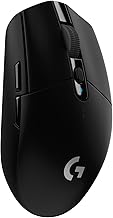
Logitech G305 LIGHTSPEED Wireless Gaming Mouse, Hero 12K Sensor - Black | 12,000 DPI, lightweight, 6 programmable buttons, 250h battery life, on-board memory, PC/Mac, lightweight gaming mouse
Chosen because it specifies Hero 12K Sensor and Black.
View on AmazonThe listing shows a lightweight wireless mouse with a HERO 12K sensor, 12,000 DPI and six programmable buttons. It runs on an AA battery and comes in several colors. For Minecraft, it gives clean clicks and a comfortable medium shape at a low-cost tier.
- Sensor: HERO 12K
- Buttons: 6 programmable
- Connection: LIGHTSPEED wireless
Best for: players who want one mouse for building, survival and PvP. Skip if: you want a very light mouse for aggressive PvP.
Pros: low cost, wireless, simple, good battery. Cons: AA battery adds weight, basic shape.
2. Redragon M612: best lowest-cost wired

Redragon M612 Wired RGB Optical Gaming Mouse 8000 DPI Remapping Keys | Stable Lag-Free Connection, Redefine Keybinding Macro, Vibing Backlight, Ergonomic Grip Body Comfort
Chosen because it specifies Stable Lag-Free Connection and Redefine Keybinding Macro.
View on AmazonThe listing describes a wired RGB optical gaming mouse with 8000 DPI, remappable keys and a stable, lag-free connection. It is among the lowest-cost options in the store. For a child’s first gaming mouse or a spare for a laptop, it keeps things simple. Check the weight on the maker’s page, since the listing text does not give one.
- Connection: wired
- DPI: 8000
- Extras: RGB, remappable keys
Best for: younger players and tight budgets. Skip if: you want a light mouse or long-term durability at the highest level.
Pros: very low cost, wired, no battery. Cons: basic build, unknown weight.
3. Razer Basilisk V3 X HyperSpeed: best for building and hotkeys
Razer Basilisk V3 X HyperSpeed Customizable Wireless Gaming Mouse, Black | Mechanical Switches Gen-2, 5G Advanced 18K Optical Sensor, Chroma RGB, 9 Programmable Controls, 285 Hr Battery
Chosen because it specifies Black and Mechanical Switches Gen-2.
View on AmazonThe listing describes a customizable wireless mouse with Gen-2 mechanical switches, a 5G advanced 18K optical sensor and programmable buttons. For Minecraft builders who like to bind the hotbar, inventory or a shortcut to side buttons, the extra controls are useful. Its ergonomic shell suits palm and claw grips.
- Sensor: 18K optical
- Switches: mechanical Gen-2
- Connection: HyperSpeed wireless
Best for: builders, modded play and players who like extra buttons. Skip if: you want a light, symmetrical PvP mouse.
Pros: many programmable controls, comfortable shell, wireless. Cons: heavier than light esports mice, right-hand shape.
4. Razer Viper V3 HyperSpeed: best mid-weight wireless for PvP

Razer Viper V3 HyperSpeed Wireless PC Gaming Mouse, 82g, Black | 30K DPI Optical Sensor, Up to 280 Hr Battery Life, Mechanical Switches Gen-2, 6 Programmable Buttons, 1 x AA Battery included
Chosen because it specifies 82g and Black.
View on AmazonThe listing shows an 82 g wireless mouse with a 30K DPI optical sensor and up to 280 hours of battery life. The symmetrical Viper shape suits claw and fingertip grips, which suits jitter and butterfly clicking styles. The long battery life means fewer charging breaks.
- Weight: 82 g per listing
- Sensor: 30K DPI optical
- Battery: up to 280 hours (listing)
Best for: PvP players who want a wireless symmetrical mouse. Skip if: you want a sub-60 g mouse.
Pros: long battery, symmetrical shape, wireless. Cons: heavier than the Viper Pro line.
5. Logitech G502 HERO: best for tinkerers

Logitech G502 HERO Wired Gaming Mouse, HERO 25K Sensor for PC/Mac | High performance, 25,600 DPI, RGB, adjustable weights, 11 programmable buttons, on-board memory, programmable mouse
Chosen because it specifies HERO 25K Sensor for PC/Mac and High performance.
View on AmazonThe listing describes a wired mouse with a HERO 25K sensor, 25,600 DPI, RGB lighting and adjustable weights. It has a long list of buttons, which suits players who like to bind many actions. It is a larger, heavier mouse than the other picks here.
- Sensor: HERO 25K
- Connection: wired
- Extras: adjustable weights, RGB
Best for: players with a large hand and a taste for many buttons. Skip if: you want a light, small mouse.
Pros: adjustable weights, many buttons, wired, low-cost. Cons: large, heavier by design.
6. Glorious Model O Eternal: best light wired PvP

GLORIOUS Model O Eternal Ultralight RGB Gaming Mouse - Wired - 55g Lightweight - Customizable RGB Lighting - 6 Programmable Buttons - Symmetrical Design - 12K DPI Optical Sensor - PC/Mac - White
Chosen because it specifies Wired and 55g Lightweight.
View on AmazonThe listing shows a wired ultralight RGB mouse at 55 g with six programmable buttons. A light wired mouse removes battery concerns and gives a good feel for aim and quick turns. The honeycomb-style shells of this line are polarizing, so check photos.
- Weight: 55 g per listing
- Connection: wired
- Buttons: 6 programmable
Best for: PvP players who want light and wired. Skip if: you want wireless or a rounded shell.
Pros: light, no battery, low-cost tier. Cons: cable drag, shell style not for everyone.
7. SteelSeries Aerox 5: best light mouse with extra buttons

SteelSeries Aerox 5 Gaming Mouse - Black | Holey RGB Gaming Mouse - Ultra-lightweight Water Resistant Design - 18K DPI TrueMove Air Optical Sensor
Chosen because it specifies Black and Holey RGB Gaming Mouse.
View on AmazonThe listing describes an ultra-lightweight, water-resistant mouse with an 18K DPI sensor and a holey RGB shell. It offers more buttons than a typical light mouse, which is handy for Minecraft hotbar binds. Check the listing to confirm whether you are buying the wired or wireless version.
- Sensor: 18K DPI
- Design: ultra-lightweight, water resistant
- Extras: RGB, extra buttons
Best for: players who want light and extra buttons. Skip if: you dislike holes in the shell.
Pros: light, more buttons, water resistant. Cons: perforated shell, mid-tier price tier.
8. Attack Shark X3: best lightest on a budget

ATTACK SHARK X3 49g Ultra-Lightweight Wireless Gaming Mouse, White&Tape | Bluetooth 5.2/2.4G Wireless/Wired, PAW3395 Gaming Sensor, 26K DPI, 200h Battery Life, Programmable Buttons for PC/Mac/Win
Chosen because it specifies White&Tape and Bluetooth 5.2/2.4G Wireless/Wired.
View on AmazonThe listing describes a 49 g ultra-lightweight mouse with Bluetooth 5.2, 2.4G wireless and wired modes and a PAW3395 sensor. It is a low-cost way to try a very light mouse. Support from small brands varies, so read the return terms.
- Weight: 49 g per listing
- Sensor: PAW3395
- Modes: Bluetooth, 2.4G, wired
Best for: trying a light mouse cheaply. Skip if: you want a major brand’s support.
Pros: very light, tri-mode. Cons: small brand, less usage history.
Also Consider
- Logitech G703 LIGHTSPEED: a wireless mouse with a HERO 25K sensor that the listing says is PowerPlay compatible, for players who want a charging mat.
- Redragon M725: a 49 g honeycomb tri-mode mouse at a very low-cost tier.
- MCHOSE L7 Pro: a 39 g wireless mouse with an 8K receiver per the listing, for players who want the lightest option and accept a smaller brand.
Best Mouse for Minecraft PvP
For PvP, favor a mouse you can control for long sessions. A symmetrical mouse such as the Viper V3 HyperSpeed suits jitter and butterfly styles. A light wired mouse such as the Glorious Model O Eternal removes battery worries. The Logitech G305 is the low-cost choice. Whatever you buy, make sure the left button gives a clear click without double-clicks, and do not rely on software to click for you.
Best Mouse for Minecraft Building and Survival
For long building sessions, comfort matters more than weight. A mouse that fits your palm, like the Basilisk V3 X HyperSpeed or the G502 HERO, reduces fatigue. Extra side buttons can map to the hotbar, zoom or inventory. Mouse-pad choice also matters, since you will move the cursor a lot in menus and creative mode.
Best Keyboard for Minecraft
Minecraft has no demanding keyboard needs. You want reliable keys for movement, a layout you know and enough space for key binds. A full-size or compact board both work. Here are two options from the store catalog.
Redragon K521 wired keyboard

Redragon K521 Upgrade Rainbow LED Gaming Keyboard, 104 Keys Wired Mechanical Feeling Keyboard with Multimedia Keys, One-Touch Backlit, Anti-Ghosting, Compatible with PC, Mac, PS4/5, Xbox
Chosen because it specifies One-Touch Backlit and Anti-Ghosting.
View on AmazonThe listing describes a 104-key wired keyboard with rainbow LED lighting and a mechanical feel, plus multimedia keys. It is among the lowest-cost options for a first gaming keyboard. Skip it if you want true mechanical switches and hot-swap support.
SteelSeries Apex 3
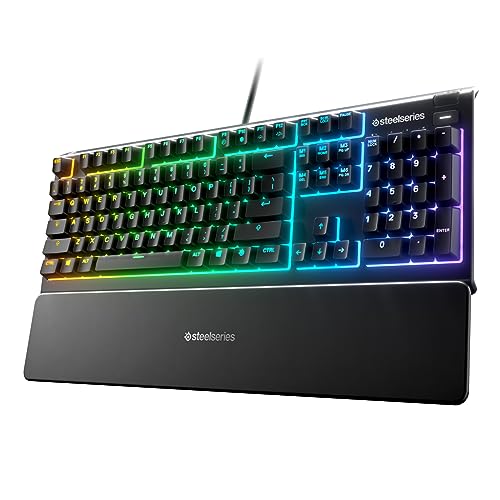
SteelSeries Apex 3 Gaming Keyboard - Black | 10-Zone RGB Illumination – IP32 Water Resistant – Premium Magnetic Wrist Rest (Whisper Quiet Gaming Switch)
Chosen because it specifies Black and 10-Zone RGB Illumination.
View on AmazonThe listing shows a gaming keyboard with 10-zone RGB, IP32 water resistance and a magnetic wrist rest. It suits players who want a sturdier, spill-tolerant board with a wrist rest for long sessions. Skip it if you want a compact layout.
Buying Guide: Thresholds That Matter
| Factor | Good target | Why |
|---|---|---|
| Switches | Crisp, no double-click | Mining and PvP both rely on clean clicks. |
| Weight | 50 to 90 g for PvP, anything for building | Easy control, less fatigue. |
| Shape | Match your grip | Comfort over long sessions. |
| Connection | Wired for budget, wireless for freedom | Both are fine today. |
| Buttons | 2 side buttons or more | Hotbar and shortcut binds. |
| Software | Optional | Use it for DPI and button binds, never for auto-clicking. |
Mouse pad
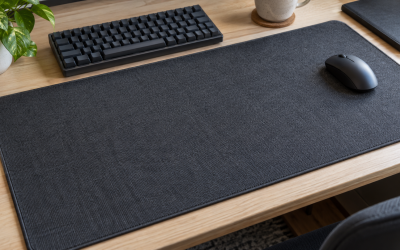
A cloth pad such as the SteelSeries QcK XXL gives a large, consistent surface. For a cheaper option, a basic stitched-edge pad does the job. Wipe the pad regularly.
Raw input and sensitivity
Turn off pointer acceleration in your system settings so the in-game cursor responds the same way each time. Set DPI to a comfortable level and tune the in-game sensitivity slider.
Mouse Picks by Play Style
| Play style | What matters most | Picks from this list |
|---|---|---|
| Survival and exploring | Comfort, reliable clicks | Logitech G305, Redragon M612 |
| Building and creative mode | Extra buttons, palm comfort | Basilisk V3 X HyperSpeed, G502 HERO |
| PvP and minigames | Light weight, clean left-click | Viper V3 HyperSpeed, Model O Eternal, Attack Shark X3 |
| Modded packs with many hotkeys | Button count | G502 HERO, Aerox 5, Basilisk V3 X HyperSpeed |
| Kids and spare mice | Low cost, sturdy | Redragon M612 |
Java Edition and Bedrock: Does It Change the Mouse?
The mouse you choose works the same on both editions. The difference is in combat and menus. Java Edition players on 1.9 and newer face the attack cooldown, so timing beats raw click speed. Many Java PvP servers still run 1.8-style combat, where faster clicking matters more. Bedrock players often use touch or a controller, but on PC both mouse and keyboard work. Console players should check which games and modes accept a USB mouse before buying one.
Keeping Your Hand Healthy During Long Sessions
Long Minecraft sessions mean thousands of clicks. A few habits protect your hand and wrist.
- Take short breaks every hour, and stretch the fingers and forearm.
- Keep your wrist straight and your forearm supported, and avoid resting the wrist on a hard edge.
- Choose a mouse that fits your hand. A mouse that is too small makes you clench, and one that is too large makes you stretch.
- Jitter clicking strains the forearm, according to click guides. If your arm aches, stop and switch to normal clicking.
- If you feel numbness, tingling or lasting pain, stop playing and talk to a health professional.
Setup Checklist for a New Minecraft Mouse
- Plug in the mouse, or pair the wireless receiver to a front USB port.
- Install the maker’s software only if you need DPI changes or button binds, and keep any macro features off.
- Set DPI between 400 and 1600 and adjust the in-game sensitivity slider.
- Turn off pointer acceleration in the system mouse settings.
- Bind side buttons to the hotbar, drop or inventory in the game’s own controls menu where possible.
- Check that left and right clicks register once per press. If one press shows two clicks, return the mouse.
- Read the rules of each server you play on before you try a new clicking style.
Common Mistakes When Buying a Minecraft Mouse
Paying for esports features you will not use
A flagship mouse with an 8K polling rate and a huge DPI number brings little to Minecraft. Spend the difference on a good pad or a better keyboard.
Buying a mouse sold for automated clicking
Some products are marketed for extreme click speed. If a product promises to click for you, or advertises burst clicking, it is likely to run into server rules. We left those out on purpose.
Ignoring double-click faults
A worn switch that registers two clicks can break a block you did not mean to or place a block twice. On a server with strict anti-cheat, repeated double clicks can also look like a macro. Replace a mouse that shows this fault.
Forgetting the pad and the desk
A smooth, clean surface helps any mouse track well. A cheap stitched pad or a large cloth pad both work with modern optical sensors.
Budget Tiers at a Glance
| Tier | Picks | What you give up |
|---|---|---|
| Lowest cost | Redragon M612, Redragon M725 | Brand polish and a flagship sensor |
| Low cost | Logitech G305, Attack Shark X3, Glorious Model O Eternal | Premium build and software |
| Mid | Basilisk V3 X HyperSpeed, G502 HERO, Aerox 5, Viper V3 HyperSpeed | The very lightest weight |
Prices change often, so we use tiers instead of numbers. Check the live listing for the current figure.
Sensitivity Basics for Minecraft
Minecraft lets you tune sensitivity with a slider in the game’s controls menu, and the right value depends on your DPI, your desk space and your play style. Here is a simple way to set it up.
Start with DPI
Pick a DPI between 400 and 1600 on the mouse. Most modern mice offer several steps you can cycle through. A lower DPI gives finer control for bridging and precise block placement, and a higher DPI turns the camera faster with less hand movement.
Tune the in-game slider
Set the in-game slider so that a comfortable sweep across your mouse pad turns the camera a full half-circle. Lower it if you overshoot when placing blocks, and raise it if you run out of pad during fast turns in PvP.
Use a different feel for different modes
Many players keep a slower setting for building and bridging, and a faster one for PvP. If your mouse has a DPI button, you can switch between two saved steps without opening any software.
Give it time
Muscle memory takes days to settle. Change one setting at a time, and wait before you judge a new value.
Frequently Asked Questions
What is the best mouse for Minecraft?
The Logitech G305 is a strong all-round choice. For PvP, the Viper V3 HyperSpeed or Glorious Model O Eternal suit players who want a lighter mouse.
What is the best mouse for Minecraft PvP?
A light, symmetrical mouse with crisp clicks and no double-click fault. The picks above that fit this are the Viper V3 HyperSpeed, the Model O Eternal and the Attack Shark X3.
What is the best keyboard for Minecraft?
Any reliable gaming keyboard works. The SteelSeries Apex 3 adds a wrist rest and water resistance, and the Redragon K521 is a low-cost starting point.
What is the best drag clicking mouse for Minecraft?
We do not recommend a mouse for drag clicking. Many PvP servers restrict it because the click bursts look automated. If a server allows it, check its rules first.
Is there a cheap drag clicking mouse?
Drag clicking is a technique, not a mouse feature, and we do not recommend hardware for it. Buy a reliable low-cost mouse such as the Redragon M612 for normal play and read the rules of each server.
Are autoclickers allowed in Minecraft?
No. Autoclickers and macros are treated as cheating on major servers and can get your account banned.
How many CPS do I need for Minecraft PvP?
It depends on the combat version and the server. Guides suggest about 4 to 7 timed clicks on 1.9 and newer combat and about 10 to 14 on 1.8-style servers. Check each server’s rules.
Which One Should You Buy?
If you want one simple mouse for everything, take the Logitech G305. If you build a lot and like hotkeys, take the Basilisk V3 X HyperSpeed. If you play PvP, take the Viper V3 HyperSpeed for wireless or the Glorious Model O Eternal for light and wired. If your budget is tight, the Redragon M612 and Attack Shark X3 cover the basics. Whatever you buy, keep your clicking within server rules.
How We Chose
This guide is research-based. We did not use the products ourselves. We compared store listings for weight, sensor and connection, and we read click-speed and server-rule guides to understand how Minecraft clicking works. Those guides are community sites, not official server documentation, so treat CPS numbers as rough and read each server’s rules. We did not select products designed to automate clicking.
Sources
- Click-Battle.com, drag clicking and server rules guides
- Alpha CPS Test, Minecraft CPS guide
- OnlineMouseTester.com, Minecraft PvP clicking techniques
- Logitech G, Razer, SteelSeries and Glorious product listings
Last updated: November 2026
FAQ
Java Edition and Bedrock: Does It Change the Mouse?
What is the best mouse for Minecraft?
What is the best mouse for Minecraft PvP?
What is the best keyboard for Minecraft?
What is the best drag clicking mouse for Minecraft?
Is there a cheap drag clicking mouse?
Are autoclickers allowed in Minecraft?
How many CPS do I need for Minecraft PvP?
More from Amazon
Programs that pair well with the guide above. Offers and eligibility are set by Amazon and may change.
Free shipping on eligible items, Prime Video and more. Eligible new members can start with a free trial.
Start a Prime free trialAd-free music streaming. Eligible new subscribers can start with a free trial.
Try Music Unlimited freeA Prime membership for ages 18-24 with a trial period. Eligibility is set by Amazon.
See Prime for Young AdultsAudiobooks and podcasts to listen to on the go. Eligible new members can start with a free trial.
Try Audible freeAs an Amazon Associate we earn from qualifying purchases.