Our Top Picks
Case fans are the cheapest part of a build that changes how the whole machine feels. A tower with two weak fans can run hot, loud and dusty even with an excellent processor and graphics card inside, while a handful of well-chosen 120mm fans can drop noise and keep component temperatures steady. The catch is that fan listings look nearly identical: every one says quiet, every one says PWM, and the differences hide in bearing type, speed ceiling, pack size and lighting.
This guide approaches the decision from the airflow plan outward. First decide how many fans your case can hold and which way air should move, then choose a fan style that fits. Ten listings were considered for 2026 shopping; seven distinct fan models remain after pack-size and color duplicates were set aside. Everything here is based on the specs printed in the listing titles, with no invented noise figures or airflow numbers, so treat the picks as a shortlist to confirm on the full product page.
Quick Picks

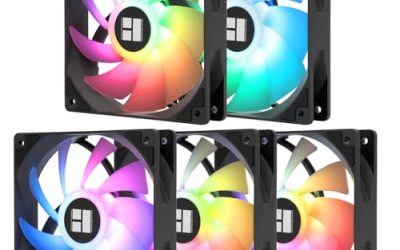
Thermalright 5 Pack TL-C12C-S CPU Fan 120mm ARGB Case Cooler Fan, 4pin PWM Silent Computer Fan with S-FDB Bearing Included, up to 1550RPM Cooling Fan(5 Quantities)
One of the consumer electronics options compared in this guide.
View on Amazon
Thermalright TL-C12C X3 CPU Fan 120mm Case Cooler Fan, 4pin PWM Silent Computer with S-FDB Bearing Included, up to 1550RPM Cooling Fan(3 Quantities)
One of the consumer electronics options compared in this guide.
View on Amazon
ARCTIC P12 (5 Pack) - PC Fans, 120mm Case Fan, Pressure-optimised, Quiet Motor, Computer, Fan Speed: 1800 RPM - Black
One of the consumer electronics options compared in this guide.
View on Amazon
Noctua NF-P12 redux-1700 PWM, Quiet Fan 120mm | High Airflow, Low Noise, 25mm Thick Fan for PC and Electronics Cooling Streamlined Package 1700rpm 4-Pin PWM
One of the consumer electronics options compared in this guide.
View on Amazon
Thermalright TL-C12C-S X5 CPU Fan 120mm ARGB Case Cooler Fan, 4pin PWM Silent Computer Fan with S-FDB Bearing, up to 1550RPM (5 Pack)
One of the consumer electronics options compared in this guide.
View on Amazon
Thermalright TL-C12C-S X3 CPU Fan 120mm ARGB Case Cooler Fan, 4pin PWM Silent Computer Fan wth S-FDB Bearing Included, up to 1550RPM Cooling Fan(3 Quantities)
One of the consumer electronics options compared in this guide.
View on Amazon
CORSAIR RS120 ARGB 120mm PWM Fans – Daisy-Chain Connection – Low-Noise – Magnetic Dome Bearing – Triple Pack – Black
One of the consumer electronics options compared in this guide.
View on Amazon| Product | Best for | Key spec from the title |
|---|---|---|
| Thermalright TL-C12C-S ARGB | Filling a whole case with lit fans | 5 pack, 120mm ARGB, 4pin PWM, S-FDB bearing, up to 1550RPM |
| Thermalright TL-C12C X3 | A plain, unlit three-fan set | 3 quantities, 120mm, 4pin PWM, S-FDB bearing, up to 1550RPM |
| ARCTIC P12 5 Pack | Pressure for filters and radiators | Pressure-optimised, quiet motor, 1800 RPM |
| Noctua NF-P12 redux-1700 PWM | Low noise from a single known quantity | High airflow, low noise, 25mm thick, 1700rpm |
| Corsair RS120 ARGB | Clean cable routing with lighting | Triple pack, daisy-chain connection, magnetic dome bearing |
| UTLGAMENG 7 Pack | Reverse-blade intake look across a big case | 7 pack, 4 forward plus 3 reverse, 28 ARGB LED, 1550 RPM |
| DARKROCK F120 3in1 | A mirror-effect showpiece build | Infinite mirror design, 24 LED, hydraulic HDB bearing |
The 7 Best Options
Thermalright TL-C12C-S ARGB 5 Pack
Buyers outfitting an entire case in one order will find this five-fan set attractive. The title describes a 120mm ARGB fan set with 4pin PWM control, a silent claim, an S-FDB bearing and a speed of up to 1550RPM. Thermalright words the title as both a CPU fan and a case cooler fan, which hints at flexible use on a heatsink or a case mount. For a builder who dislikes ordering fans in small batches, a five-pack is the most convenient way to match every mount in a mid tower, and the shared model means the look and sound stay consistent from front to back.
- Five fans in one pack covers a front intake, a rear exhaust and a top row without a second order.
- 4pin PWM means each fan can follow a motherboard curve rather than run flat out.
- S-FDB is a bearing type named in the title, a good sign for longevity compared with listings that omit it.
- ARGB lighting needs a matching header or a controller, which not every board provides.
- A 1550RPM ceiling is lower than the 1800 RPM seen on some rivals, so very restrictive filters may call for another model.
Who should pass: anyone with a plain, unlit case who does not want a rainbow of lights, since the next pick drops the lighting. Set beside the TL-C12C X3 that follows, the difference is mostly color and quantity, so choose by how many fans your case needs. If your board has only one ARGB header, plan on a splitter or hub, because five lit fans will not all connect directly in most builds.
Thermalright TL-C12C X3
This is the sensible option for builders who want the same family of fan without any lighting. The title lists a 120mm case cooler fan, 4pin PWM, a silent design, an S-FDB bearing and up to 1550RPM, sold as three quantities. There is no ARGB wording, so expect a plain look and fewer cables to manage. That makes it a natural fit for an office tower, a living-room machine or any build where the fans are meant to disappear into the background rather than draw attention.
- Three fans fill a typical front intake or a front plus rear layout in one go.
- No lighting means a simpler wiring job and no extra headers to find.
- The same S-FDB bearing and speed cap as the ARGB set give a predictable feel.
- With no ARGB mentioned, it will not match a themed glass-panel build.
- Three fans may not cover a large case, so a second pack could be needed.
Who should pass: shoppers who want a visible light show or a sealed, single-cable setup. Next to the ARCTIC P12, this Thermalright set caps lower on speed, so it suits quiet builds better than very restrictive ones. Buyers who already own one lit Thermalright set can also use this pack to fill the remaining mounts at the rear and top, where lighting is rarely seen.
ARCTIC P12 5 Pack
This pack is built around a straightforward idea: a pressure-optimised 120mm fan that pushes air through resistance. The title describes a quiet motor, a speed of 1800 RPM and a black finish, with five fans in the box. Pressure-oriented fans are often used behind dust filters and in front of radiators, though the listing does not claim a specific use. It is the plainest and most practical pack on the list, aimed at a buyer who counts fan mounts rather than light effects.
- Pressure-optimised wording points to use behind mesh panels or filters.
- The 1800 RPM figure is the highest speed listed among the plain-PWM sets here.
- A five-fan pack covers a whole case from a single order.
- The title carries no lighting or bearing name, so it is a plain choice for visual builds.
- Higher top speed can be louder if the fan curve is left on default, so set a custom curve.
Who should pass: buyers who want a lit showpiece or who need a named bearing type in the title. Compared with the Noctua that follows, the ARCTIC trades a single premium fan for a bulk pack, so it is the practical option when you need many fans at once. If you can only afford one premium fan, though, the Noctua is the better single choice, whereas a whole case of ARCTIC fans can be tuned quietly with a good curve.
Noctua NF-P12 redux-1700 PWM
For buyers who prefer a single, known quantity to a bulk bundle, this Noctua fan is the quiet-minded pick. The title lists a 120mm fan with high airflow and low noise, a 25mm thickness, a 1700rpm speed, a streamlined package and a 4-pin PWM connector that is cut off at the end of the title. It is sold as one fan, not a multi-pack, which makes it ideal for replacing a single failed or noisy unit rather than redoing an entire case. The streamlined package wording also hints at a simple, no-frills product.
- The title pairs high airflow with low noise, a balance many builders prioritize.
- 25mm thickness is the standard fan depth, so it fits common mounts.
- 1700rpm sits between the Thermalright and ARCTIC speed caps.
- It is a single fan, so filling a case means buying several.
- No lighting is mentioned, so it will not add color to the build.
Who should pass: shoppers who want an affordable bulk set or ARGB effects. Set against the Corsair RS120 that follows, the Noctua is a plain performer, while the Corsair brings lighting and a tidy cable approach. A sensible plan for a quiet build is to place a few of these at the main intake and fill the remaining positions with a cheaper bulk pack.
Corsair RS120 ARGB
The RS120 suits buyers who want lit fans without a bird’s nest of cables. The title lists a 120mm ARGB PWM fan, a daisy-chain connection, low-noise operation and a magnetic dome bearing, sold as a triple pack in black. A white version exists in a separate listing, but it is the same fan in another color, so it is not covered separately here. Buyers choosing between the two should simply match the fan color to the case and the rest of the lighting.
- Daisy-chain connection reduces the number of cables running to the controller.
- A magnetic dome bearing is a named bearing type aimed at low-noise operation.
- A triple pack suits a front intake or a three-fan radiator.
- The title does not list a maximum speed, so confirm RPM on the full page.
- Daisy-chain designs can tie several fans to one connection, which needs a compatible ARGB header.
Who should pass: builders who want to power each fan on a separate header or who like a bulk pack. Next to the UTLGAMENG set, the Corsair is the more orderly choice, while the UTLGAMENG pack counts more fans for a larger case. If your build uses a three-fan radiator, the triple pack is the more natural size, since it covers the radiator without leftover fans.
UTLGAMENG 7 Pack ARGB
If your case has seven fan positions or you want a matched look across a large build, this is the largest pack on the list. The title lists seven 120mm ARGB PC fans with 4 forward and 3 reverse blades, PWM control, 28 ARGB LED and 1550 RPM. The reverse-blade fans push air the other way while spinning the same direction, which can tidy a visible front panel. A set this large mostly makes sense in a full-tower case or in a build that mixes radiators with several intake and exhaust positions, where matching appearance across many mounts matters.
- Seven fans in one pack is the largest quantity here, good for a big case.
- The mix of forward and reverse blades is designed to keep the light-facing side clean.
- 28 ARGB LED per fan is a high lighting count for a bright build.
- The brand is less established, so check what support the seller offers.
- Seven fans is more than most cases hold, so unused fans may sit in a drawer.
Who should pass: anyone with a standard mid tower, since the pack is oversized. In comparison with the DARKROCK set, the UTLGAMENG fans prioritize count and reverse-blade layout, whereas the DARKROCK fans lean on a mirror effect. For builders who are unsure how many fans they will end up using, the extra units here double as spares for the next upgrade.
DARKROCK F120 3in1
This one is for builders who care how the case looks through the glass. The title lists a black 120mm fan with an infinite mirror design, 24 LED lights, PWM control, an ARGB effect and a hydraulic HDB bearing for low-noise operation. The 3in1 label suggests a multi-fan set, though the title is cut off, so verify what comes in the box. The mirror effect is a decorative extra, which makes this a pick for people who open the side panel often and want the build to catch the eye.
- The infinite mirror design is a distinct visual effect compared with plain ARGB rings.
- Hydraulic HDB bearing is named, with a stated focus on low noise.
- PWM control still lets a motherboard curve manage speed.
- The title does not state a maximum RPM, so airflow is hard to compare with the others.
- Lighting effects are the main selling point, so function may take second place to looks.
Who should pass: buyers prioritizing pressure for dust filters or radiators, who are better served by the ARCTIC. As the last entry here, the DARKROCK is the style-first pick, and it makes the most sense when the build is meant to be seen. If your priority is noise or filter performance, the plain PWM sets earlier in the list do that job more directly.
Why Buy Better Case Fans
Case fans are an easy upgrade, but they only matter when the current ones are limiting you. Here are the situations where a fresh set pays off, along with the cases where it does not, so you can spend only where it helps.
Your machine is loud or hot under load
A common sign is fans that ramp up and down constantly. A set with PWM control and a decent bearing can smooth that out, because the motherboard can hold a steady curve instead of jumping between extremes. If your tower has only one or two fans, adding intake and exhaust fans balances airflow and often lowers temperatures without any other change.
You are building or rebuilding a gaming PC
Modern graphics cards and processors dump a lot of heat into the case. Fans that move air through a front panel keep those parts from recycling their own warm air. For a new build, buying a matched pack saves time and keeps the look consistent, which is why multi-fan sets dominate this list.
You want a cleaner, brighter look
Lighting is a style choice, not a performance feature, but it does matter to many buyers. Daisy-chain sets, mirror designs and reverse-blade packs all try to make a glass-panel case look tidy. Be honest about whether you want lighting at all; plain fans are quieter to set up and just as capable.
How to Choose Case Fans
Size and mounting
Every listing here is a 120mm fan, which fits most modern cases, front intake mounts and 240mm or 360mm radiators. Check your case for 120mm positions first, and note whether it supports 140mm if you want a larger size. A 25mm thick fan is the standard depth, and thin fans can lose airflow. Ignore claims about unusual shapes that do not match your case slots, and count the positions before choosing a pack size. Remember that a radiator also takes up fan positions at the top or front, so a 360mm radiator uses three of them. Budget cases sometimes ship with fewer mounts than the product page implies, so check the manual.
Bearing type and lifespan
Bearing type is a clue about longevity and noise. S-FDB, magnetic dome and hydraulic HDB are all named in these titles, while some titles omit the bearing entirely. Fluid and magnetic types are generally quieter over time than basic sleeve bearings. Where budget fans cut corners, the bearing is the first place, so a named type is worth more than a bold noise claim. A fan with no named bearing may still be fine, but you have nothing to compare it against. When two listings are close, take the one that tells you what is inside the hub.
PWM control and speed range
Look for 4-pin PWM, which lets the motherboard vary speed in small steps. A fan that runs at a fixed speed cannot adapt to idle and load. Maximum speeds in this guide run from 1550RPM to 1800 RPM. A lower ceiling is quieter at full speed, while a higher ceiling helps when airflow is restricted by filters or radiators. Ignore a huge top speed if you plan to run fans at half power anyway. A practical rule is to set intake fans a little faster than exhaust fans so the case holds slight positive pressure, which helps keep dust out through the filters instead of through the gaps.
Airflow versus static pressure
Airflow-focused fans move the most air in open space, such as a rear exhaust. Pressure-focused fans push better through resistance, such as a dust filter, a mesh panel or a radiator. The ARCTIC P12 states pressure optimization and the Noctua states high airflow, which shows how the two styles are labeled. Match the style to the obstruction in front of the fan rather than chasing the highest speed. Where budget models cut corners, the fan frame and blade shape are often generic, so the stated focus matters more than the brand slogan.
Lighting and connectors
If you want lights, confirm your board has a 5V ARGB header, or plan for a controller. Daisy-chain sets reduce cabling but still need a compatible port. Lit fans add a header or a cable, so count your connectors before buying a seven-fan pack. If you have no interest in lighting, skip ARGB entirely and spend the difference on a better bearing or more fans. Ignore the number of LEDs on its own; more lights do not mean better build quality.
Pack size, warranty and support
Count the fans your case will hold and buy one pack to match, rather than two mismatched ones. Reverse-blade and mirror sets look best when every fan is the same model. Warranty length and seller support vary, so read the terms. Budget packs sometimes cut corners on connectors or include no cable extenders, so check what is in the box before you commit. Also look for mounting screws, anti-vibration pads and a cable length that reaches your headers, since a short lead can force an awkward route across the board.
Plain PWM Fans Versus ARGB Sets
Most shoppers face the same fork: spend on lighting and cabling, or spend on airflow and quiet. The table below lines up the styles in this guide.
| Style | Where it helps | Listed examples | Trade-off |
|---|---|---|---|
| Plain PWM | Simple builds and quiet setups | Thermalright TL-C12C X3, ARCTIC P12, Noctua NF-P12 | No lighting to match a themed build |
| Standard ARGB | Glass-panel builds with colors | Thermalright TL-C12C-S, Corsair RS120 | Needs ARGB headers or a controller |
| Reverse-blade ARGB | Tidy lit front panels | UTLGAMENG 7 Pack | Large pack may exceed what a case holds |
| Mirror effect | Display-first builds | DARKROCK F120 3in1 | Speed and airflow not printed in the title |
Choosing plain fans over lit ones
Plain fans make sense when the case has a solid panel, when you want fewer cables or when you would rather spend on airflow. The ARCTIC, Noctua and Thermalright X3 options fit here. They tend to be simpler to set up and do not depend on lighting software or special headers. If your motherboard has few connectors, plain fans also let you use a hub without worrying about lighting channels, and a spare lit fan can always be added later at a single spot such as the rear.
Choosing standard blades over reverse-blade sets
Reverse-blade fans are designed so that the visible side of every fan looks the same, even when some face the intake direction and others the exhaust. That is attractive for a front panel, but it adds complexity when mixing with other fans. If you do not care about symmetry, standard blades are simpler and widely available. Reverse-blade sets also tie you to a single brand when you add more fans later, because the blade layout needs to match to keep the look.
Setup, Compatibility and Upgrade Tips
What to check before buying
Count your case fan mounts and check the maximum fan size each one accepts. Look at how many fan headers the motherboard has, and whether a hub or splitter is needed. If you choose ARGB, confirm the 5V header type, because a 12V RGB header is not compatible. Finally, check clearance next to memory and the top radiator, which can block thicker fans. If you plan a top radiator, measure the gap above the motherboard so that fans and radiator fit together.
What to upgrade first
Begin with intake: a pair of good fans at the front gives the most noticeable change, because cool air feeds every component. Then add one rear exhaust. After that, set a custom fan curve in the firmware so the fans stay slow at idle and ramp up under load. Replace stock fans before adding extra ones, since stock fans are often the loudest part. If your case has a rear exhaust that already works well, leave it alone and spend on the front instead.
Common compatibility traps
Do not plug a 4-pin PWM fan into a header that is set to DC mode and expect smooth control. Do not mix ARGB with 12V RGB headers. A daisy-chain set may need a specific order of connection. Check that the screws in the box match your case, and keep spare rubber pads in case they are not included. Dust filters can reduce airflow, so clean them every few months. Finally, route cables behind the tray where possible, because a loose cable can brush a blade and cause a ticking sound that seems like a bad bearing.
Which One Fits Your Situation
You are fitting a mesh-front case with dust filters
Pick the ARCTIC P12 5 Pack. Its pressure-optimised wording and 1800 RPM ceiling suit the resistance of a filter, and five fans cover intake, exhaust and top mounts.
You want a quiet office or bedroom PC
Pick the Noctua NF-P12 redux-1700 PWM. The title states low noise and high airflow, and buying one at a time lets you replace just the loudest fans.
You are building a glass-panel gaming tower with lighting
Pick the Corsair RS120 ARGB. The daisy-chain connection keeps the cabling neat, and the triple pack covers a three-fan front intake.
You have a large case and want a matched, bold look
Pick the UTLGAMENG 7 Pack. Seven fans with a forward and reverse mix can fill a big case, and the ARGB LED count delivers a lot of color.
Common Mistakes
- Buying a seven-fan pack for a case that holds three, then leaving the extras unused.
- Chasing the highest RPM figure, which usually means more noise at full speed.
- Plugging ARGB fans into a 12V RGB header or the wrong connector.
- Ignoring bearing type, then replacing a noisy fan again within a year.
- Mounting every fan as intake, which leaves hot air trapped in the case.
- Forgetting to set a fan curve, so the fans run loud even at idle.
Related guides
- Business Laptops With Quad Core Processors
- Retro Game Storage Cases And Displays
- Solar Chargers For Camping And Hiking
Frequently Asked Questions
How many case fans do I need?
Most mid towers do well with two or three intake fans and one rear exhaust. Large cases with high-power parts can use more. Add fans until the case airflow is balanced, then stop, as extra fans add noise without much benefit.
Is PWM really better than a three-pin fan?
PWM lets the motherboard adjust speed in fine steps, which keeps noise low at idle and rises smoothly under load. Three-pin fans often change speed in a coarser way. For a quiet build, 4-pin PWM is the better choice.
Do ARGB fans affect cooling?
Lighting itself does not improve or reduce cooling. The fan blade design, bearing and speed decide airflow. Choose lighting for looks, and compare airflow style separately.
What does a reverse-blade fan do?
It is built so that air flows in the opposite direction while the blades spin the same way. That lets the lit side face outward on both intake and exhaust positions. It is mainly a visual feature for glass-panel builds.
Should I mix different fan models?
You can, and many builders do, for example using a pressure fan on a filter and an airflow fan at the rear. Mixing is fine for performance but can look uneven if the fans are lit. Keep the front fans matched if appearance matters.
Are 120mm fans enough, or should I use 140mm?
A 120mm fan fits almost every case and radiator, which is why all of these listings use it. A 140mm fan can move similar air at a lower speed, but only if your case has the mounts. Check your case before switching sizes.
Final Words
The right case fans match the airflow plan of your case, not the longest feature list. Choose the ARCTIC P12 for filters and radiators, the Noctua NF-P12 redux for quiet single-fan upgrades, the Corsair RS120 for neat lit builds, and the Thermalright sets when you want a full case of 120mm fans from one order. Count your mounts, check your headers, set a sensible fan curve once everything is installed, and read the full listing for anything the title leaves out before you buy. A little planning here costs nothing and pays back every day in lower noise and steadier temperatures.