Our Top Picks
The best PC soundbars under $30 are the OHAYO USB model for its volume knob and Bluetooth 5.3, and the Bluedee for a mix of Bluetooth, USB and RGB at a lower price tier. Every option here is a compact bar that sits under or beside a monitor, runs from USB power, and is compared from listing specifications rather than from owning them. Check the maker page for wattage, drivers, and cable length before you buy.
Quick Comparison
| Model | Key specs per listing | Best for |
|---|---|---|
| OHAYO USB Computer Speakers | USB plug-in, 16W, Bluetooth 5.3, RGB, volume knob, USB-C adapter | Bluetooth plus a physical knob |
| Bluedee Bluetooth and USB Sound Bar | Bluetooth and USB, 10W, RGB, USB-A/C power | Wired and wireless flexibility |
| LENRUE G11 | USB-C or USB powered, AUX, touch lights | Simple wired desk audio |
| XKX Computer Soundbar | USB plug-in, wired, clip-on, USB-C adapter | Clip-on mounting |
| Tylubio Under-Monitor Soundbar | Flowing LED, Bluetooth and USB input, under-monitor | Lighting and Bluetooth |
| LIELONGREN Small PC Sound Bar | USB plug-and-play, touch controls, stereo audio | Smallest, simplest option |
1. OHAYO USB Computer Speakers

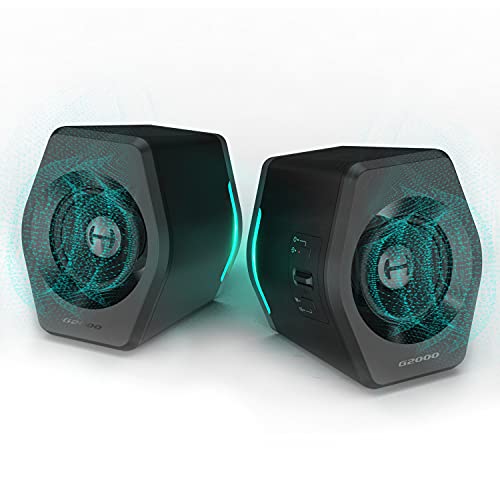
OHAYO Computer Speakers for Desktop PC, USB Plug-in with G-Sensor/16W/BT5.3 | RGB Light, Volume Knob, Loud Sound Monitor Speaker for Laptop with Deep Bass, Easy Clip-on Design, USB-C Adapter (Black)
Chosen because it specifies USB Plug-in with G-Sensor/16W/BT5.3 and RGB Light.
View on AmazonSpec line: USB plug-in, 16W, Bluetooth 5.3, G-sensor, RGB light, volume knob, clip-on design, USB-C adapter included.
OHAYO packs the most on its spec sheet in this price range: a 16W rating, Bluetooth 5.3, a volume knob and a clip-on design. A knob is a quiet advantage, because adjusting volume without opening software or hunting for a touch zone gets old fast. The listing also mentions a G-sensor for the lighting, so the bar can respond to movement, and an included USB-C adapter widens the connection options. As with every bar at this price ceiling, expect compact drivers, so the sound is aimed at casual listening, video calls, and games at moderate volume instead of window-rattling bass. The listing does not give driver size, so check the maker page if sound detail matters to you. It sits near the top of the price ceiling, so confirm the current price before ordering.
Pros: Volume knob; Bluetooth 5.3; USB-C adapter included.
Cons: Driver details not in the listing; near the price ceiling.
2. Bluedee Bluetooth and USB Sound Bar

Bluedee Computer Speakers for Desktop PC, Bluetooth & USB PC Sound Bar RGB | USB-A/C Audio and Power, 10W PC Speakers, Wired Plug-and-Play, Desktop Speakers for PC, Laptops, Tablet
Chosen because it specifies Bluetooth & USB PC Sound Bar RGB and USB-A/C Audio and Power.
View on AmazonSpec line: Bluetooth and USB PC sound bar, RGB, USB-A/C audio and power, 10W, wired plug-and-play.
Bluedee gives you two ways to play audio: wired via USB for the PC and Bluetooth for a phone or tablet. The listing names USB-A and USB-C for audio and power, so it should work with a wider range of desktops and laptops without extra adapters. That dual input is the main draw, since you can run game audio from the PC and switch to a phone call or playlist without moving cables. At 10W per the listing, it will fill a small room but not a large one. RGB lighting is included, which is a plus for a gaming desk and a distraction for a quiet office, so check whether you can turn it off. A solid all-rounder for people who want wireless flexibility without paying much more.
Pros: Bluetooth and wired USB; USB-A and USB-C; 10W rating per listing.
Cons: RGB may distract; modest power for large rooms.
3. LENRUE G11

LENRUE G11 Computer Speakers for Desktop, Touch Lights PC Speakers with Surge Clear Sound, USB C/USB Powered, AUX Audio for Computer Desktop PC Laptop Desk
Chosen because it specifies Touch Lights PC Speakers with Surge Clear Sound and USB C/USB Powered.
View on AmazonSpec line: computer speakers for desktop, touch lights, USB-C or USB powered, AUX audio, clear sound.
LENRUE G11 is a straightforward wired bar: it draws power over USB or USB-C and carries audio over a 3.5mm AUX cable, per the listing. That AUX path means it works with older PCs, laptops, and even phones that still have a headphone jack, so compatibility is broad. The listing notes touch lights, which is a small decoration rather than a feature that affects sound. There is no Bluetooth mentioned, so you will be tied to a cable, and cable length may limit placement on a wide desk. If your priority is something that plugs in and just works, with no pairing step and no battery, this is the easiest choice here. Think of it as the dependable default rather than the most advanced option.
Pros: USB and USB-C power; AUX works with many devices; no pairing step.
Cons: No Bluetooth in the listing; wired only.
4. XKX Computer Soundbar

Computer Speakers for Desktop PC Monitor, USB Plug-in, Wired, Computer Soundbar for PC, Laptop Speakers with Adaptive-Channel-Switching, Loud Sound, Deep Bass, USB C Adapter, Easy to Clip on Monitor
Chosen because it specifies USB Plug-in and Wired.
View on AmazonSpec line: USB plug-in, wired, adaptive channel switching, USB-C adapter, easy to clip on a monitor.
XKX is built to clip onto a monitor, which saves desk space and puts the speakers close to ear level. The listing names adaptive channel switching, though it does not explain how that works, so treat it as an unverified feature and check the maker page. A clip-on bar gets the sound out of the keyboard clutter and lifts it above the desk surface, which can help with clarity compared with a bar buried under a monitor stand. The compromise is that a monitor clip needs a stable edge, and a very thin bezel or curved display may not take it well. It includes a USB-C adapter per the listing, so it works with both USB-A and USB-C ports. Wired only means no Bluetooth.
Pros: Clip-on design; USB-C adapter; saves desk space.
Cons: Needs a suitable monitor edge; no Bluetooth listed.
5. Tylubio Under-Monitor Soundbar
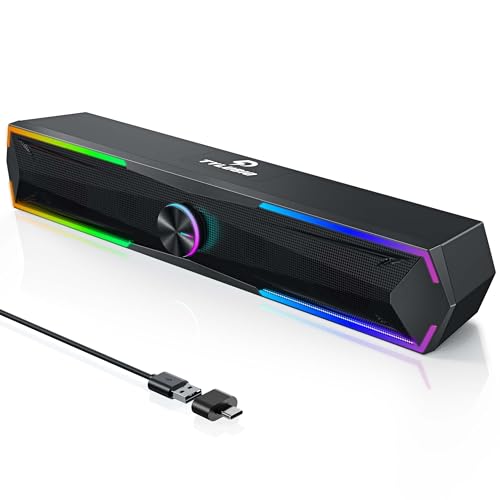
Tylubio Computer Speakers for PC Desktop, Flowing LED Under-Monitor Soundbar with Clear Stereo Sound, Bluetooth & USB 2-in-1 Audio Input, PC Speaker for Monitor Laptop, Black
Chosen because it specifies Flowing LED Under-Monitor Soundbar with Clear Stereo Sound and Bluetooth & USB 2-in-1 Audio Input.
View on AmazonSpec line: flowing LED under-monitor soundbar, clear stereo sound, Bluetooth and USB 2-in-1 audio input, black.
Tylubio is designed to slide under a monitor and combines Bluetooth with USB input. The listing highlights flowing LED lights, which suit a gaming setup, and a 2-in-1 audio input, so you can switch between a wired PC and a wireless device. The under-monitor shape suits desks where the monitor stand has enough clearance, but a bar that does not fit the gap ends up on the desk beside the screen, so measure the space under your monitor first. As with other bars in this group, it is aimed at casual listening and gaming, not studio accuracy. The listing mentions stereo sound without specifying wattage, so check the maker page if loudness matters.
Pros: Bluetooth and USB inputs; LED lighting; designed for under-monitor placement.
Cons: Wattage not listed; needs clearance under the monitor.
6. LIELONGREN Small PC Sound Bar

Computer Speakers for Desktop PC Laptop Monitor, Upgraded Touch Controls | USB Plug-n-Play Small PC Sound Bar, Delivers Rich Stereo Audio & Deep Bass, Compatible with Windows, macOS, ChromeOS, Linux
Chosen because it specifies Upgraded Touch Controls and USB Plug-n-Play Small PC Sound Bar.
View on AmazonSpec line: computer speakers for desktop, laptop, monitor; upgraded touch controls; USB plug-and-play; stereo audio; compatible with Windows, macOS, ChromeOS, Linux.
LIELONGREN is the smallest and simplest bar in the list. The listing stresses USB plug-and-play and broad compatibility with Windows, macOS, ChromeOS, and Linux, so it should work without drivers on all four. Touch controls handle volume, which looks clean but can be fiddly if you want a quick adjustment mid-game. The small size suits a laptop on a stand or a compact desk. Expect a modest sound, so it is an upgrade over tinny monitor speakers rather than a replacement for a proper 2.1 system. It sits at the lower end of the price ceiling in this list, which makes it a sensible choice for a secondary computer or a child’s study desk.
Pros: Broad OS compatibility; very compact; simple plug-and-play.
Cons: Touch controls can be fiddly; modest sound expected.
How to Choose Under $30
Pick the connection first
USB-only bars are simplest for a desktop, while Bluetooth models help if you also want to play music from a phone. If your PC has only a headphone jack, look for an AUX input such as the LENRUE offers.
Check the wattage and size
For a desk about two feet from your ears, 5 to 10 watts is plenty. Higher ratings such as 16W add headroom but not necessarily better sound. Also verify the bar’s width fits under or beside your monitor.
Decide whether you want lighting
RGB and flowing LEDs look good in a gaming setup but can annoy in an office. Look for a model with an off switch, or choose a plain bar.
Choose controls you will use
A physical knob like the OHAYO is faster than touch controls. If you change volume often, that matters more than a spec number.
Manage expectations
Bars in this tier are about clearer voices and moderate volume, not deep bass. If you want a bigger sound later, a proper desktop speaker pair or 2.1 set will sound fuller.
Think about power and ports
Every bar here draws power from USB, so count your free ports before buying. A bar that needs both a USB port and an AUX cable uses two connections, while a USB-only model uses one. If your desktop’s front ports are crowded, a short USB extension or a powered hub can help, but avoid long unpowered extensions because they can cause hum or dropouts. A laptop with only USB-C will need an adapter, which several listings say is included.
Placement and setup tips
Center the bar below the screen and point it slightly upward toward your ears, since small drivers sound clearest when the sound is aimed directly at you. Keep the cable tidy so USB power does not pull the bar off a clip, and avoid placing it directly on a stand that vibrates. If the volume knob or touch control is on the bar itself, leave a few centimeters of reach. Finally, set the PC volume to about three quarters and use the bar’s control for fine changes, which reduces distortion on compact amplifiers.
PC Soundbars for Home Office, Small Spaces and Gaming
Which soundbars suit a home office?
The Bluedee suits a home office because Bluetooth lets you switch from PC audio to a phone call, and the LENRUE is a no-fuss wired choice.
Which are best for small spaces?
The LIELONGREN and the clip-on XKX save the most room, since neither needs a large footprint on the desk.
Which suit gaming?
OHAYO and Tylubio are aimed at gaming setups with RGB lighting and Bluetooth. Expect fine audio for casual play, but headphones are still better for competitive positional audio.
FAQ
Do USB soundbars need a sound card?
No. A USB bar has its own audio chip and plugs straight into a USB port, so no sound card or extra drivers are needed.
Can I use a PC soundbar with a console?
Only if the console offers a compatible output, such as USB audio or AUX. Check the soundbar and console connections first.
Is Bluetooth good enough for gaming?
Bluetooth can add a small delay. For fast games, prefer the wired USB or AUX connection and keep Bluetooth for music and calls.
Where should I place a soundbar?
Under or in front of the monitor, centered, and aimed toward your ears. Keep it clear of obstructions so voices and effects stay clean.
Do these include a microphone?
The listings reviewed here do not mention a microphone, so plan on a separate headset or mic for voice chat.
Last updated: November 2026
FAQ
Which soundbars suit a home office?
Which are best for small spaces?
Which suit gaming?
Do USB soundbars need a sound card?
Can I use a PC soundbar with a console?
Is Bluetooth good enough for gaming?
Where should I place a soundbar?
Do these include a microphone?
More from Amazon
Programs that pair well with the guide above. Offers and eligibility are set by Amazon and may change.
Free shipping on eligible items, Prime Video and more. Eligible new members can start with a free trial.
Start a Prime free trialAd-free music streaming. Eligible new subscribers can start with a free trial.
Try Music Unlimited freeA Prime membership for ages 18-24 with a trial period. Eligibility is set by Amazon.
See Prime for Young AdultsAudiobooks and podcasts to listen to on the go. Eligible new members can start with a free trial.
Try Audible freeAs an Amazon Associate we earn from qualifying purchases.