Key takeaways
- Learn the palm, claw, and fingertip grips, how to pick the right one for your hand and mouse shape, and how to stay comfortable in long sessions.
As an Amazon Associate we earn from qualifying purchases.
Every gamer has wondered whether the way they hold a mouse is holding back their aim, their speed, or their comfort during long sessions. The answer is not one perfect grip, because hands come in different sizes, mice come in different shapes, and games ask for different kinds of movement. Palm, claw, and fingertip grips each change how much of your hand touches the mouse, how your fingers reach the buttons, and how your wrist and arm share the work of aiming in real matches.
This guide is for players who feel wrist strain after an evening of play, for newcomers choosing their first serious mouse, and for experienced players who want steadier aim without changing their whole setup. It also helps anyone switching between game types, from fast shooters to slower strategy and building games, where one grip rarely fits every moment of play. Read through the grip styles, match one to your hand, and give it a few sessions before you judge it.
How to Choose
There is no single grip that wins for everyone, so the smart move is to understand what each style asks of your hand and then match it to your mouse shape and your games. The four styles below cover nearly every player, and most people land on one main grip with a second style for certain moments. A grip that feels odd for a day can still become your best choice once your hand learns it, so judge by comfort after several sessions, not by the first few minutes.
Palm Grip
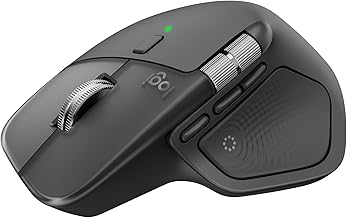
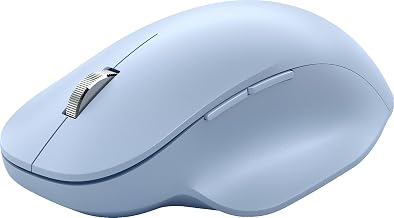
The palm grip is the most relaxed way to hold a mouse: your palm rests on the body of the mouse, your fingers lie flat along the buttons, and your thumb and fingers wrap the sides for control. Movement comes mostly from the arm and wrist together, which spreads effort across larger muscles and keeps the hand calm during long sessions. This style suits players with medium to large hands, anyone who plays for hours at a time, and people who value comfort over sudden bursts of speed. It pairs best with a larger mouse that fills the palm, with a hump in the middle and a shape that supports the hand without forcing the fingers to curl.
Claw Grip
With the claw grip, the back of your palm touches the rear of the mouse while your fingers arch upward and only your fingertips press the buttons. That arch gives fast, snappy clicks and quick vertical movement, because the fingers can lift and tap with very little travel. It suits players who need rapid clicking in shooters and action games, people with medium hands, and anyone who wants a mix of control and speed. It pairs best with a medium mouse that has a raised rear hump, a body that fits a medium hand, and a shape that lets the palm anchor while the fingers stay arched and free to move.
Fingertip Grip
Only your fingertips touch the mouse in the fingertip grip: your palm floats above the body while your thumb and outer fingers guide the sides. With so little of the hand resting on the mouse, tiny finger movements turn into precise aim adjustments, which is why many competitive shooter players prefer this style. It suits players with smaller hands, people who aim mostly with their fingers and wrist, and anyone who wants the quickest response to small movements. It pairs best with a light, low mouse that is easy to lift and reposition, with a narrow body and a shape that stays out of the way of a floating palm.
Hybrid and Relaxed Grip
A hybrid grip blends two styles instead of locking you into one: you might rest your palm on the mouse while aiming, then lift into a claw shape for quick flicks, or switch to fingertips during tense moments in a match. This flexible approach suits players who move between game types in one evening, people whose hands tire in a single fixed pose, and anyone still learning which style fits them best. It pairs best with a medium, rounded mouse that feels good in more than one hand position, with smooth sides, a balanced weight, and a shape that never forces your fingers into a single angle.
Which One Fits Your Situation
Your best grip depends less on what other players use and more on your hand, your mouse, and the games you play most. Your hand size, your mouse shape, and your preferred games all shape the answer. Use the situations below as a guide, then adjust in small steps until the grip feels natural.
Long Sessions and Comfort
If you play for several hours at a stretch, comfort matters more than raw speed. Rest your palm on a larger mouse, keep your wrist in a neutral line with your forearm, and let your arm share the work instead of asking your fingers to do everything. Take a short pause every hour to stretch your fingers and roll your shoulders, and lower your mouse sensitivity a little so small hand movements cover less ground.
Fast Shooters and Quick Aim
Shooters reward quick target switches and fast reactions, so a claw or fingertip grip often works well here. Your fingers stay free to click rapidly, and small wrist movements can snap the aim across the screen. Choose a light mouse with a shape that lets you lift and reset it easily, keep your grip loose rather than squeezing, and practice smooth tracking before you chase faster flicks.
Small Hands or a Small Mouse
When your hand is small or your mouse is compact, a palm grip can feel like a stretch, so fingertip or claw styles usually fit better. Let your fingertips do the aiming, keep your palm clear of the mouse body, and avoid a tall hump that pushes your fingers too far forward. If your ring finger drags on the pad, widen your hand position slightly or look for a narrower shape that matches your hand.
Wrist Strain or Soreness
If your wrist aches after playing, your grip may be too tight or your wrist may be doing too much of the aiming. Loosen your hold, rest your palm more fully on the mouse, and move from the arm for large turns while saving wrist motion for fine aim. Check that your desk and chair let your forearm sit level, and stop for a real break whenever soreness grows instead of playing through it.
Common Mistakes
Most grip problems come from habits that feel normal at first, like squeezing too hard or ignoring early soreness. The five mistakes below are the ones players mention most often, and each one has a simple fix you can try in your next session. Fixing one habit often fixes your aim too, because a calm hand aims better than a tense one.
- Gripping the mouse too tightly. A tense hold tires your hand quickly, makes small aim adjustments jerky, and can leave your fingers sore after a long session. Keep your grip firm enough to control the mouse but loose enough that your fingers can lift freely, and check in with yourself every so often: if your knuckles look pale or your fingers ache, ease off and shake your hand out for a few seconds.
- Resting your whole wrist on the desk edge. When the edge of the desk presses into your wrist, it limits movement and can cause soreness over time. Let your forearm glide on the desk or pad instead, keep your wrist floating or lightly touching the surface, and move your chair closer so your arm reaches the mouse without stretching forward or lifting your shoulder.
- Copying a well-known player’s grip without question. A grip that works for one hand size and mouse shape may feel awful for yours, and forcing it can hurt your aim and your comfort. Borrow ideas from other players, but judge them by how your own hand feels after a full session and a few days of play, not by how they look in a video.
- Using one grip for every game. A grip that feels great in a slow building game may feel sluggish in a fast shooter, and switching styles between games in one evening is normal. Keep a main grip for the games you play most, learn a second one for different moments, and give yourself time to adjust whenever you change grips.
- Ignoring early signs of soreness. Mild aches are your hand asking for a change, whether that means a looser grip, a different mouse shape, or a real break. Do not push through growing pain: pause, stretch your fingers and wrist, and change one thing at a time until the soreness fades. If aches keep returning, rest longer for a day or two and consider a shape that fits your hand better.
Frequently Asked Questions
Players ask the same grip questions again and again, so the answers below cover the ones that come up most. If your question is not here, the grip styles and situations above should point you in the right direction. Each answer below is short on purpose, so you can find what you need and get back to playing.
How do I know which grip style fits my hand?
Hold the mouse the way that feels natural, then look at how much of your palm touches the body. A full palm resting on the mouse points to a palm grip, an arched hand with only fingertips on the buttons points to claw, and a floating palm points to fingertip. If none of them feels right, try a hybrid style and adjust from there over a few sessions.
Can I switch grips after years of playing one way?
Yes, and many players do. Give the new grip at least a full week of regular sessions before you judge it, because your aim will feel worse at first while your muscles learn the new movement. Keep your old grip for important matches during that week, practice the new one in casual games only, and only switch fully once it begins to feel natural.
Does mouse shape matter more than grip style?
The two work together, so neither one matters alone. A tall mouse makes a palm grip easy and a fingertip grip awkward, while a low, narrow mouse does the opposite. Pick a shape that matches your hand size and finger length first, then choose the grip that feels natural on that shape, and change only one of them at a time when something feels wrong.
How can I stop my wrist from aching during long sessions?
Loosen your grip, move more from the arm, and keep your wrist in line with your forearm instead of bending it sideways. Lower your sensitivity slightly so you need less wrist movement, take a short break every hour to stretch and move around, and check that your chair and desk let your arm sit level. If aching keeps coming back, change your grip or mouse shape.
FAQ
How do I know which grip style fits my hand?
Can I switch grips after years of playing one way?
Does mouse shape matter more than grip style?
How can I stop my wrist from aching during long sessions?
More from Amazon
Programs that pair well with the guide above. Offers and eligibility are set by Amazon and may change.
Free shipping on eligible items, Prime Video and more. Eligible new members can start with a free trial.
Start a Prime free trialAd-free music streaming. Eligible new subscribers can start with a free trial.
Try Music Unlimited freeA Prime membership for ages 18-24 with a trial period. Eligibility is set by Amazon.
See Prime for Young AdultsAudiobooks and podcasts to listen to on the go. Eligible new members can start with a free trial.
Try Audible freeAs an Amazon Associate we earn from qualifying purchases.