Key takeaways
- Pro: Premium aluminum build with excellent RGB and doubleshot keycaps.
- Pro: Wide range of layouts and switches to match any preference.
- Pro: Comfortable magnetic wrist rest and handy media controls on larger models.
- Pro: Deep Synapse customization for macros and lighting.
What's inside
The Razer BlackWidow V4 has been a fixture of the mechanical gaming keyboard scene, and the current lineup refines a proven formula for 2026. With a broad family spanning full-size, TKL, 75 percent, and low-profile layouts, plus a choice of Razer’s own switches, the BlackWidow V4 aims to be the do-everything gaming board. After extended daily use, it largely earns that ambition.
This review digs into the BlackWidow V4’s build, typing feel, features, and value, and points you to the right variant for your desk, from the flagship BlackWidow V4 Pro to the compact V4 75%. If you want a premium Razer mechanical without guesswork, read on.
As an Amazon Associate we earn from qualifying purchases at no extra cost to you.




⚡ Save on Your Next PC — Amazon Prime
Prime members get fast free shipping on the systems above, plus early access to Prime Day & Black Friday PC deals. New members get a 30-day free trial.
Watch: Razer BlackWidow V4 Review — Video Review
Design & Build
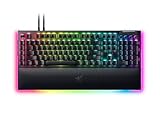
The BlackWidow V4 feels genuinely premium. A brushed aluminum top plate resists flex, the doubleshot ABS keycaps hold up to heavy use, and the underglow RGB plus per-key Chroma lighting look fantastic on a dark desk. The full-size and Pro models add a magnetic plush wrist rest and dedicated media controls with a scroll wheel, while the V4 75% and TKL trim the footprint for players who want more mouse space. Build quality is consistently excellent across the range.
Performance
Typing and gaming feel are where the BlackWidow V4 shines. Razer’s Green clicky switches deliver a crisp, tactile click with a satisfying bump, while the Yellow linear switches are smooth and quiet for fast actuation, and the 75% Orange tactile option splits the difference. Actuation is consistent, chatter is absent, and Synapse offers deep per-key remapping, macros, and lighting control. For competitive play, the response is snappy and dependable, and the sound profile is pleasing straight out of the box.
Pros & Cons
- Pro: Premium aluminum build with excellent RGB and doubleshot keycaps.
- Pro: Wide range of layouts and switches to match any preference.
- Pro: Comfortable magnetic wrist rest and handy media controls on larger models.
- Pro: Deep Synapse customization for macros and lighting.
- Con: Premium pricing, especially on the Pro model.
- Con: Synapse software can feel heavy for users who want a simple setup.
- Con: Wired models lack the flexibility of the wireless TKL variant.
Alternatives to Consider
If you want the same premium feel without the wire, the BlackWidow V4 TKL Wireless brings Orange switches and a compact footprint. Prefer a slimmer profile? The BlackWidow V4 Low Profile Wireless keeps the Razer feel in a thinner chassis. And for those who want maximum features, the BlackWidow V4 Pro adds the command dial and extra macro column for streamers and power users.
Frequently Asked Questions
Which BlackWidow V4 switch should I choose?
Pick Green for a crisp, clicky tactile feel, Yellow for smooth quiet linear speed, or Orange on the 75% for a quieter tactile bump. It comes down to whether you like an audible click.
Is the BlackWidow V4 good for competitive gaming?
Yes. Its consistent actuation, solid build, and Synapse macro support make it a strong competitive board, with linear Yellow switches favored for fast repeated inputs.
Does the BlackWidow V4 come in a wireless version?
Yes. The TKL and Low Profile models offer wireless connectivity, while the full-size and Pro models are wired. Choose based on whether you want a cable-free desk.
Is the BlackWidow V4 worth the premium price?
For players who value a premium aluminum build, excellent RGB, and deep customization, yes. Budget shoppers can find cheaper mechanicals, but the V4’s polish justifies its cost.
Verdict
The Razer BlackWidow V4 is a premium mechanical keyboard that delivers on build quality, switch feel, and customization across a versatile lineup. It is not the cheapest option, but the aluminum construction, gorgeous Chroma lighting, and dependable performance make it an easy recommendation. Pick the layout and switch that fit your grip, and the BlackWidow V4 will anchor your desk for years.