Key takeaways
- Outstanding ergonomic comfort for all-day use
- MagSpeed free-spin wheel transforms long-document scrolling
- Genuinely quiet clicks suited to shared spaces
- Excellent multi-week battery life over USB-C
What's inside
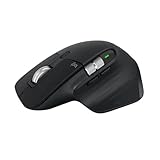
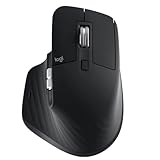
The Logitech MX Master 3S is a productivity-focused wireless mouse that has become the benchmark for people who spend all day in documents, code, spreadsheets, and creative apps. This Bluetooth graphite version connects without the bundled receiver, relying on a direct Bluetooth link and USB-C charging, and it prioritizes comfort, precision, and quiet operation over gaming responsiveness.
It is aimed at professionals, developers, editors, and multitaskers who want an ergonomic mouse that can control several computers, scroll through long files effortlessly, and stay silent in a shared office. Competitive gamers are not the audience here; the emphasis is on all-day ergonomics and workflow features rather than low latency or light weight.
As an Amazon Associate we earn from qualifying purchases at no extra cost to you.




⚡ Save on Your Next PC — Amazon Prime
Prime members get fast free shipping on the systems above, plus early access to Prime Day & Black Friday PC deals. New members get a 30-day free trial.
Watch: Logitech MX Master 3S Review — Video Review
Design & Build
The MX Master 3S has a tall, sculpted right-handed body that cradles the palm and positions the thumb over a dedicated rest with gesture support. Build quality is excellent, with soft-touch surfaces, a reassuring heft, and no creak anywhere in the shell. The standout is the MagSpeed metal scroll wheel, which switches between ratcheted and free-spinning modes automatically, and a second horizontal thumb wheel handles side scrolling. The graphite finish resists fingerprints reasonably well, and the whole thing feels built to survive years of daily use, though at 141 grams it is heavy by gaming standards and strictly right-handed.
Performance
Where the 3S shines is everyday work. The 8000 DPI sensor tracks on almost any surface, including glass, and the quiet clicks are genuinely 90 percent quieter than older Master models while still feeling tactile. The free-spinning wheel flies through long web pages and code files in a way that becomes hard to give up. Logitech Options+ enables per-application button mapping and Flow, which lets one mouse control multiple computers and even copy text between them.
The main friction points are connection and software. Relying solely on Bluetooth can mean a brief reconnection delay when a machine wakes from sleep, and the receiver-free convenience comes at the cost of the more stable Logi Bolt link some users prefer. Options+ is powerful but heavier than it needs to be, and the mouse is unsuited to fast gaming due to its weight and Bluetooth latency. Battery life, however, is superb, running for weeks on a charge.
Pros & Cons
- Outstanding ergonomic comfort for all-day use
- MagSpeed free-spin wheel transforms long-document scrolling
- Genuinely quiet clicks suited to shared spaces
- Excellent multi-week battery life over USB-C
- Heavy and right-handed only
- Bluetooth-only link can lag briefly after sleep
- Options+ software feels bloated
Alternatives to Consider
If you want the newest features and do not mind paying more, the Logitech MX Master 4 adds haptic feedback while keeping the same ergonomic DNA. Travelers and small-desk users should look at the Logitech MX Anywhere 3S, a compact version with most of the scrolling magic in a portable body. If you are building a full desk setup, the Logitech MX Keys S Combo pairs a comparable mouse with Logitech’s low-profile keyboard for a matched workflow.
Frequently Asked Questions
Is the MX Master 3S good for gaming?
Not really. Its weight and Bluetooth latency make it a poor fit for competitive gaming. It is designed for productivity, where those traits do not matter.
What is the difference from the older MX Master 3?
The 3S adds a higher 8000 DPI sensor and much quieter clicks while keeping the same shape. If silence and slight tracking gains matter to you, the upgrade is worthwhile.
Can it control more than one computer?
Yes. With Logitech Flow in Options+, a single mouse can move between multiple computers and transfer files and text across them seamlessly.
Does the Bluetooth-only version need the receiver?
No. This model connects directly over Bluetooth, so it works without a dongle, though a Logi Bolt receiver would offer a slightly more stable link if your PC supports it.
Verdict
The Logitech MX Master 3S remains the mouse to beat for anyone whose day is built around productivity. Its comfort, scrolling, quiet clicks, and cross-device features justify the price for knowledge workers, and only its weight and occasional Bluetooth reconnection hold it back. If you spend hours at a desk rather than in a match, it is one of the best purchases you can make in 2026.