Key takeaways
- Clean uninstall: Use a display driver uninstaller to strip old drivers before installing fresh ones.
- Latest package: Download the current driver directly from NVIDIA or AMD, not a random mirror.
- Windows updates: Let Windows finish pending updates that can conflict with GPU drivers.
- Integrated fallback: Use the motherboard’s video output temporarily to install drivers if needed.
A graphics card that vanishes from your system, no display, no listing in Device Manager, is one of the most panic-inducing PC faults. Yet in the vast majority of cases the GPU is perfectly healthy; it is simply not seated, powered, or configured correctly. A calm, ordered troubleshooting pass usually restores it in minutes.
This guide covers every common reason a GPU goes undetected in 2026 and the exact fix for each, from a half-seated card to a stale driver. It is written for builders and upgraders alike, and simple tools like a GPU support bracket or a PCIe diagnostic tester can help confirm where the fault lies.
Our top picks
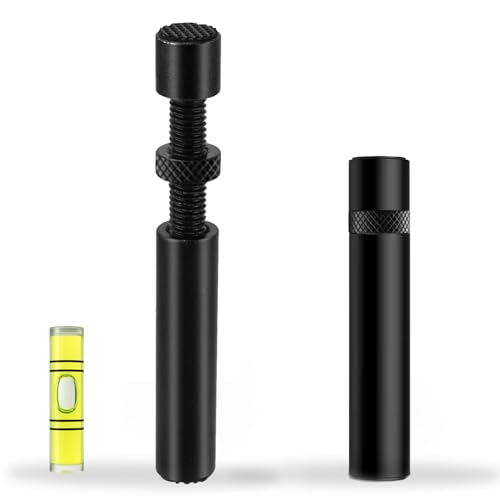 California JOS California JOS GPU Support Bracket
- ✅ Package Includes: 1 PCS Large Black GPU…
- ✅Prevents GPU Sag and Damage
- ✅Durable All-Aluminum Build
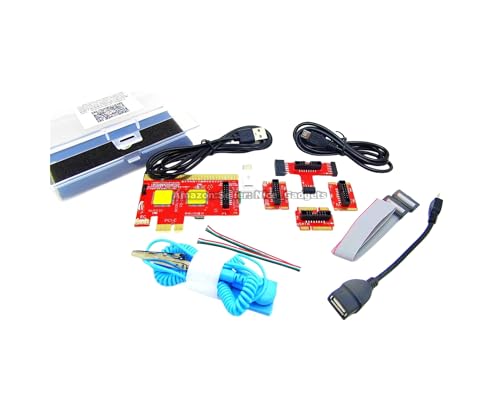 New USB PCIe Motherboard Diagnostic Tester Kit
- Please DO study the listing page the "Product…
- Easy To Use Unique USB Diagnosis with Videos…
- USB Diagnosis Unique Feature - Save hassles of…
 Pilipane Pilipane Graphics Card Virtual Display Emulator
- [MINING STABILITY SOLUTION] : Tackle mining interruptions effortlessly
- [COMPACT DESIGN , LOW POWER] : With a…
- [HIGH RESOLUTION SPOOFING] : Simulate 4K resolutions like…
| Product | Key specs | |
|---|---|---|
| California JOS California JOS GPU Support Bracket | ✅ Package Includes: 1 PCS Large Black GPU… ✅Prevents GPU Sag and Damage ✅Durable All-Aluminum Build | Check price |
| New USB PCIe Motherboard Diagnostic Tester Kit | Please DO study the listing page the "Product… Easy To Use Unique USB Diagnosis with Videos… USB Diagnosis Unique Feature - Save hassles of… | Check price |
| Pilipane Pilipane Graphics Card Virtual Display Emulator | [MINING STABILITY SOLUTION] : Tackle mining interruptions effortlessly [COMPACT DESIGN , LOW POWER] : With a… [HIGH RESOLUTION SPOOFING] : Simulate 4K resolutions like… | Check price |
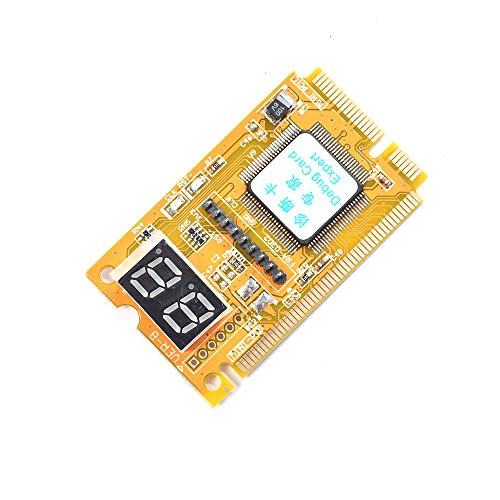 Comimark Comimark 1Pcs Mini 3 in1 PC | 3 in 1 tester. For PCI, PCI-E, and LPC. Diagnostic post-test card. | Check price |
 Wisoqu Computer Accessory Graphics Card Tester with | High Efficiency: The computer graphics card tester can… Versatile Testing Capabilities: The graphics card tester diagnostic… Comprehensive Fault Diagnosis: When troubleshooting computer graphics card… | Check price |
 Hilitand Computer Graphics Card Tester | [Quick Fault Detection] The graphics card tester quickly… [ Design] The graphics card tester with indicator… [Comprehensive Testing] Specifically designed to test data bus… | Check price |
| Masyrt Purpose AGP PCI E Graphics Card | High Efficiency: The computer graphics card tester can… Versatile Testing Capabilities: The graphics card tester diagnostic… Comprehensive Fault Diagnosis: When troubleshooting computer graphics card… | Check price |
As an Amazon Associate we earn from qualifying purchases at no extra cost to you.
⚡ Save on Your Next PC — Amazon Prime
Prime members get fast free shipping on the systems above, plus early access to Prime Day & Black Friday PC deals. New members get a 30-day free trial.
Watch: Why Is My GPU Not Being Detected? (2026 Fixes) — Video Review
Reseat the Card and Power Cables
The number-one cause is a card that is not fully clicked into the PCIe slot, often because a heavy modern GPU has sagged over time. Power down, remove the card, and reseat it firmly until the slot latch locks. Confirm the PCIe power cables are pushed all the way in at both the card and the PSU. A GPU support bracket prevents future sag that can loosen the connection.
Check the Slot and Try Another
If reseating fails, the slot itself may be the issue. Move the card to a second PCIe x16 slot if your board has one. Inspect the primary slot for dust or bent pins and clean it with compressed air. On boards with multiple slots, confirm BIOS is set to use the correct primary graphics slot rather than integrated video.
Update or Reinstall the Drivers
- Clean uninstall: Use a display driver uninstaller to strip old drivers before installing fresh ones.
- Latest package: Download the current driver directly from NVIDIA or AMD, not a random mirror.
- Windows updates: Let Windows finish pending updates that can conflict with GPU drivers.
- Integrated fallback: Use the motherboard’s video output temporarily to install drivers if needed.
Verify BIOS and Power
Enter BIOS and confirm the primary display is set to PCIe, and that any “Above 4G Decoding” or Resizable BAR options are configured correctly for a modern card. Make sure your PSU actually has the wattage and connectors the GPU needs; an underpowered supply can leave a card unable to initialize. A PCIe diagnostic post-test card can help pinpoint whether the slot is even being recognized.
Rule Out a Faulty Card
If the GPU still refuses to appear after reseating, swapping slots, and reinstalling drivers, test it in another PC or test a known-good card in yours. A PCIe riser adapter can help with bench testing, and a graphics-card tester confirms whether the card powers and outputs at all. Only after these steps should you suspect the GPU itself has failed.
Tips
- Watch the motherboard’s VGA debug LED; a lit VGA light points straight at a GPU detection fault.
- Install a GPU support bracket to stop sag that loosens the slot connection over time.
- Always plug the monitor into the graphics card, not the motherboard, once the GPU works.
- Enable Resizable BAR in BIOS for a performance bump on supported modern cards.
Frequently Asked Questions
Why is my GPU not showing up in Device Manager?
Usually a seating or driver problem. Reseat the card and power cables first, then do a clean driver reinstall. Check the motherboard VGA debug LED for a hardware clue.
Could a weak power supply cause an undetected GPU?
Yes. If the PSU lacks the wattage or the correct power connectors, the card cannot initialize and may not appear at all. Verify your PSU meets the GPU’s requirements.
Should I plug my monitor into the GPU or motherboard?
Into the GPU once it is working. Use the motherboard output only temporarily to install drivers or troubleshoot if the card is not being detected.
How do I know if the GPU itself is dead?
Test it in another system or try a known-good card in yours. If it fails everywhere after reseating and driver fixes, and a tester shows no output, the card is likely faulty.
Conclusion
An undetected GPU is far more often a seating, driver, or BIOS issue than a dead card. Reseat it, try another slot, clean-install the drivers, and verify BIOS and power before worrying. A support bracket and a simple diagnostic tester make future faults faster to catch, so you spend less time panicking and more time playing.
FAQ
Why is my GPU not showing up in Device Manager?
Could a weak power supply cause an undetected GPU?
Should I plug my monitor into the GPU or motherboard?
How do I know if the GPU itself is dead?
More from Amazon
Programs that pair well with the guide above. Offers and eligibility are set by Amazon and may change.
Free shipping on eligible items, Prime Video and more. Eligible new members can start with a free trial.
Start a Prime free trialAd-free music streaming. Eligible new subscribers can start with a free trial.
Try Music Unlimited freeA Prime membership for ages 18-24 with a trial period. Eligibility is set by Amazon.
See Prime for Young AdultsAudiobooks and podcasts to listen to on the go. Eligible new members can start with a free trial.
Try Audible freeAs an Amazon Associate we earn from qualifying purchases.