
Key takeaways
- Dramatic Latency Reduction: Bypasses your Smart TV’s slow built-in deinterlacer, cutting input lag down from multi-frame delays to virtually instantaneous response times.
- Crisp Pixel Preservation: Correctly interprets 240p signals to keep 8-bit and 16-bit pixel art sharp, preventing the fuzzy, smeared appearance caused by standard TV upscaling.
- Proper 4:3 Aspect Ratio Control: Keeps classic games rendered in their original square aspect ratio rather than stretching characters horizontally across a 16:9 widescreen display.
- Legacy Connectivity: Allows you to hook up component video cables (YPbPr) to modern Smart TVs that have completely eliminated analog red, white, yellow, and green/blue inputs.
- Clean Room Aesthetics: Compact dimensions allow the device to easily tuck behind a wall-mounted TV or inside an AV cabinet, hiding analog cable clutter from view.
The Short Answer
It depends on whether you play analog retro consoles (such as the Nintendo 64, PlayStation 1, PlayStation 2, or original Xbox) and whether your modern Smart TV induces noticeable button lag and blurry visuals. If your Smart TV lacks component or composite inputs—or stutters when processing classic 240p and 480i video signals—you do need a retro video scaler or dedicated line doubler. If you only play modern HDMI consoles or use built-in retro emulation apps, you can safely skip buying external scaling hardware.
What You Actually Get
Modern 4K and 8K Smart TVs are optimized for high-definition digital signals running at 1080p, 4K, or higher resolutions. When you plug a classic game console into a modern panel, a severe hardware mismatch occurs. Retro consoles prior to the mid-2000s output non-standard analog signals—most notably 240p (progressive scan) and 480i (interlaced scan). Modern televisions rarely recognize 240p correctly; instead, their internal image processors treat it as a noisy 480i signal.
As an Amazon Associate we earn from qualifying purchases at no extra cost to you.
This misinterpretation triggers modern motion smoothing and deinterlacing algorithms designed for legacy DVD players rather than real-time interactive video games. The result is visual artifacting (such as horizontal comb lines), smudged pixels, distorted colors, and high input latency. Standard Smart TV video processing can introduce anywhere from 50 milliseconds to over 100 milliseconds of input lag—equivalent to 3 to 6 frames of delay. For fast-paced platformers, fighting games, or rhythm titles, this lag makes games feel sluggish or entirely unplayable.
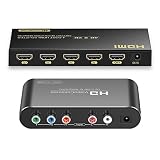
A retro video scaler fixes this bottleneck by sitting between your analog console and your display. The unit takes analog Component (YPbPr) or Composite (RCA) video and converts it into a clean, digital HDMI signal at standard resolutions like 720p or 1080p. Advanced scalers and line-doublers process 240p natively, converting each scanline instantly without heavy post-processing buffer delays, bringing latency down to under 1 millisecond (virtually zero lag).
A typical midline device—such as a Component to HDMI Converter Upscaler supporting 1080p output—occupies a remarkably compact footprint in your home media center. These metal or durable plastic chassis typically measure around 4.3 x 2.8 x 1.0 inches and weigh approximately 0.35 to 0.5 pounds. Powered by a standard 5V/1A DC adapter, they consume minimal energy (around 2.5 to 5 watts), making them easy to integrate into existing media consoles alongside soundbars and streaming boxes without creating excessive ambient heat.
Pros
- Dramatic Latency Reduction: Bypasses your Smart TV’s slow built-in deinterlacer, cutting input lag down from multi-frame delays to virtually instantaneous response times.
- Crisp Pixel Preservation: Correctly interprets 240p signals to keep 8-bit and 16-bit pixel art sharp, preventing the fuzzy, smeared appearance caused by standard TV upscaling.
- Proper 4:3 Aspect Ratio Control: Keeps classic games rendered in their original square aspect ratio rather than stretching characters horizontally across a 16:9 widescreen display.
- Legacy Connectivity: Allows you to hook up component video cables (YPbPr) to modern Smart TVs that have completely eliminated analog red, white, yellow, and green/blue inputs.
- Clean Room Aesthetics: Compact dimensions allow the device to easily tuck behind a wall-mounted TV or inside an AV cabinet, hiding analog cable clutter from view.
Cons
- Added Setup Costs: Hardware ranges from standard $50 to $70 component upscalers to high-end professional scalers costing $300 to $500+.
- Cable Management Overhead: Adds another physical box, extra HDMI run, and dedicated 5V power adapter behind your media unit.
- Inconsistent Low-Cost Quality: Generic under-$20 passive adapters often yield dark images, audio noise, or fail to fix latency problems altogether.
- Limited Utility for Modern Systems: Provides zero benefit for HDMI-native systems like the Nintendo Switch, PlayStation 4/5, or Xbox Series X.
Who Should Buy It
You should purchase a retro scaler if you still operate original gaming hardware from the 8-bit through 128-bit eras (NES, Super Nintendo, Sega Genesis, N64, GameCube, PS1, PS2, Xbox) and want to play on a modern living room display. It is essential for gamers who notice controller lag, play precision-heavy titles, or want clean, vibrant component video signals on a borderless 4K screen. It is also ideal for home media enthusiasts who want a tidy, permanent bridging solution between legacy hardware and high-definition Smart TV setups.
Who Should Skip It
You can skip buying a retro scaler if your television gaming is strictly limited to modern HDMI consoles, original mini-consoles (like the NES Classic or Sega Genesis Mini), or official software re-releases through subscription services. Likewise, if your retro gaming takes place on PC emulators, modified handheld devices, or a dedicated secondary CRT (cathode-ray tube) television, an external HDMI scaler is completely unnecessary.
Cheaper Alternatives
If you aren’t ready to invest in a dedicated line doubler or a mid-range component converter, several alternative options exist across different price brackets and trade-offs.
| Option | Cost Range | Trade-off |
|---|---|---|
| Passive RCA-to-HDMI Adapter | $12 – $25 | Inexpensive, but introduces high input lag, dark video output, and forced 16:9 widescreen stretching. |
| Console-Specific HDMI Cable | $30 – $45 | Simple single-cable setup, but tied to one specific console and offers moderate video processing quality. |
| Software Emulation (Smart TV/PC) | $0 – $60 | Zero hardware clutter and sharp 4K rendering, but loses original hardware/cartridge feel and controller compatibility. |
| Used CRT Television | $0 – $50 | Zero input lag and authentic retro visuals, but takes up a massive physical footprint (50–100 lbs) and draws 80W–150W of power. |
FAQ
Why do classic games look blurry when plugged directly into a Smart TV?
Smart TVs are programmed to process standard high-definition signals like 720p, 1080p, and 4K. When fed an old analog 240p or 480i video signal, the TV’s internal processor attempts to smooth out the image using video filters designed for live-action television. This process misinterprets sharp pixel edges, causing the image to look smeared, dim, and blurry.
How much input lag does a retro video scaler eliminate?
A quality retro line doubler or component upscaler processes video frames instantly in real-time, reducing input lag to under 1 millisecond (less than a single frame of delay). Connecting retro consoles directly to a Smart TV’s analog or converted inputs can cause anywhere from 50ms to 120ms of delay, which translates to a noticeable visual lag between pressing a button and seeing the action on screen.
Can I use my Smart TV’s green and yellow AV breakout cable instead?
Some Smart TVs ship with a small 3.5mm-to-RCA adapter cable that connects composite (yellow) or component (green/blue/red) wires to a single port on the back panel. While this allows a physical connection, it still relies entirely on the Smart TV’s internal video processing engine. This means you will still experience high input latency, image blurring, and potential aspect ratio stretching.
Is a mid-range Component-to-HDMI converter sufficient for a standard home setup in 2026?
Yes. A mid-range Component-to-HDMI Converter Upscaler supporting 1080p (typically priced around $50 to $65) provides an excellent balance for casual to moderate retro gamers in 2026. It cleanly bridges analog YPbPr component video to HDMI, locks in a stable digital signal, and avoids the extreme cost of high-end professional retro scalers while delivering a crisp picture on modern displays.









