
Our Top Picks
 Anbernic RG35XX Pro Retro Handheld Game Console RG35XXPro5.04 x 3.19 x 0.87 inches0.42 PoundsCheck on Amazon
When selecting a retro gaming device for your home, living room, or travel bag, the display dimensions directly dictate your physical comfort, visual clarity, and spatial storage needs. If you are wondering what screen size is best for retro handhelds, the short answer depends on the aspect ratio of the systems you play most. For classic 8-bit, 16-bit, and 32-bit home consoles, a 3.5-inch to 4.0-inch 4:3 screen is the absolute sweet spot. For widescreen retro consoles, portable streaming, and 3D-era handhelds, a 4.7-inch to 5.5-inch 16:9 screen delivers the most versatile experience.
The Short Answer
The optimal screen size for a retro handheld depends on matching the screen aspect ratio to your favorite retro home consoles and portable systems:

Voacle RG353V Retro Handheld Game Console, Dual OS Android 11 and Linux System Support 5G WIFI 4.2 Bluetooth Moonlight Streaming TV Output 64G SD Card 4452 Games(Transparent Purple)
Picked as a relevant option in this category.
View on AmazonAnbernic RG35XX Pro Retro Handheld Game Console RG35XXPro 4353 Preinstalled | 3.5 Inch IPS Screen Linux System 64G TFCard 3200mAH Battery RG 35XXPro Support HDMI TV Output 5G WiFi Bluetooth 4.2 Black
Picked as a relevant option in this category.
View on Amazon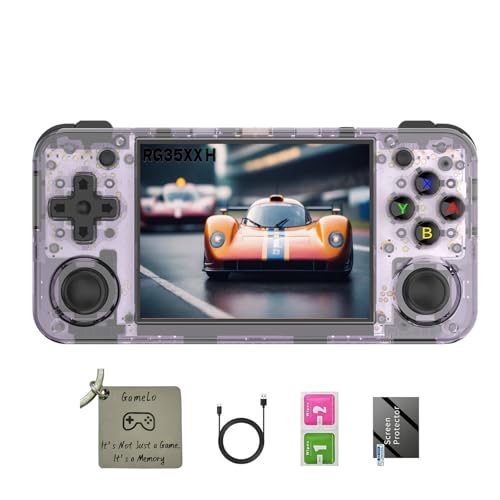
RG35XX H, Anbernic Retro Handheld Gaming Console with 64GTF Card, Dual Joystick Design 3.5-inch HD Screen Lasts up to 8 Hours High-Capacity Battery for Better Experience (64G Purple)
Chosen because it specifies Anbernic Retro Handheld Gaming Console with 64GTF Card.
View on Amazon
Anbernic RG35XX Pro Retro Handheld Game Console, 3.5" IPS OCA Screen, Linux System, 64GB, WiFi Bluetooth, HDMI Output, 7H Battery, Ideal for Travel Commute Home Outdoor RG35XXPro Teal T
Chosen because it specifies 3.5" IPS OCA Screen and Linux System.
View on Amazon- For 4:3 Classics (NES, SNES, Genesis, PS1, N64): A 3.5-inch to 4.0-inch 4:3 display is best. It provides a native full-screen picture without black bars, maintains sharp pixel integer scaling, and keeps the overall device lightweight (5.5 to 7.5 oz / 155 to 210 g).
- For Widescreen & 3D Systems (PSP, GameCube, PS2, Android): A 4.7-inch to 5.5-inch 16:9 display is best. Widescreen titles fill the panel completely, and when playing older 4:3 games, the pillarboxed image area still measures a comfortable 3.8 to 4.3 inches diagonally.
- For Micro Portability (Everyday Carry): A 2.8-inch to 3.2-inch display offers extreme pocketability, though it can cause eye strain during sessions longer than 30 minutes.
As retro handheld manufacturing reaches peak refinement in 2026, panel selection focuses on IPS and OLED screens with precise color calibration, wide viewing angles, and physical dimensions that blend smoothly into home office desks, bedside docks, and living room shelving.
Standard Sizes
Understanding screen dimensions alongside total device footprint helps you evaluate both visual real estate and storage requirements for your home environment.
| Screen Size & Type | Aspect Ratio | Active Display Area (Inches / cm) | Device Dimensions (Inches / cm) | Device Weight | Target Systems & Price Range |
|---|---|---|---|---|---|
| 2.8″ Micro Display | 4:3 or 1:1 | 2.2″ x 1.7″ (5.7 x 4.3 cm) |
3.7″ x 2.6″ x 0.7″ (9.4 x 6.6 x 1.8 cm) |
3.8–4.5 oz (108–128 g) |
GB, GBC, NES, Master System $35 – $60 |
| 3.5″ Classic Standard | 4:3 or 3:2 | 2.8″ x 2.1″ (7.1 x 5.3 cm) |
4.9″ x 3.1″ x 0.8″ (12.4 x 7.9 x 2.0 cm) |
5.6–7.2 oz (159–204 g) |
SNES, Genesis, GBA, PS1 $50 – $120 |
| 4.0″ Mid-Size Retro | 4:3 or 1:1 | 3.2″ x 2.4″ (8.1 x 6.1 cm) |
5.7″ x 3.4″ x 0.8″ (14.5 x 8.6 x 2.0 cm) |
7.0–8.5 oz (198–241 g) |
Arcade, PS1, N64, Dreamcast $90 – $175 |
| 4.7″ to 5.0″ Compact Widescreen | 16:9 | 4.1″ x 2.3″ (10.4 x 5.8 cm) |
6.5″ x 3.2″ x 0.7″ (16.5 x 8.1 x 1.8 cm) |
8.0–9.8 oz (227–278 g) |
PSP, Saturn, N64, Widescreen Hacks $120 – $220 |
| 5.5″ to 6.0″ Full Widescreen | 16:9 | 4.8″ x 2.7″ (12.2 x 6.9 cm) |
8.8″ x 3.8″ x 0.9″ (22.4 x 9.7 x 2.3 cm) |
10.5–14.0 oz (298–397 g) |
PS2, GameCube, Wii, Android $180 – $350 |
How to Measure Your Space
Integrating a retro handheld into your living space requires measuring both physical ergonomics and setup footprint to ensure comfortable gameplay and clean storage.
-
Calculate Active Viewing Distance and Screen Height:
Measure the distance from your sitting eye position to where you hold the device. For a comfortable 14 to 18-inch viewing distance, a screen with at least 2.1 inches (5.3 cm) of vertical display height (found on 3.5-inch 4:3 panels) prevents slumping or neck strain during extended play.
-
Measure Palm Span and Grip Ergonomics:
Open your primary hand and measure from the tip of your thumb to the tip of your pinky finger. If your hand span is under 7.5 inches (19 cm), a compact device under 5.5 inches wide fits comfortably. If your hand span exceeds 8.5 inches (21.5 cm), devices smaller than 3.5 inches will force tight thumb flexion, causing hand cramps after 20 minutes.
-
Check Storage and Docking Footprint:
When placing a handheld on a nightstand, side table, or desk charging dock, account for cable clearance. Measure the top surface footprint: a standard 5.5-inch widescreen device with a vertical charging dock requires a space approximately 9.5 inches wide, 4.0 inches deep, and 6.5 inches high (24 x 10 x 16.5 cm) including USB-C cable bent-radius clearance.
-
Evaluate Case and Drawer Storage Depth:
If you prefer keeping surfaces clutter-free by storing handhelds in coffee table drawers or media consoles, measure the interior drawer height. Flat 3.5-inch horizontal handhelds typically require only 1.2 inches (3 cm) of vertical drawer clearance, whereas larger 5.5-inch ergonomic handhelds with raised analog sticks need at least 1.8 inches (4.6 cm) of drawer depth.
By Room or Use Case
Everyday Commuting & On-the-Go Carry
For quick gaming sessions on public transit, in waiting rooms, or tucked into a small bag, choose a 3.5-inch horizontal or vertical handheld with a resolution of 640×480 pixels. Weighing around 6.0 to 6.8 ounces (170 to 193 g), these models slip easily into coat pockets or slim travel pouches. Their 4:3 screen geometry renders retro pixel art cleanly, and the compact body allows discreet one-handed holding when standing.
Cozy Bedside & Reading Nook Setups
If your gaming happens primarily while relaxing in an armchair, lounge chair, or bed, a 4.0-inch 4:3 screen (or a 4.0-inch 1:1 square display) is ideal. The increased screen area displays small retro text clearly from a relaxed, reclined posture without requiring you to hold the device right in front of your face. Paired with a warm wooden nightstand dock, a 4.0-inch device keeps your bedside table tidy and elegant.
Dedicated Home Office & Desk Docks
When organizing a modern desk layout with floating shelves or minimalist pegboards, a 4.7-inch to 5.0-inch widescreen handheld strikes the right aesthetic balance. It functions as a stylish secondary display on a weighted aluminum desk stand when connected to a charger. Smaller 3.5-inch handhelds look lost on large motorized standing desks, while 5.0-inch units command presence without overwhelming your keyboard and monitor setup.
Living Room Couch & TV HDMI Docking
For primary home entertainment setups where you plan to alternate between handheld mode on the couch and playing on a 55-inch 4K TV via mini-HDMI, choose a 5.5-inch widescreen handheld. The larger screen accommodates complex 3D HUDs and text in GameCube, PS2, and PSP titles, while the wider body provides room for stacked shoulder buttons and larger battery capacities (up to 5000 mAh) for multi-hour living room sessions.
Common Sizing Mistakes
-
Ignoring Black Bars (Pillarboxing Math):
Buying a 5.5-inch 16:9 screen to play classic 4:3 games like Super Mario World or Chrono Trigger leaves black bars on the sides. The actual active retro game image on a 5.5-inch 16:9 display measures only 4.3 inches diagonally. If you exclusively play pre-2000 home consoles, a native 4.0-inch 4:3 panel offers nearly identical active play area in a device that is 30% smaller.
-
Overlooking Device Weight for Comfort:
A larger display requires a larger chassis, bigger battery, and heavier heat spreaders. A 6.0-inch handheld weighing 13.5 ounces (382 g) will tire your wrists during overhead bed gaming much faster than a 3.5-inch handheld weighing 6.5 ounces (184 g).
-
Selecting High Resolution Over Physical Scale:
A tiny 2.8-inch screen with a high 1280×960 resolution looks sharp on paper, but standard user viewing distance makes reading tiny text menus in role-playing games difficult. Prioritize physical display height over extreme pixel density for low-resolution retro graphics.
-
Forgetting Cable Strain Clearance on Docks:
Placing a large widescreen handheld on an open shelf without measuring top USB-C plug clearance can bend cables or scratch cabinet interiors. Always allow an extra 1.5 inches (3.8 cm) of vertical space above the handheld for stiff power cables.
FAQ
What is the best screen size for 4:3 retro games like SNES and PS1?
A 3.5-inch to 4.0-inch 4:3 screen with a resolution of 640×480 pixels is best. It matches the original television aspect ratio of these consoles perfectly, filling the whole display without stretching, distorting pixel geometry, or wasting screen real estate with side black bars.
Is a 3.5-inch screen too small for long gaming sessions?
No, a 3.5-inch 4:3 screen is comfortable for most adults at a typical viewing distance of 14 to 16 inches. However, if you regularly play text-heavy arcade titles or role-playing games with small custom fonts, upgrading to a 4.0-inch 4:3 screen reduces eye strain considerably.
Why does aspect ratio matter more than diagonal screen size?
Aspect ratio determines how efficiently the physical screen is used. A 5.0-inch 16:9 screen playing a 4:3 retro game creates thick black side pillars, reducing the active game image to roughly 4.1 inches. Matching the display geometry to the original target system provides a larger effective image in a smaller physical device.
What size handheld fits best in a minimalist home desk setup?
A 4.7-inch to 5.0-inch horizontal handheld offers the cleanest design profile for modern desks. It sits stably on vertical metal docks, fits under monitor risers with standard 3.0-inch clearance, and serves as an attractive functional accent piece alongside smart home hubs and desktop audio gear.









