
Key takeaways
- Initial Buy-In: An entry-to-mid level IPS retro handheld usually costs between $45 and $120. In contrast, handhelds equipped with factory OLED panels start around $160 and quickly cross the $300 to $400 threshold for premium x86 or ARM devices.
- Maintenance and Replacement Parts: If an IPS handheld screen cracks, replacement panels generally cost $15 to $35 and are straightforward to repair. Replacing a custom OLED handheld screen assembly often costs $70 to $130, assuming replacement parts remain in stock.
- Power Draw and Battery Longevity: IPS displays maintain a static backlight power draw (typically 1.5W to 3.0W depending on brightness level). OLED panels scale their power consumption based on screen content—drawing under 1.0W on dark retro games, but pulling upwards of 3.5W on full-white screens. Over five years, battery charge cycles remain roughly equivalent, though OLED can offer extended single-charge playtimes if you stick primarily to dark-themed titles.
- Depreciation: High-end OLED handhelds retain a higher absolute dollar resale value within collector markets, but suffer steeper total dollar depreciation (e.g., a $300 unit dropping to $150 over 5 years vs. a $60 IPS unit dropping to $30).
Integrating gaming gear into a thoughtfully curated home environment is no longer just about hiding cords; it is about choosing devices that complement your daily living habits. When selecting a dedicated gaming device for cozy evenings on the sofa or quiet bedtime routines, the debate around an oled vs ips screen for retro emulation handhelds comes down to how and where you spend your leisure time. Retro handhelds have evolved from plastic toys into stylized lounge accessories that rest comfortably on teak side tables, minimalist nightstands, and living room credenzas.
The core dilemma rests on ambient room lighting, durability, visual fidelity, and cost. An OLED panel offers infinite contrast ratios and ink-like black levels that turn pixelated 16-bit classics into glowing artwork during late-night dim-lit sessions. Conversely, an IPS display delivers exceptional color stability, peak daylight brightness, and peace of mind against image retention—making it ideal for sunlit sunrooms, family rooms, and casual travel. Whether you choose an entry-level pocket console like the Handheld Retro Game Console with 21,000+ Games, 3.5″ IPS Screen, and Dual TF Card 128 GB System (Purple) priced around $49.99, step up to a mid-tier screen such as the Retro Handheld Portable Video Game Console – 4.3″ IPS Screen, Emuelec System ($64.99), or build a docked desktop entertainment hub utilizing premium monitors like the AOC 27″ Gaming Monitor QHD 240Hz QD OLED NVIDIA G-SYNC Compatible Q27GAZDV ($309.99) or the AOC 27″ Gaming Monitor QHD 240Hz QD OLED NVIDIA G-SYNC Compatible Q27GAZD ($329.99), understanding display technology helps tailor your setup to your home’s layout.
Our top picks
 AOC 27" Gaming Monitor QHD 240Hz QD
- 27 Inch OLED Gaming Monitor with QD-OLED Technology…
- 240Hz 1440p Gaming Monitor for Ultra-Smooth Performance -…
- QHD 1440p Resolution with HDMI 2.1 Connectivity -…
 AOC 27" Gaming Monitor QHD 240Hz QD
- 27" QHD DISPLAY: Immerse yourself in stunning visuals…
- 240Hz REFRESH RATE & 0.03ms RESPONSE TIME: Enjoy…
- Experience deeper blacks and brighter highlights with HDR400…
 Retro Handheld Portable Video Game Console
- User-Friendly Retro Experience: The M17 is designed for…
- Broad Emulator Support & Massive Library: This handheld…
- 4.3-Inch HD IPS Display: Features a high-quality IPS…
| Product | Key specs | |
|---|---|---|
| AOC 27" Gaming Monitor QHD 240Hz QD | 27 Inch OLED Gaming Monitor with QD-OLED Technology… 240Hz 1440p Gaming Monitor for Ultra-Smooth Performance -… QHD 1440p Resolution with HDMI 2.1 Connectivity -… | Check price |
| AOC 27" Gaming Monitor QHD 240Hz QD | 27" QHD DISPLAY: Immerse yourself in stunning visuals… 240Hz REFRESH RATE & 0.03ms RESPONSE TIME: Enjoy… Experience deeper blacks and brighter highlights with HDR400… | Check price |
| Retro Handheld Portable Video Game Console | User-Friendly Retro Experience: The M17 is designed for… Broad Emulator Support & Massive Library: This handheld… 4.3-Inch HD IPS Display: Features a high-quality IPS… | Check price |
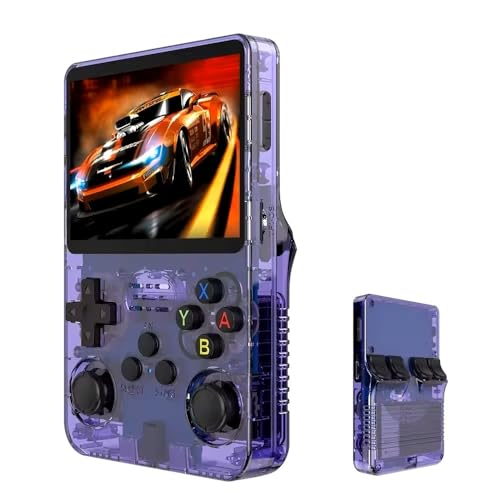 Handheld Retro Game Console with 21 Handheld Retro Game Console with 21 | Massive 210000+ Game Library: Instantly access a vast… Vibrant 3.5-inch IPS Display (640×480): Enjoy crisp, clear… Long-Lasting 3500mAh Battery: Play for extended periods on… | Check price |
As an Amazon Associate we earn from qualifying purchases at no extra cost to you.
Quick Verdict
For dark-room enthusiasts, bedtime gamers, and design purists who want pristine contrast and deep blacks without light bleed, OLED is the undisputed winner. Its organic pixels switch off entirely, delivering unmatched visual depth that makes classic 8-bit, 16-bit, and 32-bit sprites pop against true black backgrounds. However, for bright, multi-windowed living areas, households with young children, or budget-conscious buyers seeking maximum longevity without burn-in anxiety, IPS remains the practical choice as we evaluate top leisure tech for 2026. IPS screens offer bright, uniform color performance across wider viewing angles at roughly half to one-third the price of OLED handheld alternatives.
Side by Side
| Feature | OLED Handheld Displays | IPS Handheld Displays |
|---|---|---|
| Comfort & Eye Strain | Exceptional in low-light environments; eliminates background backlight glow during nighttime play. | Easy on eyes in well-lit rooms; can cause slight fatigue in pitch-black rooms due to backlight glow. |
| Durability & Lifespan | High quality, but vulnerable to organic sub-pixel degradation and static UI burn-in over long periods. | Extremely durable; immune to image burn-in; robust liquid crystal construction handles drop impacts better. |
| Price Range | $160 to $450+ for dedicated handhelds; premium replacement screen modules. | $45 to $130 for complete handheld units; highly affordable replacement parts. |
| Maintenance & Care | Requires screen timeout management, low static brightness settings, and soft microfiber cleaning. | Low maintenance; simple wipe-downs; resilient against static menus left on while paused. |
| Space & Weight | Slightly thinner profile; typically found on 3.5-inch to 7.0-inch devices weighing 180g to 420g. | Slightly thicker light guide layer; panels range from 2.8-inch to 6.0-inch, weighing 140g to 380g. |
| Look & Room Aesthetic | Sleek, modern glass aesthetics; seamless bezel blending when rendering black letterbox borders. | Clean, bright, functional appearance; slight greyish hue on black letterbox borders in dim light. |
| Resale & Value Retention | Holds strong resale value among retro enthusiast communities if screen shows zero burn-in. | Steady, moderate resale value; lower initial buy-in means minimal total dollar loss over time. |
| Best For | Dedicated evening sessions, bedroom nightstands, ambient dark lighting, high-contrast arcade titles. | Bright living rooms, sunrooms, travel, children’s play spaces, extended paused gameplay sessions. |
Where Oled Wins
When curating a relaxing home sanctuary, lighting plays a central role. OLED (Organic Light-Emitting Diode) technology shines brightest when the ambient room lighting drops. Unlike traditional panels that rely on a global or edge-lit backlight, every individual pixel in an OLED display produces its own illumination. When a game depicts dark space, dungeons, or classic black pillar-boxes for 4:3 aspect ratio titles, those pixels turn off entirely, drawing zero milliwatts of power and emitting zero backlight haze.
This capability transforms retro gaming aesthetics. Emulated titles originally crafted for CRT televisions rely heavily on shadow detail and bold color saturation. On an OLED handheld, scanline filters and CRT shaders look strikingly authentic because the black lines between pixels are genuinely pitch-black. Additionally, OLED panels boast response times under 0.1 milliseconds—virtually eliminating ghosting or motion blur during fast-paced platformers and side-scrolling shooters.
From a lifestyle perspective, OLED handhelds elevate late-night relaxation. If you enjoy playing in bed while your partner sleeps, an OLED display set to low brightness will not illuminate the entire room with gray backlight leak. The device integrates seamlessly onto a minimalist nightstand, delivering an uncompromised cinematic presentation in total darkness.
Where Ips Screen for Retro Emulation Handhelds Wins
While OLED commands high-end appeal, In-Plane Switching (IPS) screen technology remains the gold standard for versatility, daily durability, and casual living room use. The primary advantage of an IPS panel in an oled vs ips screen for retro emulation handhelds comparison is its stability under ambient light and its immunity to permanent image retention.
Modern living spaces are designed around natural daylight, large windows, and open floor plans. In bright daytime environments, IPS screens excel by producing consistent, high peak brightness (often ranging between 400 to 500 nits) without the risk of pixel wear. IPS panels also maintain consistent color rendition across wide 178-degree viewing angles, allowing family members sitting alongside you on the couch to see clear, un-shifted colors.
Durability is another major win for IPS. Retro emulation frequently involves static interface elements: life bars, fixed scoreboards, speedometers, and stationary game selection menus. Leaving an OLED device paused on a bright retro HUD while answering the front door can cause burn-in over time. An IPS display carries no risk of burn-in, making it a stress-free option for busy homes, kids, and multi-user households. Furthermore, devices utilizing IPS screens are far less expensive to replace or repair if dropped on hard hardwood or tile flooring.
Cost Over 5 Years
Evaluating screen technology through a five-year ownership lens highlights stark financial differences between these two display types:
- Initial Buy-In: An entry-to-mid level IPS retro handheld usually costs between $45 and $120. In contrast, handhelds equipped with factory OLED panels start around $160 and quickly cross the $300 to $400 threshold for premium x86 or ARM devices.
- Maintenance and Replacement Parts: If an IPS handheld screen cracks, replacement panels generally cost $15 to $35 and are straightforward to repair. Replacing a custom OLED handheld screen assembly often costs $70 to $130, assuming replacement parts remain in stock.
- Power Draw and Battery Longevity: IPS displays maintain a static backlight power draw (typically 1.5W to 3.0W depending on brightness level). OLED panels scale their power consumption based on screen content—drawing under 1.0W on dark retro games, but pulling upwards of 3.5W on full-white screens. Over five years, battery charge cycles remain roughly equivalent, though OLED can offer extended single-charge playtimes if you stick primarily to dark-themed titles.
- Depreciation: High-end OLED handhelds retain a higher absolute dollar resale value within collector markets, but suffer steeper total dollar depreciation (e.g., a $300 unit dropping to $150 over 5 years vs. a $60 IPS unit dropping to $30).
Which One for Your Home
Small Apartment / Studio
In compact living spaces where your living room, home office, and bedroom often overlap, space efficiency and lighting flexibility are paramount. An IPS handheld offers the best all-around versatility. It easily handles direct sunlight filtering through studio windows during the day and provides reliable performance without needing dedicated dark curtains or light-controlled environments.
Family with Kids / Pets
In high-traffic homes with children or pets, durability and low replacement costs take priority over absolute black levels. An IPS screen handheld is resilient, cost-effective, and safe against long pause screens or static game menus. Kids can leave the console running on the playroom rug without risking permanent panel damage.
Rental / Shared Living
If you live with roommates or frequently move between rental properties where ambient lighting varies widely from room to room, an IPS display provides consistent performance across unpredictable spaces. Its lower upfront cost also means less concern when storing it in shared common areas or throwing it into a backpack for commute trips.
Long-Term Home / Dedicated Game Nook
For homeowners who have crafted a dedicated gaming nook, dim-lit den, or curated reading corner with warm 2700K mood lighting, an OLED retro handheld is the ultimate upgrade. It pairs beautifully with rich hardwood side tables, dark textiles, and evening leisure routines, offering a rich visual experience that transforms classic gaming into an artful home pastime.
FAQ
Does static retro UI cause burn-in on OLED handhelds?
It can over extended periods if brightness is set to maximum and static elements (such as health bars or paused overlay menus) remain on screen for hours at a time. Modern OLED panels incorporate pixel-shifting features, but managing screen brightness and using short auto-sleep timers is recommended to preserve panel life.
Is an IPS screen bright enough for playing retro games near bright living room windows?
Yes. Quality IPS panels produce high peak luminance (often 450+ nits) and feature matte or anti-reflective cover glass, making them significantly easier to read under direct sunlight or intense ambient ceiling lights than glossy, lower-brightness OLED displays.
Can I dock an IPS or OLED retro handheld to a desktop monitor?
Yes, many modern retro emulation handhelds feature USB-C or mini-HDMI video outputs. You can easily route signal out to external desktop screens—such as high-refresh gaming displays like the AOC 27″ Gaming Monitor QHD 240Hz QD OLED NVIDIA G-SYNC Compatible Q27GAZD or Q27GAZDV—allowing you to enjoy handheld games on a large, color-accurate home desk setup.
Why are OLED retro handhelds significantly more expensive than IPS models?
OLED panels require complex manufacturing processes involving organic compounds deposited onto thin-film transistor substrates. Yield rates for smaller, high-density OLED panels are lower than standard IPS liquid crystal sheets, driving up component costs for manufacturers and raising final retail prices for consumers.









