
Key takeaways
- Focusing Only on Screen Diagonal Instead of Body Dimensions: A 4.0-inch screen with thick bezels can result in a physical shell that feels noticeably larger in hand than a 4.0-inch screen with slim borders. Always review total height, width, and depth metrics alongside screen size.
- Choosing the Wrong Aspect Ratio for Retro Games: Most classic home and arcade systems prior to the mid-2000s were created natively for 4:3 displays. Selecting a widescreen 16:9 vertical display to play classic 8-bit or 16-bit titles leaves large black bars at the top and bottom (letterboxing), rendering an actual usable image area equal to a much smaller native 4:3 display. As retro gaming handheld ergonomics evolve for 2026, 4:3 screens remain the optimal match for retro aspect ratios.
- Underestimating Top-Heavy Weight Distribution: Large vertical devices with 5.5-inch to 6.0-inch screens place significant display weight above your gripping hands. Without proper palm support or contoured rear grips, top-heavy handhelds can cause wrist flexor strain over time.
- Overlooking Button Reach for Smaller Hands: Larger vertical shells move the top shoulder buttons (L1/L2/R1/R2) higher up the rear casing. If you have smaller hands, reaching these rear triggers on a 5.0-inch or larger vertical console can force uncomfortable hand repositioning during fast-paced games.
The Short Answer
When selecting a vertical retro gaming handheld, the ideal screen size for most players is between 3.5 inches and 4.0 inches with a 4:3 aspect ratio. This standard size range provides the ultimate balance between authentic visual scaling for classic consoles (such as NES, Game Boy, SNES, and PlayStation 1), comfortable hand ergonomics, and effortless pocketability.
If your primary goal is maximum mobility for quick commutes, a compact 3.5-inch screen housed in a shell roughly 4.6 inches long by 3.2 inches wide provides an iconic Game Boy-inspired footprint. For longer home play sessions, reduced eyestrain, or text-heavy RPGs, stepping up to a 4.0-inch or even a roomier 6.0-inch vertical display offers greater visual comfort, though it requires a larger shell footprint and higher battery capacity (ranging from 3,000mAh up to 6,000mAh). Modern options typically range in price from $45 to $80 depending on display scale, chipset, and features.
Our top picks
 PandoraGame R60MAX Retro Handheld Gaming Console
- 【40000+ Classic Games Ready to Play】No manual downloads…
- 【6.0-Inch HD IPS Screen for Stunning Visuals】Game visuals…
- 【Smooth Performance with Open Source Linux】The open-source Linux…
 R40 Retro Handheld Game Console with Storage
- 💝【New Retro Game System】The R40 retro handheld game…
- 💝【3.5 inch HD Tempered Glass Screen】The R40 Retro…
- 💝【Multiple Functions】The R40 retro game console is not…
 RG35XX Pro
- 【MiGoFee Exclusive Bonus Accessories Bundle】 Includes a complimentary…
- 【Immersive Display, Precise Controls & Long Battery Life】…
- 【Optimized Linux Operating System】 Powered by a Linux…
| Product | Key specs | |
|---|---|---|
| PandoraGame R60MAX Retro Handheld Gaming Console | 【40000+ Classic Games Ready to Play】No manual downloads… 【6.0-Inch HD IPS Screen for Stunning Visuals】Game visuals… 【Smooth Performance with Open Source Linux】The open-source Linux… | Check price |
| R40 Retro Handheld Game Console with Storage | 💝【New Retro Game System】The R40 retro handheld game… 💝【3.5 inch HD Tempered Glass Screen】The R40 Retro… 💝【Multiple Functions】The R40 retro game console is not… | Check price |
| RG35XX Pro | 【MiGoFee Exclusive Bonus Accessories Bundle】 Includes a complimentary… 【Immersive Display, Precise Controls & Long Battery Life】… 【Optimized Linux Operating System】 Powered by a Linux… | Check price |
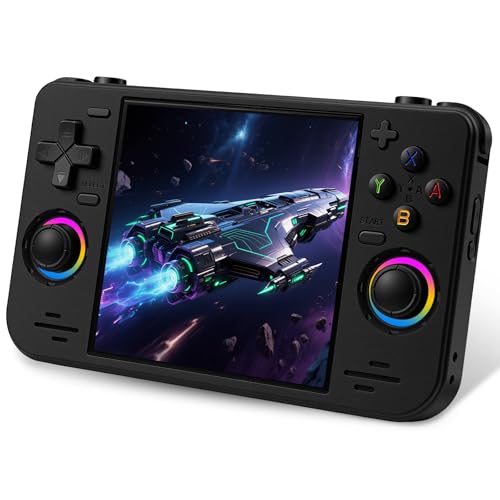 RF40H Handheld Game Console RF40H Handheld Game Console | 【Massive Preloaded Game Library & Powerful Emulation】This RF40H… 【Vibrant 4.0-Inch IPS Display for Immersive Play】Enjoy every… 【Supports WiFi for Connect & Compete】Our RF40H retro… | Check price |
As an Amazon Associate we earn from qualifying purchases at no extra cost to you.
Standard Sizes
Vertical retro handhelds follow distinct dimensional tiers based on display size, bezel width, and shell design. Understanding both the screen diagonal and the overall physical device dimensions ensures your chosen handheld fits your hands, pockets, and home storage setups comfortably.
| Category | Screen Diagonal | Aspect Ratio | Shell Dimensions (H x W x D) | Average Weight | Typical Price Range |
|---|---|---|---|---|---|
| Ultra-Compact | 2.8″ – 3.0″ | 4:3 or 1:1 | 4.0″ x 2.6″ x 0.7″ (10.2 x 6.6 x 1.8 cm) |
3.5 – 4.5 oz (100 – 130 g) |
$35 – $50 |
| Standard Classic | 3.5″ | 4:3 | 4.6″ x 3.2″ x 0.8″ (11.7 x 8.1 x 2.0 cm) |
5.5 – 6.5 oz (155 – 185 g) |
$45 – $75 |
| Mid-Size Comfort | 4.0″ | 4:3 or 1:1 | 5.2″ x 3.5″ x 0.9″ (13.2 x 8.9 x 2.3 cm) |
7.0 – 8.0 oz (200 – 225 g) |
$60 – $80 |
| Maxi Vertical | 5.5″ – 6.0″ | 16:9 or 4:3 | 6.5″ x 3.8″ x 1.0″ (16.5 x 9.7 x 2.5 cm) |
9.5 – 11.0 oz (270 – 310 g) |
$65 – $95 |
How to Measure Your Space
Determining the right screen size requires looking beyond screen specs to measure your physical hands, carrying gear, and home storage setup. Follow these four steps to find your ideal match.
- Measure Your Hand Span and Grip Reach: Open your dominant hand and measure from the tip of your thumb to the tip of your index finger in a relaxed natural arc. If your reach is under 5 inches (12.7 cm), a 3.5-inch vertical shell (about 3.2 inches wide) will keep all face buttons and top shoulder triggers within easy reach. If your grip span exceeds 6.5 inches (16.5 cm), a 4.0-inch or 6.0-inch shell provides the width needed to prevent palm cramping.
- Check Pocket and Bag Clearances: Measure the interior depth and width of your standard jacket or pants pockets. Standard front pockets accommodate devices up to 4.8 inches (12.2 cm) long and 3.3 inches (8.4 cm) wide. Devices with 4.0-inch screens or larger usually require dedicated travel cases measuring at least 6.0 inches x 4.5 inches x 2.0 inches (15.2 x 11.4 x 5.1 cm) for safe transport.
- Determine Visual Focal Distance: Measure the average distance from your eyes to your handheld during typical gameplay. If you tend to hold consoles 10 to 12 inches (25 to 30 cm) away from your eyes, a 3.5-inch panel provides sharp 640×480 resolution clarity. If you play at lap height (16 to 20 inches / 40 to 50 cm away), opt for a 4.0-inch to 6.0-inch display so menu text remains effortlessly legible.
- Account for Charging Dock and Storage Desk Footprint: If you plan to dock your vertical console near a living room media console or home office desk, measure dedicated surface space. A compact 3.5-inch model in a vertical charging stand requires a minimal footprint of roughly 3.5 inches deep by 4.0 inches wide, while larger 6.0-inch devices need closer to 5.0 inches deep by 4.5 inches wide to prevent accidental tipping.
By Room or Use Case
Daily Commute & Pocket Carry
For gamers who want a device that seamlessly slips into a denim pocket, suit jacket, or compact crossbody bag, 3.5-inch vertical handhelds are the industry benchmark. Units like the R40 ($48.98) or the RG35XX Pro ($72.99) utilize tight bezel layouts to fit high-density 3.5-inch IPS displays into bodies measuring roughly 4.6 x 3.2 x 0.8 inches. They weigh between 5.5 and 6.5 ounces, making them light enough that you will hardly notice carrying them. Powered by 3,000mAh to 3,200mAh batteries, they deliver 4 to 6 hours of continuous play while taking up virtually no space on your bedside table or hallway entry console.
Cozy Couch & Long Home Play Sessions
If your gaming primarily happens on the sofa, in bed, or lounging in a reading chair, ergonomics take priority over ultra-compact dimensions. A 4.0-inch screen form factor, such as the RF40H ($64.99), expands the shell body to approximately 5.2 inches in height and 3.5 inches in width. This additional quarter-inch of body width spreads your hands farther apart, aligning your wrists in a more neutral posture. The larger 4.0-inch display panel enlarges retro sprites and in-game text by nearly 30% compared to a 3.5-inch panel, drastically reducing eye fatigue during multi-hour RPG marathons.
Text-Heavy RPGs & Large-Display Immersion
For players who prioritize maximum screen estate or struggle with tiny on-screen text in tactical games and retro computer emulators, 6.0-inch vertical handhelds present a compelling option. Devices like the PandoraGame R60MAX ($69.99) feature a substantial 6.0-inch HD IPS display mounted on a sturdy vertical chassis. To support this expansive display, these consoles incorporate heavy-duty 6,000mAh batteries, resulting in overall device dimensions around 6.5 x 3.8 x 1.0 inches and weights near 10 ounces. While less pocket-friendly, they excel as home-based dedicated handhelds that double as striking display pieces on open shelving or gaming desks.
Travel, TV Output & Desktop Docking
When choosing a versatile console for hotel stays or living room TV connectivity, screen size plays hand-in-hand with hardware features like Mini-HDMI output, WiFi, and Bluetooth. Modern vertical handhelds in the 3.5-inch to 4.0-inch range offer built-in HDMI scaling. When docked on a home media cabinet or desk setup, the internal display turns off while outputting crisp digital video to your television. Look for units packaged with structured hard-shell travel storage cases (typically measuring 6.5 x 4.5 x 2.2 inches) to keep screen protectors and charging cables organized in your luggage.
Common Sizing Mistakes
- Focusing Only on Screen Diagonal Instead of Body Dimensions: A 4.0-inch screen with thick bezels can result in a physical shell that feels noticeably larger in hand than a 4.0-inch screen with slim borders. Always review total height, width, and depth metrics alongside screen size.
- Choosing the Wrong Aspect Ratio for Retro Games: Most classic home and arcade systems prior to the mid-2000s were created natively for 4:3 displays. Selecting a widescreen 16:9 vertical display to play classic 8-bit or 16-bit titles leaves large black bars at the top and bottom (letterboxing), rendering an actual usable image area equal to a much smaller native 4:3 display. As retro gaming handheld ergonomics evolve for 2026, 4:3 screens remain the optimal match for retro aspect ratios.
- Underestimating Top-Heavy Weight Distribution: Large vertical devices with 5.5-inch to 6.0-inch screens place significant display weight above your gripping hands. Without proper palm support or contoured rear grips, top-heavy handhelds can cause wrist flexor strain over time.
- Overlooking Button Reach for Smaller Hands: Larger vertical shells move the top shoulder buttons (L1/L2/R1/R2) higher up the rear casing. If you have smaller hands, reaching these rear triggers on a 5.0-inch or larger vertical console can force uncomfortable hand repositioning during fast-paced games.
FAQ
Is a 3.5-inch screen big enough for classic 90s console games?
Yes, a 3.5-inch 4:3 display is considered the gold standard for classic retro gaming. Because 8-bit, 16-bit, and 32-bit home consoles were originally designed for square-ish CRT televisions, a 3.5-inch screen renders sprites, UI elements, and dialogue box text at exceptional clarity without pixel distortion or awkward stretching.
What vertical screen size is best if I wear reading glasses?
If you wear reading glasses or experience visual fatigue with small typography, a 4.0-inch to 6.0-inch screen is recommended. The expanded display surface scales up fine text in dialogue-heavy RPGs and strategy titles, allowing you to play comfortably from a natural lap-level viewing distance.
How much does screen size affect handheld battery life?
Larger screens require brighter backlights that draw higher wattage from the system. However, manufacturers offset this by equipping larger consoles with bigger battery cells. While a 3.5-inch console typically uses a 3,000mAh to 3,200mAh battery for 4 to 6 hours of play, a larger 6.0-inch vertical console utilizes a massive 6,000mAh battery to achieve a comparable 5 to 7 hours of runtime.
Can vertical retro handhelds fit into standard pant pockets?
Handhelds with 3.5-inch screens (measuring under 4.8 inches tall and 3.3 inches wide) easily fit into standard men’s denim front pockets and jacket pockets. Handhelds with 4.0-inch or larger displays are wider and thicker, making them better suited for coat pockets, backpacks, or dedicated protective carrying cases.









