Our Top Picks
For a typical RTX 50-series gaming build, a fully modular 750W to 850W Gold unit with a native 12V-2×6 cable is the best ATX 3.1 starting point, and the MSI MAG A750GL and NZXT C850 are the clearest matches here. Seven models are covered, from 650W budget units to a 1600W Titanium flagship. The details come from titles, published specifications, manufacturer documentation and buyer reviews, and we mark wherever a title is silent on wattage or cabling.
Where each unit sits
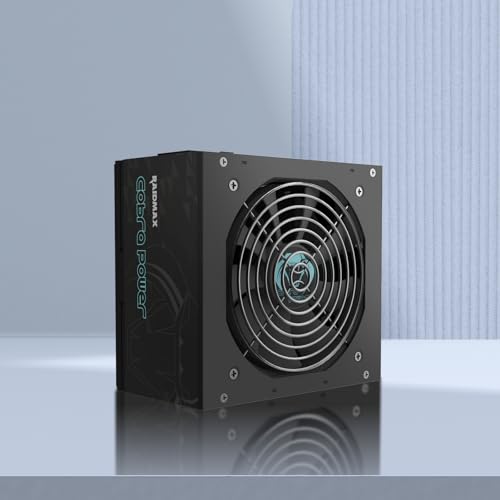
RAIDMAX Cobra ATX 3.1 PCIe Gen 5 Ready Power Supply, 80+ Gold Certified Gaming PSU, High-Performance Power Supply for Gaming PCs, RoHS, Active PFC, Black Flat Cables (RX650AED)
One of the gaming accessory options compared in this guide.
View on AmazonRAIDMAX Cobra RX750AED 750W ATX 3.1 Gaming Power Supply, PCIe Gen 5 Ready, 80+ Gold Certified, Active PFC, RoHS, Black Flat Cables (RX750AED)
One of the gaming accessory options compared in this guide.
View on Amazon
NZXT C850 Gold Core - 850W ATX 3.1 Power Supply, 80+ Gold | 850W ATX 3.1 PSU, 80 PLUS Gold and Cybenetics Platinum, fully modular. Quiet, efficient power for gaming builds.
One of the gaming accessory options compared in this guide.
View on Amazon
NZXT C850 Gold ATX 3.1-850W Fully Modular Power Supply | 850W 80 PLUS Gold ATX 3.1 PSU, fully modular and quiet. PCIe 5 ready for modern GPUs, backed by a 10-year warranty.
One of the gaming accessory options compared in this guide.
View on Amazon
be quiet! Pure Power 12 650W Gaming PSU, 80 Plus Gold, ATX 3.1, 12V-Rail | PCIe 5.1 GPU Support Power Supply, Silent 120mm Fan, LLC Technology, Advanced Stability, Voltage Regulation, 10 Year Warranty
One of the gaming accessory options compared in this guide.
View on Amazon
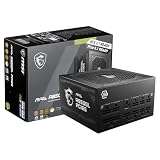
MSI MAG A750GL PCIE5, Fully Modular Compact Gaming 750W Power Supply, 80+ Gold, ATX 3.1 & PCIe 5.1 Ready, Native Dual-Color 12V-2x6 Cable, 10 Year Warranty
One of the gaming accessory options compared in this guide.
View on Amazon
be quiet! Dark Power Pro 13 1600W Power Supply, 80+ and Cybenetics Titanium | ATX 3.1, PCIe 5.1, Fully Modular, Digital Voltage Control, Overclocking Key, Full Bridge LLC PSU, 10-Year Warranty
One of the gaming accessory options compared in this guide.
View on Amazon| Model | Key point from title | Price tier | Best for |
|---|---|---|---|
| RAIDMAX Cobra RX650AED | ATX 3.1, PCIe Gen 5 ready, 80+ Gold, flat cables | Budget | Mid-range builds on a tight budget |
| RAIDMAX Cobra RX750AED | 750W, ATX 3.1, 80+ Gold, flat cables | Budget | Slightly more headroom, same class |
| NZXT C850 Gold Core | 850W, ATX 3.1, 80+ Gold, Cybenetics Platinum, fully modular | Mid-range | Quiet high-wattage builds |
| NZXT C850 Gold | 850W, ATX 3.1, fully modular, 10-year warranty | Mid-range | Near-twin of the Core listing |
| be quiet! Pure Power 12 650W | 650W, 80+ Gold, ATX 3.1, silent 120mm fan, 10-year | Mid-range | Quiet mid-range gaming builds |
| MSI MAG A750GL | 750W, fully modular, 80+ Gold, native 12V-2×6, 10-year | Mid-range | Balanced modern build |
| be quiet! Dark Power Pro 13 | 1600W, Titanium, fully modular, 10-year | Premium | Extreme multi-component builds |
The seven, in detail
RAIDMAX Cobra RX650AED (ATX 3.1, 80+ Gold)
A budget Gold-rated unit that lists ATX 3.1 and PCIe Gen 5 readiness along with black flat cables. The wattage appears only in the model code, so confirm 650W on the listing before ordering. Flat cables are easier to tidy in smaller cases, but the title does not mention modularity, which usually means fixed cabling. Warranty length is not stated, and a lesser-known brand deserves a closer look at buyer reviews. For a build that sits near the unit’s limit, this model leaves little spare capacity, so match it to a modest graphics card. Check that the cable count covers your drives, fans and graphics card before you buy, since fixed cabling cannot be extended by swapping in extra leads.
Pros
- Low price tier with Gold rating
- Flat cables are easier to route
Cons
- Wattage only in the model code
- Modularity and warranty not stated
Who it’s for: Cost-conscious builders with a mid-range graphics card.
RAIDMAX Cobra RX750AED (750W, ATX 3.1)
The same Cobra family with a stated 750W output, ATX 3.1, PCIe Gen 5 readiness, 80+ Gold and active PFC. It adds more headroom than the 650W model for a bit more cost. The same caveats apply: the title does not confirm modular cabling or warranty length, and it names no native 12V-2×6 cable, so check the cable list for your graphics card before relying on it. In a mid-range build it gives sensible spare capacity, and it is easier to justify than the 650W sibling if you might upgrade the graphics card later. As with all fixed-cable units, plan your routing before you start, because you cannot remove unused leads.
Pros
- 750W stated clearly
- Gold efficiency at a budget tier
Cons
- No warranty or modularity information
- Native 12V-2×6 cable not mentioned
Who it’s for: Builders who want more margin than 650W without a large budget.
NZXT C850 Gold Core (850W, fully modular)
This 850W unit lists ATX 3.1, 80 Plus Gold, Cybenetics Platinum and full modularity. The Platinum mention refers to a separate efficiency or noise scheme, so check which one the listing means. It is described as quiet. At 850W it has comfortable room for a high-end graphics card and a fast processor. Quiet in this context is a seller description, not a measurement, so read buyer reviews for comments on fan noise at high load. The title does not name the connectors for the graphics card, so check the listing for the cable it ships with.
Pros
- Fully modular with 850W
- Quiet by description
Cons
- Warranty not in this title
- Near-duplicate of the other C850 listing
Who it’s for: High-end gaming builds where cable tidiness and low noise matter.
NZXT C850 Gold ATX 3.1 (850W, 10-year warranty)
Essentially the same product class as the Core listing: 850W, 80 Plus Gold, fully modular, PCIe 5 ready and a stated 10-year warranty. Because the titles overlap, compare them on the product pages, then buy whichever has the clearer warranty and price. The 10-year figure makes this listing slightly easier to trust than ones that say nothing about warranty. Neither title lists the graphics connector cable in detail, so check the box contents on the product page, and confirm the cable length suits your case before you route anything behind the motherboard tray.
Pros
- 10-year warranty stated
- Fully modular 850W
Cons
- Little to separate it from the Core listing
- No native cable detail in the title
Who it’s for: Buyers who put warranty length near the top of their list.
be quiet! Pure Power 12 650W
A 650W unit with 80 Plus Gold, ATX 3.1, PCIe 5.1 support, a silent 120mm fan, LLC technology and a 10-year warranty. The title stresses stable voltage regulation and quiet running. It does not say whether the cables are modular, so check the listing. At 650W it suits mid-range cards, but a high-end card would leave little margin. The brand name is associated with quiet cooling, which is why it is popular in living-room and bedroom builds, but fan behaviour should be confirmed by reading buyer reviews. If you expect to upgrade to a larger card, move up a wattage tier now rather than replacing the unit later.
Pros
- Quiet fan and 10-year warranty
- ATX 3.1 and PCIe 5.1 stated
Cons
- Modularity not stated
- 650W is limiting for flagship cards
Who it’s for: Quiet mid-range gaming builds.
MSI MAG A750GL PCIE5 (750W, fully modular)
A compact 750W unit that is fully modular, Gold-rated, ATX 3.1 and PCIe 5.1 ready, with a native dual-colour 12V-2×6 cable and a 10-year warranty. A native cable means you may not need an adapter. It is a well-balanced pick for mid-to-upper-range cards, though 750W may be limiting for the strongest RTX 50-series cards. Because it is sold as compact, it should be easy to fit in smaller cases, but check the listing for its length and cable lengths in case you use a tall tower with a bottom-mounted unit. The dual-colour cable helps you see which end plugs into the graphics card.
Pros
- Native 12V-2×6 cable included
- Compact and fully modular
Cons
- 750W may be tight for flagship cards
- Check cable length for large cases
Who it’s for: Most gaming builds, especially compact ones.
be quiet! Dark Power Pro 13 1600W (Titanium)
A flagship 1600W unit with 80+ and Cybenetics Titanium, ATX 3.1, PCIe 5.1, full modularity, digital voltage control, an overclocking key and a 10-year warranty. This is more power than most gaming PCs need. It is sensible only for builds with multiple high-draw parts, and its size and cost put it in a premium tier. Its digital control and overclocking key are features for tinkerers, not necessities. Check that your case can hold a unit this large and that your wall circuit and surge protection suit a build drawing this much power, since high loads put stress on a household circuit.
Pros
- Titanium efficiency and large headroom
- 10-year warranty, fully modular
Cons
- Overkill for most gaming PCs
- Very high cost and size
Who it’s for: Enthusiasts running extreme or multi-GPU builds.
How we compared them
We grouped units by wattage and certification, compared the cabling, warranty and connector details stated in each title, and drew on manufacturer documentation and buyer reviews for general reliability patterns. We flagged missing details instead of guessing. Nobody on the team used or measured these units. Prices are omitted because they change often. Wattage guidance below is a planning aid, not a measurement, and the connector and cable details need checking on each product page.
Sizing and choosing an ATX 3.1 PSU
A simple wattage estimate
Use this planning formula, with assumptions stated. Say the graphics card is rated at 300W, the processor at 150W and the rest of the system at 100W, for 550W total. Add 30 percent headroom for spikes and ageing, and you get about 715W, so a 750W unit fits. For a card rated at 450W with the same other parts, the total becomes 700W, and 30 percent more gives about 910W, which points to a 1000W unit. Swap in your actual part ratings, or try our PC power calculator guide.
ATX 3.1 and 12V-2×6
ATX 3.1 units are designed for the newer high-power connector. A native cable lowers the need for adapters. Whichever you use, push the connector in fully and keep cable bends gentle near the plug.
Efficiency: Gold, Platinum and Titanium
Gold suits most builds. Efficiency describes how much wall power becomes usable power, so a Gold unit wastes a little more as heat than a Titanium one at the same load, but both can be reliable when well built. Higher tiers cost more and mostly save small amounts of power. Choose them for headroom and warranty rather than electricity savings.
Modularity, noise and warranty
Fully modular cabling helps airflow and small cases. Non-modular and flat-cable units can still be fine in a roomy case if you route the spare leads neatly out of the airflow path. A larger 120mm fan can spin slowly at low loads, which helps noise. Prefer units with long, clearly stated warranties.
A short worked example
Imagine you buy a build with a 250W processor and a 360W graphics card, plus 100W for other parts. The total is 710W. Multiply by 1.3 for headroom and you reach 923W, so an 850W unit is a minimum and a 1000W unit is more comfortable. Compare that with the MSI A750GL’s stated 750W: it would be tight. These numbers are examples for planning, not measurements of any listed product.
Case fit
Check unit length against your case, particularly with large cases like the ones in our E-ATX airflow case guide.
Mistakes buyers make
- Buying on wattage alone. Quality and certification matter too.
- Assuming ATX 3.1 includes the native cable. Check the listing.
- Using loose adapters. Strain on the plug causes poor contact.
- Opening the unit. Power supplies hold dangerous charge; never open one.
- Paying for Titanium by default. Gold is enough for most.
- Ignoring cable lengths. Large cases with bottom-mounted units may need longer leads than short cables allow.
Verdict
The MSI MAG A750GL is the best fit for most builds, the NZXT C850 is the choice for high-end cards, and the be quiet! Pure Power 12 suits quiet mid-range machines. The RAIDMAX Cobra units are budget options that need extra checks. Choose the Dark Power Pro 13 only if you truly need 1600W. If you cannot decide between two listings, favour the one that states modularity, warranty and a native connector, since those lines tell you what the brand is willing to put in writing.
Related guides
- Retro Game Storage Cases And Displays
- How To Clean Retro Game Cartridges Safely
- Wireless Chargers For Samsung Galaxy
Frequently asked questions
What wattage ATX 3.1 power supply do I need for an RTX 50-series card?
Start with the graphics card maker’s recommended PSU figure for your exact model, then add margin if your processor is power hungry. A mid-range build often sits comfortably on 650W to 750W, while a high-end card with a fast processor is safer on 850W or more. Short load spikes matter too, so avoid running a unit close to its rated limit.
What is the difference between ATX 3.1 and 12V-2×6?
ATX 3.1 is the power supply standard, and 12V-2×6 is the high-power graphics connector associated with it, an updated version of the older 12VHPWR design. A unit labelled ATX 3.1 should support it, but check the listing for a native cable. If your card uses a different connector, confirm that the supplied cables match before buying.
Is 80 Plus Gold enough, or should I pay for Titanium?
Gold is a sensible efficiency level for most gaming builds. Titanium saves a small amount of electricity at load and typically comes with better components, but it costs much more. Unless you run the PC many hours daily at heavy load, the savings rarely repay the premium. Buy the higher tier mainly for the extra headroom and warranty.
Do I need a fully modular power supply?
Fully modular units let you connect only the cables you need, which improves airflow and makes small cases easier to wire. Non-modular units with flat cables can still work well in roomy cases. Three listings here do not state modularity in their titles, so check the listing before assuming. A tidy interior mostly helps maintenance and appearance.
How long should a power supply warranty be?
A longer warranty signals manufacturer confidence in the unit. Four of the seven listings here state a 10-year warranty, and the others do not state one in the title. Treat unlisted terms as unknown and check the product page. Keep your receipt, and register the product where the brand offers it.