Our Top Picks
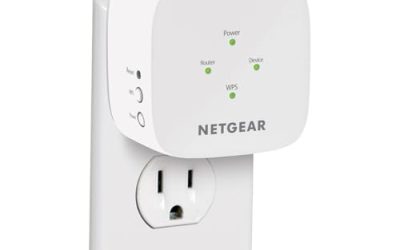
 NETGEAR WiFi Extender EX50001.2 Gbps, 1000 sq.ft.2.55 x 2.85 x 2.85 inches0.34 PoundsCheck on Amazon
Shopping for a WiFi extender when your internet comes over DSL turns the usual advice upside down. The big numbers printed on extender boxes, such as 1200Mbps or 1.8Gbps, describe the wireless link between devices and not the speed of your internet service. A DSL line often delivers a fraction of that, so the extender is almost never the bottleneck. What a DSL household needs is reach: a stable signal in the back bedroom or the garage, from a router that is stuck near the phone jack where the line enters the house.
That shifts the priorities. Instead of chasing gigabit claims, you want an extender that works with any router, sets up without fuss, offers an Ethernet port for a stubborn desktop or TV, and covers the rooms where the signal drops. This guide compares six extenders by standard, band, listed coverage, and setup, so you can pick one that fills the dead zones of a DSL home without paying for speed your line cannot deliver. Every comment relies on the specs in the listings, so read the coverage figures as ranges of ambition and not as measured results.
Quick Picks

2026 New WiFi Extender, WiFi Booster 1200Mbps Dual Band | (5.8GHz/2.4GHz), WiFi Extender Signal Booster for Home with Ethernet Port Covers up to 18999sq.ft and 115+ Devices (White)
One of the consumer electronics options compared in this guide.
View on Amazon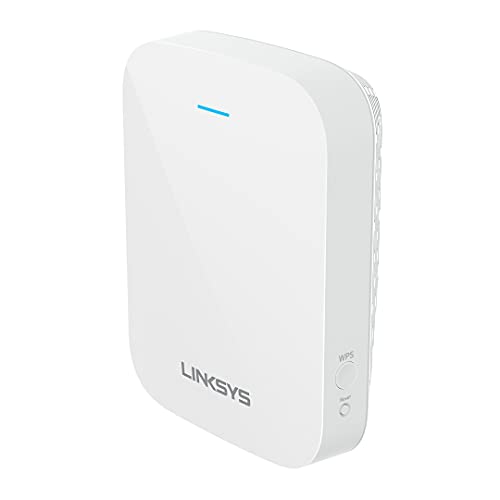
Linksys WiFi Extender, WiFi 6 Range Booster, Dual-Band Booster, Internet Repeater, 2,000 Sq. ft Coverage, Speeds up to (AX1800) 1.8Gbps - RE7310
One of the consumer electronics options compared in this guide.
View on Amazon
WiFi Extender Signal Booster for Home 5G 1200Mbps Dual Band WiFi Booster | wifi extenders signal booster Device Servers Covers Up to 5000 Sq.ft and 35 Devices, Wireless Signal Repeater Ethernet
One of the consumer electronics options compared in this guide.
View on AmazonNETGEAR WiFi Extender EX5000, up to 1,500 sq ft, 1.2 Gbps | Signal Booster for Home, Easy Set Up, 25 devices, Works with any Router, Compact Design, WiFi 5, AC1200
One of the consumer electronics options compared in this guide.
View on Amazon
WiFi Extender Signal Booster: WiFi Repeater 2026 Upgraded Internet Booster | Internet Repeater with Ethernet Port, Range Covers Up to 9995 Sq.ft and 45+ Devices
One of the consumer electronics options compared in this guide.
View on Amazon
2026 Fastest WiFi Extender, WiFi Repeater, WiFi Booster, Covers Up to 10000 Sq.ft and 80 Devices, Internet Booster - with Ethernet Port, Quick Setup, Home Wireless Signal Booster
One of the consumer electronics options compared in this guide.
View on Amazon| Product | Best for | Key spec from the listing |
|---|---|---|
| Dual-Band 1200Mbps Extender | Basic dead-zone fixing | 1200Mbps, 5GHz and 2.4GHz, Ethernet port |
| Linksys RE7310 | Newer WiFi 6 devices | WiFi 6, AX1800, 2,000 sq ft |
| NETGEAR EX5000 | Small homes and apartments | 1.2 Gbps, 1,500 sq ft, 25 devices |
| 9995 Sq Ft Extender With Ethernet Port | Larger layouts on a budget | Ethernet port, up to 9995 sq ft |
| Fastest-Labeled Extender, 10000 Sq Ft | Many connected devices | 10000 sq ft, 80 devices, Ethernet port |
| Jancane Extender | Quick one-key setup | 5800 sq ft, 55 devices, 1-key setup |
How to Choose
Understand what your DSL line limits
DSL speed depends on the distance from the provider’s equipment and the quality of the copper line, and it often tops out far below what even a basic extender can handle. Check your plan’s actual speed first. If it is modest, spending more on a WiFi 6 extender buys little for internet tasks, though it can still help local traffic such as streaming from a media server. The best use of money is coverage and reliability, not top speed. A simple speed test at the router, then another in the weak room, shows exactly how much you are losing and what you need to recover.
Band, standard, and the halving problem
Most extenders receive the router’s signal and rebroadcast it, which can cut available speed roughly in half on a single radio. Dual-band models help by using one band to talk to the router and another to serve your devices. The 2.4GHz band travels farther through walls, while 5GHz is faster at shorter range. WiFi 6 adds efficiency with many devices, which matters if the house is full of phones and smart plugs. Single-band repeaters are cheaper but pay the halving penalty on every connection.
Coverage claims, device counts, and ports
Treat square-foot ratings as marketing. A listing claiming 10000 sq ft is describing ideal open space, not a house with plaster walls and appliances. Compare relative sizes, where 1,500 or 2,000 sq ft claims are more modest, and use judgment based on your floor plan. An Ethernet port is useful for wiring a TV, console, or desktop, which avoids wireless slowdowns. Device counts such as 55 or 80 are also loose, so do not rely on them. The practical limit is usually how well the extender handles several video streams at once.
Placement, compatibility, and what to ignore
An extender works best placed halfway between the router and the dead zone, where it still receives a strong signal. Put it in the dead zone itself and it just repeats a weak signal. Many frustrated buyers make exactly this mistake and blame the product. Look for compatibility with any router, since DSL modems from providers vary. Ignore claims of 99 percent faster speeds or mesh-like performance on plain extenders. In 2026, if your home layout is difficult, a wired access point or a mesh kit may be a better answer than any single extender. A wired link between the router and the extender, where possible, avoids the speed loss entirely.
The 6 Best Options
Dual-Band 1200Mbps WiFi Extender With Ethernet Port
A basic dual-band extender listing 1200Mbps across 5GHz and 2.4GHz, with an Ethernet port and a very large coverage claim. It fits DSL homes that need a simple fix for a weak back room and want the option to wire a device such as a streaming box. Its generic naming means you should rely on the stated specs, not brand reputation, when comparing it with the other models in this group, and you should expect the coverage figure to be optimistic.
- Dual-band design separates router traffic from device traffic.
- Ethernet port allows a wired connection for a TV or desktop.
- Coverage number is a marketing claim and should be discounted heavily.
Skip it if you want a recognized brand with a clear support record or a documented WiFi standard. Keep in mind that the Ethernet port is the most dependable feature on the spec sheet.
Linksys RE7310 WiFi 6 Range Extender
The Linksys RE7310 is a WiFi 6, dual-band booster with an AX1800 rating and 2,000 sq ft of listed coverage. It suits households with newer phones and laptops that support WiFi 6 and want better efficiency when many devices are connected at once. The brand name is also a reassurance for buyers who value established support, which is a real consideration when the router is a provider-supplied DSL gateway.
- WiFi 6 standard improves handling of many simultaneous devices.
- 2,000 sq ft rating is a modest and more believable claim.
- The WiFi 6 benefits are lost if your devices or DSL line are slow.
Skip it if your devices are older and your DSL speed is low, since you will not use the added capability.
NETGEAR WiFi Extender EX5000
A compact extender listing 1.2 Gbps, coverage up to 1,500 sq ft, support for 25 devices, easy setup, and compatibility with any router. It is a good match for apartments and small homes where a single weak spot needs a fix and the router is tucked beside the phone jack. The modest numbers in the title are easier to trust than the giant claims on unbranded boxes, which suits cautious buyers.
- Works with any router, which helps with provider-supplied DSL gear.
- Compact design fits crowded outlets and power strips.
- 1,500 sq ft is the smallest coverage claim in this group.
Skip it if your home is large or has several floors that need coverage. Larger layouts are better served by a model with a wider stated range or a mesh kit.
WiFi Extender Covering Up to 9995 Sq Ft With Ethernet Port
A generic upgraded booster that lists a large 9995 sq ft claim and an Ethernet port. It targets larger layouts at a budget tier, and the repeater format makes it simple to plug in and try. As with other unbranded models, the figures are marketing numbers, so treat the coverage as a best-case figure and plan to place it carefully for decent results.
- Large stated range aimed at sprawling homes.
- Ethernet port helps stubborn wired devices.
- Listing details are thin and support is unclear.
Skip it if you want a documented standard such as WiFi 6 or a brand you can contact for help.
Fastest-Labeled WiFi Extender, 10000 Sq Ft
This unbranded extender claims coverage up to 10000 sq ft and 80 devices, with an Ethernet port and quick setup. It appeals to crowded households with many smart plugs, cameras, and speakers, where the number of connections matters more than raw speed. The listing calls it the fastest, but on a DSL line that word means little because the line itself sets the ceiling.
- High device count claim suits smart-home setups.
- Ethernet port and quick setup are included.
- The word fastest is marketing and does not change your DSL speed.
Skip it if you prefer realistic, conservative specs and a recognizable manufacturer.
Jancane WiFi Extender Signal Booster
The Jancane lists 5800 sq ft, 55 devices, an Ethernet port, a long-range amplifier, and one-key setup. It is a middle option for buyers who want a simple installation with a moderate coverage claim, which fits renters and people who do not enjoy fiddling with router menus. The one-key approach helps when a DSL gateway has a confusing admin page.
- One-key setup helps non-technical users.
- Ethernet port available for wired devices.
- Brand recognition is limited compared with established makers.
Skip it if you want a more established brand or an official WiFi 6 label. A reset button and a simple app or web page are usually all you need for setup.
Which One Fits Your Situation
You have a small apartment with one weak room
The NETGEAR EX5000 is the focused choice. Its modest 1,500 sq ft claim fits a one-floor layout, and it works with the router your provider already supplied.
You have newer devices and want future-proofing
Choose the Linksys RE7310 for its WiFi 6 standard and modest coverage claim. It is the pick for a household that streams on several newer devices at once and wants steady performance across rooms.
You need to wire a TV or desktop
The Ethernet-equipped models, including the 9995 sq ft and Jancane extenders, support wired connections. A short Ethernet cable to a TV or console is usually more stable than any wireless link, especially for video calls and gaming.
You have a crowded smart home
The 10000 sq ft extender lists the highest device count, though the claim is loose. Place it where it still receives a good signal, and do not expect it to serve eighty devices at full speed.
Common Mistakes
- Paying for gigabit labels when your DSL line is much slower. The extra cost buys nothing for internet tasks.
- Placing the extender in the dead zone instead of midway.
- Trusting square-foot claims as guarantees. Walls, floors, and appliances shrink the real coverage dramatically.
- Ignoring the Ethernet port when a wired link would be better.
- Buying a WiFi 6 extender for devices that only support older standards.
Related guides
- Retro Game Storage Cases And Displays
- Solar Chargers For Camping And Hiking
- Wireless Chargers For Samsung Galaxy
Frequently Asked Questions
Will an extender make my DSL faster?
No. It extends coverage, but the internet speed is set by your DSL line. If your plan is slow, contact the provider about the line or an upgrade.
Do I need a mesh system instead?
Not for one weak room. For large homes with many dead zones, a mesh kit may be smoother. A mesh system also manages handoff between nodes, which extenders do not always do well.
Where should I plug it in?
Halfway between the router and the weak area, where the signal is still strong. A quick test with a phone at the chosen outlet shows whether the signal is good enough before you plug anything in.
Is WiFi 6 worth it for DSL?
It helps with many devices and local traffic, but it will not raise your DSL speed. Choose it for the number of devices, not for faster browsing.