Our Top Picks
For a small space, measure first, then choose a compact straight desk about 40 to 55 inches wide and 20 to 27 inches deep, or a corner or L-shaped desk if you have a free, unobstructed corner. The right size is the largest desk that still leaves room for your chair to move and your door or closet to open.
Step 1: Measure the room, not just the wall
- Measure the width and depth of the spot where the desk will go.
- Subtract about 6 to 12 inches as a buffer for chair movement and cable routing, a margin many small-space guides suggest.
- Note door swings, radiators, windows, outlets and closets that could block the desk.
- Outline the desk footprint on the floor with painter’s tape or cardboard and sit in it with your chair to see how it feels.
Step 2: Pick a size for your monitor setup
Sources from Bestier, Eureka Ergonomic and desk reviewers give consistent ranges. For one monitor, aim for at least about 43 inches wide and 23 to 27 inches deep. For two monitors, about 55 inches wide or an L-shaped corner desk gives more room. In very tight areas, keep the depth to about 24 inches or less. One guide lists about 39.5 by 19.7 inches as the minimum workable gaming desk, though that leaves little room for a keyboard, mouse mat and accessories.

DurayLoly 32" Gaming Desk with Power Outlet and LED Lights,Bedroom,Black | Computer Desk with Adjustable Monitor Stand,Fabric Drawer,Office Desk with CPU Stand, Home Work,Study and Gaming,Small Spaces
Chosen because it specifies Bedroom and Black.
View on Amazon
Korfile 40 Inch Gaming Desk with Power Outlet, LED, Carbon Fiber Black | L Shaped Computer Gaming Table, Corner Gamer Table, with 3 Tiers Storage Shelves, with Moniter Stand, for Small Space
Chosen because it specifies LED and Carbon Fiber Black.
View on Amazon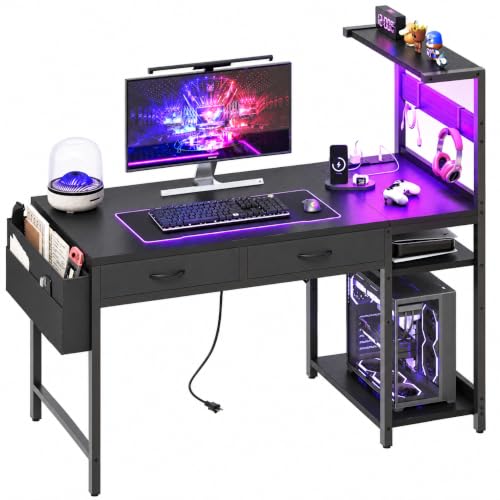
40 Inch Small Gaming Desk with Drawers & Led Lights & Storage Bag, Black | Reversible Storage Shelf, Power Outlets, Wood Grain Gaming Table, Compact Computer Desk for Small Space, Bedroom, Home Office
Chosen because it specifies Black and Reversible Storage Shelf.
View on Amazon| Setup | Width range reported | Depth range reported |
|---|---|---|
| Laptop or one monitor, tight nook | About 40 to 45 inches | About 20 to 24 inches |
| One large monitor, keyboard, mouse mat | About 43 to 55 inches | About 23 to 27 inches |
| Dual monitors | About 55 inches, or a corner desk | About 24 to 27 inches |
Deeper desks help you sit further from the screen, which is easier on the eyes, so do not shave depth below what you need for comfortable viewing.
Step 3: Decide between straight, corner and L-shaped
Guides generally agree that if you have a free corner that is not blocked by a door swing, radiator or closet, an L-shaped or corner desk gives more usable surface in a smaller footprint than a straight desk. If the room is long and narrow, or the corners are taken, a straight desk along the longest wall usually works better. An L-shaped desk of the wrong size can make a small room feel crowded.
Typical corner desk sizes mentioned include about 40 to 43 inches per side to maximize corner space, 47 to 52 inches for more workspace, and 55 inches or more per side for larger corner setups. Measure carefully so the longer arm does not block a doorway.
Step 4: Consider height-adjustable or folding options
A standing desk lets you change positions without adding furniture, and one guide says a mid-size model about 47 to 55 inches wide hits a sweet spot for small spaces. Note that the base often extends past the edges of the desktop, so check the footprint. A wall-mounted or folding desk can clear the floor space when not in use, though you should confirm the maker’s weight capacity and wall-mounting requirements before installing.
Step 5: Check weight capacity
Small desks tend to hold less. Add up your monitor, arm, PC and accessories, and compare with the rated capacity. A PC tower on the floor beside the desk, rather than on top of it, keeps weight down and surface free. See the desk maker’s manual for static and lifting limits.
Step 6: Add vertical space and cable control
- A monitor arm frees surface space and lets you move the screen closer or further away.
- A monitor riser or shelf adds storage beneath or above the screen.
- A pegboard or wall shelf holds headsets, controllers and gadgets without using desk area.
- A cable tray or clips keep wires from cluttering the floor, which matters when floor space is limited.
- A compact PC case or a wall-mounted tower holder reduces the footprint.
Step 7: Check the chair clearance
A compact desk is useless if the chair cannot slide in and out. Compare the chair’s width and the room’s remaining space. A chair with a smaller base or no armrests that tuck under the desk is an option in tight rooms. Avoid placing the desk where the chair will hit a bed, closet door or radiator.
Pick-the-right-desk guide
| If your space is … | Choose |
|---|---|
| A narrow alcove | Compact straight desk, about 40 to 45 inches wide |
| A free corner of a bedroom | Corner or L-shaped desk, about 40 to 52 inches per side |
| A dorm or shared room | Compact straight desk, folding or wall-mounted model |
| A long narrow room | Straight desk along the longest wall |
| A multi-purpose room | Height-adjustable or folding desk |
Models named in small-space roundups include the ODK 53-inch L-shaped desk, the Eureka Ergonomic L60, the Secretlab Magnus Pro XL as a premium standing option, and the Seven Warrior 40-inch desk for tight spaces. Many of these lists come from retailers, so read the maker’s dimension chart and weight capacity before buying.
Common mistakes
- Measuring the desk but not the chair space. Leave room to pull the chair back.
- Choosing an L-shaped desk for a room that is too small. It can take more floor space than two smaller pieces.
- Ignoring depth. A very shallow desk forces you close to the screen.
- Forgetting the base footprint of standing desks. The feet can extend past the top.
- Overlooking outlets and cable routing. Plan where power will come from.
- Skipping weight capacity. Small desks may have lower ratings.
Alternatives
If no desk fits comfortably, consider a wall-mounted fold-down desk, a narrow console table with a monitor arm, or a compact sit-stand desk. For console-only gaming, a TV on a stand and a lap desk can avoid the need for a full desk, though ergonomics are better with a proper surface and chair.
Frequently Asked Questions
What is the smallest desk that works for gaming?
One guide lists about 39.5 by 19.7 inches as a minimum workable size. That fits a laptop or a single small monitor, but leaves little room for a mouse mat and accessories.
Is a corner desk better for a small room?
Often yes, if the corner is free. It provides more surface in a smaller footprint, but a corner desk can crowd the room if it is too large or blocks a door.
How deep should a small gaming desk be?
About 23 to 27 inches is commonly cited for a single monitor, and tight spaces may use around 24 inches or less. Very shallow desks make it hard to sit a comfortable distance from the screen.
Are standing desks good for small spaces?
They can be, because they let you change posture without extra furniture. Check the base footprint and weight capacity first.
How can I save desk space with a gaming PC?
Place the tower on the floor, on a shelf or on a wall-mounted holder, and use a monitor arm to free surface area. Follow the maker’s ventilation guidance so the PC does not overheat.
Should I get a desk with built-in storage?
Shelves and hutches add vertical storage, but they also add bulk and weight. In a tight room, wall-mounted shelves or a pegboard may be a lighter alternative.
FAQ
What is the smallest desk that works for gaming?
Is a corner desk better for a small room?
How deep should a small gaming desk be?
Are standing desks good for small spaces?
How can I save desk space with a gaming PC?
Should I get a desk with built-in storage?
More from Amazon
Programs that pair well with the guide above. Offers and eligibility are set by Amazon and may change.
Free shipping on eligible items, Prime Video and more. Eligible new members can start with a free trial.
Start a Prime free trialAd-free music streaming. Eligible new subscribers can start with a free trial.
Try Music Unlimited freeA Prime membership for ages 18-24 with a trial period. Eligibility is set by Amazon.
See Prime for Young AdultsAudiobooks and podcasts to listen to on the go. Eligible new members can start with a free trial.
Try Audible freeAs an Amazon Associate we earn from qualifying purchases.