Our Top Picks
 New! Sceptre 24-inch Prime Gaming Monitor DisplayPort x224 inches6.7 x 21.3 x 15.6 inchesCheck on Amazon
 New! Sceptre 27-inch Prime Gaming Monitor DisplayPort x227 inches6.7 x 24.2 x 17.4 inches7 poundsCheck on Amazon
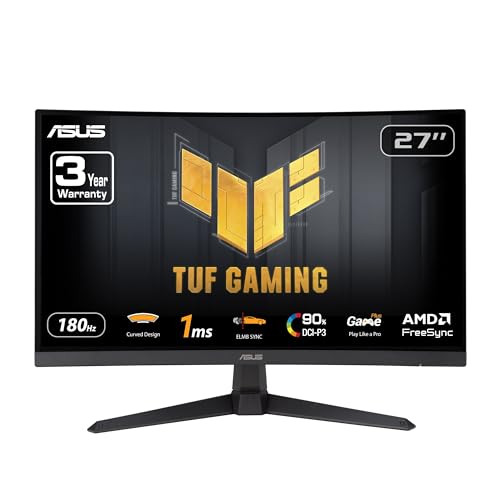 ASUS TUF Gaming VG27VQ3B 27 Inch 1080p 180Hz14.4" x 24" x 3.1"21 x 38 x 49 inches13.9 poundsCheck on Amazon
A 27-inch 1440p monitor is the better all-round gaming choice for most desks, while a 24-inch 1080p panel suits players who sit close, have limited desk space, or want the highest frame rates from a modest graphics card. The two sizes are not simply “small” and “big”: they usually come with different resolutions, and that pairing matters more than the diagonal on its own.
Short answer
Choose 24 inches if competitive shooters are your main focus, your desk is shallow, or your GPU is entry level. Choose 27 inches if you play a mix of genres, want more detail for work and media, and have a GPU able to drive 1440p at a comfortable frame rate. If you are unsure, 27-inch 1440p is the mainstream default because pixel density stays reasonable and the image fills more of your view.
New! Sceptre 24-inch Prime Gaming Monitor DisplayPort x2 165Hz HDMI x2 165Hz Build-in Speakers, Machine Black 2027 (E248B-FW165T Series)
Chosen because it specifies Machine Black 2027 (E248B-FW165T Series).
View on Amazon
Dell 27 Monitor - SE2726H - 27-inch FHD (1920x1080) 144Hz 1ms Display, in-Plane Switching (IPS) Technology, AMD FreeSync™, TÜV 3-Star 2X HDMI, Tilt
Chosen because it specifies SE2726H and 27-inch FHD (1920x1080) 144Hz 1ms Display.
View on AmazonNew! Sceptre 27-inch Prime Gaming Monitor DisplayPort x2 180Hz HDMI x2 180Hz Build-in Speakers, Machine Black 2027 (E275B-FW180T Series)
Chosen because it specifies Machine Black 2027 (E275B-FW180T Series).
View on AmazonASUS TUF Gaming VG27VQ3B 27 Inch 1080p 180Hz HDR Curved Gaming Monitor | 1500R, 1ms, ELMB Sync, FreeSync Premium, 90% DCI-P3, Shadow Boost, Built-In Speakers, DisplayWidget Cente, for PS5 and Xbox
Chosen because it specifies 1500R and 1ms.
View on AmazonQuick comparison
| Factor | 24 inch (typically 1080p) | 27 inch (typically 1440p) |
|---|---|---|
| Pixel density (calculated from size and resolution) | About 92 PPI at 1920×1080 | About 109 PPI at 2560×1440 |
| Pixels the GPU must render | About 2.1 million | About 3.7 million |
| Desk depth needed | Comfortable at a shorter distance | Better with a bit more distance |
| Best for | Esports, budget builds, small desks | All-round gaming, work and media |
| Main limit | Less screen real estate, visible pixels on text | Needs a stronger GPU for high frame rates |
The pixel density figures are simple geometry: diagonal pixel count divided by diagonal size. They are useful because they show why a 27-inch 1080p screen looks coarser than either option above (about 82 PPI), and why a 24-inch 1440p screen looks very sharp (about 122 PPI).
Size versus resolution: the part people mix up
The query “24 vs 27” is really a question about three variables: screen size, resolution and viewing distance. A bigger panel at the same resolution spreads the same pixels over more area, so each pixel gets larger and the picture looks softer. That is why 27-inch 1080p is generally considered the weak spot of the lineup by many display reviewers, and why the 27-inch size is normally paired with 1440p or higher.
A 24-inch monitor at 1080p is a long-standing standard for esports. The panel is small enough that you can take in the whole screen without moving your head, and the low pixel count lets mid-range GPUs reach very high frame rates. A 27-inch 1440p monitor trades some of that frame-rate headroom for a sharper, larger image.
Viewing distance and field of view
Distance changes the answer. At a typical desk distance, a 27-inch screen fills more of your field of view, which many players find more immersive in open-world, racing and single-player titles. In fast competitive games, some players prefer to see the whole screen at a glance, including the minimap and HUD corners, and find 24 inches easier for that.
- Sitting close to a 27-inch screen can make the edges of the image hard to track without moving your head.
- Sitting far from a 24-inch screen makes everything look small, which wastes the benefit of the size.
- Monitor stands and arms let you adjust depth, so measure your desk before deciding.
GPU demand and frame rates
Moving from 1080p to 1440p raises the number of pixels by roughly 78 percent, based on the pixel counts above. A GPU that holds a given frame rate at 1080p will usually need to work noticeably harder at 1440p, although the exact drop depends on the game and settings. If your graphics card is a budget or older model, a 24-inch 1080p screen is the more comfortable match. If you have a current mid-range or better GPU, 1440p is generally a realistic target in most titles, with upscaling technologies available in many newer games when you need extra headroom.
Because 27-inch gaming monitors now commonly offer high refresh rates at 1440p, the old assumption that 1440p means giving up speed no longer applies across the board. Check the monitor maker’s spec sheet for the stated refresh rate at native resolution and whether variable refresh rate (G-Sync Compatible or FreeSync) is listed.
Productivity, text and media
If the screen is also your work monitor, the extra desktop space of 1440p on 27 inches is a real benefit: two windows sit side by side more comfortably. Text on a 24-inch 1080p panel can look slightly coarse to some users, especially with default Windows scaling. Streaming video, editing photos and reading long documents tend to be nicer on the higher-density 27-inch 1440p option.
Pick-this-if table
| Your situation | Better fit | Reason |
|---|---|---|
| Competitive FPS, entry or mid-range GPU | 24 inch 1080p | Lower pixel load, whole screen visible at a glance |
| Mixed gaming plus work from one monitor | 27 inch 1440p | More workspace and sharper text |
| Small or shallow desk | 24 inch | Fits comfortably, less head movement |
| Single-player and open-world games | 27 inch 1440p | Larger, more immersive, sharper image |
| Strong current GPU | 27 inch 1440p or higher | Frame-rate headroom is available |
| Tight budget | 24 inch 1080p | Cheaper panels and cheaper GPU requirements |
Common mistakes
- Buying 27-inch 1080p. The pixels are large and the image looks less sharp than either of the better pairings. If you want 27 inches, look for at least 1440p.
- Ignoring the GPU. A sharper screen does not help if the card cannot hold a smooth frame rate at that resolution.
- Judging only by diagonal. Panel type, refresh rate, response time and HDR claims differ widely between models of the same size.
- Not checking desk depth. A 27-inch screen on a very shallow desk can feel overwhelming.
- Forgetting stand adjustability. Height and tilt affect comfort more than most spec lines do.
Alternatives to consider
If neither size feels right, there are a few other directions. A 25-inch 1440p panel is offered by some makers and sits between the two in size with high pixel density. A 32-inch 1440p or 4K monitor suits players who sit farther back or use the screen for media and work. A 27-inch 4K monitor gives very high density but needs a powerful GPU for demanding games. Ultrawide models offer a different shape rather than a simple size step and have their own game-support considerations.
Frequently Asked Questions
Is 27 inches too big for gaming?
For most people at a normal desk distance it is not too big. Players of fast competitive shooters sometimes prefer a smaller screen so they can see the entire picture without moving their eyes much, but this is a preference, not a rule.
Is 24-inch 1440p a good compromise?
It can be, because the pixel density is very high and the screen remains compact. The trade-off is that the GPU still has to render 1440p, and interface elements can look small without scaling.
Will a 27-inch monitor lower my frame rate?
The size itself does not. The resolution that usually comes with it does, because 1440p has more pixels than 1080p. A capable GPU will handle it, while an older or entry-level card may struggle in demanding games.
Which is better for esports?
Many competitive players use 24-inch 1080p high refresh rate monitors because of the low GPU load and compact size. Others use 27-inch 1440p high refresh rate screens, so the choice depends on comfort and hardware.
Can I use a 27-inch monitor at 1080p to save performance?
You can, but non-native resolution scaling often looks blurrier than native output. Using in-game upscaling options is usually a better way to gain frame rate than running the panel at a lower resolution.
Does screen size affect input lag?
Size on its own does not. Input lag and response time are tied to the specific panel and its processing, so compare the maker’s stated figures and independent review measurements for the exact model.
FAQ
Is 27 inches too big for gaming?
Is 24-inch 1440p a good compromise?
Will a 27-inch monitor lower my frame rate?
Which is better for esports?
Can I use a 27-inch monitor at 1080p to save performance?
Does screen size affect input lag?
More from Amazon
Programs that pair well with the guide above. Offers and eligibility are set by Amazon and may change.
Free shipping on eligible items, Prime Video and more. Eligible new members can start with a free trial.
Start a Prime free trialAd-free music streaming. Eligible new subscribers can start with a free trial.
Try Music Unlimited freeA Prime membership for ages 18-24 with a trial period. Eligibility is set by Amazon.
See Prime for Young AdultsAudiobooks and podcasts to listen to on the go. Eligible new members can start with a free trial.
Try Audible freeAs an Amazon Associate we earn from qualifying purchases.