Our Top Picks
A good response time for a gaming monitor is a measured gray-to-gray figure of roughly 1 to 5 milliseconds on an IPS or VA panel, or well under 1 millisecond on an OLED, and the number that matters most is the independently measured result with overdrive set sensibly, not the marketing figure on the box. A lower figure helps only if the monitor does not introduce overshoot artifacts.
Quick Reference
| Panel type | Typical advertised figure | What to watch |
|---|---|---|
| TN | 1 ms | Fast, but narrower viewing angles and weaker color |
| Fast IPS | 1 ms (gray to gray, often with overdrive) | Overshoot (inverse ghosting) at the most aggressive overdrive setting |
| VA | 1 to 4 ms advertised | Dark-scene smearing reported by reviewers on many models |
| OLED | Often listed as 0.03 ms or similar | Pixels switch very quickly; other factors such as burn-in care and brightness matter |
What Response Time Means
Response time is how long a pixel takes to change from one color to another, expressed in milliseconds. A public reference notes that it is usually measured gray to gray, based on a VESA standard that runs from the 10 percent to the 90 percent points of the pixel’s response curve. Slow response creates motion blur or trails behind moving objects, which is most noticeable in fast games.
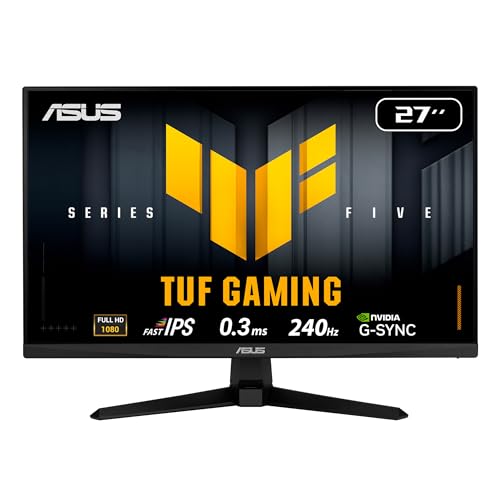
ASUS TUF VG279QM5A 27 Inch 1080p 240Hz Fast IPS G-SYNC Gaming Monitor | ELMB Sync, 0.3ms, FreeSync Premium, Variable Overdrive, 99% sRGB, HDMI, DisplayPort, 3yr warranty
Chosen because it specifies ELMB Sync and 0.3ms.
View on Amazon
Pixio PX248 Wave Pink 24 inch 200Hz Refresh Rate FHD 1080p Resolution Fast IPS Panel 1ms GTG Response Time Built-in Speakers Gaming Monitor with Adaptive Sync
Picked as a relevant option in this category.
View on Amazon
Samsung 27" Odyssey G3 (G30D) Series FHD Gaming Monitor | 1ms, 180Hz, AMD FreeSync, Adjustable Stand, Black Equalizer, Virtual Aim Point, Eye Saver Mode, Flicker-Free, LS27DG302ENXZA
Chosen because it specifies 1ms and 180Hz.
View on Amazon
Pixio PX248 Wave Blue 24 inch 200Hz Refresh Rate FHD 1080p Resolution Fast IPS Panel 1ms GTG Response Time Built-in Speakers Gaming Monitor with Adaptive Sync
Picked as a relevant option in this category.
View on AmazonMakers commonly quote the best case. The same monitor may take far longer on certain color transitions, and the figure may only be reached at the most aggressive overdrive setting. A listing of 1 ms is therefore a ceiling, not an average.
Gray-to-Gray Versus MPRT
Gray-to-gray (GtG) measures pixel transition speed. Another figure, moving picture response time (MPRT), is tied to how long each frame is visible and is often quoted for modes that strobe the backlight. A 1 ms MPRT claim is not the same as a 1 ms GtG claim. When comparing models, compare like with like, and be cautious of motion blur reduction modes, which can lower brightness and add flicker or double images.
Overdrive: The Hidden Setting
LCD monitors speed up pixel transitions with overdrive, which temporarily pushes pixels past their target voltage. A moderate setting shortens transitions. Too much creates overshoot, which shows as bright or dark halos behind moving objects and can look worse than the blur it replaces. Reviewers often find the middle overdrive setting gives the best balance and the fastest mode is not always the best. Overdrive names vary by maker, so check the monitor’s on-screen menu and manual. Some monitors adjust overdrive automatically with variable refresh rate, which helps hold quality across frame rates.
How Response Time Relates to Refresh Rate
A pixel has to finish its transition before the next frame arrives. At 144 Hz the frame interval is about 6.9 milliseconds, and at 240 Hz about 4.2 milliseconds. If a panel needs longer than that on common transitions, it will not fully reach the target color before the next frame, and the extra refresh rate gains less. That is why high refresh monitors need fast panels, and why a 240 Hz monitor with slow transitions can look no clearer than a good 144 Hz panel.
| Refresh rate | Frame interval (approx.) | Implication |
|---|---|---|
| 60 Hz | 16.7 ms | Most panels keep up |
| 144 Hz | 6.9 ms | Good IPS and VA panels are generally suited |
| 240 Hz | 4.2 ms | Needs fast transitions or an OLED to realize the benefit |
| 360 Hz | 2.8 ms | Mostly esports; panel speed is the limit |
What Is Good Enough?
For general gaming at 60 to 144 Hz, a modern IPS or VA panel with a measured response that meets the frame interval is good enough, and the difference between a 1 ms and a 4 ms advertised figure is often hard to notice in practice. For competitive play at 240 Hz and above, response time becomes more important, and OLED and the better fast IPS models are the usual choices. If you play slow strategy or story games, response time is a minor factor compared with color, contrast and resolution.
Input Lag Is a Different Thing
Response time measures the pixel change. Input lag measures the delay between your action or the GPU output and the image appearing. A monitor can have a fast pixel response and still have noticeable input lag if its processing is slow. Reviewers report both, and game or low-latency modes can reduce processing delay. Do not treat them as the same spec.
How to Judge a Monitor Before Buying
- Look for independent measurements of response time across the range of transitions, not just the best case.
- Check whether the best figure needs the fastest overdrive mode and whether that mode causes overshoot.
- Look at how the panel type handles dark scenes if you play dark games.
- Check the refresh rate and the variable refresh range alongside the response time.
- Confirm the warranty and return policy for dead-pixel or panel defects, since terms vary.
Common Mistakes
- Choosing by the lowest advertised millisecond number.
- Leaving overdrive at the most aggressive setting.
- Mixing up GtG, MPRT and input lag.
- Expecting a high refresh rate to look clear on a slow panel.
- Using strobing motion modes while also using variable refresh, when the monitor does not support both together.
Pick-If Table
| Pick this if … | Choose |
|---|---|
| You want the fastest motion clarity | OLED, taking care of the maker’s burn-in guidance |
| You want a balanced all-round panel | Fast IPS with measured, sensible overdrive |
| You want high contrast in dark games | VA, after checking reviewer measurements for smearing |
| You mostly play casual or single-player games at 60 Hz | Any modern panel; prioritize color and contrast |
Frequently Asked Questions
Is 1 ms response time really necessary?
Not for most players. A properly measured response of a few milliseconds is enough for 144 Hz gaming, and the advertised 1 ms figure is often a best-case value.
Is 5 ms too slow for gaming?
For casual and mid-refresh gaming it is acceptable. At high refresh rates such as 240 Hz it may produce visible blur compared with faster panels.
What is the difference between response time and input lag?
Response time is how fast pixels change color. Input lag is the delay before the image appears after the signal arrives. Both affect feel, but they are separate specifications.
Does overdrive always help?
No. Moderate overdrive sharpens motion, but an aggressive setting can add overshoot artifacts. Try the monitor’s settings and pick the one that looks cleanest in motion.
Are OLED monitors always better for response time?
OLED pixels switch very quickly, which gives excellent motion clarity. They come with other considerations such as brightness limits and the maker’s care guidance on static images, so read the specifications.
FAQ
What Is Good Enough?
Is 1 ms response time really necessary?
Is 5 ms too slow for gaming?
What is the difference between response time and input lag?
Does overdrive always help?
Are OLED monitors always better for response time?
More from Amazon
Programs that pair well with the guide above. Offers and eligibility are set by Amazon and may change.
Free shipping on eligible items, Prime Video and more. Eligible new members can start with a free trial.
Start a Prime free trialAd-free music streaming. Eligible new subscribers can start with a free trial.
Try Music Unlimited freeA Prime membership for ages 18-24 with a trial period. Eligibility is set by Amazon.
See Prime for Young AdultsAudiobooks and podcasts to listen to on the go. Eligible new members can start with a free trial.
Try Audible freeAs an Amazon Associate we earn from qualifying purchases.