Our Top Picks
The WD Black SN850X suits most gamers who want a fast PCIe 4.0 drive at a sensible budget, the Samsung 990 Pro suits buyers who want the top PCIe 4.0 performance and efficiency, and the Crucial T500 suits those who want a strong all-round drive with a heatsink option between the two. For a 1TB gaming drive, reviewers say you do not need a PCIe 5.0 model, because game load times are limited by more than raw sequential speed.
At a glance
| Drive (1TB) | Best for | Stated specs | Limits |
|---|---|---|---|
| WD Black SN850X | Value, PS5 and PC | PCIe 4.0 x4, M.2 2280; up to 7,300MB/s read and 6,300MB/s write; 600 TBW; 5-year limited warranty; heatsink version available | Slightly lower peak speeds than the 990 Pro; a PCIe 3.0 slot limits it to Gen 3 speeds |
| Samsung 990 Pro | Top PCIe 4.0 performance and efficiency | PCIe 4.0 x4, M.2 2280; up to 7,450MB/s read and 6,900MB/s write; up to 1,200,000 random read IOPS; 600 TBW; 5-year limited warranty; heatsink variant sold | Higher budget class than the SN850X per reviewer price snapshots |
| Crucial T500 | Balanced performance and efficiency | PCIe 4.0 x4, M.2 2280; 7,300MB/s read and 6,800MB/s write for 1TB per datasheet; 600 TBW; heatsink variant sold | Sources disagree on controller and NAND details; confirm the exact part number |
What matters for a gaming SSD
Gaming SSDs are judged on three things: how fast they load data, how well they hold speed under sustained writes, and how well they handle heat. For gaming, random read performance and consistency matter more than the headline sequential number. Tom’s Hardware, in its 2026 roundup, names the Samsung 990 Pro the best SSD overall and for gaming, while also noting that PCIe 5.0 drives are not needed for gaming.
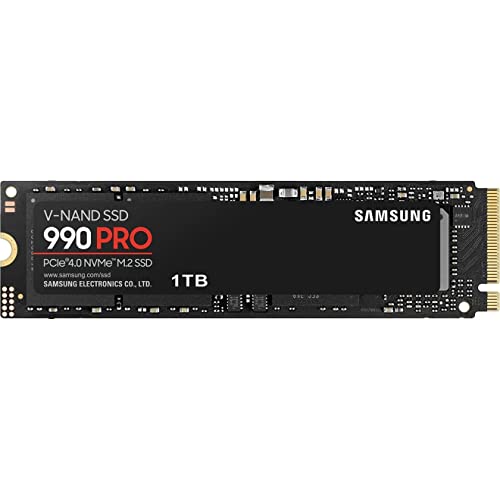
Samsung SSD 990 PRO 1TB, PCIe 4.0 M.2 2280, Up to 7,450 MB/s | NVMe Internal Solid State Hard Drive for High End Computing, Gaming, and Heavy Duty Workstations (MZ-V9P1T0B/AM)
Chosen because it specifies PCIe 4.0 M.2 2280 and Up to 7.
View on Amazon
SIX NVME M.2 SSD PCIe 4.0-1TB m.2 2280 ssd, Read UP to 7350MB/s 1TB for Gaming PS5 Memory Storage Expansion with Heatsink, Internal Solid State Hard Drive PCIe gen 4x4 Nvme for Laptop Desktop pc
Picked as a relevant option in this category.
View on Amazon
Samsung SSD 9100 PRO 1TB, PCIe 5.0x4 M.2 2280, Up to 14,700MB/s | NVMe Internal Solid State Hard Drive best for AI Computing, Gaming, and Heavy Duty Workstations (MZ VAP1T0B/AM)
Chosen because it specifies PCIe 5.0x4 M.2 2280 and Up to 14.
View on AmazonCapacity matters too. Modern games are large, and a 1TB drive fills quickly with a handful of big titles. If you install many games, consider a 2TB drive or a second drive for a library. A 1TB drive suits a boot-and-games setup for a moderate library.
WD Black SN850X
The maker lists the 1TB SN850X as a PCIe 4.0 x4 NVMe drive with up to 7,300MB/s read and 6,300MB/s write (the 2TB and 4TB models list 6,600MB/s), a 600 TBW endurance rating and a five-year limited warranty. Other sources list 112-layer BiCS5 TLC NAND and random performance up to about 800K read IOPS and 1.1M write IOPS. A heatsink version with RGB is sold at 1TB and 2TB.
Gagadget recommends it for most users because it delivers about 95 percent of the 990 Pro’s performance for less money, and UserBenchmark’s snapshot calls it the value pick at every capacity. Prices change often, so compare the current market tier instead of relying on old snapshots.
Fit notes: the plain version suits motherboards with an M.2 heatsink. The heatsink version is the safer choice for PlayStation 5 internal storage, where the console requires a heatsink or a drive with one fitted. In a PCIe 3.0 slot, it runs at Gen 3 speeds.
Samsung 990 Pro
Samsung lists the 990 Pro with up to 7,450MB/s sequential read and 6,900MB/s sequential write, random performance up to 1,200,000 IOPS read and 1,550,000 IOPS write, a 600 TBW rating for the 1TB model and a five-year limited warranty. It uses Samsung’s Pascal controller and LPDDR4 DRAM. A heatsink variant is sold separately, and B&H lists a version with a PS5-compatible heatsink.
Tom’s Hardware picks it as the best overall and for gaming, citing slightly higher sequential speeds than the SN850X and better power efficiency. The trade-off is a higher budget class. Gagadget’s comparison with the SN850X suggests the SN850X for most users because of the difference in cost relative to performance.
Crucial T500
Crucial’s datasheet lists the 1TB T500 at 7,300MB/s read and 6,800MB/s write, with 1,150K random read IOPS and 1,440K random write IOPS and a 600 TBW rating. The drive is sold with or without a heatsink, and the part number ends in SSD8 for no heatsink and SSD5 for the heatsink version. Micro Center lists five-year limited coverage.
StoredBits says the T500 has a performance edge over the SN850X, while costing roughly a little more, and Gagadget’s comparison recommends it over the 990 Pro for most users on efficiency and price-to-performance. Sources disagree on controller (Phison E25 versus E18) and NAND layer count, so rely on the maker datasheet.
Heat, heatsinks and fit
- Motherboard heatsink: many boards include an M.2 heatsink. If yours does, the plain drive is usually fine, but fit the heatsink correctly and remove any protective film.
- Drive heatsink: required or recommended for PS5 internal storage. Check the console’s published height limit for the drive plus heatsink.
- Laptops and small PCs: choose the plain drive without a heatsink, since space is limited.
- Slot generation: a PCIe 4.0 drive works in a PCIe 3.0 slot but at lower speed.
- Form factor: all three are M.2 2280, which fits most desktops and many laptops.
Budget tiers
| Tier | Drive type | Trade-off |
|---|---|---|
| Budget | Entry PCIe 4.0 or DRAM-less drives, or SATA for older systems | Slower sustained writes and lower endurance |
| Mid-range | WD Black SN850X, Crucial T500 | Strong all-round gaming performance |
| Premium | Samsung 990 Pro, PCIe 5.0 drives | Higher efficiency and peak speed, limited real-world gaming gain |
Pick X if…
| If you want… | Pick |
|---|---|
| The best value for gaming | WD Black SN850X |
| The fastest PCIe 4.0 and strong efficiency | Samsung 990 Pro |
| A balanced drive with a heatsink option | Crucial T500 |
| A PS5 upgrade | A heatsink version of any of the three |
Alternatives
Tom’s Hardware’s best SSDs roundup covers other drives for different needs, from PCIe 5.0 models to budget SATA drives. A PCIe 5.0 drive adds peak speed but also heat and a higher budget class, and reviewers say it is not needed for gaming. If your system only has SATA bays, a SATA SSD is still a big step up from a hard drive.
How to choose between the three
Start with the slot and the use case. If the drive goes into a desktop motherboard that already has an M.2 heatsink, the plain version of any of these three is a sensible choice, and the decision comes down to budget tier and efficiency. If the drive goes into a console or a cramped chassis, the heatsink question comes first, and you should compare the combined height of drive and heatsink with the published limit. Reviewers also point out that differences between these drives show up mostly in benchmarks and in sustained transfers such as copying a large game library, not in how quickly a level loads.
Endurance is the same on paper at 600 TBW for all three 1TB models, and each carries a five-year limited warranty. That makes the choice mainly about performance consistency, power draw and how much you want to spend. Laptop and handheld PC owners may care most about power efficiency, where reviewers credit the 990 Pro and T500 with strong results. Desktop gamers on a budget will often find the SN850X leaves the least room for regret. Whichever you choose, keep the drive below about three quarters full, since many drives slow down when nearly full, and keep the motherboard BIOS and the drive firmware up to date using the maker’s own tools.
Frequently Asked Questions
Is 1TB enough for gaming?
It is enough for a moderate library, but large modern games can take a big share of it. If you install many titles at once, consider 2TB or add a second drive.
Do I need a PCIe 5.0 SSD for gaming?
No. Reviewers state that PCIe 4.0 drives such as the SN850X, 990 Pro and T500 are strong choices for gaming, and PCIe 5.0 adds heat and a higher budget class without much real-world gaming benefit.
Which is better, the SN850X or the 990 Pro?
The 990 Pro has slightly higher stated speeds and better efficiency, while the SN850X is the value pick. Both are 600 TBW drives with a five-year warranty at 1TB.
Does the SN850X work with a PS5?
A heatsink version is sold, and PS5 internal storage requires a heatsink. Check the console’s current requirements and the drive’s dimensions before buying.
Will a PCIe 4.0 drive work in an older motherboard?
It works in PCIe 3.0 M.2 slots at Gen 3 speeds, which is still fast. Check that your motherboard has an M.2 NVMe slot rather than SATA-only.
What does TBW mean?
TBW is the total terabytes written the maker rates the drive for under warranty. At 600 TBW for the 1TB models here, normal gaming use is unlikely to approach it during the five-year warranty.
FAQ
Is 1TB enough for gaming?
Do I need a PCIe 5.0 SSD for gaming?
Which is better, the SN850X or the 990 Pro?
Does the SN850X work with a PS5?
Will a PCIe 4.0 drive work in an older motherboard?
What does TBW mean?
More from Amazon
Programs that pair well with the guide above. Offers and eligibility are set by Amazon and may change.
Free shipping on eligible items, Prime Video and more. Eligible new members can start with a free trial.
Start a Prime free trialAd-free music streaming. Eligible new subscribers can start with a free trial.
Try Music Unlimited freeA Prime membership for ages 18-24 with a trial period. Eligibility is set by Amazon.
See Prime for Young AdultsAudiobooks and podcasts to listen to on the go. Eligible new members can start with a free trial.
Try Audible freeAs an Amazon Associate we earn from qualifying purchases.