Our Top Picks
 Kado 3-Pack Trio 27" Curved 1500R 1920x1080 75Hz272.83 x 24.46 x 14.56 inches12.24 poundsCheck on Amazon
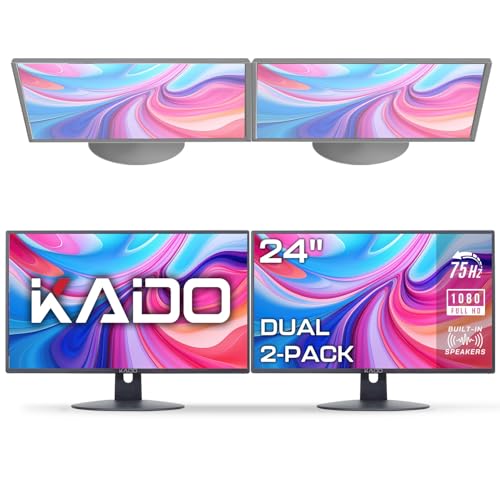 Kado Dual Monitor 2-Pack 24" 1920x1080 75Hz FHD24" Flat 2-Pack1.85 x 21.3 x 12.64 inches11.6 poundsCheck on Amazon
 Kado 2-Pack Dual 24" Curved 1500R 1920x1080 75Hz242.21 x 21.17 x 12.65 inches11.64 poundsCheck on Amazon
 Stand Steady 6 Monitor Mount Desk Setup71" x 3" x 40.15"16 x 41 x 5 inches17.6 poundsCheck on Amazon
The best multiple monitor setup for most gamers is two matching 27-inch monitors on a dual gas-spring arm, with a third screen added only if your graphics card has the outputs and your desk is wide enough. Ergotron’s LX Dual arm suits buyers who want a premium, long-warranty mount, VIVO and HUANUO suit buyers who want a budget or mid-range dual mount, and VIVO or Mount-It triple arms suit buyers going to three screens.
At a Glance: Mounts for Multi-Monitor Setups
| Mount | Best for | Key stated specs | Limits |
|---|---|---|---|
| Ergotron LX Dual | Premium dual setup | Reviewers list two monitors up to 27 inches, 7 to 20 lb per arm, VESA 75 by 75 and 100 by 100, and a long warranty (Ergotron rates its single LX up to 34 inches and 25 lb with a 10-year warranty) | Premium tier; per-arm weight limit suits most 27-inch panels but not large heavy ones |
| HUANUO dual arm (DS7) | Larger or heavier screens at a mid-range tier | Reviewers list screens up to 40 inches, 26.4 lb per arm, built-in USB ports and a 5-year warranty | Spec figures differ between outlets |
| HUANUO dual stand (budget) | Budget gas-spring dual | Reviewers list up to 32 inches, about 19.8 lb per arm, 75 and 100 VESA, clamp and grommet mounting | Weight limits vary by outlet |
| VIVO Dual Mount | Budget dual for 27-inch screens | Reviewers list 22 lb per arm, C-clamp or grommet mount and a 3-year warranty | Basic adjustment range |
| VIVO Triple Monitor Mount | Three smaller screens | Reviewers list 13 to 27 inch screens and integrated cable management | Limited to modest screen sizes |
| Mount-It! Triple Monitor Arm | Clamp-mounted triple | Reviewers list 13 to 27 inch screens | Little spec detail available |
Numbers come from review outlets and differ between sources; confirm each figure on the maker’s page, especially weight per arm.
Kado 3-Pack Trio 27" Curved 1500R 1920x1080 75Hz FHD Computer Monitor | Triple Monitor Setup HDMI Office Gaming Hybrid, VESA Wall Mount Arm Mount Built-in Speakers, Panoramic Display Multi-tasking
Chosen because it specifies Triple Monitor Setup HDMI Office Gaming Hybrid and VESA Wall Mount Arm Mount Built-in Speakers.
View on AmazonKado Dual Monitor 2-Pack 24" 1920x1080 75Hz FHD Computer Monitor | HDMI Office Gaming Hybrid Desk Setup, VESA Wall Mount Arm Mount Built-in Speakers, Panoramic Display Multi-tasking
Chosen because it specifies HDMI Office Gaming Hybrid Desk Setup and VESA Wall Mount Arm Mount Built-in Speakers.
View on AmazonKado 2-Pack Dual 24" Curved 1500R 1920x1080 75Hz FHD Computer Monitor | Dual Monitor Setup HDMI Office Gaming Hybrid, VESA Wall Mount Arm Mount Built-in Speakers, Panoramic Display Multi-tasking
Chosen because it specifies Dual Monitor Setup HDMI Office Gaming Hybrid and VESA Wall Mount Arm Mount Built-in Speakers.
View on AmazonStand Steady 6 Monitor Mount Desk Setup - Heavy-Duty Height Adjustable Monitor Stand, Swivel Arm with Clamp-On Base, 6 Screen VESA Mount Fits Most LCD/LED Monitors 17-32 in. (Silver, 6 Mounts)
Chosen because it specifies Heavy-Duty Height Adjustable Monitor Stand and Swivel Arm with Clamp-On Base.
View on AmazonPlanning a Multiple Monitor Setup
How many screens?
Two screens cover gaming plus chat, guides or streaming tools. Three give a wide view in racing and flight games, but the side screens are usually used for secondary windows. More than three is rarely practical on a single desk.
Graphics card outputs
Count the DisplayPort and HDMI outputs on your card. Modern cards typically provide several, but not every combination runs at full refresh rate with every monitor. Plan which monitor is the main gaming screen and connect it to the best port.
Matching panels
Matching size, resolution and bezel width gives a cleaner look. Mixed refresh rates are workable, but Windows treats them separately. A high-refresh main monitor with a standard-refresh side monitor is a common, sensible combination.
Performance
Games usually render on the main monitor only, so extra screens add little load unless you play across all of them. Video playback on a second screen can reduce performance slightly on some systems.
Ergotron LX Dual
Ergotron’s LX is the arm roundups most often name as best overall. Reviewers list the LX Dual as holding two monitors up to 27 inches with 7 to 20 lb per arm, VESA 75 by 75 and 100 by 100 mounting and gas-spring adjustment. Ergotron itself rates the single LX arm for monitors of 7 to 25 lb and up to 34 inches, with a 10-year warranty. Prices vary widely between outlets, so treat it as a premium-tier mount. The LX Dual Stacking Arm is a variant that places screens one above the other. The main limit is the weight rating, which matters for large or older monitors.
HUANUO Dual Arms
HUANUO has two relevant models. The budget dual stand is a gas-spring arm that reviewers list for screens up to 32 inches at around 19.8 lb each, with 75 and 100 VESA and clamp or grommet mounting. The DS7 is a mid-range model that reviewers list for screens up to 40 inches at 26.4 lb each with USB ports and a 5-year warranty. One guide lists lower figures for a HUANUO dual arm, around 17.6 lb per arm, which shows why it matters to read the exact product listing and confirm each monitor’s weight with its spec sheet.
VIVO Dual and Triple Mounts
VIVO’s Dual Basic and Dual Mount are described by reviewers as holding 27-inch monitors at 22 lb each with C-clamp or grommet mounting and a 3-year warranty. These are budget-tier mounts that work for lightweight modern panels. VIVO’s triple mount is listed for 13 to 27 inch screens with cable management, which makes it one of the few ready-made triple options in the budget tier.
Mount-It! Triple
The Mount-It! Triple Monitor Arm is listed by reviewers for 13 to 27 inch screens and a clamp mount. Detailed specs are sparse in reviews, so read the maker’s page for weight limits and arm length before buying.
Fit and Compatibility Notes
- VESA pattern: Most arms use 75 by 75 or 100 by 100 mm. Some curved or ultrawide monitors have no VESA holes or need an adapter.
- Weight: Compare each monitor’s weight without the stand against the arm’s per-arm limit.
- Desk thickness: Clamp mounts have a thickness range. Glass tops or hollow edges often need a grommet or a reinforcement plate.
- Desk depth: At least 24 inches is recommended so screens sit at a comfortable viewing distance.
- Curved ultrawides: A single large ultrawide can replace two monitors and avoids a bezel gap in the middle.
- Cables: Plan for DisplayPort and HDMI cable lengths that reach through the arm path.
Trade-offs by Budget Tier
| Tier | Mount | Gain | Trade-off |
|---|---|---|---|
| Budget | VIVO Dual or HUANUO dual stand | Cheap dual screens, gas-spring movement | Lower stated build quality and shorter warranties |
| Mid-range | HUANUO DS7, VIVO Triple, Mount-It! Triple | Larger screens or three screens | Variable weight limits |
| Premium | Ergotron LX Dual | Smooth adjustment, long warranty | Cost and 27-inch limit |
Pick X If
| If you… | Pick |
|---|---|
| Want the most consistent premium mount | Ergotron LX Dual |
| Use screens above 27 inches | HUANUO DS7 |
| Want to spend as little as possible | VIVO Dual Mount |
| Want three monitors on one arm | VIVO Triple or Mount-It! Triple |
| Own a heavy older monitor | An arm with a higher stated per-arm limit, or the stock stands |
Setting Up and Aligning Multiple Screens
After mounting, open your operating system’s display settings and arrange the screens to match their physical positions, so the cursor moves naturally between them. Set the main gaming monitor as the primary display, and set the refresh rate for each screen separately, because Windows will not always select the highest rate automatically.
Alignment matters for comfort. Match the top edges of the screens, keep them about the same distance from your eyes and tilt side screens slightly inward. A gas-spring arm makes this easy, but give the arm time to settle and tighten the tension screw if the screen drifts downward.
Think about cables early. Run DisplayPort or HDMI cables along the arm and secure them with the clips, leaving some slack for movement. If you use a laptop with a docking station, confirm in the maker’s manual that it supports the number of displays and resolutions you want.
Common Mistakes to Avoid
The biggest mistake is ignoring weight. A monitor heavier than the arm’s rating will sag, and the arm’s spring cannot hold it. Weigh each monitor without its stand, or read the maker’s spec sheet, and leave some margin.
Another is buying mismatched panels and then fighting colour differences between them. If you cannot match models, at least match size and resolution. Finally, do not forget desk space: arms reach out from the clamp point, so leave clear room behind the desk for movement and for cables.
Alternatives
- Stock stands: Zero extra cost, but they use more desk space and limit alignment.
- Single ultrawide monitor: Replaces two panels, avoids a bezel gap and needs only one cable.
- Monitor stands with risers: Raise screens to eye level and add storage underneath without clamping.
Frequently Asked Questions
Do two monitors reduce gaming performance?
Games typically render on one screen, so a second monitor adds little load. Heavy video on the second screen can use some GPU resources.
Can I mix monitor sizes and refresh rates?
Yes. A high-refresh main monitor with a standard side monitor is common. Matching sizes make arm adjustment and alignment easier.
How do I know if my monitor fits an arm?
Check that it has a 75 by 75 or 100 by 100 mm VESA pattern, then compare its weight without the stand to the arm’s per-arm limit.
Is a triple monitor setup worth it for games?
It can be for racing and flight games that support wide fields of view, but it needs a strong graphics card and a wide desk. For most games, two screens or one ultrawide is simpler.
Will a clamp damage my desk?
Clamps can mark or crush soft or hollow edges. Check the arm’s desk thickness range and use a grommet mount or reinforcement plate if the manual recommends it.
Are gas-spring arms better than fixed arms?
Gas-spring arms move smoothly and hold position, which is useful for fine tuning. Their per-arm weight limit must match the monitor, or the screen will sag.
FAQ
How many screens?
Do two monitors reduce gaming performance?
Can I mix monitor sizes and refresh rates?
How do I know if my monitor fits an arm?
Is a triple monitor setup worth it for games?
Will a clamp damage my desk?
Are gas-spring arms better than fixed arms?
More from Amazon
Programs that pair well with the guide above. Offers and eligibility are set by Amazon and may change.
Free shipping on eligible items, Prime Video and more. Eligible new members can start with a free trial.
Start a Prime free trialAd-free music streaming. Eligible new subscribers can start with a free trial.
Try Music Unlimited freeA Prime membership for ages 18-24 with a trial period. Eligibility is set by Amazon.
See Prime for Young AdultsAudiobooks and podcasts to listen to on the go. Eligible new members can start with a free trial.
Try Audible freeAs an Amazon Associate we earn from qualifying purchases.