Our Top Picks
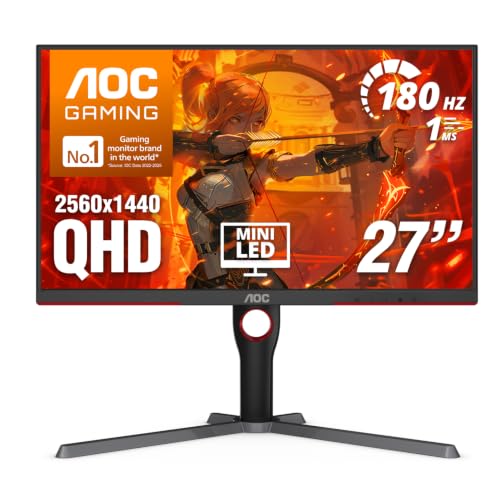 AOC 27 Inch Gaming Monitor QHD 180Hz Mini-LED27" 180Hz Mini-LED10.19 x 23.82 x 20.94 inches15.6 poundsCheck on Amazon
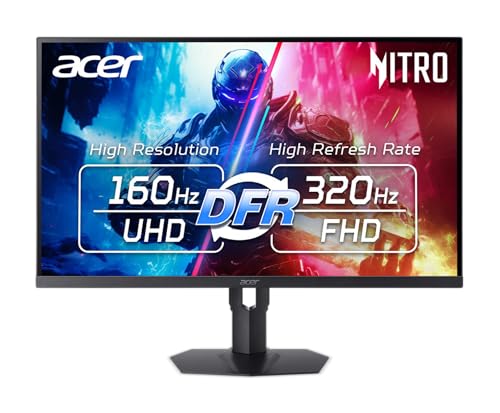 Acer Nitro 31.5 4K 3840x2160 MiniLED 160Hz DFR31.5-inch8.8 x 28.31 x 21 inches15.21 poundsCheck on Amazon
The KTC M27T6 suits buyers who want the most mini LED brightness and dimming zones for a mid-range budget, the LG UltraGear evo 27GM950B suits players who want a sharp 5K panel with a fast 1440p mode and the highest zone count in this group, and Samsung’s Odyssey Neo G7 and Neo G8 suit those who prefer a large 32-inch 4K screen. Mini LED improves contrast and HDR highlights over a standard edge-lit LCD, but it comes with trade-offs such as blooming around bright objects, so the right monitor depends on what you play and where.
At a glance
| Monitor | Best for | Stated specs | Limits |
|---|---|---|---|
| KTC M27T6 | Value HDR gaming | 27-inch 2560×1440; 180Hz over DisplayPort 1.4 and 144Hz over HDMI 2.0; 1,152 local dimming zones; DisplayHDR 1400 certified; KTC lists 1,400 nits peak; 96% DCI-P3 | Panel type is described as VA by reviewers; bright HUD elements on dark backgrounds can show halo; only HDMI 2.0 |
| LG UltraGear evo 27GM950B | 5K sharpness and dual-mode play | 27-inch 5120×2880 IPS at 165Hz, or QHD at 330Hz; 2,304 zones; 1,250 nits peak and 750 nits sustained; DisplayHDR 1000; DisplayPort 2.1, two HDMI 2.1, USB-C with 90W power delivery | Higher budget class; 5K needs a powerful GPU for high frame rates; IPS contrast is lower than VA without the backlight |
| Samsung Odyssey Neo G7 (32-inch) | Large curved 4K | 31.5-inch VA at 3840×2160; 165Hz; 1,196 zones; 1000R curve | Notebookcheck reports HDR performance short of expectations |
| Samsung Odyssey Neo G8 (32-inch) | High refresh 4K | 32-inch curved 4K at 240Hz; 1,196 zones; HDR 2000 advertised | TFTCentral says the claimed specs are unrealistic; premium budget tier |
What mini LED actually changes
Mini LED monitors replace a standard backlight with thousands of small LEDs grouped into dimming zones. Each zone can dim or brighten independently, which improves contrast in dark scenes and lifts highlights in HDR content. The number of zones matters: more zones mean finer control and less blooming. A 27-inch screen with 1,152 zones has fewer zones per area than a 27-inch screen with 2,304 zones, which is what LG states for its 5K model, calling it 1.5 times more zones than a conventional mini LED monitor.

Acer Nitro MG275U X2biippx 27" QD-MiniLED 2560 x 1440 IPS Gaming Monitor | AMD FreeSync Premium | Up to 210Hz Refresh Rate | Up to 0.5ms | HDR1000 | AdobeRGB 95% | 1 x Display Port 1.4 & 2 x HDMI 2.1
Chosen because it specifies AMD FreeSync Premium and Up to 210Hz Refresh Rate.
View on AmazonAOC 27 Inch Gaming Monitor QHD 180Hz Mini-LED HDR1000, Q27G3XMN | 3440×1440 Computer Monitor, 0.3ms, HDR400, USB 3.2, DP 1.4, HDMI 2.1, Height Adjustable Stand, Audio Out, VESA Mount
Chosen because it specifies Q27G3XMN and 3440×1440 Computer Monitor.
View on Amazon
LG 27GM950B-B 27-inch Ultragear evo Mini-LED IPS 5K 165Hz Gaming Monitor | (5120 x 2880), NVIDIA G-Sync, AMD FreeSync Premium, DisplayHDR1000, AI Upscaling, HDMI, DP, USB-C, Tilt/Height/Swivel/Pivot
Chosen because it specifies (5120 x 2880) and NVIDIA G-Sync.
View on AmazonAcer Nitro 31.5 4K 3840x2160 MiniLED 160Hz DFR 320Hz Gaming Monitor XV325QK | IPS, 0.5ms, AMD FreeSync Premium, Adobe RGB 99%, DCI-P3 99%, 2xHDMI 2.1, 2xDisplayPort, HDR1000, Ergo Stand, Speaker
Chosen because it specifies IPS and 0.5ms.
View on AmazonMini LED is not the same as OLED. A comparison on tech-insider says mini LED’s brightness advantage shows most in HDR-heavy scenes, while OLED wins on blacks and motion clarity in dark content. Mini LED panels also do not carry the same burn-in concerns that OLED panels do, which is an advantage for desktop use with static windows.
KTC M27T6
The KTC M27T6 is the most common value pick across 2026 roundups. DisplayNinja describes a flat VA panel with a 1,152-zone full-array local dimming mini LED backlight, and KTC’s own page lists the panel as an HVA mini LED. Resolution is 2560×1440, which works out to about 108 PPI on 27 inches. Refresh is 180Hz over DisplayPort 1.4 and 144Hz over HDMI 2.0, with FreeSync support. KTC lists DisplayHDR 1400 certification, 1,400 nits peak brightness, 96 percent DCI-P3 and 99 percent sRGB. Ports include two HDMI 2.0, one DisplayPort 1.4, a USB 2.0 port and a headphone output.
Fit notes: some retailer listings mention Fast IPS or a quantum dot version with different color gamut figures, so confirm the exact model code. Reviewers note that with 1,152 zones on a 27-inch screen, bright HUD elements on dark backgrounds show some halo. Best for: HDR games and mixed use on a mid-range budget.
LG UltraGear evo 27GM950B
LG lists a 27-inch 5K (5120×2880) Hyper Mini LED IPS panel at 218 PPI with a dual mode: 5K at 165Hz or QHD at 330Hz, each with 1ms GtG response time. The backlight has 2,304 local dimming zones and 9,216 mini LEDs. Peak HDR brightness is 1,250 nits and sustained brightness 750 nits, with VESA DisplayHDR 1000, about 99 percent DCI-P3 and 1000:1 static contrast. Connectivity includes DisplayPort 2.1, two HDMI 2.1 ports and USB-C with 90W power delivery, plus FreeSync Premium Pro and G-Sync Compatible support. TFTCentral has reviewed it.
Fit notes: 5K at high frame rates needs a very powerful graphics card, which is why the QHD 330Hz mode exists. Text is sharp at 218 PPI, so it suits mixed work and play. Best for: people who want one monitor for productivity and competitive play and have the GPU for it.
Samsung Odyssey Neo G7 and Neo G8
The 32-inch Neo G7 (S32BG75) uses a 31.5-inch VA panel with 1000R curvature, 165Hz refresh, 4K resolution and a 1,196-zone backlight. Notebookcheck measured about 335 nits in SDR against a claimed 350 and found HDR performance short of expectations. The 32-inch Neo G8 is a curved 4K 240Hz monitor with a 1,196-zone mini LED backlight and HDR 2000 advertised. TFTCentral says its claimed specs are unrealistic. Samsung also sells a 43-inch flat Neo G7 with 4K 144Hz and VESA HDR 600.
Best for: buyers who want a big, curved 4K screen for immersive games and accept that HDR performance is below the advertised figures. LG’s 5K model has roughly twice the zones of these Samsung models and a much higher pixel density.
Other models mentioned by reviewers
- Acer XV325QK V3: described as one of the most impressive 32-inch mini LED gaming monitors available, and the related Nitro XV325QK is listed as a 31.5-inch 4K 160Hz model.
- KTC M27P6: a benchmark for the 1,152-zone HDR1400 tier with a Fast IPS panel and a full ergonomic stand, according to reviewers.
- AOC Q27G3XMN: trades dimming zones for a trusted brand and a three-year zero-bright-dot warranty.
- TCL 27C2A: TCL’s own blog lists 4K, an FHD 320Hz dual mode, up to 1,200 nits and more than 1,100 zones, which is maker marketing rather than independent testing.
Compatibility and fit notes
- Graphics card: 4K and 5K at high refresh rates need a strong GPU. Use the lower-resolution dual mode where offered.
- Ports: HDMI 2.0 limits refresh rate (144Hz on the M27T6), while DisplayPort 1.4 or 2.1 is needed for full speed on higher-end models.
- Consoles: HDMI 2.1 matters for 4K 120Hz. The LG model lists two HDMI 2.1 ports.
- Desk space: 32-inch curved screens are large. Check stand depth and VESA mount support.
- Room lighting: mini LED brightness helps in bright rooms, but blooming is more visible in dark rooms with dark scenes.
Budget tiers
| Tier | Example | What you get | What you give up |
|---|---|---|---|
| Mid-range | KTC M27T6, AOC Q27G3XMN | 1440p, 144 to 180Hz, HDR highlights | Fewer zones, simpler connectivity |
| Upper mid-range | Acer 32-inch 4K models | 4K at 31.5 to 32 inches | Lower pixel density than 5K at 27 inches |
| Premium | LG 27GM950B, Samsung Neo G8 | 5K dual mode, high refresh 4K | Higher budget class, big GPU demands |
Pick X if…
| If you want… | Pick |
|---|---|
| Bright HDR at a mid-range budget | KTC M27T6 |
| Sharp 5K plus a fast 1440p mode | LG UltraGear evo 27GM950B |
| A large curved 4K screen | Samsung Odyssey Neo G7 or Neo G8 |
| A known brand and a bright-dot warranty | AOC Q27G3XMN |
Alternatives
If dark-room contrast and motion clarity matter most, an OLED gaming monitor is the main alternative, though it brings burn-in care and lower full-screen brightness. A good non-mini-LED IPS or VA gaming monitor is a lower budget option if HDR is not a priority. DisplayNinja and WePC maintain current roundups to compare newer models.
Settings and use tips
Mini LED monitors usually include a local dimming setting with several levels. A higher level improves contrast and can make bright objects bloom more, while a lower level reduces halos at the expense of contrast. Reviewers suggest trying both for the games you play, since an HUD-heavy shooter and a dark horror title will reward different choices. Windows HDR calibration tools and in-game HDR sliders also affect the result, so spend a few minutes tuning peak brightness values to the monitor’s stated peak, such as the 1,250 nits LG lists or the 1,400 nits KTC lists.
For desktop work, keep in mind that local dimming can make small bright objects on a dark background look different than on a standard monitor, for example a mouse cursor on a black window. Many models let you switch dimming off for desktop use. If you plan to use the monitor for photo or video work, read reviews that measure colour accuracy, because gamut figures alone do not guarantee a good result out of the box. Finally, check the stand: some models offer height, tilt, swivel and pivot adjustment, and others only tilt, which matters on a desk that is shared between work and play.
Frequently Asked Questions
Is mini LED better than OLED for gaming?
It depends. Mini LED offers higher peak brightness and avoids OLED’s burn-in concerns, while OLED offers better blacks and motion clarity in dark scenes. Pick based on room lighting and content.
What is blooming on a mini LED monitor?
Blooming is a halo of light around bright objects on a dark background caused by dimming zones being larger than the object. More zones, such as the 2,304 on the LG 27GM950B, reduce it.
Does the KTC M27T6 use a VA or IPS panel?
DisplayNinja and KTC’s own listing describe a VA-type panel, while one retailer lists Fast IPS. Confirm the panel type on the exact listing before buying.
Do I need DisplayHDR 1000 or higher?
Higher certification means higher stated brightness and contrast for HDR content. The KTC M27T6 lists DisplayHDR 1400 and the LG 27GM950B lists DisplayHDR 1000, but real results vary, as Notebookcheck’s findings on the Neo G7 show.
Can I run 5K for games?
Only with a powerful graphics card. The LG 27GM950B offers a QHD 330Hz mode so you can trade sharpness for frame rate.
Are mini LED monitors prone to burn-in?
Mini LED uses LCD panels with LED backlights, so it avoids the organic burn-in risk of OLED. Local dimming behavior can still affect static elements visually, but it is not permanent image retention.
FAQ
Is mini LED better than OLED for gaming?
What is blooming on a mini LED monitor?
Does the KTC M27T6 use a VA or IPS panel?
Do I need DisplayHDR 1000 or higher?
Can I run 5K for games?
Are mini LED monitors prone to burn-in?
More from Amazon
Programs that pair well with the guide above. Offers and eligibility are set by Amazon and may change.
Free shipping on eligible items, Prime Video and more. Eligible new members can start with a free trial.
Start a Prime free trialAd-free music streaming. Eligible new subscribers can start with a free trial.
Try Music Unlimited freeA Prime membership for ages 18-24 with a trial period. Eligibility is set by Amazon.
See Prime for Young AdultsAudiobooks and podcasts to listen to on the go. Eligible new members can start with a free trial.
Try Audible freeAs an Amazon Associate we earn from qualifying purchases.