Our Top Picks
 FIFINE CS1P Metal Scissor Microphone Boom Arm StandCS1P13 x 2.1 x 13 inches1.2 poundsCheck on Amazon
The best microphone arms under $30 are the InnoGear low-profile arm with a 3.3 lb weight capacity for heavier USB mics, the FIFINE CS1P metal scissor arm for podcasting, and the NEEWER suspension arm with 3/8 to 5/8 inch screw adapters. All are compared from listing specifications.
A microphone arm solves three problems at once: it brings the mic close to your mouth, takes it off the desk so it stops picking up keyboard thumps and frees the desk surface. Under 30 dollars you can find clamp-on scissor arms in metal, with built-in cable management and thread adapters for most mic stands. The real differences are weight capacity, reach, noise when moving and whether the arm includes extras like a pop filter.
This guide compares six arms from their listing text. Dimensions and weight ratings appear only where the listing states them, and anything missing is marked so you can check the maker page. We compared these from listing specifications and did not use them ourselves, so the notes describe what the specs suggest, not how the arms feel in daily use.
Quick Comparison
| Model | Key specs per listing | Best for |
|---|---|---|
| InnoGear Low Profile Microphone Boom Arm | Low profile, 360 degree flex, vibration resistant, 3.3 lb capacity | Heavier USB mics and tight desk layouts |
| InnoGear Boom Arm Microphone Mic Stand | Desk mount, adjustable reach, for Blue Yeti, Fifine, HyperX mics | A standard scissor arm for common USB mics |
| FIFINE CS1P Metal Scissor Microphone Boom Arm | Metal, suspension boom, desk mount, podcasting | Podcasting with a sturdy metal build |
| NEEWER Microphone Arm Stand | Suspension scissor boom, 3/8 to 5/8 inch screw, cable ties | Mics with different thread sizes |
| SUNMON QuadCast Boom Arm | Fits Blue Yeti, HyperX QuadCast, SoloCast, Fifine AM8 | HyperX QuadCast and similar gaming mics |
| Luling Arts Scissor Mic Stand with Pop Filter | Scissor boom, windscreen and double-layer pop filter included | One-box arm plus pop filter |
InnoGear Low Profile Microphone Boom Arm
Listing specs: Mic arm, low profile microphone boom arm mic stand, 360 degree flex, black, vibration resistant, 3.3 lbs weight capacity (listing text cut off).

InnoGear Mic Arm Low Profile Microphone Boom Arm Mic Stand 360° Flex, Black | Vibration Resistant, 3.3 lbs Weight Capacity, Extendable up to 25.6", Multiple Adapters, for Desk Thickness Within 2.75"
Chosen because it specifies Black and Vibration Resistant.
View on AmazonThis is the only arm in the group that states a weight capacity in the text we saw, which makes it easy to match against your mic. A 3.3 lb limit covers most USB condenser mics and many dynamic mics, but a heavy mic with a shock mount and cable can approach it, so weigh yours before buying. The low-profile design is meant to sit below the line of your monitors, and the 360 degree flex lets you swing it out of the way when you are not recording. Vibration resistance is listed, though the text does not describe how it is achieved. Check the maker page for the clamp opening size, since thick desks need a wide clamp.
Pros
- 3.3 lb weight capacity listed
- Low profile sits below monitors
- 360 degree flex
Cons
- Clamp size not stated in listing text
- May strain with the heaviest mic setups
InnoGear Boom Arm Microphone Mic Stand
Listing specs: Boom arm microphone mic stand for Blue Yeti, Fifine and HyperX, black, desk mount, desktop stand, adjustable reach (listing text cut off).
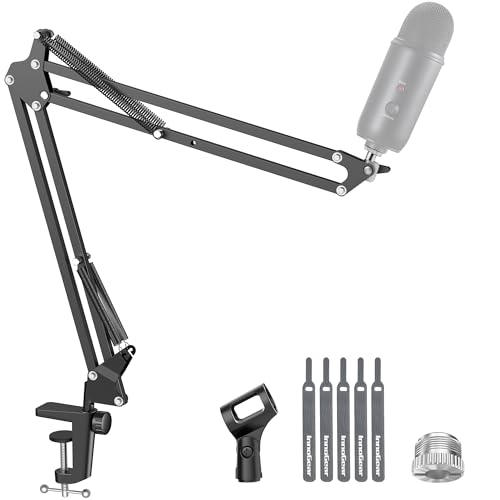
InnoGear Boom Arm Microphone Mic Stand for Blue Yeti Fifine HyperX, Black | Desk Mount, Desktop Stands, Adjustable Reach, Rotate Fully, Folds Away Compactly, for Gaming, Streaming or Recording
Chosen because it specifies Black and Desk Mount.
View on AmazonThe standard InnoGear arm names the mics it fits: Blue Yeti, Fifine and HyperX, which tells you the thread and size match the common USB gaming mics. A desk mount and adjustable reach are listed, so it is a conventional scissor arm that clamps on the edge of the desk and extends over it. The listing does not give weight capacity or clamp opening in the text we saw, and that matters most with the heavier models in the Yeti family. It is a good first arm for someone who wants a recognised design and a known fit. If you own a heavy mic, check the maker page or choose the low-profile model that lists its capacity.
Pros
- Lists compatibility with popular USB mics
- Desk mount and adjustable reach
- Familiar scissor design
Cons
- Weight capacity not stated in listing text
- Clamp opening not stated
FIFINE CS1P Metal Scissor Microphone Boom Arm
Listing specs: Metal scissor microphone boom arm stand for podcasting, metal suspension boom mic stand with desk mount (listing text cut off).
FIFINE CS1P Metal Scissor Microphone Boom Arm Stand for Podcasting | Metal Suspension Boom Mic Stand with Desk Mount, for Streaming Gaming Home Studio
Chosen because it specifies Metal Suspension Boom Mic Stand with Desk Mount and for Streaming Gaming Home Studio.
View on AmazonThe CS1P is described as a metal scissor arm, which usually means a stiffer, quieter build than plastic joints. Metal also copes better with heavier mics and repeated adjustment, though the listing does not state a weight limit in the text we saw. It is positioned for podcasting, so it is likely sized for typical USB and XLR dynamic mics, but the details are best checked on the maker page, including thread sizes and the clamp opening. The brand also sells a similarly named CS1 arm, so confirm the exact model on the listing. Check that cables route cleanly along the arm.
Pros
- Metal construction
- Suspension boom design
- Desk mount for podcasting
Cons
- Weight capacity not stated in listing text
- Easy to confuse with the CS1
NEEWER Microphone Arm Stand
Listing specs: Microphone arm stand, suspension boom scissor mic arm stand, 3/8 inch to 5/8 inch screw, cable ties (listing text cut off).

NEEWER Microphone Arm Stand, Suspension Boom Scissor Mic Arm Stand | 3/8" to 5/8" Screw, Cable Ties, Compatible with Blue Yeti, Snowball, Yeti X, Quadcast and Other Mics, Max Load 1.5kg
Chosen because it specifies Suspension Boom Scissor Mic Arm Stand and 3/8" to 5/8" Screw.
View on AmazonThe NEEWER arm states 3/8 to 5/8 inch screw sizes and includes cable ties. The screw range is the useful detail: mic thread sizes vary, and an arm that covers both common sizes saves you from hunting for an adapter. Cable ties help keep a mic cable along the arm instead of dangling. The listing names compatible mics but does not list weight capacity in the text we saw. As with the other scissor arms, an arm that extends far will droop with a heavy mic, so check the specs against your mic. It is a straightforward, reasonable pick for general use at home or in a small studio.
Pros
- 3/8 to 5/8 inch screw adapters listed
- Cable ties included
- Suspension scissor design
Cons
- Weight capacity not stated in listing text
- Reach and height not listed
SUNMON QuadCast Boom Arm
Listing specs: QuadCast boom arm, mic arm for Blue Yeti, HyperX QuadCast, SoloCast, Fifine AM8 and most microphones, mic stand desk with 3/8 inch thread (listing text cut off).

QuadCast Boom Arm, Mic Arm for Blue Yeti HyperX QuadCast SoloCast Fifine AM8 and Most Microphone, Mic Stand Desk with 3/8" to 5/8" Adapter by SUNMON
Chosen because it specifies Mic Stand Desk with 3/8" to 5/8" Adapter by SUNMON.
View on AmazonThe SUNMON arm is named for the HyperX QuadCast and lists Blue Yeti, SoloCast and Fifine AM8 as compatible, which covers many of the most popular gaming mics. A QuadCast is among the heavier USB mics, so an arm built with it in mind is reassuring, though the listing text we saw does not give a weight rating. It lists a 3/8 inch thread, which is the common standard for many mics, but a mic with a different mount may need an adapter. Check the maker page for the exact rating and the clamp opening, and confirm that the arm’s size suits your desk depth.
Pros
- Named compatibility with QuadCast, Yeti and Fifine AM8
- 3/8 inch thread listed
- Designed for gaming mics
Cons
- Weight rating not stated in listing text
- Other thread sizes may need an adapter
Luling Arts Scissor Mic Stand with Pop Filter
Listing specs: Microphone stand for Blue Yeti and QuadCast, boom arm scissor mic stand with windscreen and double layered screen pop filter (listing text cut off).

Microphone Stand for Blue Yeti, Quadcast Boom Arm Scissor Mic Stand with Windscreen and Double layered screen Pop Filter Heavy Duty Mic Boom Scissor Arm Stands, Broadcasting and Recording.Game
Chosen because it specifies Broadcasting and Recording.Game.
View on AmazonThe Luling Arts package adds the accessory most buyers end up purchasing separately. The listing says it includes a windscreen and a double-layered pop filter along with the scissor arm, so you get plosive control and the arm together. It lists Blue Yeti and QuadCast compatibility. The extras are the draw, so the arm itself is the part to check: the listing text we saw does not give a weight capacity, clamp opening or reach, and bundled accessories can be basic. If you already own a pop filter, you gain little, but for someone starting a setup from scratch it is a convenient bundle.
Pros
- Pop filter and windscreen included
- Lists Blue Yeti and QuadCast compatibility
- Scissor boom design
Cons
- Weight capacity and reach not stated
- Bundled accessories may be basic
Scissor Arm Basics
A scissor arm uses two parallel bars joined at the ends, with springs or friction to hold position. You clamp the base to the desk, swing the arm out and tighten the joints. Springs make the arm easy to move but can bounce if overloaded. The most important number is the weight capacity, and the second is the reach. An arm that is too short forces you to lean toward the mic, which defeats the point.
How Heavy Is Your Microphone?
Weigh your mic with its shock mount before you shop. A small dynamic mic may weigh under a pound, while a large USB condenser with a mount can be around two pounds. Arms that state a weight limit, like the InnoGear low-profile model at 3.3 lbs, are simple to match. For listings without a limit, read the maker page or ask the seller before buying.
How to Choose Microphone Arms Under $30
Check weight capacity and reach first
Capacity decides whether the arm holds your mic without drooping. Reach decides whether the mic can sit in front of your mouth with the clamp at the edge of the desk. For a heavy USB mic, aim for a stated capacity well above its weight.
Microphone arms for home office and small spaces
In a home office, a low-profile arm that swings out of the way keeps the desk clear for work. In a small space, a clamp mount avoids extra stands and a monitor-friendly arm sits below the line of sight so it does not block your view.
Microphone arms for gaming
For gaming, a mic arm keeps the mic near your mouth and off the desk, so keyboard thumps and mouse clicks do not travel through the mount. Look for cable management and a stable clamp, and choose an arm that lists compatibility with your mic brand.
Mind the thread size and clamp opening
Mics use 3/8 inch or 5/8 inch threads, and many arms include an adapter for the other size. Clamps accept desks up to a stated thickness. A thick desk or a desk with a lip can stop the clamp from fitting, so check the clamp opening on the maker page.
FAQ
Does a microphone arm improve sound?
Yes, indirectly. It lets you place the mic closer to your mouth and removes desk vibrations, which improves clarity and reduces noise.
What thread size do microphones use?
The two common sizes are 3/8 inch and 5/8 inch. Many arms include an adapter, so check that yours fits your mic.
Will an arm hold a heavy USB mic?
Only if its weight limit exceeds the mic’s weight with the shock mount. Always check the stated capacity.
Do I need a shock mount?
A shock mount reduces vibrations from the arm and desk. Some mics include one, and it is worth checking before you buy.
Can I attach the arm to any desk?
Most clamp mounts fit desks up to a certain thickness and need a flat edge. Check the clamp opening before buying.
Last updated: November 2026
FAQ
How Heavy Is Your Microphone?
Does a microphone arm improve sound?
What thread size do microphones use?
Will an arm hold a heavy USB mic?
Do I need a shock mount?
Can I attach the arm to any desk?
More from Amazon
Programs that pair well with the guide above. Offers and eligibility are set by Amazon and may change.
Free shipping on eligible items, Prime Video and more. Eligible new members can start with a free trial.
Start a Prime free trialAd-free music streaming. Eligible new subscribers can start with a free trial.
Try Music Unlimited freeA Prime membership for ages 18-24 with a trial period. Eligibility is set by Amazon.
See Prime for Young AdultsAudiobooks and podcasts to listen to on the go. Eligible new members can start with a free trial.
Try Audible freeAs an Amazon Associate we earn from qualifying purchases.