Key takeaways
- Restart and tap Delete or F2 during boot to enter BIOS/UEFI.
- Look for an XMP or EXPO dropdown, usually right on the main EZ Mode screen or under an AI Tweaker/Overclocking tab.
- Select Profile 1 (the rated speed); some kits offer a second, more aggressive profile.
Here is a frustrating truth about new PCs: your expensive fast RAM is probably running slow right now. Motherboards boot memory at a conservative JEDEC default, often 4800MHz on DDR5, and ignore the higher speed printed on the box until you flip a single switch. That switch is XMP on Intel platforms and EXPO on AMD, and enabling it is the easiest free performance win in PC building.
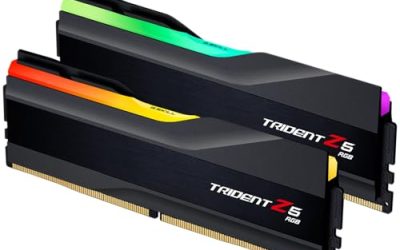
This guide shows exactly how to turn on your memory profile and confirm it worked. A kit like the CORSAIR Vengeance DDR5 6000MHz or the G.SKILL Trident Z5 Neo with AMD EXPO stores its rated speed in a profile, and one BIOS toggle applies it in seconds.
Our top picks
 Corsair Vengeance RGB RS DDR5 16GB
- Disclaimer: Maximum Speed requires overclocking/PC BIOS adjustments
- AMD EXPO & Intel XMP 3.0 Compatible Only:…
- Dynamic RGB Lighting: Individually addressable RGB lighting delivers…
 CORSAIR Vengeance DDR5 32GB
- Disclaimer: Maximum Speed requires overclocking/PC BIOS adjustments
- AMD EXPO & Intel XMP 3.0 Compatible Only:…
- Onboard Voltage Regulation: Enables easier, more finely-tuned, and…
| Product | Key specs | |
|---|---|---|
 G.SKILL Trident Z5 Neo RGB Series DDR5 | Check price | |
| Corsair Vengeance RGB RS DDR5 16GB | Disclaimer: Maximum Speed requires overclocking/PC BIOS adjustments AMD EXPO & Intel XMP 3.0 Compatible Only:… Dynamic RGB Lighting: Individually addressable RGB lighting delivers… | Check price |
| CORSAIR Vengeance DDR5 32GB | Disclaimer: Maximum Speed requires overclocking/PC BIOS adjustments AMD EXPO & Intel XMP 3.0 Compatible Only:… Onboard Voltage Regulation: Enables easier, more finely-tuned, and… | Check price |
 CORSAIR Vengeance RGB DDR5 32GB | Disclaimer: Maximum Speed requires overclocking/PC BIOS adjustments AMD EXPO & Intel XMP 3.0 Compatible Only:… Dynamic Ten-Zone RGB Lighting: Illuminate your system with… | Check price |
| Corsair Vengeance DDR5 16GB | Disclaimer: Maximum Speed requires overclocking/PC BIOS adjustments AMD EXPO & Intel XMP 3.0 Compatible Only:… Onboard Voltage Regulation: Enables easier, more finely-tuned, and… | Check price |
| Corsair Vengeance RGB RS DDR5 64GB | Disclaimer: Maximum Speed requires overclocking/PC BIOS adjustments AMD EXPO & Intel XMP 3.0 Compatible Only:… Dynamic RGB Lighting: Individually addressable RGB lighting delivers… | Check price |
 G.SKILL Flare X5 Series DDR5 RAM | * Requires overclocking/BIOS adjustments G.SKILL Flare X5 Series DDR5 U-DIMM Memory Kit,… Non-ECC, DDR5 U-DIMM, 288-pin, for Desktop PC &… | Check price |
As an Amazon Associate we earn from qualifying purchases at no extra cost to you.
⚡ Save on Your Next PC — Amazon Prime
Prime members get fast free shipping on the systems above, plus early access to Prime Day & Black Friday PC deals. New members get a 30-day free trial.
Watch: How to Enable XMP / EXPO for Faster RAM — Video Review
What XMP and EXPO Actually Do
Both are stored profiles that contain your kit’s rated frequency, timings, and voltage. XMP (Extreme Memory Profile) is Intel’s standard; EXPO (Extended Profiles for Overclocking) is AMD’s. Selecting the profile tells the board to apply those validated settings instead of the safe default, unlocking the speed you paid for.
Enter BIOS and Find the Setting
- Restart and tap Delete or F2 during boot to enter BIOS/UEFI.
- Look for an XMP or EXPO dropdown, usually right on the main EZ Mode screen or under an AI Tweaker/Overclocking tab.
- Select Profile 1 (the rated speed); some kits offer a second, more aggressive profile.
Save, Reboot, and Verify
Press F10 to save and exit. The system may take a moment or two to retrain memory on first boot, which is normal. Once in Windows, open Task Manager’s Performance tab or CPU-Z and confirm the memory speed matches the rating (remember DDR shows half the rated number, so 6000MHz appears as 3000MHz).
If It Won’t Boot or Feels Unstable
Occasionally a full-speed profile is too aggressive for your CPU’s memory controller. If the PC fails to POST, clear CMOS and it reverts to default. You can then try the profile again, drop to a slightly lower frequency, or update your BIOS, which often improves memory compatibility.
Tips
- Enable the profile on a fresh, stable system so you can tell if the RAM is the cause of any new issue.
- Run a short memory test after enabling to confirm the profile is stable before trusting it with important work.
- If you have four sticks, expect them to be harder to run at full rated speed than two.
- Update BIOS first if your board is old; newer firmware handles high-speed kits far better.
Frequently Asked Questions
Is enabling XMP or EXPO safe?
Yes. These are manufacturer-validated profiles for the exact speed your kit is sold at, so applying them is safe and expected, not risky overclocking.
Why is my RAM running slow without it?
Motherboards default to a conservative JEDEC speed for guaranteed compatibility. Your kit’s rated speed is technically an overclock, so it stays off until you enable the profile.
Does XMP/EXPO work on any motherboard?
You need a board that supports memory overclocking. Most gaming boards (B-series and above) do; some entry H-series Intel boards lock memory speed and will not apply the profile.
Do I use XMP or EXPO?
Use EXPO on AMD systems and XMP on Intel. Many kits include both profiles, and the BIOS shows the one relevant to your platform.
Conclusion
Enabling XMP or EXPO is the single most worthwhile minute you will spend in BIOS: it turns your default-throttled memory into the fast kit you actually bought. Select the profile, save, reboot, and verify the speed in Windows. If it will not boot at full speed, clear CMOS and try a lower step or a BIOS update. Either way, do not leave that performance on the table.
FAQ
Is enabling XMP or EXPO safe?
Why is my RAM running slow without it?
Does XMP/EXPO work on any motherboard?
Do I use XMP or EXPO?
More from Amazon
Programs that pair well with the guide above. Offers and eligibility are set by Amazon and may change.
Free shipping on eligible items, Prime Video and more. Eligible new members can start with a free trial.
Start a Prime free trialAd-free music streaming. Eligible new subscribers can start with a free trial.
Try Music Unlimited freeA Prime membership for ages 18-24 with a trial period. Eligibility is set by Amazon.
See Prime for Young AdultsAudiobooks and podcasts to listen to on the go. Eligible new members can start with a free trial.
Try Audible freeAs an Amazon Associate we earn from qualifying purchases.