Key takeaways
- Display quality: A 120Hz+ AMOLED panel makes streamed games feel noticeably smoother and reduces perceived input lag compared to budget LCDs.
- Network flexibility: Look for WiFi 6 support and stable dual-band connectivity, since cloud gaming is far more sensitive to network drops than local play.
- Battery life: Streaming taxes both the screen and radios hard, so prioritize devices with 6000mAh+ batteries if you plan to play away from a charger.
- Service compatibility: Confirm the device can run the actual apps or browsers you need for Xbox Cloud Gaming, GeForce NOW, PlayStation, and Luna rather than just one locked-in ecosystem.
- Controls and ergonomics: Physical sticks, triggers, and grip shape matter more for cloud gaming than raw specs, since you can’t fall back on local processing to mask a bad control scheme.
What's inside
Cloud gaming promises console-quality play without the console, but the experience lives or dies on your hardware and connection. A game that streams beautifully on a wired PC can turn into a blurry, laggy mess on the wrong handheld or tablet, and with so many devices now marketed as “cloud gaming ready,” it’s easy to buy the wrong one.
This guide breaks down the best ways to play Xbox Cloud Gaming, GeForce NOW, PlayStation Remote Play, and Amazon Luna in 2026, comparing dedicated cloud handhelds, Android gaming devices, and the streaming services themselves so you can match the right screen, chipset, and battery to how you actually play.
As an Amazon Associate we earn from qualifying purchases at no extra cost to you. Product prices and availability are accurate as of the date shown and are subject to change.


🎮 Get More From Your Setup — Free
Prime Gaming gives you free PC games every month, in-game loot, and a free Twitch channel sub — plus fast free shipping on all the gear above. New members get a 30-day free trial.
Watch: Best Cloud Gaming Service — Video Review
How to Choose a Cloud Gaming Service (2026)
- Display quality: A 120Hz+ AMOLED panel makes streamed games feel noticeably smoother and reduces perceived input lag compared to budget LCDs.
- Network flexibility: Look for WiFi 6 support and stable dual-band connectivity, since cloud gaming is far more sensitive to network drops than local play.
- Battery life: Streaming taxes both the screen and radios hard, so prioritize devices with 6000mAh+ batteries if you plan to play away from a charger.
- Service compatibility: Confirm the device can run the actual apps or browsers you need for Xbox Cloud Gaming, GeForce NOW, PlayStation, and Luna rather than just one locked-in ecosystem.
- Controls and ergonomics: Physical sticks, triggers, and grip shape matter more for cloud gaming than raw specs, since you can’t fall back on local processing to mask a bad control scheme.
The Best Cloud Gaming Service (2026)s Reviewed
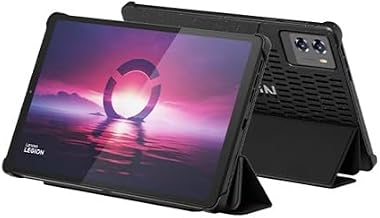
OnePro Cloud Handheld
Built specifically around remote play, the OnePro pairs a crisp 7″ 1080p touchscreen with broad service support across Xbox Cloud Gaming, GeForce NOW, and PlayStation, making it one of the few handhelds designed for streaming first rather than retrofitted for it.
Mangmi Pocket Max
The Snapdragon 865 chip and 144Hz AMOLED display give the Pocket Max enough headroom to handle both cloud streaming and native Android/PC gaming, and the 8000mAh battery holds up well through long sessions.
Luna: Cloud Gaming from Amazon
Luna’s strength is simplicity: no downloads, controller-friendly pricing tiers, and tight integration with Fire TV and Prime, making it an easy entry point if you already live in Amazon’s ecosystem.
XBOX Game Pass Ultimate | 1 Month Membership | Console, PC, Cloud Gaming Devices | Digital Code
NVIDIA’s service remains the technical leader for latency and visual fidelity, especially on Ultimate tier with RTX-quality streaming, and it works across nearly any handheld, tablet, or smart TV with a browser.
MANGMI Pocket Max (Snapdragon 865, TMR Sticks)
This variant adds Hall-effect triggers and TMR analog sticks for drift-resistant, precise input, a meaningful upgrade for competitive cloud gamers who put serious hours into their sticks.
Frequently Asked Questions
Do I need a powerful device to stream games well?
Not as much as for local gaming, but you still need a capable chipset to decode video smoothly, run the streaming app without lag, and drive a high-refresh display without stutter.
How much internet speed does cloud gaming require?
Most services recommend at least 15-20 Mbps for stable 1080p streaming, with 35+ Mbps preferred for 4K or high-refresh-rate play; wired or 5GHz WiFi connections perform far more reliably than 2.4GHz.
Can I use these handhelds for more than cloud gaming?
Yes. Android-based devices like the Mangmi Pocket Max and Razer Edge double as full gaming tablets, running native mobile and emulated games alongside cloud services.
Is GeForce NOW or Luna the better choice?
GeForce NOW generally offers better performance and a larger game library through paid tiers, while Luna is more casual-friendly with simpler pricing and deep Amazon ecosystem integration.
Final Thoughts
For most buyers, the OnePro Cloud Handheld and Mangmi Pocket Max stand out as the strongest dedicated devices, while pairing either with GeForce NOW gives you the best overall streaming performance available in 2026.