The $1,500 gaming laptop market is crowded with machines that look nearly identical on a spec sheet but perform very differently in real games. Manufacturers pair strong GPUs with underpowered cooling, cut corners on display quality, or ship configurations with just enough RAM and storage to get you through the first month. The result is a lot of buyers spending serious money and still ending up with thermal throttling, a dim panel, or a laptop that needs an SSD upgrade before the first year is out.
This guide cuts through that. We’ve focused on machines that pair current-generation RTX graphics with genuinely usable displays, adequate cooling, and enough memory and storage to last. Every pick below sits realistically within a $1,500 budget, and we’ve flagged exactly who each one suits — whether you’re chasing high-refresh esports frames, 1440p single-player visuals, or the best raw performance per dollar.
Our top picks
 ASUS ROG Strix G16
- Unleash power with Windows 11 Home, an Intel…
- Multitask seamlessly with 16GB of DDR5-5600MHz memory and…
- Immerse yourself in stunning visuals with the smooth…
 msi Katana 15 15.6” 165Hz QHD Gaming
- Supercharged Process: The 13th Gen
- Simplistic Design: Enjoy the latest generation of Windows…
- Beyond Fast: The NVIDIA GeForce RTX 4070 GPU…
 acer Nitro V 15.6” FHD IPS 165Hz
- 15.6" Full HD (1920 x 1080) widescreen LED-backlit…
- Intel Core i5-13420H Processor - up to 4.6GHz,…
- NVIDIA GeForce RTX 5050 Laptop GPU with 8GB…
| Product | Key specs | |
|---|---|---|
| ASUS ROG Strix G16 | Unleash power with Windows 11 Home, an Intel… Multitask seamlessly with 16GB of DDR5-5600MHz memory and… Immerse yourself in stunning visuals with the smooth… | Check price |
| msi Katana 15 15.6” 165Hz QHD Gaming | Supercharged Process: The 13th Gen Simplistic Design: Enjoy the latest generation of Windows… Beyond Fast: The NVIDIA GeForce RTX 4070 GPU… | Check price |
| acer Nitro V 15.6” FHD IPS 165Hz | 15.6" Full HD (1920 x 1080) widescreen LED-backlit… Intel Core i5-13420H Processor - up to 4.6GHz,… NVIDIA GeForce RTX 5050 Laptop GPU with 8GB… | Check price |
 Alienware 16 Aurora Gaming Laptop | Check price | |
 GIGABYTE | GIGABYTE GiMATE as Your Smart AI Mate Intel Core i7-13620H Processor NVIDIA GeForce RTX 5060 Laptop GPU | Check price |
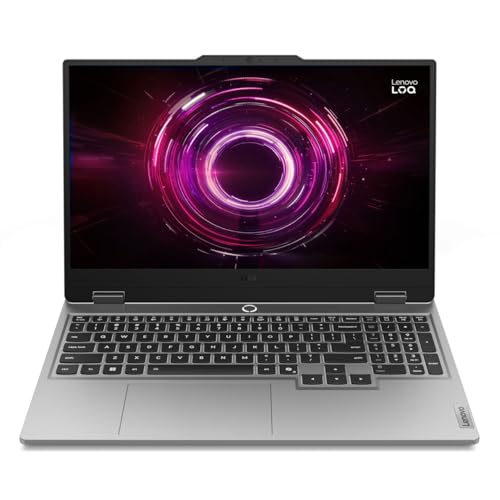 Lenovo LOQ 15.6" IPS FHD 144Hz AMD | Performance That Dominates: Equipped with an AMD Ryzen… Stunning Visuals: The 15.6" Full HD IPS LCD… Smart Connectivity: Wi-Fi 6 and Bluetooth 5.3 deliver… | Check price |
 ASUS V16 Gaming Laptop | Check price | |
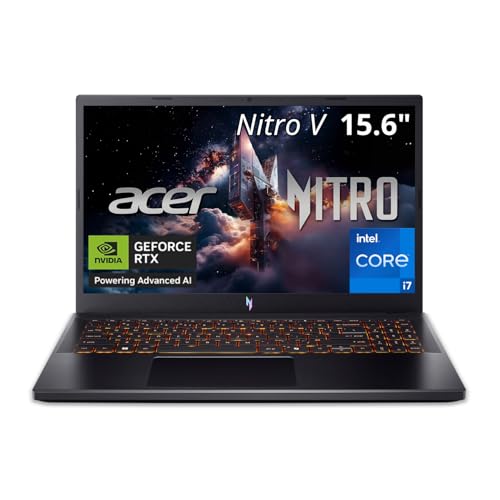 Acer Nitro V 15in Gaming Laptop ANV15-52-73D8 | Check price |
As an Amazon Associate we earn from qualifying purchases at no extra cost to you.
⚡ Save on Your Next PC — Amazon Prime
Prime members get fast free shipping on the systems above, plus early access to Prime Day & Black Friday PC deals. New members get a 30-day free trial.
Watch: Best Gaming Laptop Under $1500 — Video Review
How to Choose Gaming Laptop Under $1500
- GPU tier over GPU generation: A newer RTX 5050 will not beat an older RTX 4070 in raw raster performance. Prioritize the higher tier within your budget rather than assuming the latest generation is automatically faster.
- Display resolution and refresh rate: At this price, 165Hz is the sweet spot. Choose FHD/WUXGA if you want maximum frames in competitive titles, or QHD if you play visually rich single-player games and want the sharper image.
- Cooling and chassis design: Sustained performance depends on thermals. Look for dual-fan designs with multiple heat pipes and generous rear exhaust — thin chassis often means throttling under long sessions.
- Memory and storage headroom: 16GB DDR5 is the practical minimum in 2026. A 1TB SSD is strongly preferred over 512GB, since modern AAA installs regularly exceed 100GB each.
- Upgradeability and ports: Check that RAM slots and the M.2 bay are user-accessible, and confirm the laptop has enough USB-A, HDMI 2.1, and ideally Wi-Fi 7 to stay relevant for a few years.
The Best Picks Reviewed
ASUS ROG Strix G16 (2025)
The Strix G16 is the most complete package here, pairing an RTX 5060 with a 14-core i7-14650HX, 16GB DDR5, a full 1TB Gen 4 SSD, and Wi-Fi 7. The 16:10 165Hz FHD+ panel gives you extra vertical space for productivity, and ROG’s cooling is proven enough to hold clocks through long sessions.
MSI Katana 15
If you want the strongest raw GPU under $1,500, the Katana 15’s RTX 4070 still outpaces the newer entry-tier 50-series cards in most rasterized workloads. The 165Hz QHD panel is the natural match for that horsepower, and Cooler Boost 5 keeps the i7-13620H from becoming the bottleneck.
GIGABYTE Gaming A16
Gigabyte’s A16 hits an excellent middle ground: RTX 5060 graphics, a 16-inch 165Hz WUXGA display, 1TB of storage, and 16GB of DDR5 for noticeably less than the premium brands charge. It’s the value pick for anyone who wants a large screen without sacrificing GPU tier.
Lenovo LOQ 15.6″
The LOQ delivers RTX 5060 performance at one of the most aggressive prices on this list, backed by a capable Ryzen 7 250 and a 144Hz FHD panel. The 512GB SSD is the main compromise, but the M.2 bay is easy to reach, making a cheap capacity upgrade the obvious first move.
Acer Nitro V 15.6″
The Nitro V is the entry point to this category, pairing an RTX 5050 with 8GB of fast GDDR7 and a 165Hz IPS display for solid 1080p performance in most current titles. Budget for a storage upgrade, as 512GB fills quickly, but as a first gaming laptop it’s hard to fault at the price.
Frequently Asked Questions
Is an RTX 5060 enough for 1440p gaming?
Yes, for most titles. With DLSS enabled and settings tuned to high rather than ultra, an RTX 5060 handles 1440p comfortably in the majority of current games. For demanding path-traced titles you’ll want to drop to 1080p or lean more heavily on upscaling.
Should I choose a 15-inch or 16-inch laptop?
A 16-inch chassis generally offers better cooling volume, larger batteries, and more screen real estate, which matters if the laptop doubles as a work machine. Choose 15 inches if portability and lower weight are your priority, since the performance difference is usually small.
Is 16GB of RAM still enough in 2026?
For gaming alone, 16GB remains sufficient for nearly all titles. If you stream, run browser-heavy multitasking, or work with creative applications, plan on upgrading to 32GB — most laptops here have accessible SODIMM slots that make this straightforward.
Do I need Wi-Fi 7?
It’s a nice future-proofing bonus rather than a requirement. Wi-Fi 7 reduces latency and improves throughput on compatible routers, but Wi-Fi 6E remains perfectly capable for online gaming, and a wired Ethernet connection is still the best option for competitive play.
Final Thoughts
For most buyers, the ASUS ROG Strix G16 is the pick to beat — it combines a current-generation RTX 5060, a strong 14-core CPU, a full terabyte of storage, and cooling that holds up under pressure. If raw GPU performance matters more to you than newer silicon, the MSI Katana 15 and its RTX 4070 remains the fastest option at this price, especially paired with its QHD panel. And if you want the best value per dollar, the GIGABYTE Gaming A16 delivers nearly everything the Strix does for meaningfully less, making it the smart choice for budget-conscious gamers who still want a large, high-refresh display.