Key takeaways
- Earcup style: over-ear cups that fully surround the ear reduce pressure and block noise better than on-ear pads.
- Cushion material: memory foam with breathable fabric stays cooler than sealed leatherette during marathon sessions.
- Clamp force: a headset that grips too tightly causes headaches; adjustable headbands help spread the weight.
- Weight: lighter headsets are easier to wear for hours, especially if you also wear glasses.
What's inside
A good gaming headset does two jobs at once: it lets you hear footsteps, reloads, and directional cues before your opponents react, and it makes sure your teammates can understand every callout you make. A cheap or poorly fitted headset undermines both, turning clear communication into a muddy mess and hiding the audio cues that win rounds.
This guide walks through the decisions that actually matter when picking a headset in 2026: connection type, sound profile, microphone quality, and long-session comfort. You will learn which specs are worth paying for and which are marketing noise, so you can spend your budget where it counts.
As an Amazon Associate we earn from qualifying purchases at no extra cost to you.








⚡ Save on Your Next PC — Amazon Prime
Prime members get fast free shipping on the systems above, plus early access to Prime Day & Black Friday PC deals. New members get a 30-day free trial.
Watch: How to Choose a Gaming Headset (2026 Guide) — Video Review
Wired or Wireless
Wired headsets connect over 3.5mm or USB and never need charging, which makes budget picks like the Razer BlackShark V2 X or the JBL Quantum 100M2 reliable and cheap. Wireless models like the Turtle Beach Stealth 600 or Logitech G522 Lightspeed free you from cable clutter and let you step away without unplugging. Modern low-latency wireless is fast enough for competitive play, so the real trade-off is remembering to charge versus tolerating a cable.
Understanding Surround Sound
Many headsets advertise 7.1 surround, but nearly all gaming headsets are physically stereo, the surround effect is simulated in software. Virtual surround can help you judge distance and direction in large open maps, but for competitive shooters many players actually turn it off and rely on clean stereo, which often gives sharper left-right positioning. Treat surround as a preference to test, not a must-have feature.
The Microphone Matters More Than You Think
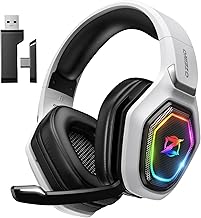
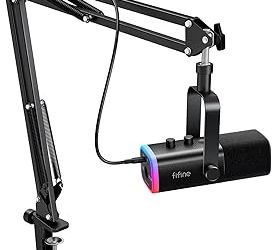
Your mic is what teammates judge you by. Look for a detachable or flip-to-mute boom mic with noise cancellation so background fans and keyboard clatter stay out of your callouts. Headsets like the Ozeino and BENGOO G9000 include noise-canceling mics at low prices, while pricier models add clearer voice pickup. If you stream or take calls, mic quality should weigh heavily in your decision.
Comfort Over Long Sessions
- Earcup style: over-ear cups that fully surround the ear reduce pressure and block noise better than on-ear pads.
- Cushion material: memory foam with breathable fabric stays cooler than sealed leatherette during marathon sessions.
- Clamp force: a headset that grips too tightly causes headaches; adjustable headbands help spread the weight.
- Weight: lighter headsets are easier to wear for hours, especially if you also wear glasses.
Platform Compatibility
Not every headset works everywhere. A 3.5mm headset plugs into almost anything with a jack, including controllers, while USB and wireless dongles are often tied to specific platforms. If you game across PC, PlayStation, Xbox, and Switch, confirm compatibility before buying, some wireless kits like the AOC 2.4GHz model list exactly which systems their dongle supports. Buying for the wrong platform is the most common headset mistake.
Tips
- Test virtual surround both on and off, then keep whichever gives you clearer footstep direction.
- Position the mic about two finger-widths from the corner of your mouth for the cleanest voice.
- If you wear glasses, prioritize soft memory-foam cushions to avoid pressure points.
- For competitive play, a wired connection removes any doubt about latency or battery.
Frequently Asked Questions
Is wireless latency a real problem for competitive gaming?
Modern 2.4GHz wireless headsets have latency low enough that most players never notice it. Bluetooth is the exception, it adds noticeable delay, so use the included dongle rather than Bluetooth for gaming.
Do I need 7.1 surround sound?
No. Virtual 7.1 can help with spatial awareness in some games, but many competitive players prefer plain stereo for tighter positional accuracy. Try both and keep what helps you hear enemies first.
Are expensive headsets worth it over budget ones?
Higher price usually buys better build, clearer mics, and more comfortable materials. But solid budget headsets deliver most of the gameplay benefit, so upgrade mainly if comfort, mic quality, or wireless freedom matter to you.
Can one headset work on PC, PlayStation, and Xbox?
A 3.5mm wired headset works across nearly all of them through the controller jack. Wireless and USB models are often locked to specific platforms, so check the compatibility list before buying if you play on several systems.
Conclusion
The right gaming headset balances four things: a connection you will actually maintain, a sound profile that reveals enemy cues, a mic your teammates can understand, and cushions comfortable enough to forget you are wearing them. Decide which of those matters most for how you play, match it to your platforms, and you will get far more value than chasing spec-sheet numbers alone.