Key takeaways
- Hold each fan blade still with a finger before blowing air, so it cannot spin and generate voltage that harms the motherboard.
- Use short bursts of canned or electric compressed air, keeping the can upright to avoid spraying propellant.
- Blow dust out of heatsink fins and radiator cores, working from one side so debris exits rather than embedding deeper.
Dust is the silent killer of PC performance. It coats fan blades, clogs heatsink fins, and blankets filters until airflow chokes and temperatures creep upward, forcing your components to throttle and your fans to roar. A twenty-minute cleaning every few months keeps a gaming PC running cool and quiet, and it costs almost nothing to do.
This guide covers cleaning fans and filters safely without damaging anything. Adding dust filters where your case lacks them, such as the ThreeBulls 120mm PVC filters or a cut-to-fit MoKo mesh, dramatically cuts how much dust gets in and how often you have to do this in the first place.
Our top picks
 ThreeBulls 12 Pcs 120mm PVC Black PC
- 100% brand new and high quality Suitable for.
- For the home computer chassis fan dust, speaker…
- Help to keep your PC and PC components…
 IMSurQltyPrise 120mm Computer Fan Filter Grills
- Brand New PC Case Fan Vent Filter Finger…
- Black Color
- Compatible with: Most of Standard 120mm Fan /…
 MoKo 400x300mm DIY PC Case Dust Mesh
- 400 x 300mm DIY Filter: This DIY PC…
- 8 x 400mm Magnetic Strips: Come with 8…
- Dustproof and Ventilation: 1mm hole not only prevent…
| Product | Key specs | |
|---|---|---|
| ThreeBulls 12 Pcs 120mm PVC Black PC | 100% brand new and high quality Suitable for. For the home computer chassis fan dust, speaker… Help to keep your PC and PC components… | Check price |
| IMSurQltyPrise 120mm Computer Fan Filter Grills | Brand New PC Case Fan Vent Filter Finger… Black Color Compatible with: Most of Standard 120mm Fan /… | Check price |
| MoKo 400x300mm DIY PC Case Dust Mesh | 400 x 300mm DIY Filter: This DIY PC… 8 x 400mm Magnetic Strips: Come with 8… Dustproof and Ventilation: 1mm hole not only prevent… | Check price |
 Dust Filter PC 120mm for Computer Cooler/PSU/Routers | 【DELIVERY LIS】YIMATEECO Provides: 2 x 120*120mm PC Dust… 【PRODUCT DESIGN】Weak magnetic design, Easy to install and… 【CHOICE OF PETS FAMILIES】The ultra-small aperture as low… | Check price |
 MoKo 400x300mm DIY PC Case Dust Mesh | 400x300mm DIY Filter: This DIY PC case dust… 16 x 400mm Magnetic Strips: Come with 16… Dustproof and Ventilation: 1mm hole not only prevent… | Check price |
| ThreeBulls 12 Pcs 140mm PVC Black PC | 100% brand new and high quality Suitable for. For the home computer chassis fan dust, speaker… Help to keep your PC and PC components… | Check price |
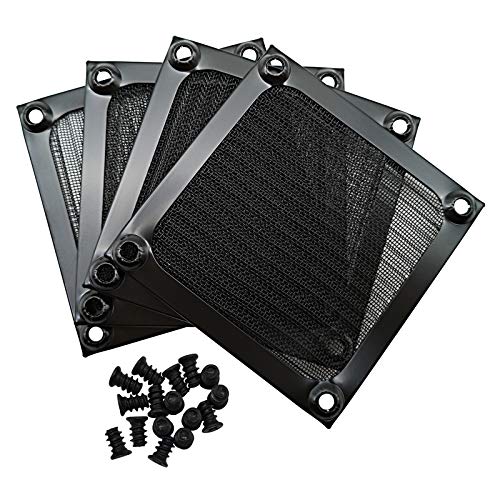 IMSurQltyPrise 80mm Computer Fan Filter Grills | Brand New PC Case Fan Vent Filter Finger… Black Color Compatible with: Most of Standard 80mm Fan /… | Check price |
 Adyoney 4 Pcs 120mm Black Square Plastic | 【Packaging & Size】: Our 4 Pcs Black Cooling… 【Unique Design】: These fan filters feature a unique… 【High-Quality Materials】: Made from durable plastic materials, these… | Check price |
As an Amazon Associate we earn from qualifying purchases at no extra cost to you.
⚡ Save on Your Next PC — Amazon Prime
Prime members get fast free shipping on the systems above, plus early access to Prime Day & Black Friday PC deals. New members get a 30-day free trial.
Watch: How to Clean Your PC Fans and Filters — Video Review
Power Down and Prep Safely
Shut the PC off, switch off the PSU, and unplug it from the wall. Move it to a well-ventilated area or outdoors, since you are about to blow dust everywhere. Never clean a powered system. Ground yourself by touching bare metal to avoid static, and have your cleaning tools ready before you open the case.
Use Compressed Air the Right Way
- Hold each fan blade still with a finger before blowing air, so it cannot spin and generate voltage that harms the motherboard.
- Use short bursts of canned or electric compressed air, keeping the can upright to avoid spraying propellant.
- Blow dust out of heatsink fins and radiator cores, working from one side so debris exits rather than embedding deeper.
Wipe and Wash the Filters
Pop out the magnetic or clip-in dust filters, since they hold most of the grime. Rinse washable mesh filters under water and let them dry fully before reinstalling, or vacuum and wipe non-washable ones. Clean filters are the single biggest factor in keeping the interior dust-free between deep cleans.
Clean Stubborn Grime and Reassemble
For caked-on dust on blades and surfaces, a microfiber cloth or a cotton swab lightly dampened with isopropyl alcohol works well; avoid getting liquid on circuit boards. Let everything dry, reseat filters, and reconnect. While you are in there, add filters to any open intake to slow future dust buildup.
Tips
- Clean every three to six months, sooner if you have pets or a carpeted floor.
- Always immobilize fan blades before blowing air to protect the motherboard.
- Keep the PC off the floor if possible; carpet and floor dust are the worst offenders.
- Run more intake than exhaust (positive pressure) so air enters through filters, not unfiltered gaps.
Frequently Asked Questions
How often should I clean my PC fans?
Every three to six months for most setups. If you have pets, smoke, or keep the PC on carpet, aim for the shorter end, since dust accumulates far faster in those conditions.
Can I use a vacuum cleaner on my PC?
Avoid regular vacuums; they generate static that can damage components. Compressed air is safer. If you want suction, use a dedicated anti-static electronics vacuum instead.
Why do I need to hold the fans still?
Blowing air spins fans faster than they are designed to go, and a spinning fan acts as a generator, sending voltage back into the board. Holding the blades prevents that risk.
Do dust filters hurt airflow?
A clean filter costs a tiny amount of airflow but keeps the interior far cleaner, which matters more for long-term temperatures. Just remember to wash the filters regularly so they do not clog.
Conclusion
Regular cleaning is the cheapest performance maintenance you can do: power down, immobilize the fans, blow out the dust with compressed air, wash the filters, and reassemble. Add filters to open intakes to slow future buildup, run slight positive pressure, and set a reminder every few months. Your components will stay cooler, your fans quieter, and your hardware will last years longer.
FAQ
How often should I clean my PC fans?
Can I use a vacuum cleaner on my PC?
Why do I need to hold the fans still?
Do dust filters hurt airflow?
More from Amazon
Programs that pair well with the guide above. Offers and eligibility are set by Amazon and may change.
Free shipping on eligible items, Prime Video and more. Eligible new members can start with a free trial.
Start a Prime free trialAd-free music streaming. Eligible new subscribers can start with a free trial.
Try Music Unlimited freeA Prime membership for ages 18-24 with a trial period. Eligibility is set by Amazon.
See Prime for Young AdultsAudiobooks and podcasts to listen to on the go. Eligible new members can start with a free trial.
Try Audible freeAs an Amazon Associate we earn from qualifying purchases.