
Key takeaways
- Authentic Visual Geometry: Preserves original 1:1 sprite scaling. Circles remain round, text fonts retain original grid alignment, and character models maintain accurate height-to-width proportions.
- Elimination of Motion Blur Distortion: Prevents uneven pixel stretching across modern display grids, ensuring sharp edges and crisp pixel art transitions.
- Versatile Display Integration: Scaled 4:3 signals work seamlessly on wide 16:9 4K TVs, 16:10 desktop monitors, and portable displays via standard aspect ratio settings or affordable inline hardware switches.
- Optimized Cabinet Ergonomics: Small-footprint retro setups (such as 3.0-inch IPS desktop units or inline video converters) eliminate the need for heavy 50-pound CRT displays in living room media consoles.
- Scanline and Scaler Compatibility: Modern video scalers (such as the RetroTINK or OSSC) require a 4:3 base signal to accurately render hardware scanline filters and CRT sub-pixel masks.
The Short Answer
No, owning a physical 4:3 screen is not strictly necessary for retro gaming, but maintaining a 4:3 display aspect ratio output is mandatory if you want accurate visual proportions. The single defining condition is simple: if your goal is to experience 8-bit, 16-bit, and 32-bit games without distorted character sprites, stretched UI elements, and blurry pixel smoothing, you must display them in 4:3. You can achieve this either by sourcing a vintage 4:3 CRT monitor or by applying pillarboxes (vertical black sidebars) on your modern 16:9 widescreen TV using video converters or built-in display scaling options.
What You Actually Get
From the mid-1970s through the mid-2000s, video game consoles—including the NES, Super Nintendo, Sega Genesis, Sony PlayStation, and Nintendo 64—were engineered around the cathode-ray tube (CRT) standard. These displays utilized a 4:3 aspect ratio, meaning the screen width was 1.33 times its height. Game artists drew character sprites, background tiles, and user interfaces specifically for square-ish CRT pixels. When you play a game designed for 240p or 480i resolutions on a modern 16:9 display without adjusting aspect settings, the display forces the image to stretch horizontally by approximately 33 percent. Perfect circles become flattened ovals, character models look compressed, and fine line work loses crispness.
Our top picks
 Dual RCA to HDMI Converter Support 4
- 【Dual RCA to HDMI Converter】This 2 RCA to…
- 【Convenient for Male/Female RCA Devices】This 2 x RCA…
- 【4 : 3 & 16 : 9 Aspect…
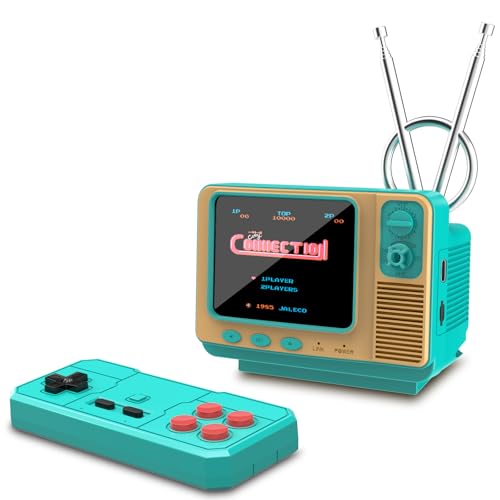 Mini TV Retro Game Console with 3.0"
- This handheld game console features a cute, vintage-style…
- Loaded with authentic JALECO licensed games plus 168…
- Built for versatility, this mini retro console supports…
As an Amazon Associate we earn from qualifying purchases at no extra cost to you.
When curating a media console or dedicated gaming nook, deciding how to handle this signal standard impacts both visual fidelity and room design. A dedicated 20-inch vintage CRT television occupies roughly 18 to 20 inches of shelf depth, weighs between 45 and 60 pounds, and consumes 80 to 120 watts of power. Integrating such heavy equipment into modern furniture requires reinforced shelving rated for at least 75 pounds and deliberate cable management to route composite (RCA) or S-Video cables.
Alternatively, routing classic hardware into modern flat-panel displays requires hardware bridging. A dual RCA-to-HDMI signal converter (typically priced around $15 to $25) measures roughly 3.2 x 2.5 x 0.8 inches and weighs under 0.2 pounds. These compact units pull 5V power via USB and feature dedicated toggle switches allowing you to lock the video output to a 4:3 aspect ratio before sending a standard 1080p 60Hz signal to a 55-inch or 65-inch television. For minimalist setups or compact desk displays, standalone mini retro gaming consoles with 3.0-inch IPS screens (priced around $25 to $35) pack native 4:3 displays into tiny footprints weighing under 0.4 pounds, drawing under 5 watts.
As retro gaming setups continue to trend in 2026 interior design, deciding between dedicated vintage hardware and modern scaled hardware comes down to balancing spatial layout, cabinet strength, and your tolerance for pillarbox sidebars on flat panel screens.
Pros
- Authentic Visual Geometry: Preserves original 1:1 sprite scaling. Circles remain round, text fonts retain original grid alignment, and character models maintain accurate height-to-width proportions.
- Elimination of Motion Blur Distortion: Prevents uneven pixel stretching across modern display grids, ensuring sharp edges and crisp pixel art transitions.
- Versatile Display Integration: Scaled 4:3 signals work seamlessly on wide 16:9 4K TVs, 16:10 desktop monitors, and portable displays via standard aspect ratio settings or affordable inline hardware switches.
- Optimized Cabinet Ergonomics: Small-footprint retro setups (such as 3.0-inch IPS desktop units or inline video converters) eliminate the need for heavy 50-pound CRT displays in living room media consoles.
- Scanline and Scaler Compatibility: Modern video scalers (such as the RetroTINK or OSSC) require a 4:3 base signal to accurately render hardware scanline filters and CRT sub-pixel masks.
Cons
- Unused Screen Real Estate: Displaying a 4:3 signal on a modern 16:9 widescreen TV creates black vertical sidebars (pillarboxing), leaving roughly 25 percent of your panel’s horizontal surface area dark.
- Risk of Uneven OLED Panel Wear: Displaying static black sidebars for thousands of hours on modern OLED televisions can lead to slight uneven sub-pixel degradation over multi-year periods.
- Heavy Spatial Footprint (for CRT hardware): Choosing a physical vintage 4:3 CRT monitor demands deep 18-to-22-inch media console shelving, dedicated high-capacity weight support, and extra power outlet clearance.
- Additional Converter Hardware Needed: Connecting legacy analog composite (yellow/white/red RCA) outputs to modern HDMI-only TVs requires dedicated upscaling devices or adapter boxes to prevent aspect stretching and input lag.
Who Should Buy It
You should prioritize a 4:3 display configuration if you are a dedicated retro gaming enthusiast, an arcade collector, or someone constructing a period-accurate gaming setup. If your game library consists primarily of systems released prior to 2005—such as the NES, Super Nintendo, Sega Saturn, PlayStation 1, or Nintendo 64—a 4:3 aspect ratio delivers the exact visual proportions intended by original software artists. Homeowners creating dedicated media rooms or retro office corners will benefit from forcing 4:3 outputs to keep classic games looking sharp alongside contemporary decor.
Who Should Skip It
You can skip worrying about dedicated 4:3 displays or complex hardware converters if you primarily play modern video games or casual retro re-releases on platforms like Nintendo Switch, PlayStation 5, or Xbox Series X. Modern digital re-releases and remaster collections often include customized widescreen hacks, dynamic background borders, or built-in scaling options that fill 16:9 screens without distorting game graphics. Additionally, apartment dwellers with minimal media console depth (under 12 inches) should avoid hunting down heavy physical CRT monitors, opting instead for quick software aspect locks on their main flat-panel TV.
Cheaper Alternatives
If you do not want to purchase an expensive dedicated retro upscaler or track down a heavy vintage CRT display, several cost-effective hardware options allow you to maintain proper 4:3 aspect ratios on modern displays:
| Option | Cost | Trade-off |
|---|---|---|
| Modern TV Built-in 4:3 Aspect Toggle | $0 (uses existing hardware) | May introduce mild input processing lag (15–30ms) depending on TV picture mode settings. |
| Dual RCA-to-HDMI Converter with 4:3/16:9 Switch | $15 – $25 | Converts composite video to 1080p standard; soft composite signal, but locks aspect ratio hardware-side without menu diving. |
| Standalone Mini 3.0″ IPS Retro Console | $25 – $35 | Small physical display size (3.0 inches); best suited for desk display or travel rather than main living room viewing. |
| PC Monitor with Hardware Aspect Ratio Lock | $100 – $180 | Requires dedicated desk space; lacks built-in analog composite inputs, requiring HDMI adapters. |
FAQ
Will playing 4:3 games on a 16:9 screen cause OLED burn-in?
Displaying pure black vertical sidebars (pillarboxes) on an OLED screen does not cause traditional burn-in because black pixels on OLED displays are completely powered off. However, over thousands of cumulative hours, the active pixels in the center of the screen will age slightly faster than the unlit side pixels. To balance panel wear during long gaming sessions, use built-in pixel shift features and vary your media usage with full-screen widescreen content.
What happens if I force a 4:3 retro game into 16:9 widescreen?
Forcing a 4:3 game into a 16:9 format stretches the image horizontally by approximately 33 percent. Circular radar maps, character heads, and environment geometry will look flattened and overly wide. Additionally, because the display must interpolate pixels to stretch the horizontal plane unevenly, text fonts and pixel art edges will become blurry or develop uneven shimmer during side-scrolling camera movement.
How do I switch an analog retro console to 4:3 on a modern HDMI television?
You can adjust the aspect ratio in two ways. First, access your television’s picture or display settings menu and change the aspect ratio setting from “Wide / 16:9” or “Stretch” to “4:3” or “Direct.” Second, if your TV gray-outs aspect controls over HDMI inputs, install an inline hardware upscaler or dual RCA-to-HDMI adapter that features a physical toggle switch to set the output to 4:3 before sending the video signal to the television.
Is a CRT monitor worth the room space compared to a 4:3 LCD scaling setup?
A CRT television offers superior motion clarity, zero display input lag, and natural color blending that sub-pixel masks on modern LCDs cannot fully replicate. However, CRTs require significant space—a typical 20-inch CRT requires at least 18 inches of depth and a shelf load capacity over 50 pounds. If shelf space, weight limits, and cable clutter are primary concerns in your room design, a modern flat panel paired with an aspect-correcting converter box is the far more practical choice for living spaces.









