Key takeaways
- Your Primary Host Hardware: Are you plugging directly into original legacy consoles (NES, SNES, N64, GameCube), plug-and-play mini consoles (NES Classic, Super NES Classic), a Nintendo Wii/Wii U remote, or a modern PC/Nintendo Switch dock via USB? Connectors are rarely cross-compatible without dedicated active adapters.
- Control Interface Style: Do your target games rely exclusively on a directional pad and face buttons (NES and SNES titles), or do they demand an analog stick with an octagonal gate (N64 and GameCube games)? Matching the controller geometry to the game era is essential for accurate gameplay.
- Wired Signal vs. Wireless Freedom: Native wired controllers deliver zero-latency input transmission (under 2ms) and require no battery maintenance. Wireless 2.4GHz or Bluetooth controllers offer cleaner living room aesthetics but require internal battery management and can introduce 8ms to 18ms of input lag depending on receiver quality.
Retro gaming is as much an architectural and tactile experience as it is a digital one. The click of a switch, the micro-textured grip of an ABS plastic shell, and the tension of an internal rubber dome dictate how an 8-bit or 16-bit masterpiece actually feels in your hands. When learning how to choose controller for classic nintendo games, many buyers fall into a predictable trap: they buy based entirely on visual nostalgia, picking up low-cost replicas that look identical to 1990s hardware on a screen but perform poorly on the coffee table.
In 2026, the marketplace for retro-style gamepads is broader—and more variable in quality—than ever. Common mistakes include ignoring cable length (leaving you seated two feet from an OLED display), purchasing D-pads lacking a physical center pivot (which causes accidental diagonal inputs in precision games like Super Mario World), and confusing incompatible plug standards such as Wii extension ports, native GameCube ports, and USB connectors. A great retro gamepad must balance historical accuracy, ergonomic comfort, and precise mechanical responsiveness.
Our top picks
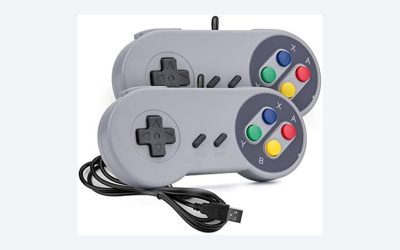
 OSTENT Wired Classic Controller Gamepad Joystick for
- The controller is for gamers who don't feel…
- Blends elements from the controllers for the Nintendo…
- The L and R button of controller comes…
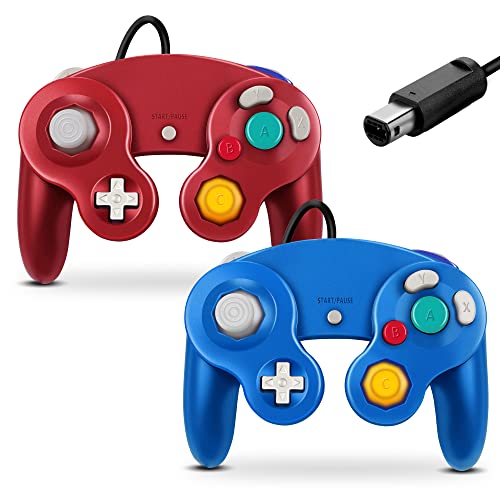 FIOTOK Gamecube Controller
- 【Wide Compatibility & Plug and Play】Fiotok GameCube controllers…
- 【Upgraded Analog Stick & Rumble Feedback】Fiotok wired gamecube…
- 【4-Player Multiplayer Ready】GameCube controllers are designed for Nintendo…
 Nintendo Entertainment System NES Classic Edition- Game
- Mini Classic Edition: The NES Classic Edition is…
- Includes: The original look and feel of the…
- 30 Preloaded Games
| Product | Key specs | |
|---|---|---|
| OSTENT Wired Classic Controller Gamepad Joystick for | The controller is for gamers who don't feel… Blends elements from the controllers for the Nintendo… The L and R button of controller comes… | Check price |
| FIOTOK Gamecube Controller | 【Wide Compatibility & Plug and Play】Fiotok GameCube controllers… 【Upgraded Analog Stick & Rumble Feedback】Fiotok wired gamecube… 【4-Player Multiplayer Ready】GameCube controllers are designed for Nintendo… | Check price |
| Nintendo Entertainment System NES Classic Edition- Game | Mini Classic Edition: The NES Classic Edition is… Includes: The original look and feel of the… 30 Preloaded Games | Check price |
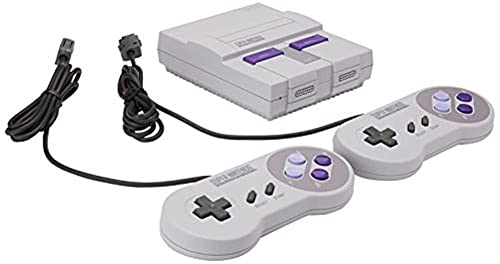 Nintendo Super NES Classic Edition Nintendo Super NES Classic Edition | From your first ride on Yoshi to the… Now a new, miniaturized version is here, pre-loaded… Live out the golden age of 16-bit gaming… | Check price |
As an Amazon Associate we earn from qualifying purchases at no extra cost to you.
Decide These 3 Things First
Before evaluating shell molds or rubber membrane tolerances, narrow your search by establishing three baseline operational requirements:
- Your Primary Host Hardware: Are you plugging directly into original legacy consoles (NES, SNES, N64, GameCube), plug-and-play mini consoles (NES Classic, Super NES Classic), a Nintendo Wii/Wii U remote, or a modern PC/Nintendo Switch dock via USB? Connectors are rarely cross-compatible without dedicated active adapters.
- Control Interface Style: Do your target games rely exclusively on a directional pad and face buttons (NES and SNES titles), or do they demand an analog stick with an octagonal gate (N64 and GameCube games)? Matching the controller geometry to the game era is essential for accurate gameplay.
- Wired Signal vs. Wireless Freedom: Native wired controllers deliver zero-latency input transmission (under 2ms) and require no battery maintenance. Wireless 2.4GHz or Bluetooth controllers offer cleaner living room aesthetics but require internal battery management and can introduce 8ms to 18ms of input lag depending on receiver quality.
Size, Weight, and Shell Geometry
The physical footprint of a retro gamepad directly affects hand fatigue during extended play sessions. Classic Nintendo designs vary dramatically in weight and volume across generations:
- NES-Style Rectangular Controllers: Measure approximately 4.8 inches by 2.1 inches by 0.7 inches and weigh between 85 and 100 grams. Their sharp 90-degree corners require a light fingertip grip rather than full palm contact.
- SNES-Style Curved Controllers: Measure roughly 5.6 inches by 2.4 inches by 0.8 inches and weigh between 105 and 125 grams. The rounded shoulder contours distribute palm pressure more evenly than 8-bit pads.
- GameCube-Style Ergonomic Controllers: Feature deep hand grips measuring roughly 5.8 inches by 6.3 inches by 2.5 inches, weighing between 200 and 240 grams. The asymmetrical dual-handle geometry supports a full palm enclosure, reducing wrist extension.
When selecting a reproduction pad, verify that the shell casing uses minimum wall thicknesses of 1.8mm to 2.2mm. Sub-1.0mm plastic shells feel hollow, flex under moderate twisting force, and register under 80 grams on a scale—a clear sign of structural compromises.
Material Quality, Plastics, and Rubber Membranes
The structural integrity of a controller depends on its raw polymer formulation and internal switches. Premium original and high-end reproduction gamepads use impact-resistant Acrylonitrile Butadiene Styrene (ABS) thermoplastic resin with a matte, micro-textured surface finish that resists finger oils.
Inside the controller, button actuation relies on conductive silicone rubber membranes positioned between the plastic keycaps and the printed circuit board (PCB). High-quality membranes utilize silicone with a Shore A durometer hardness rating between 45 and 55. This provides an actuation force of roughly 60 to 75 grams, offering a crisp, tactile snap without feeling stiff. Cheap clone controllers frequently use low-grade silicone under 35 durometer, which feels soft and mushy, or over-vulcanized rubber above 65 durometer, which causes finger fatigue after 15 minutes of play.
D-Pad Pivot and Button Travel Performance
The directional pad (D-pad) is the critical component of any classic controller. A correctly engineered Nintendo-style D-pad measures 23mm to 25mm across and rests atop an internal central steel or molded-plastic pivot ball. This pivot acts as a fulcrum, preventing the entire pad from being pressed straight down simultaneously.
Without a proper center pivot, pressing “Right” can accidentally register “Up-Right” or “Down-Right”—a issue known as diagonal bleed. Button travel depth should register precisely between 1.1mm and 1.4mm before bottoming out on the board contacts. Face buttons (A, B, X, Y) require a dome travel distance of 1.0mm to 1.3mm, while analog triggers (found on GameCube-style pads) should feature a smooth 8mm to 10mm analog pull coupled with a distinct tactile microswitch click at full depression.
Cable Length, Wiring Gauge, and Connectors
Cable length is one of the most overlooked details in retro gaming. Stock cables on original mini consoles were notoriously short—the official NES Classic controller included a brief 3-foot (0.9-meter) cord, forcing players to sit uncomfortably close to their displays. A proper living room setup requires a cable length between 6 feet (1.8 meters) and 10 feet (3.0 meters).
Inspect the wire construction specifications:
- Standard Wiring: Look for 24 AWG or 26 AWG copper conductors shielded in a flexible PVC jacket with integrated strain-relief boots at both the controller body and the plug terminal.
- Wii Extension Interface: Controllers designed for the Wii Remote accessory port (such as classic mini pads) utilize a proprietary 6-pin connector operating on the I2C protocol.
- GameCube Native Interface: Uses a rounded 6-pin plug with a flat bottom operating at 3.3V power logic, compatible with original hardware, Wii consoles with top ports, and USB adapters.
Price Tiers and Real-World Value
Market prices for classic Nintendo gamepads fall into three main tiers based on materials, authenticity, and licensing:
- Budget Tier ($10.00 – $18.00): Includes basic third-party utility pads like the OSTENT Wired Classic Controller ($12.99). These offer functional Wii remote compatibility and lightweight builds ideal for casual secondary players, though button feel and cord lengths are basic.
- Mid-Range Tier ($25.00 – $55.00): Includes dedicated reproduction hardware like the FIOTOK GameCube Controller ($27.99). These feature reinforced cable strain reliefs, authentic button layouts, dual vibration motors, and full compatibility with original GameCube or Wii ports.
- Premium & Collector Tier ($150.00 – $320.00+): Encompasses original manufacturer hardware and sealed retro console packages, such as the Nintendo Super NES Classic Edition ($169.00) or the Nintendo Entertainment System NES Classic Edition set ($309.99). These premium collector items feature precise OEM silicone membrane feel, factory-matched plastic textures, and exact original specifications.
Warranty, Longevity, and Maintenance Expectations
Commercial-grade conductive rubber membranes are rated for approximately 1,000,000 to 2,000,000 actuations before the silicone dome develops structural micro-tears. Budget clone pads often fail after fewer than 200,000 actuations, resulting in stuck buttons or lost tactile resistance.
Look for third-party manufacturers that offer at least a 90-day to 1-year warranty against button drift or connector failure. Higher-end reproduction units feature accessible Phillips or Tri-Wing screws on the rear shell, allowing you to open the controller, clear dust, and swap internal conductive pads after years of use.
Spec Checklist
| Specification | Budget Tier ($10 – $18) | Mid-Range Tier ($25 – $55) | Premium / Collector Tier ($150 – $300+) |
|---|---|---|---|
| Target Shell Weight | 80g – 100g (Lightweight) | 110g – 210g (Reinforced) | 95g – 220g (OEM Specification) |
| Cable Length | 3.0 ft – 4.5 ft | 6.0 ft – 9.0 ft | 3.0 ft (Requires Extension) or Wireless |
| D-Pad Pivot Mechanism | Flat Membrane (Prone to Bleed) | Molded Center Pivot Ball | Precision OEM Pivot Point |
| Silicone Membrane Rating | < 300,000 Cycles | 1,000,000+ Cycles | 2,000,000+ Cycles |
| Connector Type | Wii Remote / Basic USB | GameCube 6-Pin / Reinforced USB | Proprietary Classic / OEM Native |
| Average Input Latency | 8ms – 15ms | 2ms – 5ms (Wired) | < 3ms (Wired Direct) |
Red Flags
- Absence of Internal D-Pad Pivot: If pressing down on the center of the cross causes all four directions to register simultaneously, the pad lacks a pivot sphere. Avoid it entirely.
- Unshielded Cables Under 4 Feet: Cords under 4 feet long force you dangerously close to large television screens and put strain on console connector ports.
- Ultra-Lightweight Shells: A controller weighing under 80 grams often uses paper-thin ABS walls that flex under thumb pressure and crack easily if dropped on hardwood floors.
- Rattling Face Buttons: Excessive lateral play (wobble over 1.5mm) around the button perimeter indicates poorly tolerance plastic injection molds, leading to sticky buttons during fast inputs.
FAQ
Can I use a Wii Classic accessory controller directly on an original 1990s SNES console?
No. Controllers with Wii connector plugs use a modern digital I2C signal protocol. To use them on original NES or SNES hardware, you must use an active, powered controller adapter designed to convert the pinouts and signaling formats.
Why does my character walk diagonally when I only press Right on the D-pad?
This is caused by a poor D-pad design lacking a center pivot point, or a worn-out conductive silicone pad. When you apply thumb pressure to the right arrow, the entire directional cross depresses flat against the circuit board, bridging the contacts for “Up” or “Down” at the same time.
Are third-party USB retro controllers good for modern PC emulation?
Yes, provided they feature a direct X-Input or D-Input toggle switch and use a standard USB-A interface. Ensure the controller supports polling rates of at least 125Hz to 250Hz for low input lag during gameplay.
How can I clean sticky buttons or stiff directional pads on classic controllers?
Unscrew the rear housing using the correct driver (usually Tri-Wing or small Phillips). Separate the plastic shell, remove the conductive rubber membranes, and clean the contact pads on the PCB using 90%+ isopropyl alcohol and a soft cotton swab. Wash the plastic buttons and silicone pads in warm, soapy water, and allow them to dry completely before reassembly.