Key takeaways
- Primary Connection Protocol: Determine whether your primary platform is a PC, a mobile device, or dedicated retro hardware. Hardwired USB-C or direct physical bridge connections deliver sub-2ms input latency, whereas 2.4GHz wireless dongles average 4ms to 8ms, and standard Bluetooth connection options lag behind at 12ms to 25ms.
- D-Pad Switch Architecture: Choose between tactile microswitches (clicky, ultra-fast 0.2mm to 0.5mm actuation) and classic conductive rubber membrane switches (soft, damped feel with 1.0mm to 1.5mm travel). Microswitches offer faster resetting for frame-precise inputs, while membrane switches replicate original 16-bit console feel.
- Hardware Form Factor: Decide between a telescopic clamping pad designed to wrap around smartphones, a traditional standalone wireless/wired gamepad, or an arcade stick setup. If you run original retro hardware into an upscaler like the Kaico OSSC 1.8 Open Source Scan Converter (retailing around $169.99), your controller interface must complement the low-latency signal chain from source to screen.
When building a retro emulation station or configuring a mobile cloud gaming setup, enthusiasts often invest heavily in high-refresh-rate displays and optimized emulator cores, yet neglect the critical bridge between their hands and the system: the controller. The most common mistake buyers make when searching for low latency emulation controllers is prioritizing flashy aesthetics or wireless convenience over raw input transmission speed and switch responsiveness. Standard Bluetooth gamepads frequently introduce 15 to 30 milliseconds of wireless latency, which—when stacked on top of emulator frame delays and display processing lag—renders frame-perfect platformers and fighting games nearly unplayable.
Another frequent oversight is ignoring the mechanical architecture of the directional pad. Modern gamepads designed for 3D camera controls often feature soft, floating D-pads without physical center pivots, causing frustrating accidental diagonal inputs during classic 2D games. Understanding what to look for in low latency emulation controllers requires evaluating connection protocols, switch travel distances, shell ergonomics, and hardware manufacturing standards before making a purchase.
Our top picks
 Kaico OSSC 1.8 Open Source Scan Converter
Works with a wide range of retro consoles via RGB SCART input
6x output mode adds shadow mask emulation for retro-style visuals
Updated firmware improves synchronization stability and adds HDR mode
Does not work with Nintendo 64, unmodified NES, or NTSC GameCube
Requires a separate high-quality RGB SCART cable not included
 Razer Kishi Mobile Game Controller/Gamepad for Android
- Universal Mobile Gaming Controller: Designed to bring console-level…
- Cloud and Mobile Gaming: Compatible with leading cloud…
- Refine Your Aim and Execution: Clickable analog thumbsticks…
 Razer Kishi Mobile Game Controller / Gamepad
- Universal Mobile Gaming Controller: Designed to bring console-level…
- Cloud and Mobile Gaming: Compatible with leading cloud…
- Refine Your Aim and Execution: Clickable analog thumbsticks…
As an Amazon Associate we earn from qualifying purchases at no extra cost to you.
Decide These 3 Things First
Before comparing specs and price tags, narrow down your configuration by defining these three core parameters:
- Primary Connection Protocol: Determine whether your primary platform is a PC, a mobile device, or dedicated retro hardware. Hardwired USB-C or direct physical bridge connections deliver sub-2ms input latency, whereas 2.4GHz wireless dongles average 4ms to 8ms, and standard Bluetooth connection options lag behind at 12ms to 25ms.
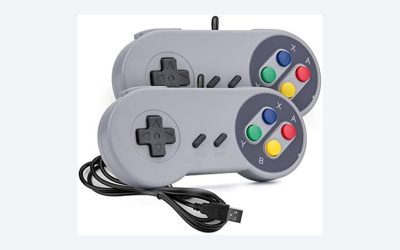
- D-Pad Switch Architecture: Choose between tactile microswitches (clicky, ultra-fast 0.2mm to 0.5mm actuation) and classic conductive rubber membrane switches (soft, damped feel with 1.0mm to 1.5mm travel). Microswitches offer faster resetting for frame-precise inputs, while membrane switches replicate original 16-bit console feel.
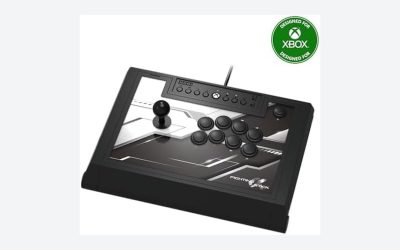
- Hardware Form Factor: Decide between a telescopic clamping pad designed to wrap around smartphones, a traditional standalone wireless/wired gamepad, or an arcade stick setup. If you run original retro hardware into an upscaler like the Kaico OSSC 1.8 Open Source Scan Converter (retailing around $169.99), your controller interface must complement the low-latency signal chain from source to screen.
Size and Form Factor Dimensions
A controller’s physical dimensions dictate both hand comfort and muscle memory precision. Standalone retro controllers typically measure between 140mm and 155mm in width, 95mm to 105mm in depth, and 45mm to 60mm in total thickness. For adults with average-to-large hand spans (7.5 inches or greater from wrist to middle fingertip), handles with a grip depth of at least 40mm prevent cramping during multi-hour gaming sessions.
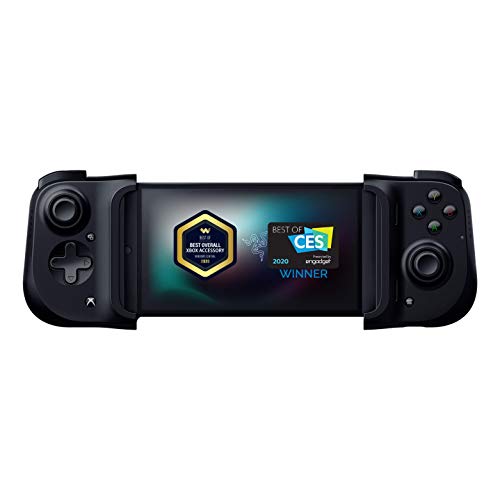
For mobile setups, telescopic controllers like the Razer Kishi Mobile Game Controller series clamp directly onto devices ranging from 130mm to 175mm in length and up to 10mm in thickness. Weight distribution is equally critical: standalone pads should weigh between 180 grams and 260 grams. Anything lighter than 150 grams feels hollow and unstable, while controllers exceeding 320 grams induce wrist fatigue when held unsupported.
Material Quality and Shell Construction
The tactile feel of a controller relies heavily on housing materials and surface treatments. High-grade controllers utilize thick-walled (2.0mm to 2.5mm) ABS plastic or PC-ABS composite shells that resist flex when twisted. Cheap alternatives use thin polypropylene that creaks under pressure and alters button alignment under heavy thumb torque.
Look for textured micro-beading or laser-etched diamond patterns along the rear grips. Matte-finished shells resist skin oils and maintain traction during intense gameplay, whereas high-gloss plastics collect fingerprint smudges and grow slippery. Internal weight balancing should keep the center of gravity directly over the palm swell rather than tilted toward the top bumpers.
Switch Mechanics and Internal Construction
Low latency performance extends beyond circuit boards into physical switch engineering. The actuation distance—how far a button must be pressed before registering an input—should range between 0.3mm for mechanical microswitches and 1.2mm for silicone membrane pads. High-end low latency controllers utilize Kailh or Omron microswitches rated for 3 million to 5 million clicks, providing crisp tactile feedback with minimal pre-travel.
For directional pads, a rigid central pivot ball or post is mandatory. Without a physical central pivot, pressing “Right” can collapse the entire D-Pad down, registering an unintentional “Down-Right” diagonal. Look for D-pads with an outer ring diameter of 23mm to 26mm, which balances quick rotational motions for special moves with distinct cardinal direction separation.
Ergonomics, Grip Geometry, and Latency Performance
Input latency is measured in polling rate (expressed in Hertz, Hz) and overall system response time (in milliseconds, ms). A standard controller polling at 125Hz sends updates every 8ms. High-performance emulation controllers operate at 500Hz (2ms) or 1000Hz (1ms polling interval), dramatically reducing input variance.
When selecting a controller for 2026 rigs, ergonomic geometry must support proper thumb placement over both the D-pad and primary face buttons without awkward thumb hyperextension. Handles should flare outward at a 15 to 20-degree angle from the vertical axis. Passthrough charging capability—featured on dedicated mobile grips like the Razer Kishi USB-C series—ensures your phone remains powered via a direct hardware connection without routing signals through high-latency wireless stacks.
Price Tiers and Value Mapping
Controller prices generally align with component specifications, switch longevity, and connection tech:
- Budget ($20 – $40): Basic wired USB controllers featuring standard rubber membrane switches, plastic thumbsticks, 125Hz polling rates, and lighter plastic shells. Suitable for casual emulation where frame-perfect inputs are not required.
- Mid-Range ($50 – $90): Includes direct USB-C mobile grips (such as the Razer Kishi line), 500Hz–1000Hz wired/2.4GHz PC pads, Hall Effect joysticks, and dedicated hardware pivots on D-pads. Delivers the ideal balance of sub-5ms input latency and durable construction.
- Premium ($100 – $200+): Professional-grade gamepads, modular arcade fight sticks, and specialized retro setups. Features hot-swappable mechanical switches, adjustable trigger stops, high-end scan converters like the Kaico OSSC 1.8 ($169.99) for zero-lag analog signal processing, and customizable polling rate firmware.
Warranty, Firmware Support, and Long-Term Durability
Hardware failures in controllers usually occur in two places: potentiometer joystick drift and rubber membrane tearing. Look for manufacturers offering at least a 1-year to 2-year replacement warranty. Brands that supply downloadable companion software allow users to update controller firmware, re-calibrate stick deadzones, adjust trigger sensitivity, and overclock USB polling rates.
Controllers built with Hall Effect magnetic sensor joysticks eliminate physical contact points entirely, preventing wear-induced drift over time. If selecting a controller with traditional analog potentiometers, ensure the internal module deadzone defaults to less than 3% out of the box.
Delivery, Packaging, and Out-of-the-Box Setup
When unboxing a performance controller, inspect the included accessories. A quality wired controller should include a detachable, braided USB-C to USB-A cable measuring between 1.8 meters (6 feet) and 3 meters (10 feet) with integrated strain-relief boots. Mobile clamp-style controllers should include swappable rubber adapter cushions to accommodate various phone camera bumps and case thicknesses without forcing the USB-C connector into an angled strain position.
Spec Checklist
| Spec / Feature | Budget Tier | Mid-Range Tier | Premium Tier |
|---|---|---|---|
| Connection Type | Standard Bluetooth / USB-A | Direct USB-C / 2.4GHz Dongle | Direct USB-C / 1000Hz Wired |
| Polling Rate | 125 Hz (8ms) | 500 Hz (2ms) | 1000 Hz (1ms) |
| D-Pad Type | Soft Rubber Membrane | Pivoted Membrane or Tactile | Microswitch with Central Pivot |
| Stick Tech | Potentiometer (Standard) | Potentiometer / Hall Effect | Hall Effect Magnetic Sensors |
| Weight | 120g – 160g | 180g – 240g | 240g – 340g |
| Target Price | $20 – $40 | $50 – $90 | $100 – $200+ |
Red Flags
- Bluetooth-Only Connection without USB Data Passthrough: Controllers that use USB cables strictly for power charging while continuing to transmit gameplay inputs via Bluetooth introduce unnecessary latency spikes.
- D-Pads Without a Physical Pivot: If you can press the entire D-pad straight down flat into the housing like a single big button, it lacks a center pivot and will cause misreads on diagonal inputs.
- Excessive Analog Stick Deadzones: Controllers requiring more than 10% stick movement before registering input feel sluggish and imprecise in 3D emulation platforms.
- Slippery Shell Finish: Smooth, glossy ABS plastic handles without rear micro-texturing lead to hand fatigue and slippage during extended gameplay sessions.
- Unprotected Telescopic Ribbons: On clamping mobile pads, flimsy exposed ribbon cables behind the expansion spine are prone to fraying after repeated stretching cycles.
FAQ
Why does input latency matter more in emulation than in modern games?
Classic console games were coded specifically for CRT displays running at a native 60Hz with zero display buffer lag. Timings for jump physics, parries, and combinations rely on sub-frame reaction windows. When software emulation delays are combined with display response time and controller input lag, total latency can easily exceed 80ms, making classic titles feel heavy and unresponsive.
Are Hall Effect joysticks necessary for retro emulation?
While classic 8-bit and 16-bit games rely entirely on the D-pad, emulation of 64-bit and 128-bit eras requires precise analog control. Hall Effect sensors use magnets rather than rubbing electrical contacts to measure position. This eliminates physical friction wear, prevents stick drift, and maintains ultra-tight center deadzones over millions of rotation cycles.
Does USB-C passthrough charging increase input lag on mobile controllers?
No. On well-engineered direct-connect grips like the Razer Kishi, the passthrough charging port handles power delivery on separate power traces without interfering with the dedicated USB data pins routing your button inputs directly to the host processor.
How does an upscaler affect total system latency when using original controllers?
If you connect original console hardware to modern displays, legacy analog-to-digital converters can add several frames of lag. Pairing original low-latency controllers with a zero-lag scan line processor like the Kaico OSSC 1.8 digitizes analog video signals in real time (under a few microseconds), maintaining the immediate response feel required for timing-sensitive games.