Our Top Picks
 TP-Link AV1000 Powerline Ethernet Adapter+AX1500 Wi-Fi 6 WiFi3.07 x 1.33 x 5.87 inches0.55 poundsCheck on Amazon
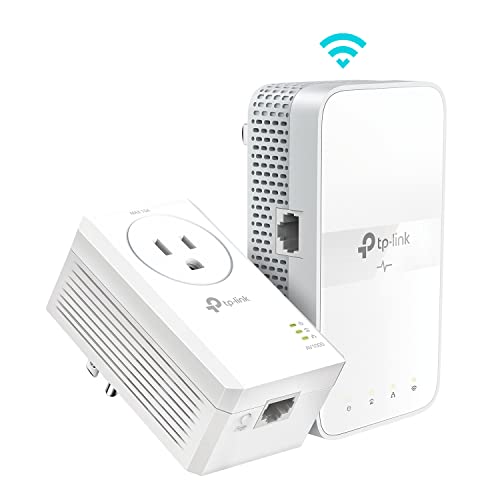 TP-Link AV1000 Powerline Ethernet Adapter WiFi Extender KitAV1000, AC1200- Kit9.8 x 7.6 x 4 Inches1.4 poundsCheck on Amazon
 Tenda AV1000 WiFi Powerline Adapter Kit with GigabitPH104.33 x 2.36 x 1.25 inches1 poundsCheck on Amazon
 TP-Link Powerline WiFi Extender- AC1200 Dual Band NetworkAV1000, AC1200- Add on2.74 x 1.38 x 4.89 inches0.44 poundsCheck on Amazon
Powerline Wi-Fi extenders exist for one stubborn problem: a router that cannot push a usable signal through the walls, floors, or distance between it and the room where you actually need to work. Instead of repeating a weak wireless signal, a powerline kit sends the connection through your home’s electrical wiring and rebroadcasts it as Wi-Fi at the far end. That is a different decision from buying a plain wireless extender, because it depends on your wiring, your outlets, and what you plug into the second unit.
This guide is for people with a dead-spot bedroom, a detached office, a basement, or a smart TV that refuses to stream in a back room. We narrowed the original set to the five listings that truly are powerline products with built-in Wi-Fi or an add-on Wi-Fi unit, and left out standalone wireless extenders and an outdoor access point because they do not use house wiring. Each pick is judged by the figures in its title, from powerline speed class to Wi-Fi standard to Gigabit port count, with details checked against 2026 listings.
Quick Picks
TP-Link AV1000 Powerline Ethernet Adapter+AX1500 Wi-Fi 6 WiFi Extender KIT | AV1000 Powerline Network Adapter&AX1500 Dual-Band Extender, Gigabit Port, EasyMesh, Plug & Play, TL-WPA7817 KIT
One of the consumer electronics options compared in this guide.
View on AmazonTP-Link AV1000 Powerline Ethernet Adapter WiFi Extender Kit, Passthrough | Includes AV1000 Powerline Adapter and AC1200 Dual Band Extender, Gigabit Port, OneMesh, Plug Pair & Play (TL-WPA7617 KIT)
One of the consumer electronics options compared in this guide.
View on Amazon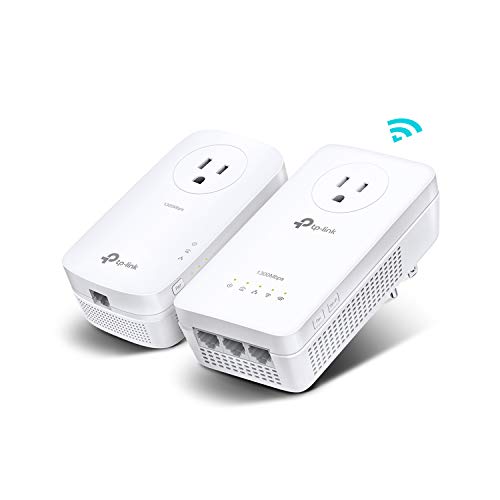
TP-Link AV1300 Powerline Ethernet Adapter WiFi Extender KIT- Passthrough | AV1300 Powerline Adapter and AC1200 Dual Band Extender, 2x2 MIMO,3 Gigabit Ports, Plug & Play, TL-WPA8631P KIT
One of the consumer electronics options compared in this guide.
View on AmazonTenda AV1000 WiFi Powerline Adapter Kit with Gigabit Ports, Powerline Extender with AC650 Dual Band WiFi, Plug and Play, for HD/3D/4K Video Streaming and Gaming (PH10)
One of the consumer electronics options compared in this guide.
View on AmazonTP-Link Powerline WiFi Extender- AC1200 Dual Band Network Extender | Gigabit Port, Passthrough, OneMesh, Ethernet Over Power, 𝐀𝐝𝐝-𝐨𝐧 𝐔𝐧𝐢𝐭 (TL-WPA7617)
One of the consumer electronics options compared in this guide.
View on Amazon| Product | Best for | Key spec from the title |
|---|---|---|
| TP-Link AV1000 + AX1500 Wi-Fi 6 Kit | Newest Wi-Fi standard in the group | AV1000 powerline, AX1500 dual-band extender, Gigabit port |
| TP-Link AV1000 + AC1200 Kit | Balanced everyday kit | AV1000 adapter, AC1200 dual band, passthrough |
| TP-Link AV1300 + AC1200 Kit | Fastest powerline class here | AV1300, AC1200 dual band, 2×2 MIMO, 3 Gigabit ports |
| Tenda AV1000 + AC650 Kit | Entry-level 4K streaming kit | AV1000 powerline, AC650 dual band, Gigabit ports |
| TP-Link TL-WPA7617 Add-On Unit | Expanding an existing powerline network | AC1200 dual band, Gigabit port, passthrough, OneMesh |
How to Choose
Understand the two numbers: powerline class and Wi-Fi class
Every kit here carries two ratings. The first, such as AV1000 or AV1300, describes the link between the two units over the electrical wiring. The second, such as AC650, AC1200, or AX1500, describes the Wi-Fi the far-end unit broadcasts. These are theoretical maximums, so real speeds will be lower, and the powerline portion usually limits how much of the Wi-Fi capacity you can use. A fast Wi-Fi class paired with a modest powerline class still gives a sound result for most households, but do not expect the headline number. A practical way to read the pair is to ask which one is the bottleneck for your use. If you mostly stream video and browse, either class is enough. If you move large files between rooms, the powerline figure and the Gigabit ports deserve more weight than the wireless label.
Look for Gigabit ports and passthrough
A Gigabit Ethernet port on the far unit lets you wire a console, smart TV, or desktop directly, which is often more stable than Wi-Fi. A kit that lists three Gigabit ports gives you room for several devices. Passthrough, listed on several of these models, means the unit does not block the wall socket: you plug a power strip or appliance into the adapter and keep the outlet. Without it, you lose one outlet in a room that may already be short on sockets. In a bedroom with one outlet behind the bed or a living room with a single wall plate behind a cabinet, that detail matters more than a modest speed difference.
Check your wiring and plan the outlets
Powerline performance depends on the home’s wiring. Units on the same electrical circuit generally work best, while a separate breaker or a very old installation can reduce speed. Plug adapters straight into a wall outlet, not a power strip with surge protection, since filtering in a strip can weaken the signal. If your house has more than one story or an older panel, consider that a plain wireless extender may or may not perform better, and that powerline is a good fit mainly where walls are the problem. Before you commit, map out which outlet is nearest the router and which is nearest the dead spot, and note whether they are on the same floor. Appliances such as space heaters, hair dryers, and some chargers can add electrical noise, so avoid sharing an outlet strip with them when you can.
What to ignore and where budget kits cut corners
Ignore claims about range in square feet, because the signal reach depends on the layout. Budget-tier kits typically give you a lower Wi-Fi class, such as AC650, fewer Ethernet ports, and no mesh-style features. Mid-range kits step up to AC1200 or Wi-Fi 6, and OneMesh support for pairing with compatible routers. If your router is not from the same brand, check the compatibility notes before assuming mesh features will work.
The 5 Best Options
TP-Link AV1000 + AX1500 Wi-Fi 6 Kit
This kit couples an AV1000 powerline adapter with an AX1500 dual-band Wi-Fi 6 extender and lists a Gigabit port. As the only Wi-Fi 6 kit in the group, it suits people with newer phones and laptops who want the latest wireless standard in a far room.
- Strength: Wi-Fi 6 on the extender side matches newer devices.
- Strength: dual-band design offers a choice between the 2.4 and 5 GHz bands.
- Trade-off: the AV1000 powerline link may limit the full AX1500 potential.
Skip it if your devices are older and do not support Wi-Fi 6, or if you want the fastest powerline class. It makes sense for a home office that you expect to keep for several years, and for households already moving to Wi-Fi 6 routers. Think of it as the premium-leaning option of the five, since the Wi-Fi 6 label is the newest feature on offer.
TP-Link AV1000 + AC1200 Kit
This is the balanced kit: an AV1000 powerline adapter plus an AC1200 dual-band extender with a Gigabit port and passthrough. It is a straightforward choice for a bedroom or a TV room where you want both a wired port and a Wi-Fi signal.
- Strength: passthrough keeps the wall outlet usable.
- Strength: AC1200 dual-band is a familiar, widely compatible standard.
- Trade-off: no Wi-Fi 6 support, so it is older technology than the AX1500 kit.
Skip it if you want Wi-Fi 6 or more than one Ethernet port. It is a good fit for a single-room fix, such as a back bedroom or a den. It is also the kit most shoppers will compare against the Wi-Fi 6 version, and the decision usually comes down to whether your phones and laptops can use the newer standard at all.
TP-Link AV1300 + AC1200 Kit
Here the powerline link steps up to AV1300 and is paired with an AC1200 dual-band extender with 2×2 MIMO, passthrough, and three Gigabit ports in the title. That mix makes it the most flexible wired option in the group.
- Strength: AV1300 is the fastest powerline class listed here.
- Strength: three Gigabit ports can connect a TV, console, and streaming box.
- Trade-off: Wi-Fi remains AC1200, not Wi-Fi 6.
Skip it if you only need a single wireless connection and a light budget. It is the pick for an entertainment corner where wired connections matter more than the newest wireless standard. A game room, a home theater shelf, or a workstation with a docking station are all places where those extra ports pay off. It is a mid-range choice that favors wired reliability.
Tenda AV1000 + AC650 Kit
The Tenda kit lists an AV1000 powerline adapter with AC650 dual-band Wi-Fi, Gigabit ports, and plug-and-play setup, and positions itself for HD, 3D, and 4K streaming. It is the entry-level option here, with the lowest Wi-Fi class.
- Strength: plug-and-play setup keeps installation simple.
- Strength: Gigabit ports allow wired connections for streaming devices.
- Trade-off: AC650 Wi-Fi is the lowest tier in the group.
Skip it if you have many wireless devices or need the highest Wi-Fi speeds. It suits a tight budget and a room used mainly for a smart TV. For a guest room or a spare bedroom where a couple of devices connect at once, the lower Wi-Fi class is less of a concern, and the Gigabit ports mean a streaming box can use a cable if the wireless signal is crowded.
TP-Link TL-WPA7617 Add-On Unit
The TL-WPA7617 is labeled as an add-on unit with AC1200 dual-band Wi-Fi, a Gigabit port, passthrough, OneMesh, and Ethernet over power. Because it is an add-on, it is meant to expand an existing powerline setup rather than serve as a complete kit by itself.
- Strength: OneMesh support suits a compatible TP-Link router.
- Strength: passthrough keeps the outlet free.
- Trade-off: as an add-on, it needs a matching powerline unit already in place.
Skip it if you are starting from scratch and need a complete kit. It suits someone who already owns a compatible adapter and wants a second Wi-Fi spot in another room. The OneMesh mention also points to a nicer roaming experience when the router is from the same brand, though you should verify router compatibility on the listing before relying on that.
Which One Fits Your Situation
You have newer phones and want future-proofing
The TP-Link AV1000 + AX1500 Wi-Fi 6 Kit is the clear choice. It is the only one in the group that lists Wi-Fi 6. Pair it with a Wi-Fi 6 router for the most consistent result.
You need several wired connections in one room
Look at the TP-Link AV1300 + AC1200 Kit, which lists three Gigabit ports. A console, TV, and streaming box can all connect through it.
You are on a tight budget
The Tenda AV1000 + AC650 Kit is the entry-level pick. It handles basic streaming needs with a simple setup, and it is a sensible way to test whether powerline suits your house before you invest in a mid-range or premium kit.
You already own a powerline adapter
The TL-WPA7617 add-on unit is built for that scenario, providing another Wi-Fi point without buying a second full kit.
Common Mistakes
- Plugging a powerline adapter into a surge-protected power strip, which can weaken the signal.
- Expecting the Wi-Fi class number to equal real-world speed.
- Buying an add-on unit without a matching base adapter.
- Forgetting that circuits and wiring age can affect performance.
- Choosing a kit with a single Ethernet port when several devices need wired access.
Related guides
- Solar Chargers For Camping And Hiking
- Retro Game Storage Cases And Displays
- How To Clean Retro Game Cartridges Safely
Frequently Asked Questions
How is a powerline extender different from a regular Wi-Fi extender?
A regular extender repeats a wireless signal, while a powerline kit sends the connection through your electrical wiring. That can help when walls or floors weaken wireless signals.
Do both units need to be on the same circuit?
Generally, yes, or at least on the same electrical system. Different breakers or older wiring can lower speed, so test the placement.
Is AV1300 noticeably better than AV1000?
The AV1300 class has a higher theoretical maximum, but real gains depend on your wiring. For many homes, the difference is modest.
Can I use more than one powerline set?
Often yes, but they should be compatible and paired correctly. Check the manufacturer’s guidance before mixing brands.