Our Top Picks
 C4000BG CenturyLink Bonded Line Wi Fi DSL Router5x5x10 inches4.7 x 5.7 x 8.3 inches2 PoundsCheck on Amazon
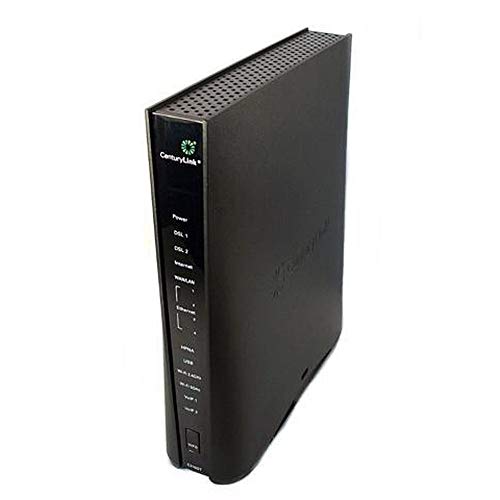 CenturyLink Prism TV Technicolor C2100T 802.11AC Modem Router10.6" L x 2.6" W x 10.6" H10.6 x 10.6 x 2.6 InchesCheck on Amazon
Shopping for a router that works with CenturyLink is less about Wi-Fi speed and more about what the line coming into your house actually is. CenturyLink service has arrived over different kinds of lines over the years: standard DSL, VDSL2, bonded pairs of DSL lines, and fiber. A device that is perfect for one of those can be useless on another, because the box has to be a modem as well as a router, or at least pair with one that is. So the real decision behind “best routers for CenturyLink” is matching a model number to your service type, then thinking about Wi-Fi standards and ports second.
This guide is for people replacing a failed gateway, returning a rental unit to save the monthly fee, or buying a spare for a home office, and it is written for 2026 shoppers who keep seeing the same cluster of model names: C3000A, C4000BG, C4000LZ, C4000XG, C2100T, and C1100T. Everything below is based on the listing titles, which name the line type, the wireless standard, and the condition. A general-purpose router from the original shortlist was dropped because its title makes no CenturyLink claim, which leaves seven carrier-oriented devices. Always confirm your plan and line type with the provider before ordering.
Quick Picks

Centurylink C3000A Wireless DSL Modem Router (Renewed)
One of the consumer electronics options compared in this guide.
View on AmazonC4000BG CenturyLink Bonded Line Wi Fi DSL Router
One of the consumer electronics options compared in this guide.
View on AmazonCenturyLink Prism TV Technicolor C2100T 802.11AC Modem Router Gigabit DSL Fiber 2.4/5GHz (Renewed)
One of the consumer electronics options compared in this guide.
View on Amazon
C4000LZ xDSL Gigabit 802.11a/b/g/n/ac WiFi Modem Router Compatible with Centurylink (Renewed)
One of the consumer electronics options compared in this guide.
View on Amazon
CenturyLink Technicolor C1100T Vdsl2 Modem 802.11n WiFi Router
One of the consumer electronics options compared in this guide.
View on Amazon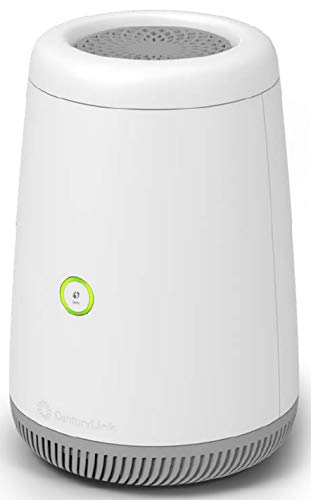
CenturyLink C4000BG CenturyLink Bonded Line DSL Router (Renewed)
One of the consumer electronics options compared in this guide.
View on Amazon
CenturyLink C4000XG Gigabit Fiber WiFi Modem Router (Renewed)
One of the consumer electronics options compared in this guide.
View on Amazon| Product | Best for | Key spec from the title |
|---|---|---|
| CenturyLink C3000A | Standard DSL with built-in Wi-Fi | Wireless DSL modem router, renewed |
| C4000BG Bonded Line | Customers on a bonded DSL service | Bonded line Wi-Fi DSL router |
| Technicolor C2100T | DSL or fiber with a dual-band 802.11ac gateway | 802.11AC, gigabit, DSL/fiber, 2.4/5GHz, renewed |
| C4000LZ xDSL | Gigabit wired and Wi-Fi 5 on an xDSL line | xDSL gigabit, 802.11a/b/g/n/ac, renewed |
| Technicolor C1100T | VDSL2 lines with older devices | VDSL2 modem, 802.11n Wi-Fi |
| C4000BG Bonded Line Renewed | Bonded DSL on a tighter plan | Bonded line DSL router, renewed |
| C4000XG Fiber | Fiber customers needing a gateway | Gigabit fiber Wi-Fi modem router, renewed |
How to Choose
Identify your line type first
The words in the title are the shopping filter. “Bonded line” means two DSL lines combined for more throughput, “VDSL2” is a faster flavor of DSL, “xDSL” is a broad label for DSL variants, and “fiber” means an optical connection. If your account is on a bonded pair, a single-line DSL model will not make use of both. If you have fiber, a DSL-only device is the wrong tool. Look at the equipment you currently have, find the model sticker, and read your service details in your account before buying a replacement. If the paperwork is vague, call CenturyLink and ask which line type and which modem models are supported at your address, then write the answer down before you shop. That single step prevents the most common return reason for this category, which is a good device on the wrong kind of line.
Choose the Wi-Fi standard by device mix
Wi-Fi capability varies widely across these boxes. A listing that mentions 802.11ac and 2.4/5GHz dual-band support will work with most phones, laptops, and streaming boxes made in the last decade. A unit that lists only 802.11n will be slower for modern devices and is best for light use or as a modem feeding your own Wi-Fi router. For a household with more than a dozen connected devices, 5GHz support is essentially a requirement, so favor ac models and ignore the single-band ones.
Check ports and the modem versus router role
These are combined gateways, so ports matter. Look for the word gigabit, which tells you the wired ports can handle fast plans, and count the Ethernet jacks for your desktop, TV box, and printer. Some people run the carrier gateway as a modem only and add a separate router behind it for better Wi-Fi. If you plan that, any listed gateway still works as the modem, and you gain flexibility later when you upgrade the router without replacing the line-facing device. Bridge or pass-through settings, where the gateway hands the connection to your own router, are worth looking up for the exact model you buy, since not every carrier box exposes the same options.
Handle renewed gear and activation carefully
Most of these listings are renewed, and some carrier gear is tied to specific provisioning. Check the return window, ask whether the power adapter is included, and expect a configuration step when connecting a replacement. Budget replacements cut corners on updates, since carrier-specific firmware is not always refreshed. If you hit setup issues, contact the provider to confirm the model is allowed on your account and to learn what login or activation details are needed.
The 7 Best Options
CenturyLink C3000A
The title describes a CenturyLink wireless DSL modem router in renewed condition. It suits a customer on a standard DSL plan who wants a single box that handles both the line and Wi-Fi, without extra detail to evaluate. The title does not state the Wi-Fi standard, so check the listing.
- Strength: combines modem and wireless router in one box.
- Strength: carrier-branded model name makes it easy to match against the equipment list on your account.
- Trade-off: the title does not name a Wi-Fi standard or port speed.
Who should skip it: fiber customers and anyone needing detailed Wi-Fi specs before buying. Because the listing is short, ask the seller or read the full description for port speeds and band support.
C4000BG Bonded Line
The listing calls this a CenturyLink bonded line Wi-Fi DSL router. Bonded service combines two DSL lines, and this model is named for that purpose. It targets customers whose plan is on a bonded pair and who need a gateway that is built for that arrangement.
- Strength: described as built for bonded lines, a specialized need.
- Strength: includes Wi-Fi, so it covers the wireless role as well.
- Trade-off: only useful on a bonded service, and the title does not state the Wi-Fi standard.
Who should skip it: single-line DSL or fiber customers. If you are unsure whether your plan is bonded, check your account details before ordering, since the model name alone will not tell you.
Technicolor C2100T
This is a Prism TV Technicolor C2100T modem router with 802.11AC, gigabit, DSL or fiber, and 2.4/5GHz support, in renewed condition. It is the most flexible gateway in the group on paper, a fit for a household that wants dual-band Wi-Fi 5 from a carrier-oriented box.
- Strength: 802.11AC and 2.4/5GHz dual-band support suit modern devices.
- Strength: the title mentions both DSL and fiber, which widens its use cases.
- Trade-off: renewed condition means you should check the return policy and included accessories.
Who should skip it: buyers on a bonded line or anyone who needs a plain, new-in-box unit.
C4000LZ xDSL
The title lists an xDSL gigabit modem router with 802.11a/b/g/n/ac Wi-Fi, described as compatible with CenturyLink, in renewed condition. It is a good match for a household that wants gigabit wired ports and Wi-Fi 5 on a DSL-family line.
- Strength: 802.11ac support is mentioned along with older standards, so older devices stay connected.
- Strength: gigabit is called out in the title for the wired side.
- Trade-off: renewed unit, with compatibility stated generally, so confirm that it matches your plan.
Who should skip it: fiber customers or buyers who want a brand-new unit. The mix of older and newer Wi-Fi standards in the title is useful for homes that still have an old tablet or printer on the network.
Technicolor C1100T
The listing describes a Technicolor C1100T VDSL2 modem with an 802.11n Wi-Fi router. It fits an older VDSL2 service where devices are modest, such as a few phones, a laptop, and a streaming stick, and where Wi-Fi 5 is not a priority.
- Strength: VDSL2 modem function is named directly in the title.
- Strength: it still includes Wi-Fi, so it works as a one-box gateway.
- Trade-off: 802.11n is older and slower than ac and lacks the 5GHz emphasis seen in other listings.
Who should skip it: homes with many streaming devices or anyone wanting dual-band Wi-Fi 5. If you already own a good router, you could treat this box mainly as the VDSL2 modem and let your own router handle the wireless side.
C4000BG Bonded Line Renewed
This is a second listing for the bonded-line DSL router, in renewed condition and titled with the CenturyLink name. It is aimed at the same bonded-line customer as the other C4000BG listing, and the difference lies in the renewed status and the shorter description.
- Strength: bonded-line support stated in the title.
- Strength: renewed status can mean a lower entry cost than new.
- Trade-off: the title gives no Wi-Fi standard, and the listing is lighter on detail than the Wi-Fi-focused C4000BG above.
Who should skip it: anyone not on a bonded line, or who wants more detailed specs before ordering.
C4000XG Fiber
The listing calls this a gigabit fiber Wi-Fi modem router in renewed condition. It is the clear option for a fiber customer who needs to replace a gateway and wants gigabit-class wired performance along with built-in Wi-Fi.
- Strength: gigabit fiber capability is stated in the title.
- Strength: modem, router, and Wi-Fi combined in one device.
- Trade-off: renewed condition and no stated Wi-Fi standard, so verify it before you buy.
Who should skip it: DSL customers, because the title points to a fiber use case. Fiber installs may also involve provider-side equipment, so confirm with CenturyLink that a customer-supplied gateway is allowed at your address.
Which One Fits Your Situation
You are on standard DSL and want one box
The CenturyLink C3000A is the straightforward modem-router combination. The C4000LZ xDSL is a better fit if you want gigabit wired ports and 802.11ac.
You pay for a bonded service
The C4000BG Bonded Line listing is built for that arrangement. The renewed C4000BG Bonded Line listing is the same idea if you are comfortable with a renewed unit.
You have fiber and need a gateway
The C4000XG Fiber is described as a gigabit fiber Wi-Fi modem router. The Technicolor C2100T also mentions fiber and adds dual-band 802.11AC.
You have a small household on VDSL2
The Technicolor C1100T names VDSL2 directly and provides Wi-Fi, which is enough for a few devices. Move up to the C2100T if you want dual-band ac.
Common Mistakes
- Buying a DSL device for a fiber line, or a single-line model for a bonded service.
- Choosing an 802.11n gateway for a busy household and blaming the provider for slow Wi-Fi.
- Skipping the return policy and activation details on renewed carrier equipment.
- Assuming any router works without a modem, when most of these listings are combined modem routers tied to a line type.
- Forgetting to count Ethernet ports for wired devices such as a desktop and a TV box.
Related guides
- Retro Game Storage Cases And Displays
- Solar Chargers For Camping And Hiking
- How To Clean Retro Game Cartridges Safely
Frequently Asked Questions
Can I use my own router with CenturyLink?
Often yes, but you still need a compatible modem for your line type. Many people use the carrier-oriented gateway as a modem and add a separate router for Wi-Fi.
What does bonded line mean?
It means two DSL lines are combined to carry more traffic than a single line can. A bonded-line router is built for that setup and is not a general-purpose choice.
Is 802.11ac enough for CenturyLink plans?
For most households, yes. Wi-Fi 5 handles streaming, video calls, and gaming well, and your plan’s speed will usually be the limiting factor, not the Wi-Fi standard.
Should I buy renewed?
It can be a sensible way to get a model that matches your line type. Read the listing carefully, confirm the return window, and make sure the power adapter and activation steps are clear.