Our Top Picks
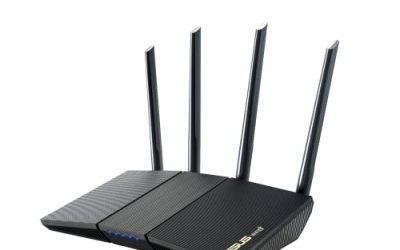
 ASUS RT-AX1800S Dual Band WiFi 6 Extendable RouterRouter9.06 x 5.28 x 2.2 inches0.82 PoundsCheck on Amazon
 ASUS ROG Rapture GT-BE98 Pro WiFi 7 GamingQuad-Band13.7 x 8.6 x 13.7 inches4.4 PoundsCheck on Amazon
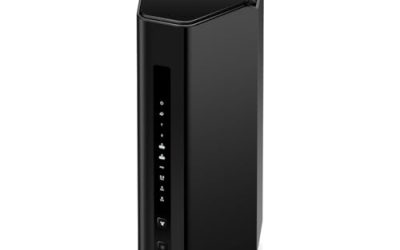
 ASUS ROG Strix GS-BE12000 WiFi 7 Gaming RouterTri-Band8.9 x 3.5 x 8.9 inches2.04 poundsCheck on Amazon
Picking an ASUS router is rarely about the brand alone. The catalog splits into two WiFi generations, two design families (the plain RT line and the gaming-focused ROG line), and a wide spread of port layouts, so the real decision is which slice of that lineup matches your home. A renter with a fiber plan and a dozen phones has very different needs from someone running a home office with a network storage box and a wired gaming PC.
This guide is for buyers who have already settled on ASUS, probably for the router software, the built-in security options, or the mesh option that lets you add nodes later, and now need to choose among eight models. The comparison below uses only what each listing states: WiFi standard, band count, headline speed, listed coverage, and port counts. That keeps the comparison honest, and 2026 is a fine time to decide whether WiFi 7 is worth it for you or whether WiFi 6 still covers your household.
Quick Picks
ASUS RT-AX1800S Dual Band WiFi 6 Extendable Router, Subscription-Free Network Security, Parental Control, Built-in VPN, AiMesh Compatible, Gaming & Streaming, Smart Home
One of the consumer electronics options compared in this guide.
View on AmazonASUS ROG Rapture GT-BE98 Pro WiFi 7 Gaming Router - Quad-Band, 30Gbps, Mesh | Coverage up to 3,500 Sq. Ft., 10G Port x2, 2.5G Port x4. Game Boost for Low Latency Gaming & Streaming. VPN support
One of the consumer electronics options compared in this guide.
View on Amazon
ASUS RT-BE82U WiFi 7 Router - Dual-Band, 6.5 Gbps, Mesh + VPN Compatible | Subscription Free Network Security, Parental Controls Included, 2.5G Port x5, VPN support
One of the consumer electronics options compared in this guide.
View on Amazon
ASUS RT-BE88U WiFi 7 Router - x2 10G Ports, Up to 7.2 Gbps, Mesh Compatible | Subscription Free Network Security, Parental Controls Included, 10G SFP+ Port x1, 2.5G Port x4, 1G Port x4, VPN support
One of the consumer electronics options compared in this guide.
View on Amazon
ASUS RT-BE9700 WiFi 7 Router - Tri-Band (6GHz), 9.7 Gbps, x2 WAN, Mesh | Coverage up to 2,500 Sq. Ft., Subscription Free Network Security, Parental Controls Included, 2.5G Port x4, VPN support
One of the consumer electronics options compared in this guide.
View on AmazonASUS ROG Strix GS-BE12000 WiFi 7 Gaming Router - Tri-Band, 12Gbps, Mesh | Coverage up to 3,300 Sq. Ft., 2.5G Port x8. Game Boost for Low Latency Gaming & Streaming. VPN support
One of the consumer electronics options compared in this guide.
View on Amazon
ASUS RT-AX3000S Dual Band WiFi 6 Extendable Router, Instant Guard, Parental Control Scheduling, Built-in VPN, AiMesh Compatible
One of the consumer electronics options compared in this guide.
View on Amazon
ASUS RT-BE58U WiFi 7 Router - Dual-WAN, 3.6 Gbps, Mesh + VPN Compatible | Triple-level Network Security, Parental Controls Included, 2.5G Port x1, 1G Port x4, VPN support
One of the consumer electronics options compared in this guide.
View on Amazon| Product | Best for | Key spec from the title |
|---|---|---|
| ASUS RT-AX1800S | Modest homes on a WiFi 6 budget | Dual-band WiFi 6, AiMesh compatible, built-in VPN |
| ASUS ROG Rapture GT-BE98 Pro | Maximum-spec gaming setups | Quad-band WiFi 7, 30Gbps, two 10G ports |
| ASUS RT-BE82U | Balanced WiFi 7 upgrade | Dual-band WiFi 7, 6.5 Gbps |
| ASUS RT-BE88U | Multi-gig wired networks | Up to 7.2 Gbps, two 10G ports, 10G SFP+ |
| ASUS RT-BE9700 | Dual-internet and 6GHz users | Tri-band WiFi 7, 9.7 Gbps, two WAN |
| ASUS ROG Strix GS-BE12000 | Wired-heavy gaming desks | Tri-band, 12Gbps, eight 2.5G ports |
| ASUS RT-AX3000S | Families who want parental scheduling | Dual-band WiFi 6, Instant Guard |
| ASUS RT-BE58U | Entry-level WiFi 7 with failover | Dual-WAN, 3.6 Gbps, triple-level security |
How to Choose
WiFi 6 or WiFi 7
Two models here are WiFi 6 and six are WiFi 7. WiFi 7 only pays off when your phones, laptops, or consoles also support it; older devices still connect, but they run at their own maximum. If most of your gear is two or three years old, a WiFi 6 router is a perfectly reasonable choice, and the savings can go toward better placement. If you are buying new laptops and phones this year, WiFi 7 gives the router room to grow.
Bands, headline speeds, and what they really mean
A figure like 30Gbps or 12Gbps is the sum of every band’s theoretical maximum, not a speed any single device will see. A tri-band router adds a dedicated 6GHz lane that can carry backhaul or your fastest clients; a dual-band model shares fewer channels among all devices. Use the band count as a congestion indicator and ignore the total as a performance promise. A household with many simultaneous streams benefits from extra bands more than from a bigger number on the box.
Ports and WAN options
Check your internet plan first. If your provider delivers more than a gigabit, you need a 2.5G or 10G WAN port or the router becomes the bottleneck. Count wired devices next: a NAS, a gaming PC, and a smart TV already take three ports. The listings range from a single 2.5G port to eight, and two models advertise a second WAN for failover or load balancing. Choose the port layout to match your cable run, not the other way around.
Coverage claims and mesh
Listed coverage, such as 2,500 or 3,500 square feet, assumes open layouts and few walls. Brick, concrete, and tile cut that sharply. Several models say mesh compatible, and the two WiFi 6 units name AiMesh specifically, which means you can start with one router and add a node later rather than overspending now. Budget routers tend to cut corners on port count and band count, not on the basic software features, so judge them on those two items first.
The 8 Best Options
ASUS RT-AX1800S
This is the most modest router in the group: dual-band WiFi 6 with subscription-free network security, parental control, a built-in VPN, and AiMesh compatibility. It suits small apartments and first-time homes where a handful of devices share a standard internet plan. Because the security suite and VPN are built in, a buyer who does not want to configure add-ons gets a reasonable baseline on day one, and the router can later become the main unit of a small mesh.
- Strength: AiMesh compatibility lets you extend coverage later without replacing it.
- Strength: security and parental tools carry no subscription according to the listing.
- Trade-off: dual-band WiFi 6 has less headroom for crowded networks.
Skip it if you have a multi-gig internet plan or want to plug in many wired devices.
ASUS ROG Rapture GT-BE98 Pro
The flagship of the gaming line is a quad-band WiFi 7 router rated at 30Gbps, with listed coverage up to 3,500 square feet, two 10G ports, four 2.5G ports, and Game Boost. It is built for large homes with demanding wired and wireless gear, such as a workstation, a storage array, and a living-room console all pulling data at the same time. The listing leaves little to add on the hardware side, so the decision is mostly about whether you need this much.
- Strength: quad-band design gives the busiest networks the most lanes.
- Strength: two 10G plus four 2.5G ports cover fast storage and workstations.
- Trade-off: it is the premium tier, and most households will never use its full headroom.
Skip it if your home is small or your devices are mostly older WiFi 5 and WiFi 6 hardware.
ASUS RT-BE82U
A dual-band WiFi 7 router listed at 6.5 Gbps, mesh and VPN compatible, with subscription-free security and parental controls. It is a sensible way into WiFi 7 without paying for extra bands, aimed at buyers who stream, work from home, and want newer phones and laptops to connect at modern speeds. Parental controls round out the package for families.
- Strength: WiFi 7 support at a mid-range tier.
- Strength: mesh and VPN compatibility keep the upgrade path open.
- Trade-off: dual-band means no dedicated third lane for heavy traffic.
Skip it if you need a second WAN port or more than a few wired connections.
ASUS RT-BE88U
This one leans on wired speed: up to 7.2 Gbps, two 10G ports, and a 10G SFP+ connection, along with mesh compatibility and subscription-free security. It suits creators and home-lab users who move large files over the network, for example between an editing machine and a storage box. The SFP+ connection also hints at fiber-style uplinks or fast switch links for people who already own that gear.
- Strength: 10G ports and SFP+ support fiber-style or high-speed switch links.
- Strength: parental controls and security come without a subscription.
- Trade-off: multi-gig ports only help if the rest of your gear matches them.
Skip it if your plan and devices top out at gigabit speeds.
ASUS RT-BE9700
A tri-band WiFi 7 router with 6GHz, a listed 9.7 Gbps, two WAN ports, and coverage up to 2,500 square feet. The dual WAN is its distinguishing feature for anyone who wants a backup internet line, such as cable as the main connection and a cellular gateway as the spare. The 6GHz band also gives newer clients a quieter channel.
- Strength: tri-band layout spreads traffic across more lanes.
- Strength: two WAN ports allow failover between connections.
- Trade-off: listed coverage is smaller than the top gaming models.
Skip it if you only have one internet line and need reach across a very large home.
ASUS ROG Strix GS-BE12000
A tri-band WiFi 7 gaming router listed at 12Gbps, with coverage up to 3,300 square feet, eight 2.5G ports, and Game Boost for low-latency play. The port count is the headline: it can wire up a whole desk or entertainment center without an extra switch. Buyers who keep consoles, a PC, and a media server on cable will find the layout convenient.
- Strength: eight 2.5G ports mean few switches are needed.
- Strength: Game Boost targets latency for competitive play.
- Trade-off: it sits in the premium range and gaming styling is not for everyone.
Skip it if you rarely use wired devices or have no 2.5G gear.
ASUS RT-AX3000S
A dual-band WiFi 6 router with Instant Guard, parental control scheduling, a built-in VPN, and AiMesh compatibility. The scheduling feature is useful in households that manage screen time by hour, for instance switching off a child’s tablet at bedtime. Instant Guard adds a security layer without a separate box.
- Strength: scheduling controls help parents set daily limits.
- Strength: AiMesh compatibility supports later expansion.
- Trade-off: it is WiFi 6, so newer devices cannot use WiFi 7 features.
Skip it if you want WiFi 7 or multi-gig ports.
ASUS RT-BE58U
An entry-level WiFi 7 option rated at 3.6 Gbps, with dual WAN, mesh and VPN compatibility, triple-level network security, and parental controls. Dual WAN at this tier is uncommon, which makes it attractive to small offices and remote workers who want a second connection ready. It also keeps the VPN and mesh options found on its larger siblings.
- Strength: dual WAN offers a failover path for remote workers.
- Strength: triple-level security is included in the listing.
- Trade-off: the listed speed is the lowest of the WiFi 7 models.
Skip it if you need several multi-gig ports or the widest coverage.
Which One Fits Your Situation
Small apartment, ordinary internet plan
The ASUS RT-AX1800S covers the basics with security and parental tools, and AiMesh compatibility gives you a path to add a node if a bedroom gets a weak signal.
Remote worker who cannot afford downtime
The ASUS RT-BE9700 or the ASUS RT-BE58U, both with dual WAN, can switch to a second line. Pick the BE9700 for tri-band capacity or the BE58U for a lower tier.
Wired gaming desk with a console, PC, and capture card
The ASUS ROG Strix GS-BE12000 has eight 2.5G ports and Game Boost, so everything connects directly without a separate switch.
Home lab or fast storage
The ASUS RT-BE88U with two 10G ports and SFP+ fits a network that already uses multi-gig switches, while the ROG Rapture GT-BE98 Pro suits the largest homes.
Common Mistakes
- Treating the combined band total as the speed a single phone will get.
- Buying WiFi 7 when no device in the house supports it yet.
- Ignoring the WAN port speed when the internet plan exceeds a gigabit.
- Placing the router in a closet or at floor level, which cuts real coverage far below the listed number.
- Counting wired devices only after purchase and running out of ports.
Related guides
- Solar Chargers For Camping And Hiking
- Retro Game Storage Cases And Displays
- How To Clean Retro Game Cartridges Safely
Frequently Asked Questions
Do I need a subscription for the built-in security?
Several listings describe their network security as subscription-free, including the RT-AX1800S, RT-BE82U, RT-BE88U, and RT-BE9700. Confirm the exact wording on the model you choose.
Can I add nodes later?
Models tagged AiMesh compatible or mesh compatible are designed to pair with other compatible ASUS routers. Check that the device you plan to add is on the same compatibility list.
Is a gaming router worth it for non-gamers?
The ROG models offer more ports and higher listed capacity, which also benefits large households. If you do not need that capacity, a standard RT model costs less and covers everyday use.
How much coverage should I plan for?
Treat the listed square footage as a best case. Walls and floors reduce it, so choose a model above your home size or plan a mesh node.