Our Top Picks
Searching for the best Cisco routers rarely means one thing. The name covers rack-style Integrated Services Routers built for branch offices, compact small-business VPN routers, and a legacy Cisco-Linksys home model, and those solve very different problems. The shortlist below spans all three, so the first decision is not which box is fastest but which category matches the network you actually run.
This guide is for IT generalists building a lab, small offices replacing a failed edge router, and buyers who need Cisco hardware for compatibility with existing gear. Several listings are renewed, so the article also covers what to verify before relying on one in 2026. A used router is only a bargain if you can still configure it, license it, and return it if something is wrong.
Quick Picks

Cisco ISR4331/K9 - ISR 4331 - Integrated Service Router (Renewed)
One of the consumer electronics options compared in this guide.
View on Amazon
Cisco C1111-8P 1100 Series 8-Port Dual WAN Ethernet Integrated Services Router (Renewed)
One of the consumer electronics options compared in this guide.
View on Amazon
Cisco-Linksys E1000 Wireless-N Router
One of the consumer electronics options compared in this guide.
View on Amazon
Cisco CISCO1921/k9 Series Integrated Services Routers (Renewed)
One of the consumer electronics options compared in this guide.
View on Amazon
Cisco RVS4000 4-Port Gigabit Security Router - VPN
One of the consumer electronics options compared in this guide.
View on Amazon
Cisco C1111-4P 4-Port Integrated Services Router (Renewed)
One of the consumer electronics options compared in this guide.
View on Amazon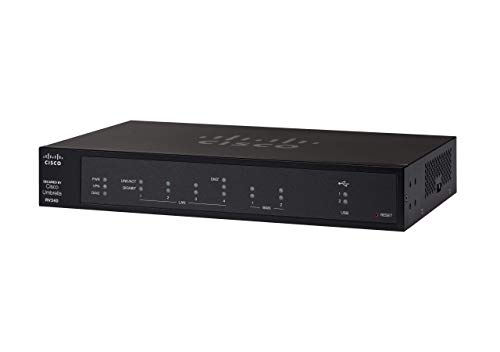
Cisco RV340 VPN Router with 4 Gigabit Ethernet (GbE) Ports Plus Dual WAN, Limited Lifetime Protection (RV340-K9-NA),Black
One of the consumer electronics options compared in this guide.
View on Amazon
Cisco CISCO1941/K9 1941 Integrated Services Router (Renewed)
One of the consumer electronics options compared in this guide.
View on Amazon| Product | Best for | Key spec from the title |
|---|---|---|
| Cisco ISR4331/K9 | Larger branch office edge | ISR 4331 Integrated Service Router, renewed |
| Cisco C1111-8P | Small site needing many LAN ports | 8-port dual WAN Ethernet ISR, renewed |
| Cisco C1111-4P | Compact branch or home lab | 4-port Integrated Services Router, renewed |
| Cisco 1921/K9 | Classic ISR for CLI practice | 1921/K9 series Integrated Services Router, renewed |
| Cisco 1941/K9 | Branch routing with ISR heritage | 1941 Integrated Services Router, renewed |
| Cisco RV340 | Small office VPN with failover | 4 Gigabit Ethernet ports, dual WAN, limited lifetime protection |
| Cisco RVS4000 | Basic wired security router | 4-port Gigabit security router with VPN |
| Cisco-Linksys E1000 | Simple wireless home use | Wireless-N router |
How to Choose
Match the product family to the job
Integrated Services Routers such as the 4331, 1921, 1941 and the 1100 series units are modular, command-line driven devices meant for branch edges and training labs. The RV340 and RVS4000 sit in the small-business VPN class, with simpler setup and fewer licensing questions. The Linksys E1000 is a consumer wireless router with a Cisco name on the box. If you want to learn IOS or run a managed WAN, shop the ISR group; if you want a small office online with a tunnel to headquarters, the RV class is the realistic choice.
Count the WAN and LAN ports you need
Start with how many internet uplinks you have. A dual WAN design, listed on the C1111-8P and the RV340, lets you pair a primary line with a backup. For LAN, count wired devices today and add a few spare ports: four ports suit a single desk cluster, eight suit a small office with printers and access points. Gigabit ports should be your floor, because a 100 Mbps port becomes the bottleneck on any modern fiber or cable plan.
Know what renewed means before you buy
Most of the ISR listings here are renewed. Check that the seller offers a return window of at least 30 days, that the unit powers on with its original power cord, and that you can reach a console prompt. Ask whether the image on the device is a version you can legally keep running, since software licensing and update access can depend on a support contract rather than the hardware purchase. Factory-reset behavior and missing rack ears are common surprises.
What to ignore and where budget models cut corners
Ignore the age of the model number when the job is simple routing; a 1900-series router can still handle a small site if throughput needs are modest. Be wary of older wireless-N hardware for Wi-Fi, since that standard predates the faster Wi-Fi generations, and of any unit that cannot take current security updates. Lower-priced routers also cut corners on VPN tunnel counts and on throughput once encryption is enabled, so read the vendor datasheet rather than the headline port count.
The 8 Best Options
Cisco ISR4331/K9
The ISR 4331 is the step-up pick for buyers who want a true Integrated Service Router rather than a compact small-office box. The listing is renewed, which makes it a lower-cost entry point into branch-class routing for a lab or a modest remote site. It suits administrators who already know IOS and want familiar syntax on newer-generation hardware.
- Strength: full Integrated Service Router platform, not a stripped-down VPN appliance.
- Strength: a renewed unit lowers the entry cost for lab and test environments.
- Trade-off: the title lists no port count or throughput, so confirm module and license details first.
Skip it if you want plug-and-play setup or have no one comfortable with the command line.
Cisco C1111-8P
This 1100 Series unit pairs eight LAN ports with dual WAN Ethernet, which is a rare combination in one compact router. It is aimed at a small office that wants a wired switch-style fan-out and a backup internet path without buying a separate switch. Like the 4331, it is renewed, so verify condition on arrival.
- Strength: eight ports cover a small office without extra switching.
- Strength: dual WAN supports a primary and a backup connection.
- Trade-off: renewed stock means condition and software state vary by seller.
Skip it if you need integrated Wi-Fi from the same box, since the title does not mention any.
Cisco C1111-4P
The C1111-4P is the smaller sibling of the eight-port model, with four ports in a compact Integrated Services Router. It fits a home lab, a retail back room, or a tiny branch where four wired devices are enough. Buyers choosing between the two should simply count their cables.
- Strength: compact ISR form with a simple four-port layout.
- Strength: same 1100 Series family as the larger unit, so skills transfer.
- Trade-off: four ports run out fast once phones, printers and access points are added.
Skip it if your site already has more than four wired devices and no separate switch.
Cisco 1921/K9
The CISCO1921/K9 is a long-running Integrated Services Router that remains popular for certification practice and for small sites with modest needs. Because it is listed as renewed, it is an economical way to get real Cisco hardware under your fingers. It rewards patience rather than speed.
- Strength: classic ISR hardware that is widely documented online.
- Strength: renewed pricing keeps lab experimentation affordable.
- Trade-off: an older design means you should confirm software support before production use.
Skip it if you need current-generation throughput or a router you can set up without reading documentation.
Cisco 1941/K9
The 1941 sits alongside the 1921 in the same ISR lineage and is another renewed option for admins who prefer proven designs. It makes sense where a site already runs similar gear and you want a matching spare. The title gives no specs beyond the model, so the datasheet is your guide.
- Strength: established Integrated Services Router model with strong community knowledge.
- Strength: a sensible matching spare for networks already built on this series.
- Trade-off: the listing offers no port or throughput details, so verify before committing.
Skip it if you are starting a fresh network and would rather buy newer hardware.
Cisco RV340
The RV340 is the most office-friendly pick here, with four Gigabit Ethernet ports, VPN capability, and dual WAN. The title also mentions limited lifetime protection, which adds reassurance that older renewed ISRs cannot match. It targets a small business that needs a secure tunnel and a failover line.
- Strength: dual WAN with four Gigabit ports in a small-business router.
- Strength: limited lifetime protection is stated in the listing.
- Trade-off: it is a VPN router, not a modular platform, so it will not teach full IOS.
Skip it if you want to practice on a branch-class router or need a large port count.
Cisco RVS4000
The RVS4000 is a four-port Gigabit security router with VPN support, an older small-business design. It is a reasonable fit for a simple wired office that needs basic tunnels and firewall functions without a lot of complexity. Treat it as a budget-class option.
- Strength: Gigabit ports on all four LAN connections.
- Strength: VPN support in a simple, appliance-style package.
- Trade-off: no dual WAN is listed, so it offers no built-in failover.
Skip it if internet uptime matters and you want a second uplink.
Cisco-Linksys E1000
The E1000 is a Wireless-N router from the Cisco-Linksys era and the only consumer-style product on this list. It suits a very light household that wants a basic wireless network and does not need business features. Buyers should keep expectations modest.
- Strength: all-in-one wireless router that is easy to place and set up.
- Strength: low-complexity choice for casual browsing and streaming.
- Trade-off: Wireless-N is an older standard, which limits speed on busy networks.
Skip it if you need VPN, dual WAN, or Wi-Fi that keeps up with current phones and laptops.
Which One Fits Your Situation
You are studying for a networking certification
The Cisco 1921/K9 or the Cisco 1941/K9 gives you real ISR hardware and a command line to practice on. Pick whichever listing offers the better return policy, and pair it with a console cable.
You run a small office that cannot lose internet
The Cisco RV340 is the clearest answer, with dual WAN and four Gigabit ports in one unit. Connect two providers and let the router fail over automatically.
You need many wired ports and a backup uplink
The Cisco C1111-8P covers both needs with eight ports and dual WAN Ethernet. It removes the need for a separate small switch in a compact office.
You manage a larger branch and want headroom
The Cisco ISR4331/K9 is the platform to look at first. Confirm modules and licensing with the seller so the router matches your WAN circuits.
Common Mistakes
- Buying a renewed router without confirming the return window and that the unit boots to a usable prompt.
- Assuming every Cisco-branded box offers Wi-Fi, when most ISR and RV units here do not mention wireless.
- Ignoring dual WAN support and then discovering a single internet line has no failover.
- Choosing a Wireless-N consumer router for a busy office with many connected devices.
- Overlooking software licensing and update access, which can matter more than the hardware itself.
Frequently Asked Questions
Are renewed Cisco routers safe to use?
They can be, provided the seller offers a return window and the device can be reset and configured. Check that you can reach the console and that software updates are available for your use case.
Do these routers include Wi-Fi?
Only the Cisco-Linksys E1000 is listed as a wireless router. The ISR and RV units in this list are described as wired routers, so plan on a separate access point if you need Wi-Fi.
Should I buy a new small-business router instead of a renewed ISR?
It depends on who will maintain it. A renewed ISR suits someone who enjoys command-line work and wants expandable hardware, while a small-business router such as the RV340 is simpler to deploy and comes with listed protection. If nobody on your team knows IOS, the simpler appliance usually causes fewer problems.
What does dual WAN do?
Dual WAN lets a router connect to two internet lines at once. You can use one as a backup or, depending on configuration, balance traffic between them.