
Our Top Picks
 ASUS ROG Crosshair X870E Hero AMD X870E AM5X870E Hero | M.2x514.6 x 12.2 x 4.4 inches5.8 poundsCheck on Amazon
For a local AI machine with one or two graphics cards, an X870E AM5 board with a confirmed x8/x8 split such as the ASUS ProArt X870E-Creator WiFi or the ASRock X870E Taichi Lite is the practical choice, while builders who want three or more GPUs, large amounts of ECC memory or many PCIe lanes should look at Threadripper platforms, led by the ASUS Pro WS WRX90E-SAGE SE for four-GPU workstations. The motherboard matters for AI mostly through PCIe lanes, slot spacing, memory capacity and storage layout, not through gaming-style features.
What Makes a Motherboard Good for AI Work
AI workloads such as running local language models, image generation and fine-tuning lean mainly on the GPU, so the board’s job is to feed it and host more than one. The features that matter are:
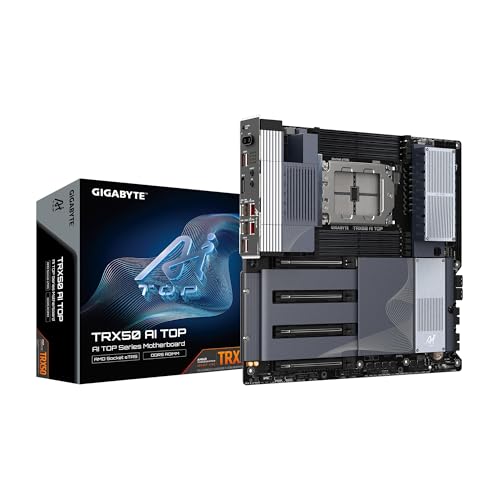
GIGABYTE TRX50 AI TOP sTR5 AMD TRX50 EATX Motherboard - DDR5, PCIe 5.0 M.2, PCIe 5.0, USB4 Type-C, Wi-Fi 7, Marvell 10GbE
Chosen because it specifies DDR5 and PCIe 5.0 M.2.
View on AmazonASUS ROG Crosshair X870E Hero AMD X870E AM5 ATX Motherboard, Advanced AI PC Ready, 18+2+2 Power Stages, DDR5, PCIe® 5.0, 5X M.2, Wi-Fi 7, USB4®, Overclocking, Core Flex, Slot Q-Release Slim
Chosen because it specifies Advanced AI PC Ready and 18+2+2 Power Stages.
View on Amazon
ASUS ROG Strix B850-A Gaming WiFi AMD AM5 B850 ATX Motherboard 14+2+2 Power Stages, DDR5 AEMP, 2.5G LAN, Wi-Fi 7 with Q-Antenna, 4X M.2, PCIe® 5.0, USB 20Gbps Type-C, AI Networking II, ASUS Advisor
Chosen because it specifies DDR5 AEMP and 2.5G LAN.
View on Amazon- PCIe lane layout: How many full-speed slots the platform gives you, and how they divide when several are populated.
- Slot spacing: Modern GPUs occupy two to four slots, so physical clearance decides whether two cards fit.
- Memory capacity and channels: More system memory lets you offload large models, and more channels add bandwidth.
- Storage: Several fast M.2 slots help for model files and datasets.
- Networking and management: Fast Ethernet and remote management matter on a headless server.
- Power delivery and cooling: Sustained loads stress the board, so solid power stages matter.
Many online roundups on this topic are affiliate-style, so always confirm the slot table and lane sharing in the manufacturer’s manual before buying.
At a Glance: Motherboard Options
| Board | Platform | Best for | Key maker-listed specs | Limits |
|---|---|---|---|---|
| ASUS ProArt X870E-Creator WiFi | AM5 | One to two GPUs with creator features | 2x PCIe 5.0 x16 slots (x16 single or x8/x8 dual), one PCIe 4.0 slot running at x4, four M.2 slots, 10G and 2.5G Ethernet, WiFi 7, up to 192 GB DDR5 | Second GPU slot shares lanes with an M.2 slot; best with two-slot cards |
| ASRock X870E Taichi Lite | AM5, EATX | Value dual-GPU AM5 build | 2x PCIe 5.0 x16 slots (x16 or x8/x8), four M.2 slots, 5 Gbps Ethernet, WiFi 7, four DIMM slots up to 256 GB | Stripped-down extras by design; 5 Gbps network rather than 10G |
| ASUS Pro WS WRX90E-SAGE SE | Threadripper PRO (sTR5), EEB | Four or more GPUs and large ECC memory | Seven PCIe 5.0 x16 slots (one runs at x8 per some listings), eight-channel DDR5 registered ECC up to 2 TB, four PCIe 5.0 M.2 slots, dual 10 Gb LAN, BMC | Workstation cost and size; needs EEB-capable case and registered memory |
| TRX50 boards (Threadripper 7000) | sTR5 | Two to three GPUs at full speed | Roundups report 88 CPU lanes and quad-channel memory | Higher platform cost than AM5; confirm the exact board |
AM5 X870E Boards: One to Two GPUs
AM5 processors offer a limited set of CPU lanes, so the consumer-platform limit is a pair of GPUs at x8/x8. For many local AI users, this is enough: running a single large model on one card, or splitting a model across two cards for more total video memory. Roundups from Compute-Market and others suggest that for tools such as Ollama, LM Studio or llama.cpp, a well-chosen X870E or similar board with confirmed x8/x8 bifurcation and enough slot spacing is the sensible purchase.
ASUS ProArt X870E-Creator WiFi
This is the board most frequently named for dual-GPU AM5 AI builds. ASUS lists two PCIe 5.0 x16 slots (x16 with one card, x8/x8 with two) plus a PCIe 4.0 slot that runs at x4. The manual says the second PCIe 5.0 slot shares bandwidth with the second M.2 slot, so with that M.2 slot enabled the slots run at x8/x4. It also lists four M.2 slots, 10G and 2.5G Ethernet, WiFi 7 and support for up to 192 GB of DDR5. TechPowerUp and APH Networks have published reviews. Roundups warn that two three-slot cards leave little clearance, and that it works best with two-slot cards.
ASRock X870E Taichi Lite
ASRock lists two PCIe 5.0 x16 slots (x16 or x8/x8), one PCIe 5.0 x4 M.2 and three PCIe 4.0 x4 M.2 slots, six SATA ports, four DIMM slots up to 256 GB, 5 Gbps Ethernet and WiFi 7. It trims extras such as RGB lighting and accessories to hold the cost down. Roundups position it as the value pick for two GPUs on AM5. Note the extended ATX size, so confirm case support.
Threadripper Boards: Three or More GPUs
If you need more PCIe lanes than AM5 offers, workstation platforms are the next tier. Roundups describe TRX50 (Threadripper 7000) as suitable for two to three GPUs at full speed with quad-channel memory, and WRX90 (Threadripper PRO) for four or more GPUs.
ASUS Pro WS WRX90E-SAGE SE
ASUS lists seven PCIe 5.0 x16 slots, though some retailer listings and Puget Systems note that one slot functions at x8. It uses an eight-channel memory design with registered ECC DDR5, up to 2 TB. It supports Threadripper PRO 9000 and 7000 WX-series processors, with four PCIe 5.0 M.2 slots, dual 10 Gb Ethernet, two rear USB4 ports and an onboard BMC with dedicated management LAN. Some retail pages say quad channel, which appears to be a listing error, so check the maker’s page. This is a workstation-class purchase: it needs an EEB-capable case, a strong power supply and registered memory, and the total platform cost is far above a consumer build.
Intel Options
Intel Z890 boards also exist for dual-GPU builds, and Compute-Market lists them alongside X870E in its recommendation of boards with confirmed x8/x8 bifurcation. The same rule applies: check the slot table for how lanes divide, and whether M.2 slots take lanes from the GPU slots.
Compatibility and Fit Notes
- Case size: ATX boards fit most cases, EATX boards such as the Taichi Lite need a case that lists EATX, and EEB boards like the WRX90E-SAGE SE need workstation cases.
- GPU thickness: Measure the slot occupancy of your cards. Two three-slot cards may not fit on boards with closely spaced slots.
- Power supply: Multi-GPU systems need a high-wattage PSU with enough power connectors. Follow each GPU maker’s recommendations.
- Cooling: Cards stacked together restrict airflow, so plan for strong case fans or open-frame designs.
- Memory: AM5 uses unbuffered DDR5; Threadripper PRO uses registered ECC DDR5. They are not interchangeable.
- Riser use: Risers can solve spacing problems but need to be rated for PCIe 5.0 or 4.0 speeds as appropriate.
- Software support: Confirm your chosen GPUs are supported by the AI software you plan to run, including driver and framework versions.
Pick X If… Decision Table
| Pick | If you… |
|---|---|
| ASUS ProArt X870E-Creator WiFi | Want a feature-rich AM5 board with fast networking for one or two GPUs |
| ASRock X870E Taichi Lite | Want dual-GPU lane support on AM5 with fewer extras |
| TRX50 board | Need two to three full-speed GPUs and more memory bandwidth |
| ASUS Pro WS WRX90E-SAGE SE | Plan four or more GPUs, large ECC memory and remote management |
| Standard X870 or B850 board | Run a single GPU and want to keep the cost down |
Budget Tiers
- Budget: A B850 or X870 board with a single GPU slot at full speed, suitable for a single-card local AI machine.
- Mid-range: X870E boards with confirmed x8/x8 support, such as the Taichi Lite or the ProArt.
- Premium: Threadripper and Threadripper PRO platforms for many GPUs and large memory capacity.
Alternatives
- MSI MEG X870E ACE MAX and Gigabyte X870E Aorus Xtreme X3D AI TOP: Roundups list these as higher-end AM5 options with a more premium feature set.
- Prebuilt AI workstations: Convenient when you want a validated configuration and a single warranty.
- Cloud GPU rental: For occasional heavy tasks, renting may suit better than building a multi-GPU machine.
Frequently Asked Questions
Does the motherboard affect AI performance?
Mainly indirectly. The GPU does the heavy lifting, but the board decides how many cards you can run, how fast each connects and how much system memory you can add. Poor lane sharing can limit multi-GPU setups.
Is x8/x8 enough for two GPUs?
For many local inference workloads it is a common and workable setup. Heavier training or tensor-parallel work can benefit from more lanes, which is where workstation platforms come in. Check the needs of your software.
How much RAM should I plan for?
That depends on the model sizes you want to run. AM5 boards listed here support up to 192 GB or 256 GB, while the WRX90 board lists up to 2 TB of registered ECC memory. More memory lets you offload large models, but it is slower than video memory.
Do I need ECC memory?
It is not required for most hobbyist use. Workstation boards use registered ECC memory by design, which suits long-running professional workloads.
Will two large GPUs fit on a consumer board?
Often not, if the cards are three slots thick. Roundups note that two three-slot cards leave little clearance on the ProArt, which works best with two-slot cards. Measure your GPUs and slot spacing first.
Is Threadripper worth it for a home AI machine?
Only if you need more than two GPUs, very large memory, or the lane count. For one or two GPUs, an AM5 board is usually the sensible and far lower-cost route.
FAQ
Does the motherboard affect AI performance?
Is x8/x8 enough for two GPUs?
How much RAM should I plan for?
Do I need ECC memory?
Will two large GPUs fit on a consumer board?
Is Threadripper worth it for a home AI machine?
More from Amazon
Programs that pair well with the guide above. Offers and eligibility are set by Amazon and may change.
Free shipping on eligible items, Prime Video and more. Eligible new members can start with a free trial.
Start a Prime free trialAd-free music streaming. Eligible new subscribers can start with a free trial.
Try Music Unlimited freeA Prime membership for ages 18-24 with a trial period. Eligibility is set by Amazon.
See Prime for Young AdultsAudiobooks and podcasts to listen to on the go. Eligible new members can start with a free trial.
Try Audible freeAs an Amazon Associate we earn from qualifying purchases.





