Key takeaways
- Sensor quality over DPI numbers: Ignore inflated maximum DPI figures — almost nobody games above 3,200. What matters is tracking consistency and zero smoothing or acceleration, which modern optical sensors from Logitech, Razer, and PixArt all handle well even at this price.
- Weight and shape for your grip: Palm grippers benefit from larger, contoured shells around 95–110g, while claw and fingertip users generally want something lighter and shorter. Measure your hand from wrist crease to middle fingertip and match it to the mouse’s listed length.
- Wired versus wireless trade-offs: Sub-$50 wireless has improved enormously, but you’re often trading battery weight or premium switches for the cable-free experience. If you play competitively and don’t mind managing a cable, wired gets you better components for the money.
- Switch durability and click feel: Look for rated click lifespans of 50 million or higher, and prioritise crisp, low-travel actuation over heavy clicks. Optical switches, where available, eliminate the double-click failures that plague ageing mechanical switches.
- Software and onboard memory: Good configuration software lets you tune DPI stages, polling rate, and button mapping — but onboard memory matters more, since it means your settings travel with the mouse to any PC without installing anything.
What's inside
Shopping for a gaming mouse under $50 has never been more confusing. Manufacturers pack budget models with marketing buzzwords — 26,000 DPI sensors, “esports-grade” switches, RGB zones nobody asked for — while the specs that genuinely affect your aim, comfort, and click consistency get buried in the fine print. The result is a crowded shelf of near-identical options where the difference between a mouse you’ll love for three years and one you’ll replace in six months isn’t obvious until it’s too late.
This guide cuts through that. We’ve focused on mice that deliver flagship-adjacent performance without flagship pricing, weighing sensor accuracy, switch durability, shape comfort across grip styles, and long-term build quality. Every pick below is a genuine sub-$50 buy at typical street pricing in 2026, and each one earns its place by doing something meaningfully better than its competition — whether that’s wireless freedom, ergonomic comfort, or simply the best raw value on the market.
As an Amazon Associate we earn from qualifying purchases.







⚡ Save on Your Next PC — Amazon Prime
Prime members get fast free shipping on the systems above, plus early access to Prime Day & Black Friday PC deals. New members get a 30-day free trial.
Watch: Best Gaming Mouse Under $50 — Video Review
How to Choose Gaming Mouse Under $50
- Sensor quality over DPI numbers: Ignore inflated maximum DPI figures — almost nobody games above 3,200. What matters is tracking consistency and zero smoothing or acceleration, which modern optical sensors from Logitech, Razer, and PixArt all handle well even at this price.
- Weight and shape for your grip: Palm grippers benefit from larger, contoured shells around 95–110g, while claw and fingertip users generally want something lighter and shorter. Measure your hand from wrist crease to middle fingertip and match it to the mouse’s listed length.
- Wired versus wireless trade-offs: Sub-$50 wireless has improved enormously, but you’re often trading battery weight or premium switches for the cable-free experience. If you play competitively and don’t mind managing a cable, wired gets you better components for the money.
- Switch durability and click feel: Look for rated click lifespans of 50 million or higher, and prioritise crisp, low-travel actuation over heavy clicks. Optical switches, where available, eliminate the double-click failures that plague ageing mechanical switches.
- Software and onboard memory: Good configuration software lets you tune DPI stages, polling rate, and button mapping — but onboard memory matters more, since it means your settings travel with the mouse to any PC without installing anything.
The Best Picks Reviewed
Logitech G305 Lightspeed
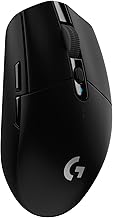
Still the value benchmark for budget wireless, the G305 pairs Logitech’s Lightspeed connection — genuinely indistinguishable from wired in real play — with a HERO sensor and battery life measured in months rather than hours. At 99g with the AA cell installed it isn’t the lightest option here, but nothing else near this price offers comparable wireless performance.
Logitech G502 Hero
The G502 remains the most feature-dense mouse you can buy under $50: eleven programmable buttons, an infinite-scroll wheel, and an adjustable weight system that lets you tune the feel to your preference. It’s a heavy, right-hand-only palm-grip mouse, so it suits MMO, RPG, and productivity users far better than lightweight FPS play.
Razer Basilisk V3
Razer’s Basilisk V3 is the ergonomic pick, with a supportive thumb rest, a genuinely excellent tilt-and-free-spin scroll wheel, and optical switches rated for 70 million clicks. The eleven-zone Chroma lighting is largely decorative, but the underlying sensor and shape make this a serious performer that frequently dips well under the $50 mark.
Redragon M612
If you want maximum functionality for minimum outlay, the M612 delivers a competent 8000 DPI optical sensor, seven remappable buttons, and RGB lighting at a price that undercuts everything else here by a wide margin. Build quality is predictably a step below the name brands, but for a first gaming mouse or a secondary machine it’s remarkable value.
Razer DeathAdder Essential
The DeathAdder shape has been a competitive staple for over fifteen years, and the Essential distils it to the basics: a reliable 6,400 DPI optical sensor, five buttons, and one of the most universally comfortable right-handed shells ever made. There’s no wireless and no frills — just a dependable mouse that gets out of your way.
Frequently Asked Questions
Is a sub-$50 gaming mouse good enough for competitive play?
Absolutely. Sensor technology has trickled down so thoroughly that budget mice now track flawlessly at any realistic gaming speed. What you sacrifice at this price is usually weight reduction, premium materials, and cable quality — none of which meaningfully limits your ceiling as a player.
Should I choose wireless or wired at this budget?
Wired generally buys you better switches, lighter weight, and more buttons for the same money. Choose wireless only if cable drag genuinely bothers you or your desk setup demands it — and if you do, stick to established low-latency implementations like Logitech’s Lightspeed rather than generic 2.4GHz dongles.
How much DPI do I actually need?
Most competitive players use between 400 and 1,600 DPI paired with a low in-game sensitivity, because lower settings give finer aim control. Any mouse on this list vastly exceeds what you’ll practically use, so treat high DPI ceilings as a marketing figure rather than a buying criterion.
How long should a budget gaming mouse last?
Expect three to five years from a reputable brand with normal daily use. The most common failure point is the main click switches developing double-click behaviour, which is why models using optical switches — like the Basilisk V3 — tend to outlast their mechanical-switch counterparts.
Final Thoughts
For most people, the Logitech G305 Lightspeed is the smartest buy on this list — it’s the only pick that delivers true competitive-grade wireless at this price, and its battery life removes the main friction of going cable-free. If you’d rather spend your budget on features than freedom, the Logitech G502 Hero gives you an extraordinary button count and build quality for the money, while the Razer Basilisk V3 is the one to choose if long-term switch reliability and all-day ergonomic comfort matter most to you.