Key takeaways
- Latency: A good 2.4GHz dongle rivals wired; Bluetooth alone is fine for typing but not competitive gaming.
- Battery: Wireless needs charging; wired never does. Many wireless boards last days to weeks per charge.
- Price: Wired boards cost less at any given build quality.
- Desk clutter: Wireless frees you from cable management and looks cleaner.
- Reliability: Wired has no dropout risk; wireless depends on a stable dongle connection.
Wireless gaming keyboards have shed their old reputation for lag and unreliable batteries, and 2026 models genuinely rival wired boards for competitive play. Yet wired keyboards remain cheaper, lighter on maintenance, and immune to charging. The right choice now comes down to how much you value a clean desk and portability versus set-and-forget simplicity.
This comparison covers real latency, battery life, price, and reliability so you can decide without the marketing noise. We reference practical options, from a TECKNET wired RGB board to Redragon tri-mode wireless combos, so the trade-offs stay grounded in what you can actually buy.
Our top picks
 CHONCHOW USB Wireless Gaming Keyboard and Mouse
- 2.4Ghz Wireless Connection----Both the LED wireless gaming mouse…
- Rainbow LED Backlit Keyboard----The rainbow LED gaming keyboard…
- Rechargeable & Long Battery Life----The gaming keyboard is…
 Redragon S101M-KS Gaming Keyboard and Mouse Wireless
- 【Wireless Gaming Keyboard and Mouse Combo】Get rid of…
- 【RGB Gaming Keyboard and Mouse】Turely RGB Backlight with…
- 【4800 DPI Adjustable Gaming Mouse】There are 5 DPI…
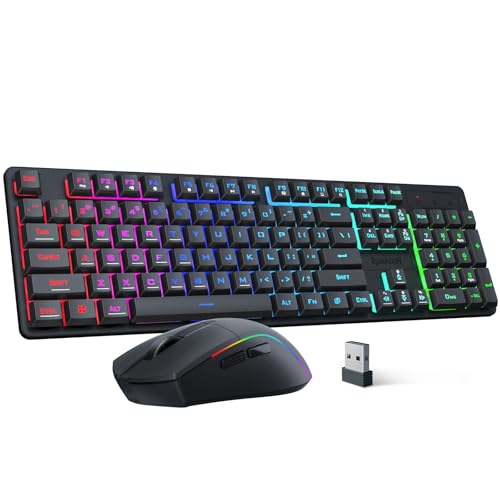 Redragon S107KS Wireless Gaming Keyboard and Mouse
- 【Tri-Mode Wireless Gaming Keyboard and Mouse】The S107KS supports…
- 【DPI Adjustable Gaming Mouse】This wireless gaming mouse supports…
- 【Professional Customised Software Support】S107KS gaming keyboard and mouse…
| Product | Key specs | |
|---|---|---|
| CHONCHOW USB Wireless Gaming Keyboard and Mouse | 2.4Ghz Wireless Connection----Both the LED wireless gaming mouse… Rainbow LED Backlit Keyboard----The rainbow LED gaming keyboard… Rechargeable & Long Battery Life----The gaming keyboard is… | Check price |
| Redragon S101M-KS Gaming Keyboard and Mouse Wireless | 【Wireless Gaming Keyboard and Mouse Combo】Get rid of… 【RGB Gaming Keyboard and Mouse】Turely RGB Backlight with… 【4800 DPI Adjustable Gaming Mouse】There are 5 DPI… | Check price |
| Redragon S107KS Wireless Gaming Keyboard and Mouse | 【Tri-Mode Wireless Gaming Keyboard and Mouse】The S107KS supports… 【DPI Adjustable Gaming Mouse】This wireless gaming mouse supports… 【Professional Customised Software Support】S107KS gaming keyboard and mouse… | Check price |
 Redragon Wireless Gaming Keyboard and Mouse Combo | 【Tri-Mode Connection & Wide Compatibility】Support Bluetooth 5.0, 2.4G… 【Long-Lasting Rechargeable Battery & Power Saving】Built-in 4000mAh keyboard… 【16.8M RGB Lighting 】Boast 16.8 million RGB colors,… | Check price |
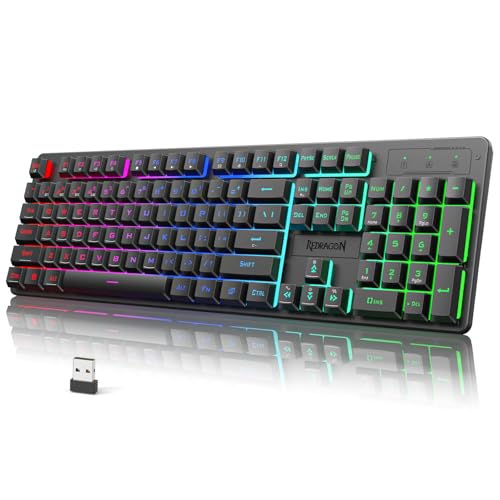 Redragon K521KS Wireless Gaming Keyboard | 【Tri-Mode Connection & 4000 mAh Battery】The K521KS red… 【Fully Programmable Software】The programmable software can edit the… 【RGB Backlit Gaming Keyboard】The K521KS PC Gaming Keyboard… | Check price |
 TECKNET Wireless Gaming Keyboard | 【Switch Between Wired & 2.4G Wireless】Simply plug the… 【4000mAh Rechargeable Battery for Extended Play】Equipped with a… 【15-Zone Rainbow Backlit Keyboard】With 11 backlight modes and… | Check price |
 TECKNET Wired Gaming Keyboard | 【Ergonomic Design, Enhanced Typing Experience】Improve your typing experience… 【15-Zone Rainbow Backlit Keyboard】Customize your PC gaming keyboard… 【Whisper Quiet Design】Experience near-silent operation with our whisper-quiet… | Check price |
As an Amazon Associate we earn from qualifying purchases at no extra cost to you.
⚡ Save on Your Next PC — Amazon Prime
Prime members get fast free shipping on the systems above, plus early access to Prime Day & Black Friday PC deals. New members get a 30-day free trial.
Watch: Wireless vs Wired Keyboard for Gaming — Video Review
Quick Verdict
Modern 2.4GHz wireless keyboards are fast enough for nearly all gamers, so if you want a tidy desk and the freedom to reposition, go wireless with a low-latency dongle. Stick with wired if you want the lowest possible cost, zero charging, and the absolute peace of mind that only a physical connection guarantees. For the vast majority, either delivers a great competitive experience today.
Key Differences
- Latency: A good 2.4GHz dongle rivals wired; Bluetooth alone is fine for typing but not competitive gaming.
- Battery: Wireless needs charging; wired never does. Many wireless boards last days to weeks per charge.
- Price: Wired boards cost less at any given build quality.
- Desk clutter: Wireless frees you from cable management and looks cleaner.
- Reliability: Wired has no dropout risk; wireless depends on a stable dongle connection.
The Case for Wireless
Wireless keyboards win on convenience and flexibility. A tri-mode board like a Redragon S107KS or K521KS switches between wired, 2.4GHz, and Bluetooth, letting you dodge a full battery drain and connect to multiple devices. A dedicated 2.4GHz dongle delivers latency close to wired, which is why competitive players now accept it. A tidy desk and the freedom to game from the couch are real quality-of-life wins.
The downsides are charging, a slightly higher price, and the small chance of a dongle hiccup on a congested wireless band.
The Case for Wired
Wired keyboards keep things simple and cheap. A TECKNET wired RGB board or any solid mechanical costs less than a comparable wireless model, never needs charging, and offers a rock-solid connection with zero dropout risk. For a desktop that never moves, the cable is a non-issue, and you get the lowest latency by definition. Wired remains the default for budget builders and no-nonsense competitors.
Which Should You Buy?
- Clean desk and portability matter: choose 2.4GHz wireless with a dongle.
- Lowest cost and zero maintenance: wired is the value pick.
- Multi-device use: a tri-mode wireless board switches between PC, laptop, and tablet.
- Absolute competitive reliability on a budget: wired removes every variable.
- Either way, prefer a 2.4GHz dongle over Bluetooth for gaming latency.
Frequently Asked Questions
Is a wireless keyboard fast enough for competitive gaming?
With a dedicated 2.4GHz dongle, yes. Latency is close enough to wired that most players cannot feel the difference. Avoid relying on Bluetooth for competitive play, though.
How long do wireless gaming keyboards last per charge?
It varies widely, from a few days with RGB blazing to several weeks with lighting off. Boards with large batteries and adjustable lighting stretch furthest.
Do wired keyboards have less input lag?
By definition wired has the lowest possible latency, but a good 2.4GHz wireless board narrows the gap to a level most gamers cannot perceive.
Can I use one wireless keyboard on several devices?
Yes, if it is a tri-mode model. Those boards pair over Bluetooth to tablets and laptops while using the 2.4GHz dongle for low-latency PC gaming.
Final Verdict
Go wireless with a 2.4GHz dongle if you value a clean desk, portability, and multi-device flexibility, since the latency penalty is now negligible. Choose wired for the lowest price, zero charging, and bulletproof reliability on a stationary desktop. Both deliver excellent 2026 gaming, so let your desk habits and budget make the call.
FAQ
Is a wireless keyboard fast enough for competitive gaming?
How long do wireless gaming keyboards last per charge?
Do wired keyboards have less input lag?
Can I use one wireless keyboard on several devices?
More from Amazon
Programs that pair well with the guide above. Offers and eligibility are set by Amazon and may change.
Free shipping on eligible items, Prime Video and more. Eligible new members can start with a free trial.
Start a Prime free trialAd-free music streaming. Eligible new subscribers can start with a free trial.
Try Music Unlimited freeA Prime membership for ages 18-24 with a trial period. Eligibility is set by Amazon.
See Prime for Young AdultsAudiobooks and podcasts to listen to on the go. Eligible new members can start with a free trial.
Try Audible freeAs an Amazon Associate we earn from qualifying purchases.