Typing on a loud, clicky keyboard feels great right up until you’re gaming late at night, sharing a room with a partner, or hopping on a work call and hearing every keystroke bleed into the mic. Most “gaming” keyboards are tuned for tactile feedback and RGB flash, not for quiet operation, which leaves a lot of buyers stuck between annoying their household and settling for mushy membrane boards that kill the typing feel.
This guide covers six genuinely quiet mechanical keyboards that don’t sacrifice performance, from budget hot-swap options to premium wireless builds. We’ll break down what actually makes a switch “silent” versus just marketed that way, review each pick’s strengths and weaknesses, and answer the most common questions so you can find the right board for gaming, typing, or both.
Our top picks
 Cherry KC 200 MX Wired Mechanical Office
- Wired, mechanical office keyboard with anodized metal plate:…
- CHERRY MX2A SILENT RED switches: Smooth and quiet…
- Practical: Tasteful white status LEDs in the CAPS…
 SOLAKAKA KI99 Pro Wireless Mechanical Keyboard with
- Triple-mode & Long-lasting: KI99 Pro mechanical keyboard supports…
- 96% Layout & Control Knob: KI99 Pro computer…
- Gasket Structure & Quiet Typing: This gaming keyboards…
 Logitech MX Mechanical Wireless Illuminated Keyboard Tactile
- Tactile Quiet mechanical key switches with a satisfying…
- Low-profile keys, more comfort: A keyboard layout designed…
- Smart illumination: Backlit keys light up the moment…
| Product | Key specs | |
|---|---|---|
| Cherry KC 200 MX Wired Mechanical Office | Wired, mechanical office keyboard with anodized metal plate:… CHERRY MX2A SILENT RED switches: Smooth and quiet… Practical: Tasteful white status LEDs in the CAPS… | Check price |
| SOLAKAKA KI99 Pro Wireless Mechanical Keyboard with | Triple-mode & Long-lasting: KI99 Pro mechanical keyboard supports… 96% Layout & Control Knob: KI99 Pro computer… Gasket Structure & Quiet Typing: This gaming keyboards… | Check price |
| Logitech MX Mechanical Wireless Illuminated Keyboard Tactile | Tactile Quiet mechanical key switches with a satisfying… Low-profile keys, more comfort: A keyboard layout designed… Smart illumination: Backlit keys light up the moment… | Check price |
 Redragon K668 108-Key Hot-Swap Wired RGB Gaming Redragon K668 108-Key Hot-Swap Wired RGB Gaming | 4 Extra Hotkeys, Full-Size 108-Key Anti-Ghosting - Dedicated… Swap Switches Without Soldering, Smooth and Quiet -… Vibrant RGB for a True eSports Vibe -… | Check price |
 SteelSeries Apex 3 RGB Gaming Keyboard SteelSeries Apex 3 RGB Gaming Keyboard | Ip32 water resistant 10-zone RGB illumination Whisper quiet gaming switches | Check price |
 AULA F99 Pro Wireless Mechanical Keyboard-Silent Version AULA F99 Pro Wireless Mechanical Keyboard-Silent Version | Multi-Device Connection: AULA F99 Pro wireless mechanical keyboard… Hot-Swappable Custom Keyboard: The switches and keycaps can… Gasket-Structure and PCB Single Key Slotting: This computer… | Check price |
 AULA F99 Pro Wireless Mechanical Keyboard-Silent Version AULA F99 Pro Wireless Mechanical Keyboard-Silent Version | Multi-Device Connection: AULA F99 Pro wireless mechanical keyboard… Hot-Swappable Custom Keyboard: The switches and keycaps can… Gasket-Structure and PCB Single Key Slotting: This computer… | Check price |
 EPOMAKER TH99 Tri-Mode Wireless Mechanical Keyboard with EPOMAKER TH99 Tri-Mode Wireless Mechanical Keyboard with | Check price |
As an Amazon Associate we earn from qualifying purchases at no extra cost to you.
🎮 Get More From Your Setup — Free
Prime Gaming gives you free PC games every month, in-game loot, and a free Twitch channel sub — plus fast free shipping on all the gear above. New members get a 30-day free trial.
Watch: Best Silent Mechanical Keyboard: Top Picks Reviewed — Video Review
How to Choose a Silent Mechanical Keyboard
- Switch type: Look for switches explicitly labeled “silent,” “linear silent,” or with built-in dampeners; standard linear or tactile switches without silencing still produce noticeable clack even without a clicky mechanism.
- Case and structure: Gasket-mounted designs and foam or silicone dampening inside the case absorb vibration and reduce hollow, echoey sound compared to bare plastic housings.
- Connectivity needs: Decide between wired for zero-latency gaming or wireless (Bluetooth/2.4GHz) for a cleaner desk; many silent boards now offer both.
- Hot-swappable sockets: A hot-swap PCB lets you experiment with different silent switches later without soldering, which is useful since “silent enough” is subjective.
- Build quality and extras: Aluminum or metal top plates improve acoustics and durability, while features like wrist rests, dedicated media keys, and software customization add everyday value.
The Best Silent Mechanical Keyboards Reviewed
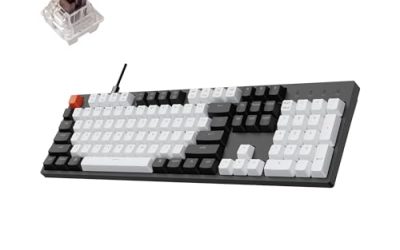
Cherry KC 200 MX Silent Red
Cherry’s own MX2A Silent Red switches make this wired office-style board one of the most consistently quiet typing experiences available, and the aluminum top plate gives it a premium, rattle-free feel. It’s not aimed at gamers with flashy RGB, but for silent typing and light gaming it’s hard to beat.
SOLAKAKA KI99 Pro
The KI99 Pro pairs a gasket-mounted case with pre-lubed, hot-swappable silent switches, delivering a surprisingly plush, muted sound signature for the price. Wireless flexibility and RGB backlighting make it a strong all-rounder for gamers who also want a comfortable daily typer.
Logitech MX Mechanical
Built for productivity first, the MX Mechanical uses tactile switches tuned for quiet operation alongside a sturdy metal frame and reliable multi-device Bluetooth connectivity. It’s the best pick here for anyone who splits time between work and gaming and wants a refined, office-appropriate keyboard that still feels mechanical.
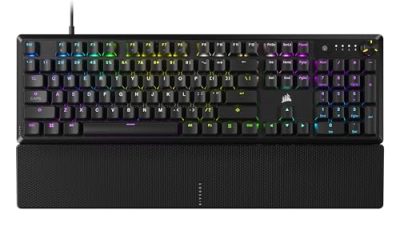
Redragon K668
The K668’s cushioned noise-dampening foam gives it that popular “thocky” sound while keeping volume low, and its hot-swap sockets and full 108-key layout with extra hotkeys add real versatility. It’s an excellent budget option for gamers who want a satisfying sound profile without the high price tag of boutique boards.
SteelSeries Apex 3
SteelSeries’ whisper-quiet switches combined with IP32 water resistance make the Apex 3 a practical, durable choice for gamers who eat or drink at their desk. The 10-zone RGB and magnetic wrist rest round out a solid, no-fuss gaming keyboard that stays quiet under fast, repeated keypresses.
Frequently Asked Questions
Are silent mechanical keyboards actually as quiet as membrane keyboards?
They get close but not identical; silent mechanical switches use internal dampeners to cut down on the click and bottom-out noise, resulting in a soft thump rather than complete silence, while membrane boards are naturally quieter but lack tactile precision and durability.
Do silent switches feel different when typing or gaming?
Yes, silent linear switches typically feel slightly softer and more cushioned at the bottom of each keystroke due to the internal dampening material, though the actuation force and travel distance remain similar to their non-silent counterparts, so gaming performance isn’t compromised.
Is hot-swappable a must-have feature?
It’s not essential, but it’s valuable if you’re unsure exactly how quiet you need your board to be, since hot-swap sockets let you try different silent switches later without any soldering or warranty concerns.
Wired or wireless for a quiet gaming keyboard?
Wired connections offer the lowest latency and are preferred for competitive gaming, but modern 2.4GHz wireless keyboards have closed the gap significantly, so wireless is a fine choice for most gamers who value desk cleanliness and flexibility.
Final Thoughts
For most buyers, the SOLAKAKA KI99 Pro offers the best balance of quiet performance, wireless convenience, and price, while the Cherry KC 200 MX Silent Red is the top choice for dedicated quiet typing with premium build quality. Gamers who want a louder personality in their quiet keyboard should look at the Redragon K668 for its satisfying thock and hot-swap flexibility at a budget-friendly price.