Our Top Picks
 Logitech G560 PC Gaming Speaker System with 7.111.9010 x 8.1 x 15.9 inches12.1 poundsCheck on Amazon
 ULTIMEA Large 3-Way Powered Bookshelf Speakers with Smart9.17 x 7.4 x 13.15 inches18.96 poundsCheck on Amazon
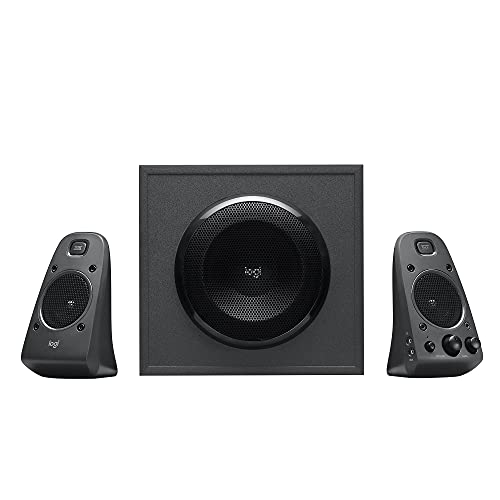 Logitech Z625 Powerful THX® Certified 2.1 Speaker System1247.7 x 4.6 x 5.3 inches18.1 poundsCheck on Amazon
The best desktop speakers under $300 are led by the Edifier M60, a compact 66W RMS pair with Bluetooth 5.3 and LDAC that fits a desk without crowding the monitor. For a bigger, bass-heavy setup, the Logitech Z625 and Logitech G560 cover the 2.1 and RGB gaming ends of the range.
Spending close to 300 dollars on desktop speakers puts you in a different league from basic USB sticks: you are choosing between powered bookshelf monitors, compact Hi-Res pairs and subwoofer systems with proper inputs. This guide compares six options from their listing specifications only, so every spec below comes from the product page text. Specs the listing does not mention are marked as not listed, and it is worth checking the maker page for those before you buy.
Everything here is a powered speaker, meaning the amplifier is built in and you only need a source (PC, console, turntable or phone) and a cable. We did not use these products ourselves; the picks are compared from listing specifications, and the trade-offs below are drawn from the features each listing actually states.
Quick Comparison
| Model | Key specs per listing | Best for |
|---|---|---|
| Edifier M60 | 66W RMS, Bluetooth 5.3, LDAC Hi-Res, 3-inch mid-bass | Small desks and everyday PC audio |
| Edifier R1700BTs | 66W RMS, Bluetooth, near-field studio monitor style | Music-first listening on a desk |
| Logitech G560 | 7.1 DTS:X surround, Bluetooth, USB, subwoofer | Gamers who want RGB and wide sound |
| Creative XF1 | 72W RMS, Bluetooth 6.0, Hi-Res, LDAC, sub-out | Compact pair that can add a sub later |
| ULTIMEA BS-3 Powered Bookshelf Speakers | 3-way, app control, HDMI ARC, sub out, optical, USB, RCA | Desk plus TV or turntable |
| Logitech Z625 | THX certified 2.1, optical input | Bass-heavy movies and games on a desk |
Edifier M60
Listing specs: 66W RMS computer speaker, Bluetooth 5.3, Hi-Res Audio with LDAC, 3-inch mid bass driver (further driver details cut off in the listing).

Edifier M60 Multimedia Speaker, 66W RMS Computer Speaker, Black | Bluetooth 5.3, Hi-Res Audio with LDAC, 3" Mid Bass & 1" Tweeter, USB-C AUX Inputs, Compact Desktop Speaker
Chosen because it specifies 66W RMS Computer Speaker and Black.
View on AmazonThe M60 is the most desk-friendly pair here. A 3-inch mid-bass driver is small enough to sit either side of a monitor, yet the 66W RMS rating gives it enough headroom to fill a bedroom or home office at normal listening volumes. Bluetooth 5.3 with LDAC means a phone or laptop can stream wirelessly at high quality while the PC stays on a wired connection. The trade-off is physical: a 3-inch driver will not give the chest-thumping bass of a 2.1 system, so anyone who wants explosions in games to hit hard should look at the Logitech picks below. The listing does not state the full list of inputs in the text we could see, so confirm the connection types you need (USB, optical, 3.5mm) on the maker page.
Pros
- Compact footprint suits small spaces
- Bluetooth 5.3 with LDAC for wireless music
- 66W RMS output is generous for the size
Cons
- 3-inch mid-bass limits low-end weight
- Full input list not shown in the listing text
Edifier R1700BTs
Listing specs: Active Bluetooth bookshelf speakers, 2.0 wireless near-field studio monitor design, 66W RMS (rest of the listing text is cut off).
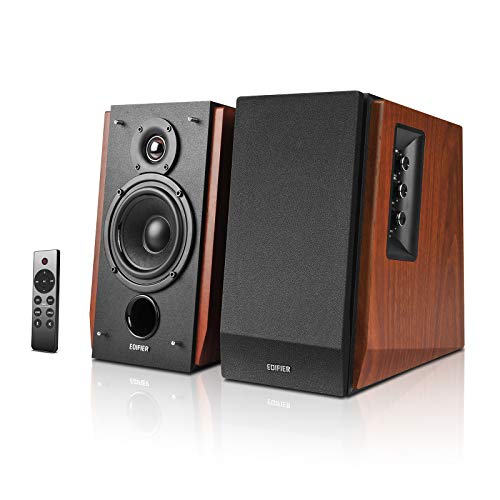
Edifier R1700BTs Active Bluetooth Bookshelf Speakers - 2.0 Wireless Near Field Studio Monitor Speaker - 66w RMS with Subwoofer Line Out
Chosen because it specifies 2.0 Wireless Near Field Studio Monitor Speaker and 66w RMS with Subwoofer Line Out.
View on AmazonThe R1700BTs is a classic wooden-cabinet bookshelf pair sold as a near-field studio monitor, which is exactly how it works best: placed a metre or so from your ears on a desk, with the tweeters aimed at head height. Its 66W RMS rating and larger cabinets give a fuller midrange than the M60, which is why it suits people who listen to music more than they game. The cost is space. These cabinets take noticeably more desk depth, and a single pair will crowd a small workstation. They are also 2.0 speakers with no dedicated subwoofer output stated in the text we saw, so bass depth depends on the cabinet alone. Check the maker page for the complete input list before choosing between this and the M60.
Pros
- Studio-monitor layout favours accurate music playback
- Bluetooth built in
- 66W RMS suits medium rooms
Cons
- Large cabinets need real desk depth
- 2.0 layout, no stated subwoofer output
Logitech G560
Listing specs: PC gaming speaker system, 7.1 DTS:X Ultra Surround Sound, Bluetooth, USB, subwoofer included.
Logitech G560 PC Gaming Speaker System with 7.1 DTS X - Black | 7.1 DTS:X Ultra Surround Sound, Bluetooth, USB, Subwoofer + 2 Satellite Speakers, LIGHTSYNC RGB
Chosen because it specifies Black and 7.1 DTS:X Ultra Surround Sound.
View on AmazonThe G560 is the gaming-first choice. Its listing leans on 7.1 DTS:X Ultra Surround Sound and includes a subwoofer, so the satellites and the sub together give the wide, loud sound many players want from shooters and action games. It also supports both USB and Bluetooth, which makes switching between a gaming PC and a phone straightforward. Surround on a pair of desktop satellites is a simulated effect, not true rear speakers, so do not expect the precision of a real multi-speaker room. The system also needs more desk and floor space than a 2.0 pair, because of the subwoofer. If you mainly play music or work with it, one of the Edifier pairs will give you more refined sound for the same budget.
Pros
- Subwoofer adds real low-end for games
- 7.1 DTS:X surround processing listed
- USB and Bluetooth in one system
Cons
- Takes more space than a 2.0 pair
- Surround is virtual, not discrete rear speakers
Creative XF1
Listing specs: PC speakers, Bluetooth 6.0, 72W RMS, Hi-Res Audio, LDAC, AAC, compact, sub-out, parametric controls (listing text partly cut off).

Creative XF1 PC Speakers, Bluetooth 6.0, 72W RMS, Hi-Res Audio, LDAC, AAC | Computer speakers, Compact, Sub-Out, Parametric EQ, Desktop Mode, Bookshelf, Turntable, Speaker Isolation Stand, Black
Chosen because it specifies Bluetooth 6.0 and 72W RMS.
View on AmazonThe XF1 stands out because it lists a subwoofer output, which most compact 2.0 pairs omit. That gives you a clear upgrade path: start with the pair, then add a powered sub later if you want more bass without replacing the speakers. At 72W RMS it is the most powerful pair in this lineup on paper, and Bluetooth 6.0 with LDAC and AAC covers high-quality wireless playback on a wide range of phones. The listing describes it as compact, but it does not give dimensions in the text we saw, so measure your desk before ordering. The sub-out is only useful if you buy a separate subwoofer, which adds to the total cost, and the parametric controls mentioned in the listing need a look at the maker page to understand what they adjust.
Pros
- Sub-out lets you add bass later
- 72W RMS rating is the highest pair here
- Wide Bluetooth codec support listed
Cons
- Dimensions not shown in the listing text
- Subwoofer must be bought separately
ULTIMEA BS-3 Powered Bookshelf Speakers
Listing specs: Large 3-way powered bookshelf speakers with smart app control, HDMI ARC, SUB OUT, optical, USB and RCA inputs.
ULTIMEA Large 3-Way Powered Bookshelf Speakers with Smart App Control, BS-3 | HDMI ARC/SUB OUT/Optical/USB/RCA Input, App EQ, 5.25" Woofer, Bluetooth 6.0, 70W RMS, Wireless Studio Monitors, TV/Turntable
Chosen because it specifies BS-3 and HDMI ARC/SUB OUT/Optical/USB/RCA Input.
View on AmazonThe BS-3 is the connection-rich pick. HDMI ARC means it can serve as a TV speaker pair, while optical, USB and RCA cover a PC, a console and a turntable preamp, and the sub-out leaves room for a subwoofer. Smart app control is also listed, though the listing text does not say which functions the app controls. A three-way design usually spreads the work across more drivers than the two-way Edifier pairs, but the text we saw does not give the driver sizes, so treat the tuning as unknown until you read the maker page. These are large bookshelf cabinets, so they suit a wide desk, a media console or a shelf rather than a tight workstation.
Pros
- HDMI ARC, optical, USB, RCA and sub-out inputs
- Works for PC, TV and turntable in one pair
- App control listed
Cons
- Large cabinets need space
- Driver sizes and app functions not detailed
Logitech Z625
Listing specs: Powerful THX Certified 2.1 speaker system with optical input.
Logitech Z625 Powerful THX® Certified 2.1 Speaker System with Optical Input
Picked as a relevant option in this category.
View on AmazonThe Z625 is a straightforward 2.1 system: two satellites and a subwoofer with THX certification and an optical input, which is the connection to look for if your PC or console has a digital output. Its appeal is simple, loud and bass-forward sound for movies and games without any pairing or app. The limits are the usual ones for a 2.1 desktop kit: the subwoofer needs floor space and a power outlet, and the satellites are not aimed at critical music listening. The listing text we saw does not state wattage or other connection types, so check the maker page for those details, particularly if you need a 3.5mm input for a phone.
Pros
- THX certification listed
- Optical input for digital sources
- Separate subwoofer for bass
Cons
- Needs floor space for the sub
- Wattage and other inputs not shown in the listing text
How to Choose Desktop Speakers Under $300
Decide the layout first: 2.0 pair or 2.1 with a sub
A 2.0 pair like the Edifier M60 or R1700BTs keeps the desk tidy and sounds more balanced for music and voice. A 2.1 or 7.1 system like the Logitech G560 or Z625 adds a subwoofer, which helps with movies and games but needs floor space and a power socket. Pick 2.1 only if you have somewhere to put the sub.
Desktop speakers for home office and small spaces
For a home office, a pair of 3-inch to 4-inch driver speakers with Bluetooth is usually enough, and the M60 fits that profile. In a small room, bass travels through walls and bothers neighbours, so a compact 2.0 pair with sub-out, like the Creative XF1, lets you decide later whether you need a sub at all.
Desktop speakers for gaming
For gaming, look for low-latency wired connections (USB or optical) and a subwoofer or sub-out. Bluetooth adds delay that shows up in fast games, so keep the PC on a cable and use Bluetooth only for phones. The G560’s listed USB connection and sub are the closest fit to that brief.
Check inputs against your sources
Count what you need to plug in: PC (USB or 3.5mm), console or TV (optical or HDMI ARC), turntable (RCA). The BS-3 lists the widest spread. Always confirm cable types in the box, because speakers in this class rarely include every cable. A mismatch is the most common reason a speaker pair gets returned.
Match power and cabinet size to the room
In a typical bedroom or office, 40W to 70W RMS is already loud, and the extra headroom mostly keeps the sound clean at moderate volumes rather than adding useful loudness. Larger cabinets and 4-inch or bigger woofers move more air at low frequencies, but they also demand more desk depth and clear space behind them. If your desk is shallow, choose the smaller pair and spend the difference on a stand or isolation pads.
FAQ
Is under $300 enough for good desktop speakers?
Yes. This range covers powered bookshelf pairs, Hi-Res compact speakers and subwoofer kits with Bluetooth and optical inputs, a clear step up from basic USB pairs.
Do I need a subwoofer on a desk?
Not always. A 2.0 pair with 3-inch to 4-inch drivers is enough for voice, music and light gaming. Add a subwoofer if you want heavy bass from movies and games.
Are Bluetooth speakers fine for gaming?
Bluetooth adds latency, so wired USB or optical is better for fast games. Keep Bluetooth for phones, music and casual play.
What does RMS power mean?
RMS is continuous output power, a steadier measure than peak power. Compare RMS figures between models, and treat peak-only numbers cautiously.
How should I place desktop speakers?
Put them roughly an arm’s length apart, aimed at your ears, with the tweeters at head height. A few centimetres of space behind each speaker helps bass.
Last updated: November 2026
FAQ
Is under $300 enough for good desktop speakers?
Do I need a subwoofer on a desk?
Are Bluetooth speakers fine for gaming?
What does RMS power mean?
How should I place desktop speakers?
More from Amazon
Programs that pair well with the guide above. Offers and eligibility are set by Amazon and may change.
Free shipping on eligible items, Prime Video and more. Eligible new members can start with a free trial.
Start a Prime free trialAd-free music streaming. Eligible new subscribers can start with a free trial.
Try Music Unlimited freeA Prime membership for ages 18-24 with a trial period. Eligibility is set by Amazon.
See Prime for Young AdultsAudiobooks and podcasts to listen to on the go. Eligible new members can start with a free trial.
Try Audible freeAs an Amazon Associate we earn from qualifying purchases.