Our Top Picks
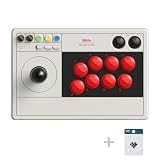
The best arcade stick for PC in this group is the 8BitDo Arcade Stick for Switch and Windows: it connects by Bluetooth, a 2.4G receiver or wired USB-C, supports button remapping and macros in software, and uses a universal mounting plate that the maker says accepts Sanwa-style sticks. If you want something small and wired, the HORI Fighting Stick Mini is the compact option, and Qanba’s N3 Drone 2 is the pick for a full-size wired panel with Omron-switch joystick. An arcade stick for PC is a fight-stick controller that registers as a standard gamepad so Windows games recognize it.
Quick List
- 8BitDo Arcade Stick (Switch and Windows) – best for wireless play and modding the joystick
- 8BitDo Arcade Stick for Switch 2 and Windows (Purple) – best for a glass faceplate and Switch 2 compatibility
- 8BitDo Arcade Stick for Xbox and Windows – best for Xbox-licensed play with a headset jack
- Qanba N3 Drone 2 – best for a full-size wired stick with a touch pad and Omron joystick
- HORI Fighting Stick Mini – best for a compact, portable wired stick
- SUBSONIC Arcade Stick – best for a simple multi-platform stick with turbo and combo features
Which One Is Right for You?
| If you… | Choose |
|---|---|
| want to go wireless and swap the stick and buttons later | 8BitDo Arcade Stick (Switch and Windows) |
| also own a Switch 2 and like a glass faceplate | 8BitDo Arcade Stick (Switch 2, purple) |
| play on Xbox and PC and want a headset jack on the stick | 8BitDo Arcade Stick for Xbox |
| want a full-size wired panel with a touch pad and microphone input | Qanba N3 Drone 2 |
| carry your stick to events or have limited desk space | HORI Fighting Stick Mini |
| need a simple, long-cable stick that spans several consoles and PC | SUBSONIC Arcade Stick |
Pick between wireless and wired first. The 8BitDo sticks offer wireless connections, while the HORI, Qanba and SUBSONIC listings describe wired use. Then check the PC line in each listing, because several sticks are sold mainly for consoles and treat Windows as a secondary platform.

8Bitdo Arcade Stick for Switch & Windows, Arcade Fight Stick Support Wireless Bluetooth, 2.4G Receiver and Wired Connection
Chosen because it specifies Arcade Fight Stick Support Wireless Bluetooth and 2.4G Receiver and Wired Connection.
View on Amazon
8Bitdo Arcade Stick for Xbox Series X|S, Xbox One and Windows 10, Arcade Fight Stick with 3.5mm Audio Jack - Officially Licensed (Black)
Chosen because it specifies Xbox One and Windows 10 and Arcade Fight Stick with 3.5mm Audio Jack.
View on Amazon
HORI Fighting Stick Mini for PS5, PS4, and PC - Officially Licensed by Sony
Chosen because it specifies PS4 and and PC.
View on Amazon
8BitDo Arcade Stick for Switch 2, Switch and Windows PC, Purple
Chosen because it specifies Switch and Windows PC and Purple.
View on Amazon
SUBSONIC Arcade Stick Controller for PS4, Xbox Serie X/S Xbox One PC PS3
Chosen because it specifies Xbox Serie X/S Xbox One PC PS3.
View on Amazon
Qanba N3 Drone 2 Wired Joystick for PlayStation 5/4 and PC (Fighting Stick) Officially Licensed Sony Product
Picked as a relevant option in this category.
View on AmazonAll 6 Picks in Detail
1. 8BitDo Arcade Stick (Switch and Windows) – Best for Wireless Play and Modding
As an Amazon Associate we earn from qualifying purchases at no extra cost to you.

This is the most flexible stick in the list. The listing names three ways to connect: Bluetooth, a 2.4G receiver and wired USB-C, with a hidden compartment in the case for the receiver. The mounting plate is described as universal for Sanwa-style joysticks, so you can swap the stock stick later. On PC it uses a mode switch for X-input, and the Ultimate Software lets you remap buttons and build macros.
- Bluetooth, 2.4G and wired USB-C connection
- Customizable button mapping and macros
- Dynamic button layout that changes by mode
- Universal mounting plate for Sanwa-style sticks
- Listed at about 4.6 pounds and 11.9 by 4.4 by 8 inches
The maker’s page lists a rechargeable battery and Windows 7 and later support, so wireless play does not need a cable on a living room PC.
For PC buyers the practical selling point is the pairing of X-input mode and software profiles: you can save one layout for a fighting game and another for a platformer, then swap with the fast-mapping controls instead of reconfiguring in each game.
Who should skip it: players who want a very small stick for travel, since the 4.6-pound case is large.
Pros:
- Wireless and wired options
- Easy modding of stick and buttons
Cons:
- Large and heavy to carry
- Needs the mode switch set correctly for PC
Compared with the Switch 2 version below, it has the same core design without the glass faceplate.
2. 8BitDo Arcade Stick for Switch 2 and Windows (Purple) – Best for a Glass Faceplate

The purple edition shares the 8BitDo concept and lists Switch, Switch 2 and Windows PC. It features a tempered glass faceplate, two dedicated macro buttons labeled P1 and P2, built-in turbo and three connection types: Bluetooth, a 2.4G adapter and wired USB-C. The dynamic layout switches between Switch and PC (X-input) modes.
- Tempered glass faceplate
- P1 and P2 macro buttons, plus turbo
- Bluetooth, 2.4G adapter and wired USB-C
- Customizable mapping and profiles in Ultimate Software
- Listed at about 4.6 pounds
The listing does not give dimensions, so confirm the size against your desk space. The weight matches the other 8BitDo stick in this list.
Because the Switch 2 and PC modes change the on-case button graphics, the stick is easy to hand to a friend who is used to a console layout. The same flexibility applies when you share it between a handheld console and a desktop PC.
Who should skip it: buyers who want an Xbox-licensed stick or who prefer a plain panel without a glass finish.
The macro buttons are the practical feature here: you can map a multi-press sequence to P1 or P2 and call it up quickly. Confirm any tournament rules before relying on macros or turbo in competitive play.
Pros:
- Switch 2 support plus Windows
- Macro buttons built in
Cons:
- Dimensions not stated
- Glass surface may need more careful cleaning
It is nearly the same as the first 8BitDo stick, with a different look and Switch 2 support.
3. 8BitDo Arcade Stick for Xbox and Windows – Best for Xbox-Licensed Play

This 8BitDo model is positioned as an Xbox-licensed wireless arcade stick and works with Xbox Series X|S, Xbox One and Windows 10 and later. The listing describes 2.4G wireless or wired USB connectivity, and does not mention Bluetooth. It includes a 3.5 mm audio jack with volume control, fast-mapping and profile buttons, and supports the 8BitDo Ultimate Software.
- Xbox Series X|S, Xbox One and Windows 10+
- 2.4G wireless or wired USB
- 3.5 mm audio jack with volume control
- Customizable mapping and fast-mapping button
- Listed at about 9.4 by 13.4 by 5.5 inches
The weight field shows 0.18 pounds, which cannot be right for a full arcade case, so ignore it and confirm on the product page.
The built-in audio jack is the unusual feature: you can plug a headset into the stick itself and adjust volume without leaving the grip. That suits voice chat during online matches, assuming the game and platform route audio to the controller.
Who should skip it: players who need Bluetooth, which is not mentioned for this model, or Switch compatibility.
If you use the stick on both Xbox and PC, plan to check the mode on each startup, and confirm which Windows version you run since the listing starts at Windows 10.
Pros:
- Headset jack on the stick
- Works on Xbox and PC
Cons:
- Weight field is clearly wrong
- Windows 10 or later only
Choose it over the first 8BitDo stick only if Xbox is part of your plan.
4. Qanba N3 Drone 2 – Best for a Full-Size Wired Panel

The N3 Drone 2 is an officially Sony-licensed wired stick for PlayStation 5, PlayStation 4 and PC. The listing mentions a full control panel, touch pad, Qanba 30 mm B30 buttons and a Qanba OV7 joystick with Omron switches. It also includes a 3.5 mm microphone input with a mute button, which suits online play.
- Wired, for PS5, PS4 and PC
- Qanba B30 buttons at 30 mm
- OV7 joystick with Omron switches
- Touch pad, full control panel and mic input with mute
- Listed at about 14 by 8.7 by 4.6 inches and 3.95 pounds
It is the widest stick here, with more room for hands and a stable stance. Because it is a PlayStation-licensed device, confirm how it appears on Windows before relying on it for PC-only play.
The listing frames it as a complete control panel, which helps players who want a familiar console-style layout on PC. The touch pad and microphone mute are mainly console conveniences, so on Windows expect the core stick and button functions to be the useful part.
Who should skip it: players who want a wireless stick or a compact travel case.
Check the cable length and the PC button naming on the product page, because console-style labels can differ from what Windows games expect. A stable table or lap board helps with a 14-inch-wide case.
Pros:
- Full-size layout with a touch pad
- Microphone input with mute
Cons:
- Wired only
- Large footprint
It is the wired alternative to the 8BitDo sticks, with more panel space than the HORI Mini.
5. HORI Fighting Stick Mini – Best for Compact Wired Play

The Mini is the portable option, officially licensed by Sony for PS5, PS4 and PC. The listing describes a classic 8-button layout, HORI’s original joystick with V-cut housing, and an 8-foot cable. It is lightweight and aimed at both arcade and fighting games.
- Wired, 8-foot cable
- Classic 8-button layout
- HORI joystick with V-cut housing
- For PS5, PS4 and PC
- Listed at about 5.9 by 8.3 by 3.4 inches and 1 pound
The size makes it easy to use on a lap or small desk, though its small panel can feel cramped for large hands.
Its 8-button layout covers the usual six attack buttons plus two utility buttons, which is the common arrangement for modern fighting games. The V-cut housing is described as part of HORI’s own joystick design, a detail aimed at consistent diagonal inputs.
Who should skip it: people who want a roomy panel, wireless play or easy modding, because the listing does not describe replaceable parts.
Pair it with a non-slip mat or lap board if you use it on a couch, as a light case can shift during fast inputs. The 8-foot cable is long enough for most desks, but not for a distant TV.
Pros:
- Small and light
- Simple wired setup
Cons:
- Cramped for large hands
- Fewer options than 8BitDo sticks
It is the opposite of the Qanba N3: smaller, simpler and more portable.
6. SUBSONIC Arcade Stick – Best for a Simple Multi-Platform Stick

The SUBSONIC listing names PS4, Xbox Series X|S, Xbox One, PC and PS3 and describes a heavy-duty steel joystick with microswitch contact buttons. It has 8 action buttons, an AUTO function for rapid repeated shots and a COMBO function to program sequences. It adds a soft-touch coating, a rubberized wrist rest and a 3 meter cable.
- Steel joystick, 8 microswitch buttons
- AUTO and COMBO functions
- Soft-touch coating and wrist rest
- 3 meter cable
- Listed at about 9.8 by 6.9 by 1.9 inches and 1.7 pounds
Because it covers many platforms, confirm how it is recognized on PC and whether it is the right mode, as the listing does not describe the PC mode.
The AUTO function gives rapid repeated presses and COMBO stores sequences for one-touch playback. Both are practical for single-player games, but they are often disallowed in organized play, so check event rules before using them competitively.
Who should skip it: players who want official licensing, a modding plate or wireless connection, since the listing mentions none of these.
Since it targets many consoles, the PC mode may require a button press at connection. Read the product manual or page before relying on it for competition, and keep the 3 meter cable away from your feet.
Pros:
- Long cable and wrist rest
- Broad platform list
Cons:
- Not described as modular
- Platform mode details unclear
It is the plainest option and the one with the widest stated platform list.
Specs Compared
| Model | Connection | Platforms | Stick and buttons | Extras | Listed weight |
|---|---|---|---|---|---|
| 8BitDo (Switch and Windows) | Bluetooth, 2.4G, USB-C | Switch, Windows | Universal plate for Sanwa-style sticks | Macros, mapping software | 4.6 lb |
| 8BitDo (Switch 2, purple) | Bluetooth, 2.4G, USB-C | Switch, Switch 2, Windows | Confirm on listing | Glass faceplate, P1 and P2 macros, turbo | 4.6 lb |
| 8BitDo (Xbox) | 2.4G wireless or USB | Xbox Series X|S, Xbox One, Windows 10+ | Confirm on listing | 3.5 mm audio jack | Confirm on listing |
| Qanba N3 Drone 2 | Wired | PS5, PS4, PC | OV7 Omron joystick, 30 mm B30 buttons | Touch pad, mic input with mute | 3.95 lb |
| HORI Fighting Stick Mini | Wired, 8 ft cable | PS5, PS4, PC | HORI joystick, 8 buttons | V-cut housing | 1 lb |
| SUBSONIC | Wired, 3 m cable | PS4, PS3, Xbox, PC | Steel joystick, 8 microswitch buttons | AUTO, COMBO, wrist rest | 1.7 lb |
How We Chose These
This comparison is based on research. We took the six arcade sticks in the catalog and compared connection types, stated PC support, stick and button parts, extra features and size. Manufacturer pages for 8BitDo were used to cross-check that line, while HORI, Qanba and SUBSONIC details come from listing text. Where a platform or part is not stated, we marked it for confirmation. We prefer sticks with clear PC statements and parts you can swap, and we do not claim to have used any of them. Products are compared only with each other, and features such as latency are left out where no source states a number.
What to Look For
Connection: wired, 2.4G and Bluetooth
Wired USB is the safest choice for competitive play because it has the lowest chance of dropouts and needs no battery. Wireless options like 2.4G and Bluetooth are convenient on a couch. In general a dedicated 2.4G receiver is more stable than Bluetooth, but both add a little more delay than a cable, and the listings do not give numbers. If you will use the stick at events, check whether a wired mode is available as a backup, as in the 8BitDo listings.
Joystick and button parts
Arcade parts matter. Many players prefer Sanwa-style or Seimitsu sticks and 30 mm buttons for feel. The 8BitDo listings mention a universal mounting plate for swapping sticks, and the Qanba lists its own OV7 joystick with Omron switches and B30 buttons. Microswitch buttons, as on the SUBSONIC, click clearly and are quiet but are not always interchangeable with standard arcade parts. If you plan to mod, confirm hole spacing and the type of buttons the case accepts.
PC compatibility and input modes
Windows treats most modern sticks as XInput or DirectInput controllers. XInput works with most current PC games, while DirectInput is used by older titles. The 8BitDo listings mention an X-input mode, which is the usual choice for PC. Sticks sold for a console may need a mode switch or a button combination at startup to work on Windows. Always read the PC line in the listing, and confirm the specific mode before buying.
Size, weight and layout
A heavy case stays put on your lap or desk, while a lightweight one may slide during fast play. The 8BitDo sticks at 4.6 pounds are the steadiest, the Qanba at nearly 4 pounds is close, and the HORI Mini at 1 pound is portable but light. Layout also matters: 6-button and 8-button panels are common for fighting games, and eight buttons give room for both punches and kicks on the main row.
Cable length, cases and care
Cable length decides where you can sit. An 8-foot cable like the HORI Mini’s or a 3 meter cable like the SUBSONIC’s reaches a couch from a PC tower, while shorter cables force you to sit at the desk. Wireless sticks need charging, so keep a USB cable handy as a fallback. Wipe the top panel with a dry cloth, keep drinks away from the case, and store the 2.4G receiver in its compartment so it does not get lost. Check that the buttons feel consistent after a few weeks of play, since tiny dust or debris can affect microswitch response.
Worked example: choosing for a small desk
If your desk has 12 inches of free depth in front of the keyboard, the 8BitDo and Qanba cases at 8 to 14 inches wide may need to rest on your lap or a separate tray. A stick like the HORI Mini at about 8 inches wide fits easily. If you plan to play wireless on a couch, a 4.6-pound case on your knees is a different feel from a 1-pound one, so think about how you sit.
Questions
Do these arcade sticks work on Windows without drivers?
Most modern sticks are recognized as standard game controllers, so Windows does not need a driver for basic use. Software such as 8BitDo’s Ultimate Software is only needed for remapping. Confirm the mode and platform on the product page.
Which stick is best for fighting games on PC?
For mod-friendly PC play, the 8BitDo Arcade Stick is the most flexible, while the Qanba N3 Drone 2 offers a full wired panel. The HORI Mini works if space is tight.
Can I swap the joystick or buttons?
The 8BitDo listings describe a universal mounting plate for Sanwa-style sticks. The others do not describe replaceable parts, so assume they are not modular unless the product page says otherwise.
Are wireless arcade sticks laggy?
A 2.4G receiver is usually responsive, and Bluetooth can add a little more delay. The listings do not give latency numbers, so use the wired mode for tournament play if you worry about delay.
Will the Xbox version work with a PlayStation?
No. The 8BitDo Xbox stick lists Xbox and Windows, and the Qanba and HORI sticks list PlayStation and PC. Match the stick to your console.
What does turbo do on an arcade stick?
Turbo repeats a button press automatically while you hold it. The 8BitDo Switch 2 stick and SUBSONIC list turbo or auto functions, but some competitions ban them, so check the rules for your events.
Update History
- October 14, 2026 – Initial publication; product set drawn from current catalog listings.
- Check the product page for current specifications and availability before buying.
Sources
- Manufacturer product and specification pages for 8BitDo
- Retailer listing titles, feature bullets and specification fields for each product