Shopping for a gaming PC under $2,000 in 2026 is a strange kind of frustrating. On paper, the budget sounds generous — and it is — but the prebuilt market has never been more uneven. Two machines can carry nearly identical price tags while one ships a current-gen RTX 5070 and the other quietly pairs a last-gen entry GPU with a strong CPU to pad the spec sheet. Add in vague memory listings, single-channel RAM configurations, and power supplies chosen to hit a price rather than a performance target, and it becomes very easy to overpay for a build that will feel dated within a year.
This guide cuts through that. Below you’ll find our picks for the best gaming PCs under $2,000 right now, along with a straightforward buying framework, honest assessments of where each system makes its compromises, and answers to the questions buyers ask most. Every recommendation here is a realistic fit for the budget — no aspirational configurations that quietly creep past $2,500 once you add the parts they left out.
Our top picks
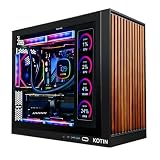
 KOTIN Prebuilt Gaming PC RTX 5070 12GB
Built-in smart display shows live CPU and GPU temperatures while gaming
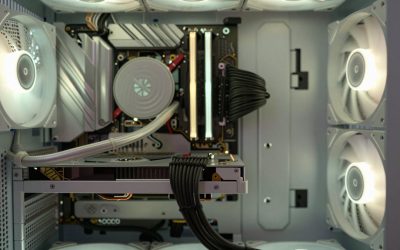
850W 80 Plus Gold PSU and 360mm liquid cooling support sustained performance
Arrives fully assembled with Windows 11 pre-installed and ready
Monitor must connect to the graphics card ports, not the motherboard ports
At 30 pounds, the tower is heavy to move once set up
 msi Codex Z2 Gaming Desktop: AMD R7-8700F
8-core, 16-thread Ryzen 7 8700F handles gaming and background tasks together
Four cooling fans with an ARGB air cooler support sustained airflow
2TB SSD offers ample room for a large game library
MSI recommends Windows 11 Pro separately for business use cases
At over 21 pounds, the tower is heavy to relocate often
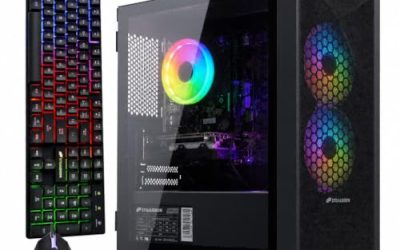
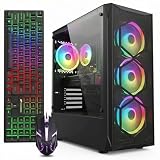
 KOTIN Gaming PC Desktop
- High-FPS Gaming PC Performance: AMD Ryzen 7 8700F…
- 16GB DDR5 + 1TB Gen4 NVMe SSD: 16GB…
- Cool, Clean Gaming Tower Build: A CPU air…
 Alienware Aurora Gaming Desktop
Customizable AlienFX lighting zones add personalized styling options
RTX 5070 with Blackwell architecture supports modern ray tracing workloads
1-Year Onsite Service brings repairs to your location if needed
At nearly 34 pounds, the desktop is heavy to relocate
Matte basalt black finish is the only color option listed
 YAWYORE Gaming PC
8-core, 16-thread Ryzen 7 5700X handles multi-threaded tasks easily
650W 80 Plus Bronze PSU is certified for efficient, stable power
Shock-absorbing foam packaging is built in for safer shipping
Foam packaging must be removed before first use, an easy step to miss
GPU brand may vary from unit to unit per the listing
 The Horizon Autherium Dragon RGB I9 RTX
- System: Core i9 Unlocked OC CPU | Premium…
- Graphics: NVIDIA GeForce RTX 5070 OC 12GB |…
- Cooling & Design: 360mm Liquid Cooling | Intelligently…
As an Amazon Associate we earn from qualifying purchases at no extra cost to you.
⚡ Save on Your Next PC — Amazon Prime
Prime members get fast free shipping on the systems above, plus early access to Prime Day & Black Friday PC deals. New members get a 30-day free trial.
Watch: Best Gaming PC Under $2000 — Video Review
How to Choose Gaming PC Under $2000
- Prioritize the GPU above everything else: Your graphics card determines your frame rate more than any other component. At this budget you should be targeting an RTX 5070 or, at minimum, an RTX 5060 Ti — a system pairing a high-end CPU with an RTX 3050 is spending your money in the wrong place.
- Match the CPU to the GPU, not to the marketing: A Ryzen 7 or Core Ultra 7 is more than enough to feed any GPU in this class. Paying extra for more cores you won’t use in games is far less valuable than putting that money into graphics.
- Insist on 32GB of DDR5 where you can get it: 16GB is still playable in 2026, but modern titles, background apps, and streaming software have made 32GB the comfortable baseline. Confirm it’s dual-channel — two sticks, not one.
- Check storage capacity and type: A 1TB NVMe SSD is the floor; with games routinely exceeding 100GB, 2TB is genuinely useful. Avoid anything still shipping a mechanical drive as primary storage.
- Look at the boring parts — PSU, cooling, and upgrade room: Power supply wattage and case airflow determine whether your machine throttles under load and whether you can drop in a better GPU in three years. These specs are where budget builders cut corners most quietly.
The Best Picks Reviewed
msi Codex Z2 (R7-8700F, RTX 5070, 32GB DDR5, 2TB NVMe)
This is the most complete package on the list and our overall pick: an RTX 5070 paired with a capable eight-core CPU, 32GB of DDR5, and a genuinely generous 2TB NVMe SSD, all from a manufacturer with a real support infrastructure behind it. VR-ready and equipped with front USB Type-C, it needs nothing added out of the box.
KOTIN Prebuilt (RTX 5070, Ryzen 7 9700X, 32GB DDR5, 1TB SSD)
The Ryzen 7 9700X is a newer, more efficient chip than most systems at this price offer, and pairing it with an RTX 5070 and 32GB of DDR5 makes this one of the strongest raw-performance-per-dollar options available. You get 1TB rather than 2TB of storage, which is a fair trade for the CPU upgrade.
Alienware Aurora (RTX 5070, Intel Core Ultra 7 265F)
The Aurora is the pick for buyers who value build quality, thermal engineering, and Dell’s warranty and support network over pure spec-sheet value. You pay a premium for the chassis and the brand, but the cooling design and long-term serviceability are meaningfully better than most boutique prebuilts.
KOTIN Gaming PC (Ryzen 7 8700F, RTX 5060 Ti 8GB, 16GB DDR5, 1TB SSD)
A sensible step down that leaves real money in your pocket — the RTX 5060 Ti handles 1440p gaming capably, and the Ryzen 7 8700F is a strong gaming CPU. The 16GB of DDR5 is the obvious compromise, but it’s also the cheapest and easiest thing to upgrade yourself later.
YAWYORE Gaming PC (Ryzen 7 5700X, RTX 5060)
The most budget-conscious entry here, built around the still-competent Ryzen 7 5700X and a current-generation RTX 5060. It’s a solid 1080p high-refresh machine and a reasonable choice if your monitor isn’t pushing past 1440p, though the older CPU platform limits future upgrade paths.
Frequently Asked Questions
Is $2,000 enough for a 4K gaming PC in 2026?
For 4K at 60fps with sensible settings and upscaling enabled, yes — an RTX 5070-equipped system will manage it in most titles. For 4K at high refresh rates in demanding games, you’d need to move up to a higher GPU tier and a correspondingly larger budget.
Should I avoid systems with an RTX 3050 at this price?
Generally, yes. The Ryzen 7 5700X paired with an RTX 3050 configuration is CPU-strong but GPU-limited, and at anything near the $2,000 mark that money is much better spent on a current-generation card. It’s only worth considering if it’s priced dramatically below the rest.
Is 16GB of RAM still acceptable?
It’s workable for pure gaming, but 32GB has become the comfortable standard for anyone who streams, keeps a browser open, or plays newer open-world titles. If you buy a 16GB system, budget roughly $60–$100 to add a matching kit down the line.
Are prebuilts worth it versus building my own?
In 2026, prebuilts at this price are genuinely competitive — bulk component pricing and included Windows licenses close most of the old gap. Building yourself still wins on component transparency and part selection, but you’re trading away warranty coverage and a working machine on day one.
Final Thoughts
If you want the best-rounded machine under $2,000, the msi Codex Z2 is the one to beat — its RTX 5070, 32GB of DDR5, and 2TB of storage leave nothing obvious to fix. The KOTIN RTX 5070 build is the value alternative for buyers who’d rather have the newer Ryzen 7 9700X than the extra terabyte, while the Alienware Aurora earns its place for anyone who wants a premium chassis and real support behind their purchase.